Product Meta

  • product_code: GT-915A
  • product_editor_4418_tab_content: <p> </p> <p><strong>Fiber-optic Networking for ISPs, Enterprises and Homes</strong></p> <p>With high-speed data transmission and easy installation, the GT-915A can build FTTH (Fiber to the Home) and FTTC (Fiber to the Curb) for ISPs, and FTTB (Fiber to the Building) for enterprises. The GT-915A enables network administrators to easily monitor operations via the Web management interface.</p> <p> </p> <p><img style="display: block; margin-left: auto; margin-right: auto;" src="https://www.planet.com.sa/planet-storage/2025/01/GT-915A-11.png" alt="" width="700" height="437" /></p> <p> </p> <p><img style="display: block; margin-left: auto; margin-right: auto;" src="https://www.planet.com.sa/planet-storage/2025/01/GT-915A-2.png" alt="" width="700" height="270" /></p>
  • product_editor_4418_tab_enabled: yes
  • product_editor_4418_tab_content_changed: yes
  • product_editor_4418_tab_title: Applications
  • product_editor_4421_tab_content: <p><strong>Physical Port</strong></p> <ul> <li>One 1G/100/10BASE-T RJ45 interface with auto MDI/MDI-X function</li> <li>One 1G/100BASE-X SFP interface</li> </ul> <p> </p> <p><strong>Layer 2 Features</strong></p> <ul> <li>Supports VLAN. <ul> <li>IEEE 802.1Q tagged VLAN</li> <li>Supports provider bridging (VLAN Q-in-Q, IEEE 802.1ad). </li> <li>VLAN transparent</li> </ul> </li> <li>Storm Control support <ul> <li>Broadcast/Multicast/DLF (Destination Lookup Failure)/ARP/ICMP</li> </ul> </li> <li>Store-and-Forward mechanism</li> <li>Non-blocking full wire-speed forwarding rate</li> <li><strong>16K</strong> jumbo frame size support </li> <li>Prevents packet loss with back pressure (half-duplex) and IEEE 802.3x pause frame flow control (full-duplex).</li> <li>Automatic address learning and address aging</li> <li>Supports port status/Ethernet statistics on both TP and fiber interfaces.</li> <li>Supports Link Fault Passthrough (LFP) and Link Layer Discovery Protocol (LLDP). </li> </ul> <p> </p> <p><strong>OAM Compliant</strong></p> <ul> <li>TS-1000 OAM / IEEE 802.3ah OAM / Loop Back Test</li> </ul> <p> </p> <p><strong>Quality of Service</strong></p> <ul> <li>Ingress Shaper and Egress Rate Limit per port bandwidth control</li> <li>8 priority queues on all converter ports</li> <li>Strict priority and Weighted Round Robin (WRR) CoS policies</li> <li>Traffic classification <ul> <li>IEEE 802.1p CoS</li> <li>IP DSCP</li> <li>IP Address</li> </ul> </li> </ul> <p> </p> <p><strong>Security</strong></p> <ul> <li>IPv4/IPv6 IP-based ACL</li> <li>IPv4/IPv6 IP-based ACE</li> <li>MAC-based ACL</li> <li>MAC-based ACE</li> </ul> <p> </p> <p><strong>Management</strong></p> <ul> <li>IPv4 and IPv6 dual stack management</li> <li>Management Interfaces <ul> <li>Web HTTP management</li> <li>Telnet Command Line Interface </li> <li>SNMP v1, v2c monitoring</li> <li>SSHv2, TLSv1.2 and SNMP v3 secure access</li> </ul> </li> <li>System Maintenance <ul> <li>Firmware upload/download via HTTP</li> <li>Reset button for system reboot or reset to factory default</li> </ul> </li> <li>Network Time Protocol (NTP)</li> <li>SNMP Management <ul> <li>SNMP trap for interface link up and link down notification</li> <li>Four RMON groups (history, statistics, alarms and events)</li> </ul> </li> <li>Network Diagnostic <ul> <li>SFP-DDM (Digital Diagnostic Monitor)</li> </ul> </li> <li>ICMPv6/ICMPv4 remote ping</li> <li>SMTP/Syslog remote alarm</li> <li>Local system Log</li> <li>PLANET Smart Discovery Utility for deploy management</li> <li>PLANET Remote Management <ul> <li>PLANET NMS Controller and CloudViewerPro for deployment management</li> </ul> </li> </ul> <p> </p> <p><strong>Case and Installation</strong></p> <ul> <li>External 5V DC, 2A power supply</li> <li>0 to 50 degrees C operating temperature </li> <li>Supports 6000 VDC Ethernet ESD protection</li> <li>Wall mounting or DIN-rail installation</li> <li>Works with PLANET’s 10”/19” Media Converter Chassis(MC-700/MC-1500/MC-1500R/MC-1500R48)</li> <li>Plug and Play installation</li> </ul>
  • product_editor_4421_tab_enabled: yes
  • product_editor_4421_tab_content_changed: yes
  • product_editor_4421_tab_title: Key Features
  • product_editor_4422_tab_content: <div class="table-responsive"> <table class="common_table_sky" style="width: 100%;"> <thead> <tr> <th colspan="2">Hardware Specifications</th> </tr> </thead> <tbody> <tr> <td class="align-middle">Copper Interface</td> <td>1 x 10/100/1000BASE-T RJ45 port (Auto-MDI/MDI-X) twisted pair</td> </tr> <tr> <td class="align-middle">Fiber Interface</td> <td>1 x 100/1000BASE-X SFP Slot</td> </tr> <tr> <td class="align-middle">Reset Button</td> <td>< 10 sec.: System reboot > 10 sec.: Factory default</td> </tr> <tr> <td class="align-middle">ESD Protection</td> <td>6KV DC</td> </tr> <tr> <td class="align-middle">Enclosure</td> <td>Compact-sized metal case</td> </tr> <tr> <td class="align-middle">Installation</td> <td>Wall mountable Media convert Chassis installation Optional DIN-rail kit</td> </tr> <tr> <td class="align-middle">Dimensions (W x D x H)</td> <td>94 x 70.3 x 26.2mm</td> </tr> <tr> <td class="align-middle">Weight</td> <td>201g (device only)</td> </tr> <tr> <td class="align-middle">Power Input</td> <td>DC 5V, 2A</td> </tr> <tr> <td class="align-middle">Power Consumption</td> <td>3.4 watts/11.6 BTU (maximum)</td> </tr> <tr> <td class="align-middle">LED Indicator</td> <td>PWR, (<font color="Green"><b>Green</b></font>) TP LINK/ACT, 1000 (<font color="Green"><b>Green</b></font>) Fiber LINK/ACT (<font color="Green"><b>Green</b></font>)</td> </tr> <tr> <td class="align-middle">Network Cables</td> <td><b>10/100/1000BASE-T:</b>  10BASE-T: 2-pair UTP Cat. 3,4,5, up to 100 m  100BASE-TX: 2-pair UTP Cat. 5, up to 100 m  1000BASE-T: 4-pair STP Cat 5 up to 100m <b>100/1000GBASE-SX/LX:</b>  50/125μm or 62.5/125μm multi-mode fiber cable, up to 220/550m.  9/125μm single-mode cable, extending long distance to 10/20/40/60/80/120km (vary on fiber transceiver or SFP module)</td> </tr> </tbody> <thead> <tr> <th colspan="2">Switching Specifications</th> </tr> </thead> <tbody> <tr> <td class="align-middle">Switch Processing Scheme</td> <td>Store and Forward</td> </tr> <tr> <td class="align-middle">Fabric</td> <td>4Gbps</td> </tr> <tr> <td class="align-middle">Throughput (packet per second)</td> <td>2.98Mpps@64bytes</td> </tr> <tr> <td class="align-middle">Address Table</td> <td>1K entries, automatic source address learning and aging</td> </tr> <tr> <td class="align-middle">Flow Control</td> <td>Back pressure for half duplex IEEE 802.3x pause frame for full duplex</td> </tr> <tr> <td class="align-middle">Jumbo Frame</td> <td>16K</td> </tr> <tr> <td class="align-middle">Shared Buffer</td> <td>512Kb</td> </tr> </tbody> <thead> <tr> <th colspan="2">Layer 2 Function</th> </tr> </thead> <tbody> <tr> <td class="align-middle">Port Configuration</td> <td>Port disable/enable Auto-negotiation 10/100/1000Mbps full and half duplex mode selection Flow control disable/enable</td> </tr> <tr> <td class="align-middle">Port Status</td> <td>Display each port’s speed duplex mode, link status, flow control status,auto negotiation status</td> </tr> <tr> <td class="align-middle">VLAN</td> <td>IEEE 802.1Q tag-based VLAN IEEE 802.1ad Q-in-Q tunneling Up to 16 VLAN groups, out of 4094 VLAN IDs Management VLAN</td> </tr> <tr> <td class="align-middle">Bandwidth Control</td> <td>Per port bandwidth control  Ingress: 1~1000,000Kbps  Egress: 1~1000,000Kbps</td> </tr> <tr> <td class="align-middle">QoS</td> <td>Traffic classification based, strict priority and WRR 8-level priority for switching Traffic classification:  802.1p priority  IP DSCP  IP Address</td> </tr> </tbody> <thead> <tr> <th colspan="2">Security Function</th> </tr> </thead> <tbody> <tr> <td class="align-middle">Access Control list</td> <td>IPv4/IPv6 IP-based ACL/MAC-based ACL IPv4/IPv6 IP-based ACE/MAC-based ACE Max. 32 ACL entries</td> </tr> <tr> <td class="align-middle">Access Security</td> <td>Remote management protocols control by SSH, Telnet, HTTP ans HTTPs</td> </tr> </tbody> <thead> <tr> <th colspan="2">System Management</th> </tr> </thead> <tbody> <tr> <td class="align-middle">Basic Management Interfaces</td> <td>Telnet; Web browser; SNMP v1, v2c</td> </tr> <tr> <td class="align-middle">Secure Management Interfaces</td> <td>SSHv2, TLS v1.2, SNMP v3</td> </tr> <tr> <td class="align-middle">System Management</td> <td>Firmware upgrade by HTTP protocol through Ethernet network Configuration upload/download through HTTP LLDP protocol NTP PLANET Smart Discovery Utility PLANET CloudViewerPro app</td> </tr> <tr> <td class="align-middle">Event Management</td> <td>Remote syslog Local system log SNMP trap</td> </tr> <tr> <td class="align-middle">SNMP MIBS</td> <td>RFC-1213 MIB-II RFC-1213 EGP-MIB IF-MIB RFC-2863 Interface Group MIB RFC-3418 SNMPv2-MIB RFC-4022 TCP-MIB RFC-4113 UDP-MIB RFC-4292 IP-Forward-MIB RFC-4293 IP-MIB RFC-4293 ICMP-MIB RFC-4836 LLDP-MIB</td> </tr> </tbody> <thead> <tr> <th colspan="2">Standards Conformance</th> </tr> </thead> <tbody> <tr> <td class="align-middle">Regulatory Compliance</td> <td>FCC Class A, CE Class A</td> </tr> <tr> <td class="align-middle">Standards Compliance</td> <td>IEEE 802.3, 10BASE-T IEEE 802.3u, 100BASE-TX/FX IEEE 802.3ab, 1000BASE-T IEEE 802.3z, 1000BASE-SX/LX IEEE 802.3x full-duplex flow control IEEE 802.1p Class of Service IEEE 802.1Q VLAN tagging IEEE 802.1ad Q-in-Q VLAN stacking IEEE 802.1ab LLDP IEEE 802.3ah OAM RFC 768 UDP RFC 793 TFTP RFC 791 IP RFC 792 ICMP RFC 2068 HTTP</td> </tr> </tbody> <thead> <tr> <th colspan="2">Environment</th> </tr> </thead> <tbody> <tr> <td class="align-middle">Operating</td> <td>Temperature: 0 ~ 50 degrees C Relative Humidity: 5 ~ 95% (non-condensing)</td> </tr> <tr> <td class="align-middle">Storage</td> <td>Temperature: -10 ~ 70 degrees C Relative Humidity: 5 ~ 95% (non-condensing)</td> </tr> </tbody> </table> </div>
  • product_editor_4422_tab_enabled: yes
  • product_editor_4422_tab_content_changed: yes
  • product_editor_4422_tab_title: Specifications
  • ekit_post_views_count: 506
  • product_editor_4418_tab_sticky_width: pw-content-1
  • product_editor_4418_tab_sticky_position: pw-left-stick
  • product_editor_4421_tab_sticky_width: pw-content-1
  • product_editor_4421_tab_sticky_position: pw-left-stick
  • product_editor_4422_tab_sticky_width: pw-content-1
  • product_editor_4422_tab_sticky_position: pw-left-stick
  • product_editor_4423_tab_content:
  • product_editor_4423_tab_content_changed: yes
  • product_editor_4423_tab_enabled: yes
  • product_editor_4423_tab_title: Downloads
  • product_editor_4423_tab_sticky_width: pw-content-1
  • product_editor_4423_tab_sticky_height: 1
  • product_editor_4423_tab_sticky_position: pw-left-stick
  • product_editor_4424_tab_content:
  • product_editor_4424_tab_content_changed: no
  • product_editor_4424_tab_enabled: yes
  • product_editor_4424_tab_title: Related Products
  • product_editor_4424_tab_sticky_width: pw-content-1
  • product_editor_4424_tab_sticky_height: 1
  • product_editor_4424_tab_sticky_position: pw-left-stick
  • total_sales: 0
  • accessories_table: <div class="table-responsive"></div> <table class="common_table"> <thead> <tr> <th colspan="2">Ordering Information</th> </tr> </thead> <tbody> <tr> <td class="text-center align-middle"> <h3 class="h6 m-0">GT-915A</h3> </td> <td>10/100/1000BASE-T to 100/1000BASE-X SFP Managed Media Converter</td> </tr> </tbody> </table>                          
  • product_label:
  • prouduct_loop_image_transparent_bg_:
  • 6_features_images: a:6:{i:0;s:5:"16186";i:1;s:5:"16181";i:2;s:5:"16184";i:3;s:5:"16183";i:4;s:5:"16182";i:5;s:5:"16185";}
  • datasheet_0_date: 20250127
  • datasheet_0_version: 1.1
  • datasheet_0_description: GT-915A
  • datasheet_0_download_pdf: https://www.planet.com.sa/storage/products/GT-915A/C-GT-915Av1.1_L.pdf
  • datasheet: 1
  • quick_guide: 2
  • users_manual: 1
  • ec_declaration: 1
  • android_app:
  • driver:
  • firmware: 1
  • utility:
  • compatible_list:
  • site-sidebar-layout: default
  • ast-site-content-layout: default
  • site-content-style: default
  • site-sidebar-style: default
  • theme-transparent-header-meta: default
  • quick_guide_0_date: 20240611
  • quick_guide_0_version: 1.1
  • quick_guide_0_description: Release for PSTI version.
  • quick_guide_0_download_pdf: https://www.planet.com.sa/storage/products/GT-915A/EMQ-GT-915A_v1.1.pdf
  • quick_guide_1_date: 20221209
  • quick_guide_1_version: 1.0
  • quick_guide_1_description: Initial release.
  • quick_guide_1_download_pdf: https://www.planet.com.sa/storage/products/GT-915A/EMQ-GT-915A_v1.0.pdf
  • users_manual_0_date: 20230402
  • users_manual_0_version: 1.0
  • users_manual_0_description: Initial release.
  • users_manual_0_download_pdf: https://www.planet.com.sa/storage/products/GT-915A/EM-GT-915A_v1.0.pdf
  • ec_declaration_0_date: 20230408
  • ec_declaration_0_version: 1.0
  • ec_declaration_0_description: EC Declaration.
  • ec_declaration_0_download_pdf: https://www.planet.com.sa/storage/products/GT-915A/GT-915A.pdf
  • firmware_0_date: 20240531
  • firmware_0_version: 1.44b240522
  • firmware_0_description: Function Added: - Added PSTI function. - Modified DDM function. FW upgrade for PSTIA (Product Security and Telecommunications Infrastructure Act) *Note: After updating the firmware, you will need to enter the product's MAC code at the first login. Please record the MAC code before proceeding with the update.
  • firmware_0_download_pdf: https://www.planet.com.sa/storage/products/GT-915A/FW-GT-915A_v1.44b240522.zip
  • astra-migrate-meta-layouts: set
  • applications_tab: <p> </p><p><strong>Fiber-optic Networking for ISPs, Enterprises and Homes</strong></p><p>With high-speed data transmission and easy installation, the GT-915A can build FTTH (Fiber to the Home) and FTTC (Fiber to the Curb) for ISPs, and FTTB (Fiber to the Building) for enterprises. The GT-915A enables network administrators to easily monitor operations via the Web management interface.</p><p> </p><p><img style="display: block; margin-left: auto; margin-right: auto;" src="https://www.planet.com.sa/planet-storage/2025/01/GT-915A-11.png" alt="" width="700" height="437"></p><p> </p><p><img style="display: block; margin-left: auto; margin-right: auto;" src="https://www.planet.com.sa/planet-storage/2025/01/GT-915A-2.png" alt="" width="700" height="270"></p>
  • key_features_tab: <p><strong>Physical Port</strong></p><ul> <li>One 1G/100/10BASE-T RJ45 interface with auto MDI/MDI-X function</li> <li>One 1G/100BASE-X SFP interface</li> </ul><p> </p><p><strong>Layer 2 Features</strong></p><ul> <li>Supports VLAN. <ul> <li>IEEE 802.1Q tagged VLAN</li> <li>Supports provider bridging (VLAN Q-in-Q, IEEE 802.1ad). </li> <li>VLAN transparent</li> </ul> </li> <li>Storm Control support <ul> <li>Broadcast/Multicast/DLF (Destination Lookup Failure)/ARP/ICMP</li> </ul> </li> <li>Store-and-Forward mechanism</li> <li>Non-blocking full wire-speed forwarding rate</li> <li><strong>16K</strong> jumbo frame size support </li> <li>Prevents packet loss with back pressure (half-duplex) and IEEE 802.3x pause frame flow control (full-duplex).</li> <li>Automatic address learning and address aging</li> <li>Supports port status/Ethernet statistics on both TP and fiber interfaces.</li> <li>Supports Link Fault Passthrough (LFP) and Link Layer Discovery Protocol (LLDP). </li> </ul><p> </p><p><strong>OAM Compliant</strong></p><ul> <li>TS-1000 OAM / IEEE 802.3ah OAM / Loop Back Test</li> </ul><p> </p><p><strong>Quality of Service</strong></p><ul> <li>Ingress Shaper and Egress Rate Limit per port bandwidth control</li> <li>8 priority queues on all converter ports</li> <li>Strict priority and Weighted Round Robin (WRR) CoS policies</li> <li>Traffic classification <ul> <li>IEEE 802.1p CoS</li> <li>IP DSCP</li> <li>IP Address</li> </ul> </li> </ul><p> </p><p><strong>Security</strong></p><ul> <li>IPv4/IPv6 IP-based ACL</li> <li>IPv4/IPv6 IP-based ACE</li> <li>MAC-based ACL</li> <li>MAC-based ACE</li> </ul><p> </p><p><strong>Management</strong></p><ul> <li>IPv4 and IPv6 dual stack management</li> <li>Management Interfaces <ul> <li>Web HTTP management</li> <li>Telnet Command Line Interface </li> <li>SNMP v1, v2c monitoring</li> <li>SSHv2, TLSv1.2 and SNMP v3 secure access</li> </ul> </li> <li>System Maintenance <ul> <li>Firmware upload/download via HTTP</li> <li>Reset button for system reboot or reset to factory default</li> </ul> </li> <li>Network Time Protocol (NTP)</li> <li>SNMP Management <ul> <li>SNMP trap for interface link up and link down notification</li> <li>Four RMON groups (history, statistics, alarms and events)</li> </ul> </li> <li>Network Diagnostic <ul> <li>SFP-DDM (Digital Diagnostic Monitor)</li> </ul> </li> <li>ICMPv6/ICMPv4 remote ping</li> <li>SMTP/Syslog remote alarm</li> <li>Local system Log</li> <li>PLANET Smart Discovery Utility for deploy management</li> <li>PLANET Remote Management <ul> <li>PLANET NMS Controller and CloudViewerPro for deployment management</li> </ul> </li> </ul><p> </p><p><strong>Case and Installation</strong></p><ul> <li>External 5V DC, 2A power supply</li> <li>0 to 50 degrees C operating temperature </li> <li>Supports 6000 VDC Ethernet ESD protection</li> <li>Wall mounting or DIN-rail installation</li> <li>Works with PLANET’s 10”/19” Media Converter Chassis(MC-700/MC-1500/MC-1500R/MC-1500R48)</li> <li>Plug and Play installation</li> </ul>
  • specifications_tab: <table style="width:100%;" class="common_table_sky"><thead><tr><th colspan="2">Hardware Specifications</th></tr></thead><tbody><tr><td class="align-middle">Copper Interface</td><td>1 x 10/100/1000BASE-T RJ45 port (Auto-MDI/MDI-X) twisted pair</td></tr><tr><td class="align-middle">Fiber Interface</td><td>1 x 100/1000BASE-X SFP Slot</td></tr><tr><td class="align-middle">Reset Button</td><td>< 10 sec.: System reboot<br /> > 10 sec.: Factory default</td></tr><tr><td class="align-middle">ESD Protection</td><td>6KV DC</td></tr><tr><td class="align-middle">Enclosure</td><td>Compact-sized metal case</td></tr><tr><td class="align-middle">Installation</td><td>Wall mountable<br /> Media convert Chassis installation<br /> Optional DIN-rail kit</td></tr><tr><td class="align-middle">Dimensions (W x D x H)</td><td>94 x 70.3 x 26.2mm</td></tr><tr><td class="align-middle">Weight</td><td>201g (device only)</td></tr><tr><td class="align-middle">Power Input</td><td>DC 5V, 2A</td></tr><tr><td class="align-middle">Power Consumption</td><td>3.4 watts/11.6 BTU (maximum)</td></tr><tr><td class="align-middle">LED Indicator</td><td>PWR, (<font color="Green"><b>Green</b></font>)<br /> TP LINK/ACT, 1000 (<font color="Green"><b>Green</b></font>)<br /> Fiber LINK/ACT (<font color="Green"><b>Green</b></font>)</td></tr><tr><td class="align-middle">Network Cables</td><td><b>10/100/1000BASE-T:</b><br />  10BASE-T: 2-pair UTP Cat. 3,4,5, up to 100 m<br />  100BASE-TX: 2-pair UTP Cat. 5, up to 100 m<br />  1000BASE-T: 4-pair STP Cat 5 up to 100m <br /> <b>100/1000GBASE-SX/LX:</b><br />  50/125μm or 62.5/125μm multi-mode fiber cable, up to 220/550m. <br />  9/125μm single-mode cable, extending long distance to 10/20/40/60/80/120km (vary on fiber transceiver or SFP module)</td></tr></tbody><thead><tr><th colspan="2">Switching Specifications</th></tr></thead><tbody><tr><td class="align-middle">Switch Processing Scheme</td><td>Store and Forward</td></tr><tr><td class="align-middle">Fabric</td><td>4Gbps</td></tr><tr><td class="align-middle">Throughput (packet per second)</td><td>2.98Mpps@64bytes</td></tr><tr><td class="align-middle">Address Table</td><td>1K entries, automatic source address learning and aging</td></tr><tr><td class="align-middle">Flow Control</td><td>Back pressure for half duplex<br /> IEEE 802.3x pause frame for full duplex</td></tr><tr><td class="align-middle">Jumbo Frame</td><td>16K</td></tr><tr><td class="align-middle">Shared Buffer</td><td>512Kb</td></tr></tbody><thead><tr><th colspan="2">Layer 2 Function</th></tr></thead><tbody><tr><td class="align-middle">Port Configuration</td><td>Port disable/enable<br /> Auto-negotiation 10/100/1000Mbps full and half duplex mode selection<br /> Flow control disable/enable</td></tr><tr><td class="align-middle">Port Status</td><td>Display each port’s speed duplex mode, link status, flow control status,auto negotiation status</td></tr><tr><td class="align-middle">VLAN</td><td>IEEE 802.1Q tag-based VLAN<br /> IEEE 802.1ad Q-in-Q tunneling<br /> Up to 16 VLAN groups, out of 4094 VLAN IDs<br /> Management VLAN</td></tr><tr><td class="align-middle">Bandwidth Control</td><td>Per port bandwidth control<br />  Ingress: 1~1000,000Kbps<br />  Egress: 1~1000,000Kbps</td></tr><tr><td class="align-middle">QoS</td><td>Traffic classification based, strict priority and WRR<br /> 8-level priority for switching<br /> Traffic classification:<br />  802.1p priority<br />  IP DSCP<br />  IP Address</td></tr></tbody><thead><tr><th colspan="2">Security Function</th></tr></thead><tbody><tr><td class="align-middle">Access Control list</td><td>IPv4/IPv6 IP-based ACL/MAC-based ACL<br /> IPv4/IPv6 IP-based ACE/MAC-based ACE<br /> Max. 32 ACL entries</td></tr><tr><td class="align-middle">Access Security</td><td>Remote management protocols control by SSH, Telnet, HTTP ans HTTPs</td></tr></tbody><thead><tr><th colspan="2">System Management</th></tr></thead><tbody><tr><td class="align-middle">Basic Management Interfaces</td><td>Telnet; Web browser; SNMP v1, v2c</td></tr><tr><td class="align-middle">Secure Management Interfaces</td><td>SSHv2, TLS v1.2, SNMP v3</td></tr><tr><td class="align-middle">System Management</td><td>Firmware upgrade by HTTP protocol through Ethernet network<br /> Configuration upload/download through HTTP<br /> LLDP protocol<br /> NTP<br /> PLANET Smart Discovery Utility<br /> PLANET CloudViewerPro app</td></tr><tr><td class="align-middle">Event Management</td><td>Remote syslog<br /> Local system log<br /> SNMP trap</td></tr><tr><td class="align-middle">SNMP MIBS</td><td>RFC-1213 MIB-II<br /> RFC-1213 EGP-MIB<br /> IF-MIB<br /> RFC-2863 Interface Group MIB<br /> RFC-3418 SNMPv2-MIB<br /> RFC-4022 TCP-MIB<br /> RFC-4113 UDP-MIB<br /> RFC-4292 IP-Forward-MIB<br /> RFC-4293 IP-MIB<br /> RFC-4293 ICMP-MIB<br /> RFC-4836 LLDP-MIB</td></tr></tbody><thead><tr><th colspan="2">Standards Conformance</th></tr></thead><tbody><tr><td class="align-middle">Regulatory Compliance</td><td>FCC Class A, CE Class A</td></tr><tr><td class="align-middle">Standards Compliance</td><td>IEEE 802.3, 10BASE-T <br /> IEEE 802.3u, 100BASE-TX/FX<br /> IEEE 802.3ab, 1000BASE-T<br /> IEEE 802.3z, 1000BASE-SX/LX<br /> IEEE 802.3x full-duplex flow control<br /> IEEE 802.1p Class of Service<br /> IEEE 802.1Q VLAN tagging<br /> IEEE 802.1ad Q-in-Q VLAN stacking<br /> IEEE 802.1ab LLDP<br /> IEEE 802.3ah OAM<br /> RFC 768 UDP<br /> RFC 793 TFTP<br /> RFC 791 IP<br /> RFC 792 ICMP<br /> RFC 2068 HTTP</td></tr></tbody><thead><tr><th colspan="2">Environment</th></tr></thead><tbody><tr><td class="align-middle">Operating</td><td>Temperature: 0 ~ 50 degrees C<br /> Relative Humidity: 5 ~ 95% (non-condensing)</td></tr><tr><td class="align-middle">Storage</td><td>Temperature: -10 ~ 70 degrees C<br /> Relative Humidity: 5 ~ 95% (non-condensing)</td></tr></tbody></table>
  • rank_math_news_sitemap_robots: index
  • rank_math_robots: a:1:{i:0;s:5:"index";}

10/100/1000BASE-T to 100/1000BASE-X SFP Managed Media Converter

» GT-915A

Remotely-managed Gigabit Converter

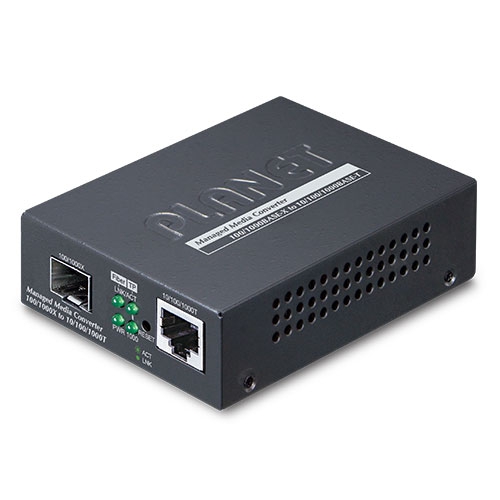
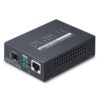
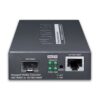
PLANET GT-915A 10/100/1000BASE-T to 100/1000BASE-X Managed Media Converter is developed to meet the advanced demand of network applications but it comes with the easy Plug and Play feature. The GT-915A provides 10/100/1000Mbps Ethernet on RJ45 port and offers highly-stable Gigabit SFP fiber performance. It supports conversion between 10/100/1000BASE-T and 100/1000BASE-X Ethernet, which includes SFP slot with single-mode or multi-mode media as required. The Ethernet signal allows three types of segments to connect easily, efficiently and inexpensively.


Enhanced Smart Management Features

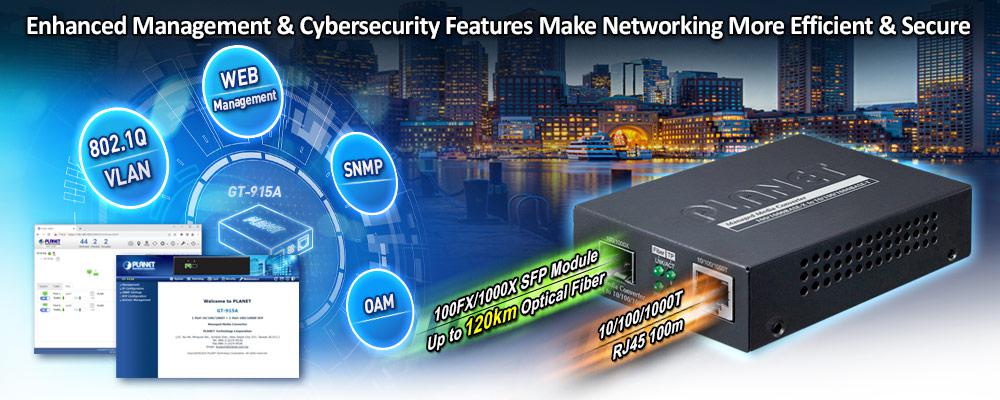
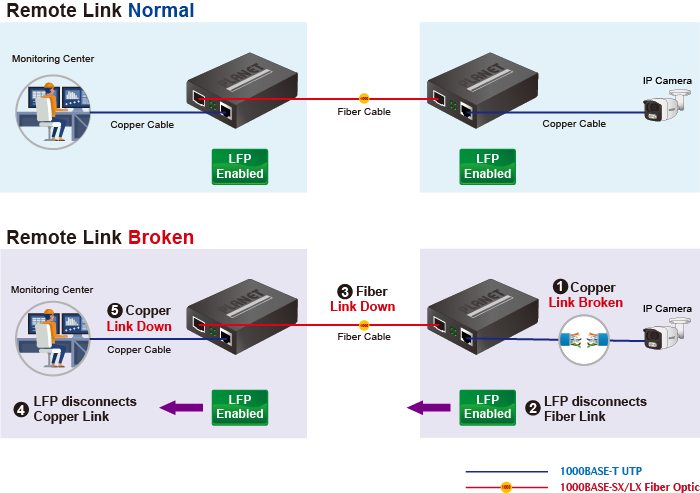
The GT-915A provides auto MDI/MDI-X on its TP port and built-in Link Fault Pass-through function (LFP). The LFP function includes Link Loss Carry Forward (LLCF) and Link Loss Return (LLR), both of which can immediately alarm administrators the problem of the link media and provide efficient solution to monitoring the net. 

  • LLCF means when a device connected to the converter and the TP line loses the link, the converter’s fiber port will disconnect the link of transmission. 
  • LLR means when a device connected to the converter and the fiber line loses the link, the converter’s fiber port will disconnect the link of transmission. 

Therefore, the GT-915A greatly supports the administrators to manage the network efficiently.  


Network with Cybersecurity Helps Minimize Security Risks

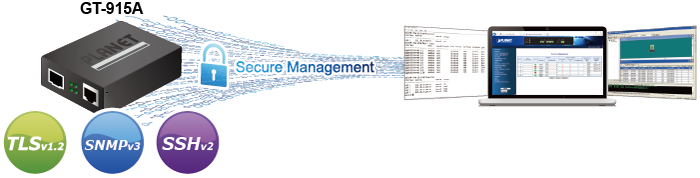
The GT-915A comes with enhanced cybersecurity to fend off cyberthreats and cyberattacks. It supports SSHv2, TLSv1.2 and SNMPv3 protocols to provide strong protection against advanced threats. Served as a key point to transmit data to customer’s critical equipment in a business network, the cybersecurity feature of the IGT-900-Series protects the management and enhances the security of the mission-critical network without any extra deployment cost and effort. 
 

User-friendly and Centralized Web Management Interface

For efficient management, the GT-915A is equipped with a remote Web/SNMP interface. With its built-in Web-based management, PLANET GT-915A acts as an easy-to-use, platform-independent management and configuration facility. The GT-915A also supports standard Simple Network Management Protocol (SNMP) and can be managed via any standard-based management software. 


OAM Management

The TS-1000/802.3ah OAM (operation, administration, and maintenance) protocol supported enables remote OAM compliant device to be managed and monitored by the GT-915A.


Remotely-managed Solution

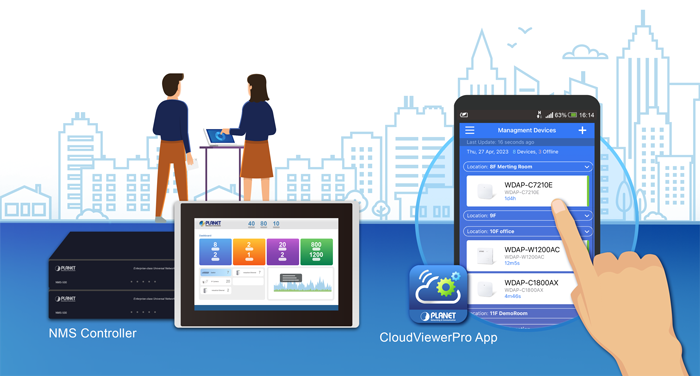
PLANET’s Universal Network Management System (UNI-NMS) and CloudViewerPro App support IT staff to remotely manage all network devices and monitor the GT-915A operation statuses. Thus, they’re designed for both the enterprises and industries where deployments of the GT-915A can be as remote as possible, without having to go to the actual location once a bug or faulty condition is found. With the UNI-NMS or CloudViewerPro app, all kinds of businesses can now be speedily and efficiently managed from one platform.
 

Enhanced Traffic Control

The GT-915A can be programmed for advanced management functions such as IP address configuration, DHCP client function, port configuration, converter configuration, 802.1Q tag VLAN, Q-in-Q VLAN, ingress/egress bandwidth control, QoS and Layer protocol filter, and broadcast storm and bandwidth control to enhance bandwidth utilization.


Intelligent SFP Diagnosis Mechanism

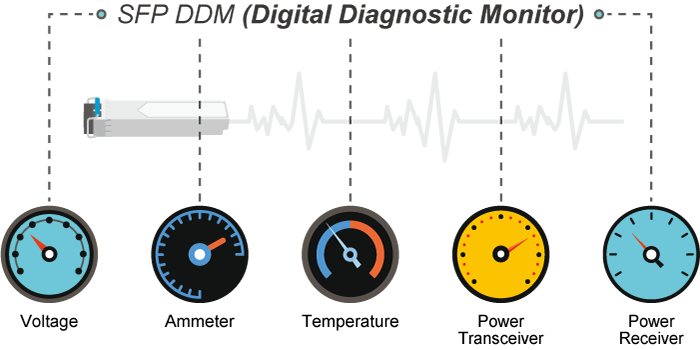
The GT-915A supports SFP-DDM (digital diagnostic monitor) function that greatly helps network administrator to easily monitor real-time parameters of the SFP transceivers, such as optical output power, optical input power, temperature, laser bias current, and transceiver supply voltage.


Easy Chassis Installation

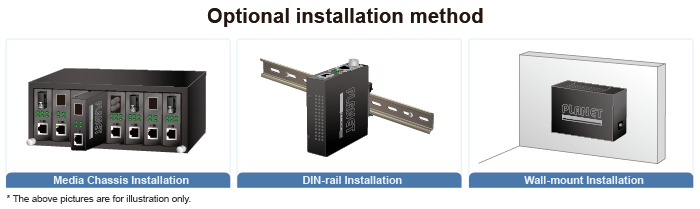
The GT-915A Media Converter can be used as a stand-alone unit or as a slide-in module to PLANET Media Converter Chassis (MC-700, MC-1500 or MC-1500R series). The media chassis can assist in providing DC power to the GT-915A Media Converter to maintain the fiber-optic network at one centralized location. It can be DIN-rail or wall mounted for efficient use of cabinet space.
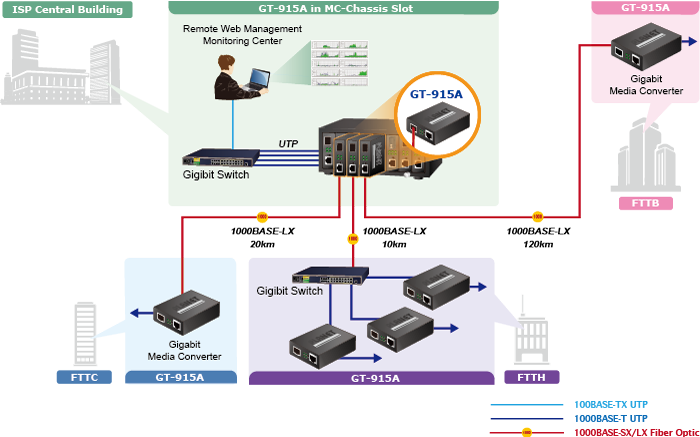


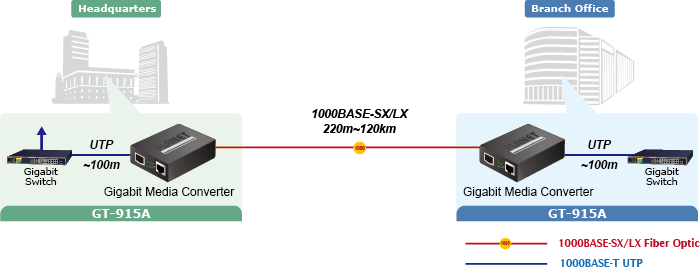
Fiber-optic Networking for ISPs, Enterprises and Homes

With high-speed data transmission and easy installation, the GT-915A can build FTTH (Fiber to the Home) and FTTC (Fiber to the Curb) for ISPs, and FTTB (Fiber to the Building) for enterprises. The GT-915A enables network administrators to easily monitor operations via the Web management interface.


Physical Port

  • One 1G/100/10BASE-T RJ45 interface with auto MDI/MDI-X function
  • One 1G/100BASE-X SFP interface


Layer 2 Features

  • Supports VLAN.
    • IEEE 802.1Q tagged VLAN
    • Supports provider bridging (VLAN Q-in-Q, IEEE 802.1ad). 
    • VLAN transparent
  • Storm Control support
    • Broadcast/Multicast/DLF (Destination Lookup Failure)/ARP/ICMP
  • Store-and-Forward mechanism
  • Non-blocking full wire-speed forwarding rate
  • 16K jumbo frame size support 
  • Prevents packet loss with back pressure (half-duplex) and IEEE 802.3x pause frame flow control (full-duplex).
  • Automatic address learning and address aging
  • Supports port status/Ethernet statistics on both TP and fiber interfaces.
  • Supports Link Fault Passthrough (LFP) and Link Layer Discovery Protocol (LLDP). 


OAM Compliant

  • TS-1000 OAM / IEEE 802.3ah OAM / Loop Back Test


Quality of Service

  • Ingress Shaper and Egress Rate Limit per port bandwidth control
  • 8 priority queues on all converter ports
  • Strict priority and Weighted Round Robin (WRR) CoS policies
  • Traffic classification
    • IEEE 802.1p CoS
    • IP DSCP
    • IP Address


Security

  • IPv4/IPv6 IP-based ACL
  • IPv4/IPv6 IP-based ACE
  • MAC-based ACL
  • MAC-based ACE


Management

  • IPv4 and IPv6 dual stack management
  • Management Interfaces
    • Web HTTP management
    • Telnet Command Line Interface 
    • SNMP v1, v2c monitoring
    • SSHv2, TLSv1.2 and SNMP v3 secure access
  • System Maintenance
    • Firmware upload/download via HTTP
    • Reset button for system reboot or reset to factory default
  • Network Time Protocol (NTP)
  • SNMP Management
    • SNMP trap for interface link up and link down notification
    • Four RMON groups (history, statistics, alarms and events)
  • Network Diagnostic
    • SFP-DDM (Digital Diagnostic Monitor)
  • ICMPv6/ICMPv4 remote ping
  • SMTP/Syslog remote alarm
  • Local system Log
  • PLANET Smart Discovery Utility for deploy management
  • PLANET Remote Management
    • PLANET NMS Controller and CloudViewerPro for deployment management


Case and Installation

  • External 5V DC, 2A power supply
  • 0 to 50 degrees C operating temperature 
  • Supports 6000 VDC Ethernet ESD protection
  • Wall mounting or DIN-rail installation
  • Works with PLANET’s 10”/19” Media Converter Chassis(MC-700/MC-1500/MC-1500R/MC-1500R48)
  • Plug and Play installation
Hardware Specifications
Copper Interface1 x 10/100/1000BASE-T RJ45 port (Auto-MDI/MDI-X) twisted pair
Fiber Interface1 x 100/1000BASE-X SFP Slot
Reset Button< 10 sec.: System reboot
> 10 sec.: Factory default
ESD Protection6KV DC
EnclosureCompact-sized metal case
InstallationWall mountable
Media convert Chassis installation
Optional DIN-rail kit
Dimensions (W x D x H)94 x 70.3 x 26.2mm
Weight201g (device only)
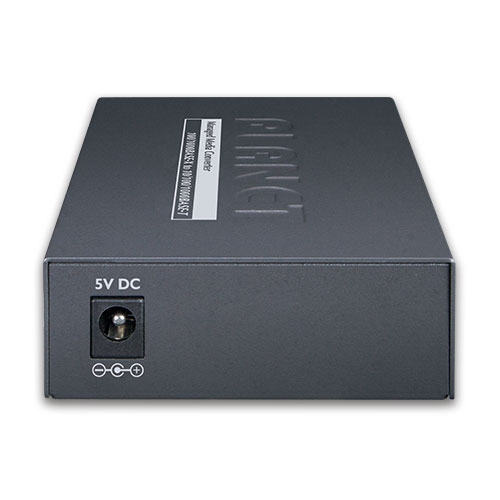
Power InputDC 5V, 2A
Power Consumption3.4 watts/11.6 BTU (maximum)
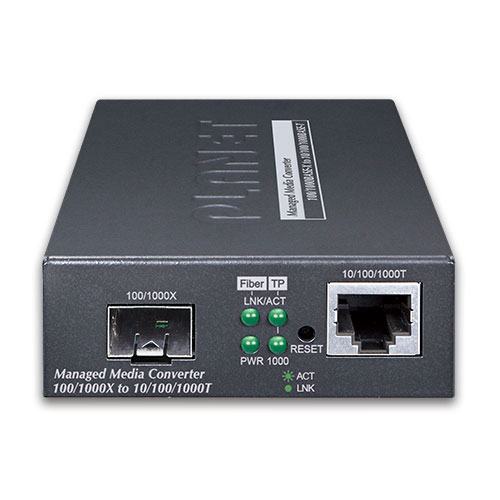
LED IndicatorPWR, (Green)
TP LINK/ACT, 1000 (Green)
Fiber LINK/ACT (Green)
Network Cables10/100/1000BASE-T:
 10BASE-T: 2-pair UTP Cat. 3,4,5, up to 100 m
 100BASE-TX: 2-pair UTP Cat. 5, up to 100 m
 1000BASE-T: 4-pair STP Cat 5 up to 100m
100/1000GBASE-SX/LX:
 50/125μm or 62.5/125μm multi-mode fiber cable, up to 220/550m.
 9/125μm single-mode cable, extending long distance to 10/20/40/60/80/120km (vary on fiber transceiver or SFP module)
Switching Specifications
Switch Processing SchemeStore and Forward
Fabric4Gbps
Throughput (packet per second)2.98Mpps@64bytes
Address Table1K entries, automatic source address learning and aging
Flow ControlBack pressure for half duplex
IEEE 802.3x pause frame for full duplex
Jumbo Frame16K
Shared Buffer512Kb
Layer 2 Function
Port ConfigurationPort disable/enable
Auto-negotiation 10/100/1000Mbps full and half duplex mode selection
Flow control disable/enable
Port StatusDisplay each port’s speed duplex mode, link status, flow control status,auto negotiation status
VLANIEEE 802.1Q tag-based VLAN
IEEE 802.1ad Q-in-Q tunneling
Up to 16 VLAN groups, out of 4094 VLAN IDs
Management VLAN
Bandwidth ControlPer port bandwidth control
 Ingress: 1~1000,000Kbps
 Egress: 1~1000,000Kbps
QoSTraffic classification based, strict priority and WRR
8-level priority for switching
Traffic classification:
 802.1p priority
 IP DSCP
 IP Address
Security Function
Access Control listIPv4/IPv6 IP-based ACL/MAC-based ACL
IPv4/IPv6 IP-based ACE/MAC-based ACE
Max. 32 ACL entries
Access SecurityRemote management protocols control by SSH, Telnet, HTTP ans HTTPs
System Management
Basic Management InterfacesTelnet; Web browser; SNMP v1, v2c
Secure Management InterfacesSSHv2, TLS v1.2, SNMP v3
System ManagementFirmware upgrade by HTTP protocol through Ethernet network
Configuration upload/download through HTTP
LLDP protocol
NTP
PLANET Smart Discovery Utility
PLANET CloudViewerPro app
Event ManagementRemote syslog
Local system log
SNMP trap
SNMP MIBSRFC-1213 MIB-II
RFC-1213 EGP-MIB
IF-MIB
RFC-2863 Interface Group MIB
RFC-3418 SNMPv2-MIB
RFC-4022 TCP-MIB
RFC-4113 UDP-MIB
RFC-4292 IP-Forward-MIB
RFC-4293 IP-MIB
RFC-4293 ICMP-MIB
RFC-4836 LLDP-MIB
Standards Conformance
Regulatory ComplianceFCC Class A, CE Class A
Standards ComplianceIEEE 802.3, 10BASE-T
IEEE 802.3u, 100BASE-TX/FX
IEEE 802.3ab, 1000BASE-T
IEEE 802.3z, 1000BASE-SX/LX
IEEE 802.3x full-duplex flow control
IEEE 802.1p Class of Service
IEEE 802.1Q VLAN tagging
IEEE 802.1ad Q-in-Q VLAN stacking
IEEE 802.1ab LLDP
IEEE 802.3ah OAM
RFC 768 UDP
RFC 793 TFTP
RFC 791 IP
RFC 792 ICMP
RFC 2068 HTTP
Environment
OperatingTemperature: 0 ~ 50 degrees C
Relative Humidity: 5 ~ 95% (non-condensing)
StorageTemperature: -10 ~ 70 degrees C
Relative Humidity: 5 ~ 95% (non-condensing)
DateVersionDescriptionDownload
2025/27/011.1

GT-915A

Download Icon
DateVersionDescriptionDownload
2024/11/061.1

Release for PSTI version.

Download Icon
2022/09/121.0

Initial release.

Download Icon
DateVersionDescriptionDownload
2023/02/041.0

Initial release.

Download Icon
DateVersionDescriptionDownload
2023/08/041.0

EC Declaration.

Download Icon
DateVersionDescriptionDownload
2024/31/051.44b240522

Function Added:
– Added PSTI function.
– Modified DDM function.
FW upgrade for PSTIA (Product Security and Telecommunications Infrastructure Act)
*Note: After updating the firmware, you will need to enter the product’s MAC code at the first login. Please record the MAC code before proceeding with the update.

Download Icon

Ordering Information

GT-915A

10/100/1000BASE-T to 100/1000BASE-X SFP Managed Media Converter

Ordering Information

GT-915A

10/100/1000BASE-T to 100/1000BASE-X SFP Managed Media Converter
                         

Subscribe to PLANET e Newsletter

Receive the latest product information and company news!