Product Meta

  • product_code: ICS-120
  • product_editor_4418_tab_content: <strong>Access Control System – Traditional System Application</strong> Most of the enterprises and government use access control plate and Mifare or RFID to authorize entrance identity. Traditionally, the access control machines use RS232 or RS485 serial interface with their cables connecting to login server. By applying the ICS-120 Serial Device Server, the access control machine is able to extend the network over longer distances via Ethernet interfaces. In addition, the ICS-120 can be linked to an xDSL router to get the internet access capability so that the access control can be set and monitored over the internet. <img style="display: block; margin-left: auto; margin-right: auto;" src="https://www.planet.com.sa/planet-storage/2025/01/ICS-120-1.png" alt="" width="700" height="430" /> <strong>Process Control</strong> To monitor, configure and manage the robotic conveyer including other production machines, PLC (programmable logical control) is required to drive the above manufacturing process. The ICS-120 can be set to the TCP server mode and connected to the PLC.  Thus, the administrator can configure and set command settings through Fast Ethernet intranet to remotely control the PLC, without having to stand by the I/O machine. <img style="display: block; margin-left: auto; margin-right: auto;" src="https://www.planet.com.sa/planet-storage/2025/01/ICS-120-2.png" alt="" width="700" height="423" /> <strong>RTU Data Collect – UDP Mode</strong> Connect with RTU (remote terminal unit) to collect and monitor the data of waves, signal and power utilization. The ICS-120 can be used to set up UDP mode and send data over Fast Ethernet to local server or over Internet to remote server automatically. <img style="display: block; margin-left: auto; margin-right: auto;" src="https://www.planet.com.sa/planet-storage/2025/01/ICS-120-3.png" alt="" width="700" height="326" /> <strong>Surveillance Motion Control – Pair Connection Mode</strong> Using pair connection mode via the fiber optic patch cord, the ICS-120 can extend the distance of the deployed devices via RS232, RS422 and RS485 interfaces, making the remote management of these devices from the monitoring center easier and efficient. <img style="display: block; margin-left: auto; margin-right: auto;" src="https://www.planet.com.sa/planet-storage/2025/01/ICS-120-4.png" alt="" width="700" height="236" />
  • product_editor_4418_tab_enabled: yes
  • product_editor_4418_tab_content_changed: yes
  • product_editor_4418_tab_title: Applications
  • product_editor_4421_tab_content: <span style="color: #5070ab;"><strong>Serial Interface</strong></span> <ul> <li>Two DB9 interfaces that support RS232, 2-wire RS485, 4-wire RS485 and RS422 operation</li> <li>Asynchronous serial data rates up to 921600bps</li> <li>Data mode includes VCOM, RFC2217, TCP server, TCP client, UDP, remote pairing, Modbus converter server / client and serial telnet modes</li> </ul> <span style="color: #5070ab;"><strong>Ethernet Interface</strong></span> <ul> <li>1-port 10/100BASE-TX RJ45 with auto MDI/MDI-X function</li> </ul> <p style="box-sizing: border-box; margin-top: 0px; margin-bottom: 1rem; color: #212529; font-family: 'Didact Gothic', Arial, 'Microsoft JhengHei', sans-serif; font-size: 16px;"><span style="box-sizing: border-box; color: #5070ab;"><span style="box-sizing: border-box; font-weight: bolder;">Management</span></span></p> <ul style="box-sizing: border-box; margin: 0px;" type="disc"> <li style="list-style-type: none;"> <ul style="box-sizing: border-box; margin: 0px;" type="disc"> <li style="box-sizing: border-box;"><span style="color: #212529; font-family: 'Didact Gothic', Arial, 'Microsoft JhengHei', sans-serif;"><span style="font-size: 16px;">IPv4 and IPv6 dual stack management</span></span></li> <li style="box-sizing: border-box;"><span style="color: #212529; font-family: 'Didact Gothic', Arial, 'Microsoft JhengHei', sans-serif;"><span style="font-size: 16px;">Remote Management Interfaces</span></span></li> </ul> </li> </ul> - IP-based Web management <ul style="box-sizing: border-box; margin: 0px;" type="disc">- Telnet console management</ul> <ul style="box-sizing: border-box; margin: 0px;" type="disc"> <li style="list-style-type: none;"> <ul style="box-sizing: border-box; margin: 0px;" type="disc">- Windows-based VCOM utility supports searching, monitoring and configuration setting <li style="box-sizing: border-box;"><span style="color: #212529; font-family: 'Didact Gothic', Arial, 'Microsoft JhengHei', sans-serif;"><span style="font-size: 16px;">IP NTP (Network Time Protocol) </span></span></li> <li style="box-sizing: border-box;"><span style="color: #212529; font-family: 'Didact Gothic', Arial, 'Microsoft JhengHei', sans-serif;"><span style="font-size: 16px;">Standard TCP/IP interface and versatile operation modes</span></span></li> <li style="box-sizing: border-box;"><span style="color: #212529; font-family: 'Didact Gothic', Arial, 'Microsoft JhengHei', sans-serif;"><span style="font-size: 16px;">Software Protocol supports ICMP, TCP/IP, UDP, HTTP server, DHCP client, Telnet server/client </span></span></li> <li style="box-sizing: border-box;"><span style="color: #212529; font-family: 'Didact Gothic', Arial, 'Microsoft JhengHei', sans-serif;"><span style="font-size: 16px;">Serial Operation mode selected via management interface</span></span></li> <li style="box-sizing: border-box;"><span style="color: #212529; font-family: 'Didact Gothic', Arial, 'Microsoft JhengHei', sans-serif;"><span style="font-size: 16px;">Pair Connection mode for connecting two serial devices over a network</span></span></li> <li style="box-sizing: border-box;"><span style="color: #212529; font-family: 'Didact Gothic', Arial, 'Microsoft JhengHei', sans-serif;"><span style="font-size: 16px;">Allows a maximum of 4 hosts to be accessed as TCP client mode</span></span></li> <li style="box-sizing: border-box;"><span style="color: #212529; font-family: 'Didact Gothic', Arial, 'Microsoft JhengHei', sans-serif;"><span style="font-size: 16px;">Firmware upgrade via HTTP protocol</span></span></li> <li style="box-sizing: border-box;"><span style="color: #212529; font-family: 'Didact Gothic', Arial, 'Microsoft JhengHei', sans-serif;"><span style="font-size: 16px;">Accessible IP security control to prevent illegal users</span></span></li> <li style="box-sizing: border-box;"><span style="color: #212529; font-family: 'Didact Gothic', Arial, 'Microsoft JhengHei', sans-serif;"><span style="font-size: 16px;">Event notification</span></span></li> </ul> </li> </ul> - Remote syslog server <ul style="box-sizing: border-box; margin: 0px;" type="disc">- SNMP trap</ul> <ul style="box-sizing: border-box; margin: 0px;" type="disc"> <li style="box-sizing: border-box;">DHCP client for IP address assignment</li> <li style="box-sizing: border-box;">PLANET Smart Discovery utility automatically finds the client devices on the netwok</li> </ul> <p style="box-sizing: border-box; margin-top: 0px; margin-bottom: 1rem; color: #212529; font-family: 'Didact Gothic', Arial, 'Microsoft JhengHei', sans-serif; font-size: 16px;"><span style="box-sizing: border-box; color: #5070ab;"><span style="box-sizing: border-box; font-weight: bolder;">Case and Installation</span></span></p> <ul> <li style="list-style-type: none;"> <ul> <li style="box-sizing: border-box;">Compact size for easy Installation</li> </ul> </li> </ul> - Standalone -- Wall mountable or DIN-rail mounting (optional accessory) <ul> <li><span style="color: #212529; font-family: 'Didact Gothic', Arial, 'Microsoft JhengHei', sans-serif; font-size: 16px;">External power adaptor 5V DC, 2A max.</span></li> <li style="box-sizing: border-box;">Supports 6000 VDC Ethernet ESD protection</li> <li style="box-sizing: border-box;">-10 to 60 degrees C operating temperature</li> <li style="box-sizing: border-box;">Supports extensive LED indicators for network diagnosis</li> <li style="box-sizing: border-box;">Reset button for resetting to factory default</li> </ul>
  • product_editor_4421_tab_enabled: yes
  • product_editor_4421_tab_content_changed: yes
  • product_editor_4421_tab_title: Key Features
  • product_editor_4422_tab_content:   <div class="table-responsive"> <table class="common_table_sky" style="width: 100%;"> <thead> <tr> <th colspan="2">Serial Interface</th> </tr> </thead> <tbody> <tr> <td class="align-middle">Serial Port</td> <td>2 x DB9 male</td> </tr> <tr> <td class="align-middle">Serial Standards</td> <td>RS232/RS422/4-wire RS485/2-wire RS485</td> </tr> <tr> <td class="align-middle">Baud Rate (Data Rate)</td> <td>50bps to 921Kbps</td> </tr> <tr> <td class="align-middle">Data Bits</td> <td>5, 6, 7, 8</td> </tr> <tr> <td class="align-middle">Stop Bit</td> <td>1, 1.5, 2</td> </tr> <tr> <td class="align-middle">Parity Type</td> <td>Odd, Even, None, Space, Mark</td> </tr> <tr> <td class="align-middle">Flow Control</td> <td>RTS/CTS and DTR/DSR (RS232 only) XON/XOFF</td> </tr> <tr> <td class="align-middle">Signals</td> <td>RS232: TxD, RxD, RTS, CTS, DTR, DSR, DCD, GND RS422: Tx+, Tx-, Rx+, Rx-, GND 4-wire RS485: Tx+, Tx-, Rx+, Rx-, GND 2-wire RS485: Data A (+), Data B (-), GND</td> </tr> <tr> <td class="align-middle">Pin Assignment</td> <td> <table class="table-bordered-bone" cellpadding="6"> <tbody> <tr> <td valign="middle" bgcolor="7f9cd3" width="40"><span style="color: #ffffff;">Pin</span></td> <td valign="middle" bgcolor="7f9cd3" width="100"><span style="color: #ffffff;">RS232</span></td> <td valign="middle" bgcolor="7f9cd3" width="100"><span style="color: #ffffff;">RS422 RS485-4W</span></td> <td valign="middle" bgcolor="7f9cd3" width="100"><span style="color: #ffffff;">RS485-2W</span></td> </tr> <tr> <td valign="middle" bgcolor="edf0f7">1</td> <td valign="middle" bgcolor="FFFFFF">DCD</td> <td valign="middle" bgcolor="FFFFFF">TxD+</td> <td valign="middle" bgcolor="FFFFFF">--</td> </tr> <tr> <td valign="middle" bgcolor="edf0f7">2</td> <td valign="middle" bgcolor="FFFFFF">RxD</td> <td valign="middle" bgcolor="FFFFFF">TxD-</td> <td valign="middle" bgcolor="FFFFFF">--</td> </tr> <tr> <td valign="middle" bgcolor="edf0f7">3</td> <td valign="middle" bgcolor="FFFFFF">TxD</td> <td valign="middle" bgcolor="FFFFFF">RxD-</td> <td valign="middle" bgcolor="FFFFFF">Data-</td> </tr> <tr> <td valign="middle" bgcolor="edf0f7">4</td> <td valign="middle" bgcolor="FFFFFF">DTR</td> <td valign="middle" bgcolor="FFFFFF">RxD+</td> <td valign="middle" bgcolor="FFFFFF">Data+</td> </tr> <tr> <td valign="middle" bgcolor="edf0f7">5</td> <td valign="middle" bgcolor="FFFFFF">GND</td> <td valign="middle" bgcolor="FFFFFF">GND</td> <td valign="middle" bgcolor="FFFFFF">GND</td> </tr> <tr> <td valign="middle" bgcolor="edf0f7">6</td> <td valign="middle" bgcolor="FFFFFF">DSR</td> <td valign="middle" bgcolor="FFFFFF">--</td> <td valign="middle" bgcolor="FFFFFF">--</td> </tr> <tr> <td valign="middle" bgcolor="edf0f7">7</td> <td valign="middle" bgcolor="FFFFFF">RTS</td> <td valign="middle" bgcolor="FFFFFF">--</td> <td valign="middle" bgcolor="FFFFFF">--</td> </tr> <tr> <td valign="middle" bgcolor="edf0f7">8</td> <td valign="middle" bgcolor="FFFFFF">CTS</td> <td valign="middle" bgcolor="FFFFFF">--</td> <td valign="middle" bgcolor="FFFFFF">--</td> </tr> <tr> <td valign="middle" bgcolor="edf0f7">9</td> <td valign="middle" bgcolor="FFFFFF">--</td> <td valign="middle" bgcolor="FFFFFF">--</td> <td valign="middle" bgcolor="FFFFFF">--</td> </tr> </tbody> </table> </td> </tr> </tbody> <thead> <tr> <th colspan="2">Ethernet Interface</th> </tr> </thead> <tbody> <tr> <td class="align-middle">Ethernet Ports</td> <td>1 x RJ45</td> </tr> <tr> <td class="align-middle">Standard</td> <td>10/100BASE-TX</td> </tr> <tr> <td class="align-middle">Distance</td> <td>100m</td> </tr> <tr> <td class="align-middle">ESD Protection</td> <td>6KV</td> </tr> </tbody> <thead> <tr> <th colspan="2">Hardware</th> </tr> </thead> <tbody> <tr> <td class="align-middle">Dimensions (W x D x H)</td> <td>94 x 70.3 x 26.2mm</td> </tr> <tr> <td class="align-middle">Weight</td> <td>189g</td> </tr> <tr> <td class="align-middle">LED Indicators</td> <td>System: Link TP Port: Link/ Active Serial Port: Active</td> </tr> <tr> <td class="align-middle">Power Requirements</td> <td>External Power Adaptor 5V DC, 2A max.</td> </tr> <tr> <td class="align-middle">Power Consumption</td> <td>5.5 watts (max.)</td> </tr> <tr> <td class="align-middle">Enclosure</td> <td>Metal</td> </tr> <tr> <td class="align-middle">Installation</td> <td>Standalone, wall-mount , and DIN-rail kit (optional)</td> </tr> <tr> <td class="align-middle">Reset Button</td> <td>< 5 sec: System reboot > 5 sec: Factory default</td> </tr> </tbody> <thead> <tr> <th colspan="2">Management</th> </tr> </thead> <tbody> <tr> <td class="align-middle">Management Interfaces</td> <td>Web management Telnet Console management Windows-based VCOM Utility management SNMPv1, v2c / SNMP trap UNI-NMS monitoring PLANET Smart Discovery Utility</td> </tr> <tr> <td class="align-middle">IP Version</td> <td>IPv4 and IPv6</td> </tr> <tr> <td class="align-middle">Operation Mode</td> <td>■ TCP server / TCP client ■ UDP client ■ Virtual COM ■ RFC2217 ■ Telnet server ■ Pair connection – Remote (Slave) ■ Pair connection – Local (Master) ■ Modbus converter server / client</td> </tr> <tr> <td class="align-middle">Virtual COM Utility Platform Support</td> <td>Windows-based Only: Windows XP Windows Server 2003 Windows 7 Windows Server 2008 Windows 8 (Must install the latest version of WinPcap) Windows Server 2012 (Must install the latest version of WinPcap) Windows 10</td> </tr> <tr> <td class="align-middle">Fault Alarm</td> <td>Record: System log / SNMP trap</td> </tr> <tr> <td class="align-middle">Time</td> <td>NTP</td> </tr> <tr> <td class="align-middle">Security</td> <td>Accessible IP (white list)</td> </tr> <tr> <td class="align-middle">SNMP</td> <td>SNMP v1 and v2c</td> </tr> </tbody> <thead> <tr> <th colspan="2">Standards Conformances</th> </tr> </thead> <tbody> <tr> <td class="align-middle">Regulatory Compliance</td> <td>FCC Part 15 Class A, CE Certification Class A</td> </tr> <tr> <td class="align-middle">Standards</td> <td>IEEE 802.3 10BASE-T IEEE 802.3u 100BASE-TX RFC 768 UDP RFC 793 TFTP RFC 791 IP RFC 792 ICMP RFC 854 Telnet RFC 958 NTP RFC 1908 SNMPv2c RFC 2068 HTTP RFC 4443 ICMPv6 EIA/TIA RS232/422/485</td> </tr> <tr> <td class="align-middle">Regulatory Approval</td> <td>RoHS</td> </tr> </tbody> <thead> <tr> <th colspan="2">Environment</th> </tr> </thead> <tbody> <tr> <td class="align-middle">Operating Temperature</td> <td>-10 ~ 60 degrees C</td> </tr> <tr> <td class="align-middle">Storage Temperature</td> <td>-10 ~ 70 degrees C</td> </tr> <tr> <td class="align-middle">Humidity</td> <td>5 ~ 95% (non-condensing)</td> </tr> </tbody> </table> </div>
  • product_editor_4422_tab_enabled: yes
  • product_editor_4422_tab_content_changed: yes
  • product_editor_4422_tab_title: Specifications
  • ekit_post_views_count: 520
  • product_editor_4418_tab_sticky_width: pw-content-1
  • product_editor_4418_tab_sticky_position: pw-left-stick
  • product_editor_4421_tab_sticky_width: pw-content-1
  • product_editor_4421_tab_sticky_position: pw-left-stick
  • product_editor_4422_tab_sticky_width: pw-content-1
  • product_editor_4422_tab_sticky_position: pw-left-stick
  • product_editor_4423_tab_content:
  • product_editor_4423_tab_content_changed: yes
  • product_editor_4423_tab_enabled: yes
  • product_editor_4423_tab_title: Downloads
  • product_editor_4423_tab_sticky_width: pw-content-1
  • product_editor_4423_tab_sticky_height: 1
  • product_editor_4423_tab_sticky_position: pw-left-stick
  • product_editor_4424_tab_content:
  • product_editor_4424_tab_content_changed: yes
  • product_editor_4424_tab_enabled: yes
  • product_editor_4424_tab_title: Related Products
  • product_editor_4424_tab_sticky_width: pw-content-1
  • product_editor_4424_tab_sticky_height: 1
  • product_editor_4424_tab_sticky_position: pw-left-stick
  • total_sales: 0
  • accessories_table: <table class="common_table"> <thead> <tr> <th colspan="2">Ordering Information</th> </tr> </thead> <tbody> <tr> <td class="text-center align-middle"> <h3 class="h6 m-0">ICS-120</h3> </td> <td>2-Port RS232/422/485 Serial Device Server</td> </tr> </tbody> </table>                                              
  • product_label:
  • prouduct_loop_image_transparent_bg_:
  • 6_features_images: a:5:{i:0;s:5:"16513";i:1;s:5:"16512";i:2;s:5:"16511";i:3;s:5:"16509";i:4;s:5:"16510";}
  • datasheet_0_date: 20200724
  • datasheet_0_version: 1.0
  • datasheet_0_description: ICS-120
  • datasheet_0_download_pdf: https://www.planet.com.sa/storage/products/ICS-120/C-ICS-120_L.pdf
  • datasheet: 1
  • quick_guide_0_date: 20200703
  • quick_guide_0_version: 1.0
  • quick_guide_0_description: Initial release.
  • quick_guide_0_download_pdf: https://www.planet.com.sa/storage/products/ICS-120/EMQ-ICS-120_v1.0.pdf
  • quick_guide: 1
  • users_manual_0_date: 20200807
  • users_manual_0_version: 1.0
  • users_manual_0_description: Initial release.
  • users_manual_0_download_pdf: https://www.planet.com.sa/storage/products/ICS-120/EM-ICS-11x_v1.0.pdf
  • users_manual: 1
  • ec_declaration_0_date: 20210323
  • ec_declaration_0_version: 1.0
  • ec_declaration_0_description: EC Declaration.
  • ec_declaration_0_download_pdf: https://www.planet.com.sa/storage/products/ICS-120/ICS-120.pdf
  • ec_declaration: 1
  • android_app:
  • driver:
  • firmware_0_date: 20211008
  • firmware_0_version: 1.155b210805
  • firmware_0_description: Bug Fixed - 1. Make up the missing Modbus Converter Server / Client Mode 2. Fixed the problem that the "green" LED would unconditionally turn on when using RS422 and RS485 3. Fixed the problem that Smart Discovery could not scan
  • firmware_0_download_pdf: https://www.planet.com.sa/storage/products/ICS-120/FW-ICS-11x_120_v1.155b210805.zip
  • firmware: 1
  • utility_0_date: 20201211
  • utility_0_version: 2011041000_2521_1337_1111
  • utility_0_description: 1. Supports starting as service mode. 2. Supports simplified Chinese *Note:This utility is only for the ICS-110, ICS-120, ICS-115A, ICS-2100T, ICS-2102T, ICS-2102TS, ICS-2105AT, ICS-2200T, and ICS-2400T and NOT compatible with ICS-100, ICS-105A, ICS-2100, and ICS-2105A.
  • utility_0_download_pdf: https://www.planet.com.sa/storage/products/ICS-120/UT-VCOM_v2011041000_2521_1337_1111.zip
  • utility_1_date: 20200731
  • utility_1_version: 2.18.1219.1600
  • utility_1_description: 1. Support to add Device IP manually. 2. Support to add COM port manually. 3. NOT compatible with ICS-210X series products.
  • utility_1_download_pdf: https://www.planet.com.sa/storage/products/ICS-120/UT-VCOM_v2.18.1219.1600.zip
  • utility: 2
  • compatible_list:
  • site-sidebar-layout: default
  • ast-site-content-layout: default
  • site-content-style: default
  • site-sidebar-style: default
  • theme-transparent-header-meta: default
  • astra-migrate-meta-layouts: set
  • applications_tab: <p><strong>Access Control System – Traditional System Application</strong></p><p>Most of the enterprises and government use access control plate and Mifare or RFID to authorize entrance identity. Traditionally, the access control machines use RS232 or RS485 serial interface with their cables connecting to login server. By applying the ICS-120 Serial Device Server, the access control machine is able to extend the network over longer distances via Ethernet interfaces. In addition, the ICS-120 can be linked to an xDSL router to get the internet access capability so that the access control can be set and monitored over the internet.</p><p><img style="display: block; margin-left: auto; margin-right: auto;" src="https://www.planet.com.sa/planet-storage/2025/01/ICS-120-1.png" alt="" width="700" height="430"></p><p><strong>Process Control</strong></p><p>To monitor, configure and manage the robotic conveyer including other production machines, PLC (programmable logical control) is required to drive the above manufacturing process. The ICS-120 can be set to the TCP server mode and connected to the PLC.  Thus, the administrator can configure and set command settings through Fast Ethernet intranet to remotely control the PLC, without having to stand by the I/O machine.</p><p><img style="display: block; margin-left: auto; margin-right: auto;" src="https://www.planet.com.sa/planet-storage/2025/01/ICS-120-2.png" alt="" width="700" height="423"></p><p><strong>RTU Data Collect – UDP Mode</strong></p><p>Connect with RTU (remote terminal unit) to collect and monitor the data of waves, signal and power utilization. The ICS-120 can be used to set up UDP mode and send data over Fast Ethernet to local server or over Internet to remote server automatically.</p><p><img style="display: block; margin-left: auto; margin-right: auto;" src="https://www.planet.com.sa/planet-storage/2025/01/ICS-120-3.png" alt="" width="700" height="326"></p><p><strong>Surveillance Motion Control – Pair Connection Mode</strong></p><p>Using pair connection mode via the fiber optic patch cord, the ICS-120 can extend the distance of the deployed devices via RS232, RS422 and RS485 interfaces, making the remote management of these devices from the monitoring center easier and efficient.</p><p><img style="display: block; margin-left: auto; margin-right: auto;" src="https://www.planet.com.sa/planet-storage/2025/01/ICS-120-4.png" alt="" width="700" height="236"></p>
  • key_features_tab: <p><span style="color: #5070ab;"><strong>Serial Interface</strong></span></p><ul> <li>Two DB9 interfaces that support RS232, 2-wire RS485, 4-wire RS485 and RS422 operation</li> <li>Asynchronous serial data rates up to 921600bps</li> <li>Data mode includes VCOM, RFC2217, TCP server, TCP client, UDP, remote pairing, Modbus converter server / client and serial telnet modes</li> </ul><p><span style="color: #5070ab;"><strong>Ethernet Interface</strong></span></p><ul> <li>1-port 10/100BASE-TX RJ45 with auto MDI/MDI-X function</li> </ul><p style="box-sizing: border-box; margin-top: 0px; margin-bottom: 1rem; color: #212529; font-family: 'Didact Gothic', Arial, 'Microsoft JhengHei', sans-serif; font-size: 16px;"><span style="box-sizing: border-box; color: #5070ab;"><span style="box-sizing: border-box; font-weight: bolder;">Management</span></span></p><ul style="box-sizing: border-box; margin: 0px;" type="disc"> <li style="box-sizing: border-box;"><span style="color: #212529; font-family: 'Didact Gothic', Arial, 'Microsoft JhengHei', sans-serif;"><span style="font-size: 16px;">IPv4 and IPv6 dual stack management</span></span></li> <li style="box-sizing: border-box;"><span style="color: #212529; font-family: 'Didact Gothic', Arial, 'Microsoft JhengHei', sans-serif;"><span style="font-size: 16px;">Remote Management Interfaces</span></span></li> - IP-based Web management</ul><ul style="box-sizing: border-box; margin: 0px;" type="disc">- Telnet console management</ul><ul style="box-sizing: border-box; margin: 0px;" type="disc">- Windows-based VCOM utility supports searching, monitoring and configuration setting <li style="box-sizing: border-box;"><span style="color: #212529; font-family: 'Didact Gothic', Arial, 'Microsoft JhengHei', sans-serif;"><span style="font-size: 16px;">IP NTP (Network Time Protocol) </span></span></li> <li style="box-sizing: border-box;"><span style="color: #212529; font-family: 'Didact Gothic', Arial, 'Microsoft JhengHei', sans-serif;"><span style="font-size: 16px;">Standard TCP/IP interface and versatile operation modes</span></span></li> <li style="box-sizing: border-box;"><span style="color: #212529; font-family: 'Didact Gothic', Arial, 'Microsoft JhengHei', sans-serif;"><span style="font-size: 16px;">Software Protocol supports ICMP, TCP/IP, UDP, HTTP server, DHCP client, Telnet server/client </span></span></li> <li style="box-sizing: border-box;"><span style="color: #212529; font-family: 'Didact Gothic', Arial, 'Microsoft JhengHei', sans-serif;"><span style="font-size: 16px;">Serial Operation mode selected via management interface</span></span></li> <li style="box-sizing: border-box;"><span style="color: #212529; font-family: 'Didact Gothic', Arial, 'Microsoft JhengHei', sans-serif;"><span style="font-size: 16px;">Pair Connection mode for connecting two serial devices over a network</span></span></li> <li style="box-sizing: border-box;"><span style="color: #212529; font-family: 'Didact Gothic', Arial, 'Microsoft JhengHei', sans-serif;"><span style="font-size: 16px;">Allows a maximum of 4 hosts to be accessed as TCP client mode</span></span></li> <li style="box-sizing: border-box;"><span style="color: #212529; font-family: 'Didact Gothic', Arial, 'Microsoft JhengHei', sans-serif;"><span style="font-size: 16px;">Firmware upgrade via HTTP protocol</span></span></li> <li style="box-sizing: border-box;"><span style="color: #212529; font-family: 'Didact Gothic', Arial, 'Microsoft JhengHei', sans-serif;"><span style="font-size: 16px;">Accessible IP security control to prevent illegal users</span></span></li> <li style="box-sizing: border-box;"><span style="color: #212529; font-family: 'Didact Gothic', Arial, 'Microsoft JhengHei', sans-serif;"><span style="font-size: 16px;">Event notification</span></span></li> - Remote syslog server</ul><ul style="box-sizing: border-box; margin: 0px;" type="disc">- SNMP trap</ul><ul style="box-sizing: border-box; margin: 0px;" type="disc"> <li style="box-sizing: border-box;">DHCP client for IP address assignment </li> <li style="box-sizing: border-box;">PLANET Smart Discovery utility automatically finds the client devices on the netwok</li> </ul><p style="box-sizing: border-box; margin-top: 0px; margin-bottom: 1rem; color: #212529; font-family: 'Didact Gothic', Arial, 'Microsoft JhengHei', sans-serif; font-size: 16px;"> </p><p style="box-sizing: border-box; margin-top: 0px; margin-bottom: 1rem; color: #212529; font-family: 'Didact Gothic', Arial, 'Microsoft JhengHei', sans-serif; font-size: 16px;"><span style="box-sizing: border-box; color: #5070ab;"><span style="box-sizing: border-box; font-weight: bolder;">Case and Installation</span></span></p><ul> <li style="box-sizing: border-box;">Compact size for easy Installation</li> - Standalone -- Wall mountable or DIN-rail mounting (optional accessory) <li><span style="color: #212529; font-family: 'Didact Gothic', Arial, 'Microsoft JhengHei', sans-serif; font-size: 16px;">External power adaptor 5V DC, 2A max.</span></li> <li style="box-sizing: border-box;">Supports 6000 VDC Ethernet ESD protection</li> <li style="box-sizing: border-box;">-10 to 60 degrees C operating temperature</li> <li style="box-sizing: border-box;">Supports extensive LED indicators for network diagnosis</li> <li style="box-sizing: border-box;">Reset button for resetting to factory default</li> </ul>
  • specifications_tab: <table style="width:100%;" class="common_table_sky"><thead><tr><th colspan="2">Serial Interface</th></tr></thead><tbody><tr><td class="align-middle">Serial Port</td><td>2 x DB9 male</td></tr><tr><td class="align-middle">Serial Standards</td><td>RS232/RS422/4-wire RS485/2-wire RS485</td></tr><tr><td class="align-middle">Baud Rate (Data Rate)</td><td>50bps to 921Kbps</td></tr><tr><td class="align-middle">Data Bits</td><td>5, 6, 7, 8</td></tr><tr><td class="align-middle">Stop Bit</td><td>1, 1.5, 2</td></tr><tr><td class="align-middle">Parity Type</td><td>Odd, Even, None, Space, Mark</td></tr><tr><td class="align-middle">Flow Control</td><td>RTS/CTS and DTR/DSR (RS232 only) <br /> XON/XOFF</td></tr><tr><td class="align-middle">Signals</td><td>RS232: TxD, RxD, RTS, CTS, DTR, DSR, DCD, GND<br /> RS422: Tx+, Tx-, Rx+, Rx-, GND<br /> 4-wire RS485: Tx+, Tx-, Rx+, Rx-, GND<br /> 2-wire RS485: Data A (+), Data B (-), GND</td></tr><tr><td class="align-middle">Pin Assignment</td><td><table class="table-bordered-bone" cellpadding="6"> <tr> <td width="40" valign="middle" bgcolor="7f9cd3"><font color="#FFFFFF">Pin</font></td> <td width="100" valign="middle" bgcolor="7f9cd3"><font color="#FFFFFF">RS232</font></td> <td width="100" valign="middle" bgcolor="7f9cd3"><font color="#FFFFFF">RS422<br>RS485-4W</font></td> <td width="100" valign="middle" bgcolor="7f9cd3"><font color="#FFFFFF">RS485-2W</font></td> </tr> <tr> <td valign="middle" bgcolor="edf0f7">1</td> <td valign="middle" bgcolor="FFFFFF">DCD</td> <td valign="middle" bgcolor="FFFFFF">TxD+</td> <td valign="middle" bgcolor="FFFFFF">--</td> </tr> <tr> <td valign="middle" bgcolor="edf0f7">2</td> <td valign="middle" bgcolor="FFFFFF">RxD</td> <td valign="middle" bgcolor="FFFFFF">TxD-</td> <td valign="middle" bgcolor="FFFFFF">--</td> </tr> <tr> <td valign="middle" bgcolor="edf0f7">3</td> <td valign="middle" bgcolor="FFFFFF">TxD</td> <td valign="middle" bgcolor="FFFFFF">RxD-</td> <td valign="middle" bgcolor="FFFFFF">Data-</td> </tr> <tr> <td valign="middle" bgcolor="edf0f7">4</td> <td valign="middle" bgcolor="FFFFFF">DTR</td> <td valign="middle" bgcolor="FFFFFF">RxD+</td> <td valign="middle" bgcolor="FFFFFF">Data+</td> </tr> <tr> <td valign="middle" bgcolor="edf0f7">5</td> <td valign="middle" bgcolor="FFFFFF">GND</td> <td valign="middle" bgcolor="FFFFFF">GND</td> <td valign="middle" bgcolor="FFFFFF">GND</td> </tr> <tr> <td valign="middle" bgcolor="edf0f7">6</td> <td valign="middle" bgcolor="FFFFFF">DSR</td> <td valign="middle" bgcolor="FFFFFF">--</td> <td valign="middle" bgcolor="FFFFFF">--</td> </tr> <tr> <td valign="middle" bgcolor="edf0f7">7</td> <td valign="middle" bgcolor="FFFFFF">RTS</td> <td valign="middle" bgcolor="FFFFFF">--</td> <td valign="middle" bgcolor="FFFFFF">--</td> </tr> <tr> <td valign="middle" bgcolor="edf0f7">8</td> <td valign="middle" bgcolor="FFFFFF">CTS</td> <td valign="middle" bgcolor="FFFFFF">--</td> <td valign="middle" bgcolor="FFFFFF">--</td> </tr> <tr> <td valign="middle" bgcolor="edf0f7">9</td> <td valign="middle" bgcolor="FFFFFF">--</td> <td valign="middle" bgcolor="FFFFFF">--</td> <td valign="middle" bgcolor="FFFFFF">--</td> </tr></table></td></tr></tbody><thead><tr><th colspan="2">Ethernet Interface</th></tr></thead><tbody><tr><td class="align-middle">Ethernet Ports</td><td>1 x RJ45</td></tr><tr><td class="align-middle">Standard</td><td>10/100BASE-TX</td></tr><tr><td class="align-middle">Distance</td><td>100m</td></tr><tr><td class="align-middle">ESD Protection</td><td>6KV</td></tr></tbody><thead><tr><th colspan="2">Hardware</th></tr></thead><tbody><tr><td class="align-middle">Dimensions (W x D x H)</td><td>94 x 70.3 x 26.2mm</td></tr><tr><td class="align-middle">Weight</td><td>189g</td></tr><tr><td class="align-middle">LED Indicators</td><td>System: Link<br /> TP Port: Link/ Active<br /> Serial Port: Active</td></tr><tr><td class="align-middle">Power Requirements</td><td>External Power Adaptor 5V DC, 2A max.</td></tr><tr><td class="align-middle">Power Consumption</td><td>5.5 watts (max.)</td></tr><tr><td class="align-middle">Enclosure</td><td>Metal</td></tr><tr><td class="align-middle">Installation</td><td>Standalone, wall-mount , and DIN-rail kit (optional)</td></tr><tr><td class="align-middle">Reset Button</td><td>< 5 sec: System reboot<br /> > 5 sec: Factory default</td></tr></tbody><thead><tr><th colspan="2">Management</th></tr></thead><tbody><tr><td class="align-middle">Management Interfaces</td><td>Web management<br /> Telnet Console management<br /> Windows-based VCOM Utility management<br /> SNMPv1, v2c / SNMP trap<br /> UNI-NMS monitoring<br /> PLANET Smart Discovery Utility</td></tr><tr><td class="align-middle">IP Version</td><td>IPv4 and IPv6</td></tr><tr><td class="align-middle">Operation Mode</td><td>■ TCP server / TCP client<br /> ■ UDP client<br /> ■ Virtual COM<br /> ■ RFC2217<br /> ■ Telnet server<br /> ■ Pair connection – Remote (Slave)<br /> ■ Pair connection – Local (Master)<br /> ■ Modbus converter server / client</td></tr><tr><td class="align-middle">Virtual COM Utility Platform Support</td><td>Windows-based Only:<br />  Windows XP<br />  Windows Server 2003<br />  Windows 7<br />  Windows Server 2008<br />  Windows 8 (Must install the latest version of WinPcap)<br />  Windows Server 2012 (Must install the latest version of WinPcap)<br />  Windows 10</td></tr><tr><td class="align-middle">Fault Alarm</td><td>Record: System log / SNMP trap</td></tr><tr><td class="align-middle">Time</td><td>NTP</td></tr><tr><td class="align-middle">Security</td><td>Accessible IP (white list)</td></tr><tr><td class="align-middle">SNMP</td><td>SNMP v1 and v2c</td></tr></tbody><thead><tr><th colspan="2">Standards Conformances</th></tr></thead><tbody><tr><td class="align-middle">Regulatory Compliance</td><td>FCC Part 15 Class A, <br /> CE Certification Class A</td></tr><tr><td class="align-middle">Standards</td><td>IEEE 802.3 10BASE-T<br /> IEEE 802.3u 100BASE-TX<br /> RFC 768 UDP<br /> RFC 793 TFTP<br /> RFC 791 IP<br /> RFC 792 ICMP<br /> RFC 854 Telnet<br /> RFC 958 NTP<br /> RFC 1908 SNMPv2c<br /> RFC 2068 HTTP<br /> RFC 4443 ICMPv6<br /> EIA/TIA RS232/422/485</td></tr><tr><td class="align-middle">Regulatory Approval</td><td>RoHS</td></tr></tbody><thead><tr><th colspan="2">Environment</th></tr></thead><tbody><tr><td class="align-middle">Operating Temperature</td><td>-10 ~ 60 degrees C</td></tr><tr><td class="align-middle">Storage Temperature</td><td>-10 ~ 70 degrees C</td></tr><tr><td class="align-middle">Humidity</td><td>5 ~ 95% (non-condensing)</td></tr></tbody></table>
  • rank_math_news_sitemap_robots: index
  • rank_math_robots: a:1:{i:0;s:5:"index";}

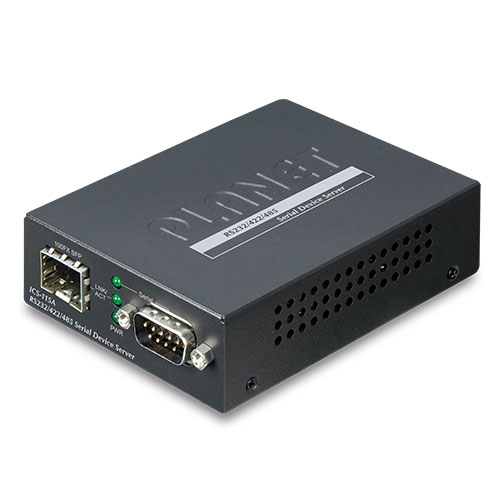
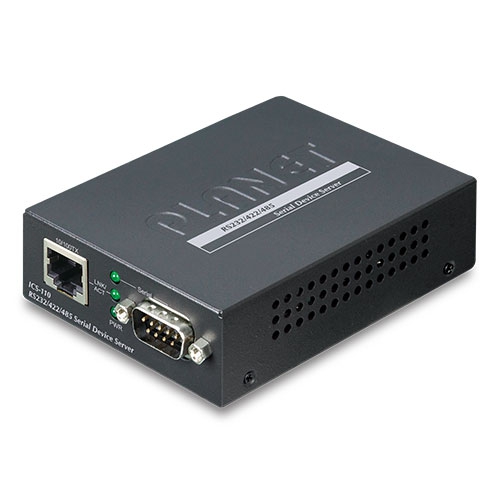
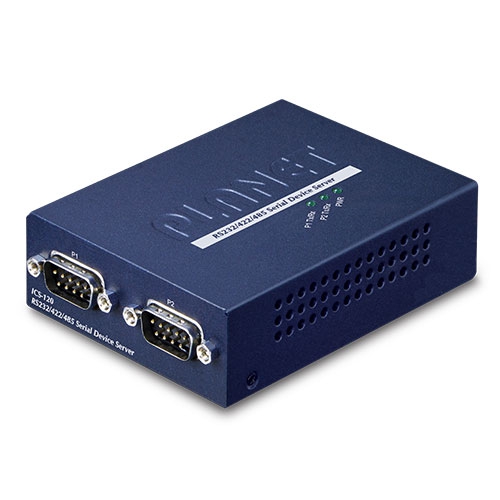
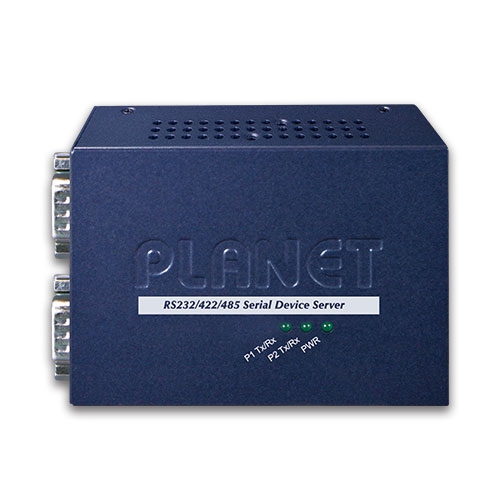
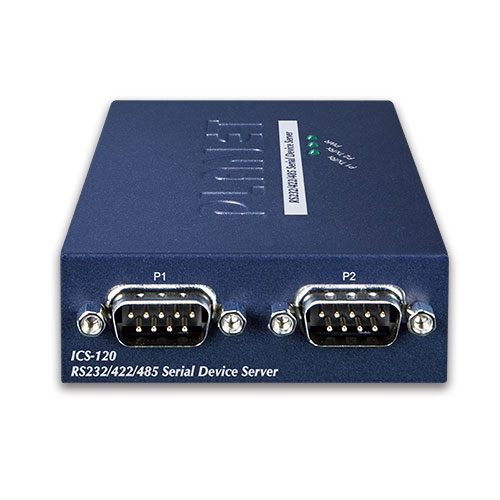
2-Port RS232/RS422/RS485 Serial Device Server

» ICS-120

Cost-effective Solution for RS232/422/485 Serial-to-Ethernet Application

PLANET ICS-120 Serial Device Server is specially designed to convert two serial RS232/RS422/RS485 communication interfaces into Fast Ethernet networking to extend the network distance efficiently and inexpensively. 
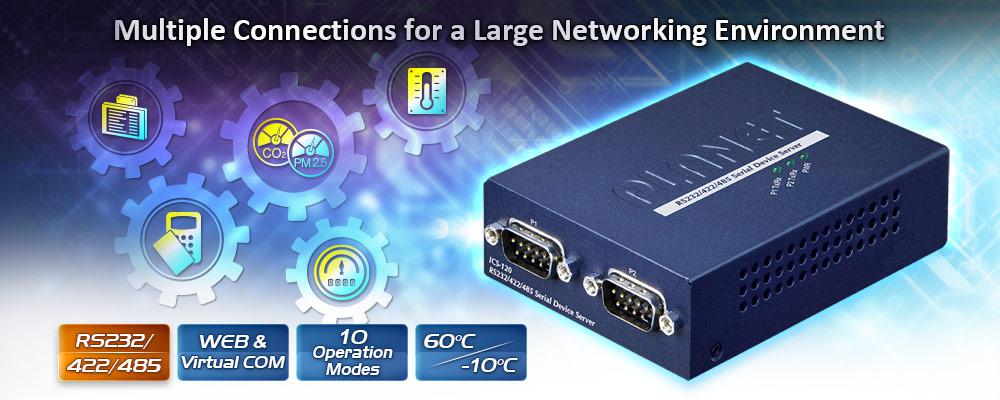
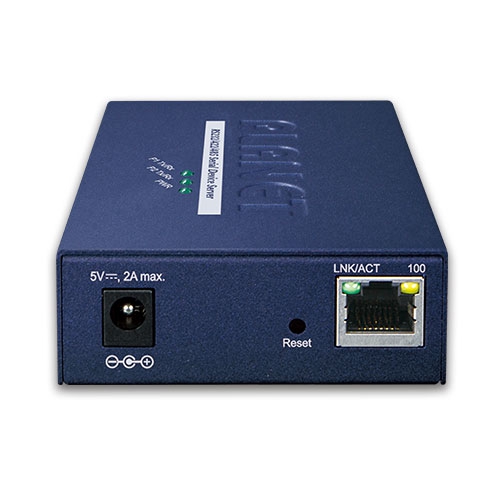
There is one 10/100BASE-TX RJ45 port in the ICS-120, making connected serial equipment become IP-based, and able to also connect to a TCP/IP networking immediately. And its operating temperature ranging from -10 to 60 degrees C is designed for all your network requirements. 

The ICS-120 is a time-saving and cost-effective solution for users and system integrators to quickly transform their serial devices into the Ethernet network with no need of replacing the existing serial devices and software system.
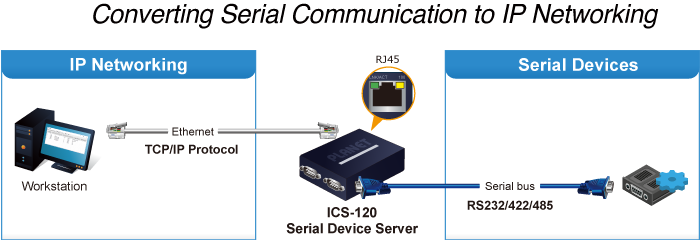
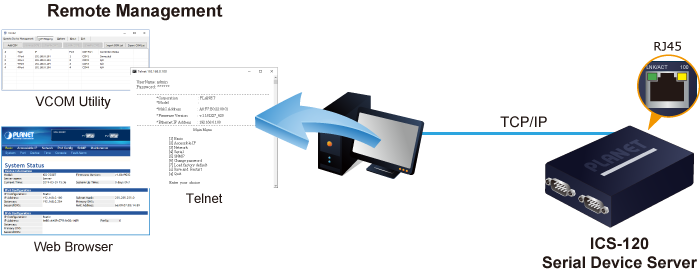
Remote Management 

As the ICS-120 provides easy serial-to-Ethernet connectivity and connection to a TCP/IP network, the remote network system can thus be managed efficiently via its Web, telnet, and VCOM management interfaces. It supports both application and serial operation modes for alarm or IP address connection, which saves the administrator’s time in detecting and locating network problems without visual inspection of the cabling and devices. Multiple connection options are available for a large networking environment as well.
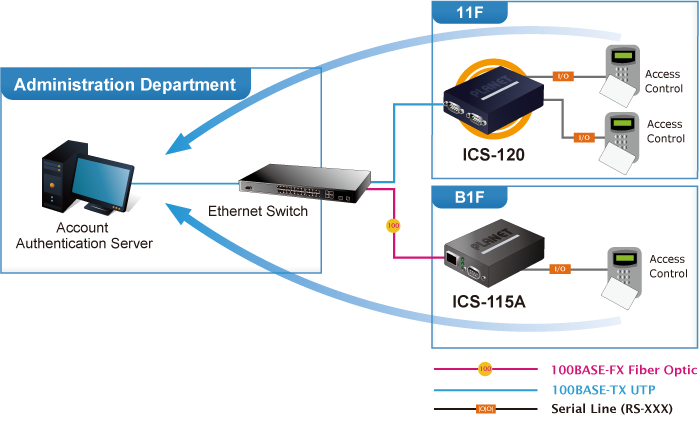
Access Control System – Traditional System Application

Most of the enterprises and government use access control plate and Mifare or RFID to authorize entrance identity. Traditionally, the access control machines use RS232 or RS485 serial interface with their cables connecting to login server. By applying the ICS-120 Serial Device Server, the access control machine is able to extend the network over longer distances via Ethernet interfaces. In addition, the ICS-120 can be linked to an xDSL router to get the internet access capability so that the access control can be set and monitored over the internet.

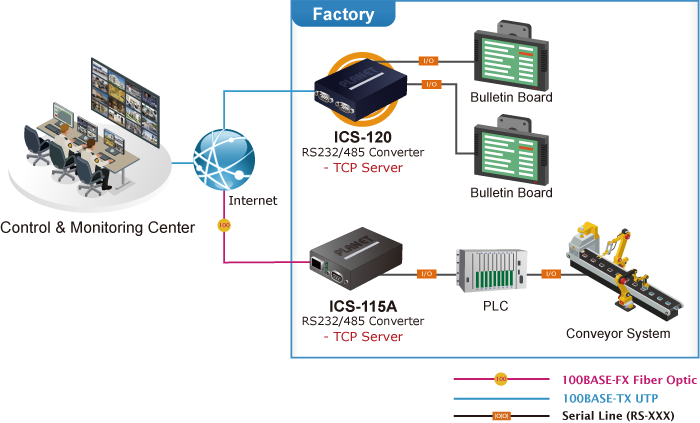
Process Control

To monitor, configure and manage the robotic conveyer including other production machines, PLC (programmable logical control) is required to drive the above manufacturing process. The ICS-120 can be set to the TCP server mode and connected to the PLC.  Thus, the administrator can configure and set command settings through Fast Ethernet intranet to remotely control the PLC, without having to stand by the I/O machine.

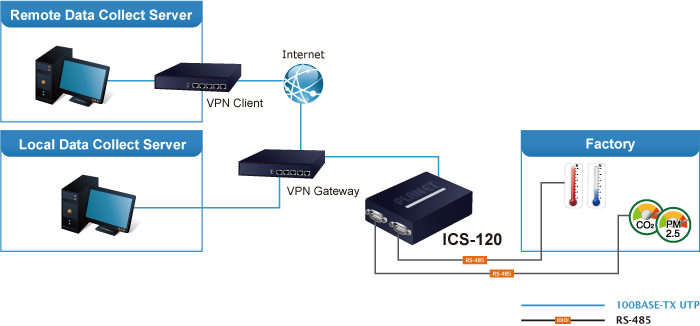
RTU Data Collect – UDP Mode

Connect with RTU (remote terminal unit) to collect and monitor the data of waves, signal and power utilization. The ICS-120 can be used to set up UDP mode and send data over Fast Ethernet to local server or over Internet to remote server automatically.

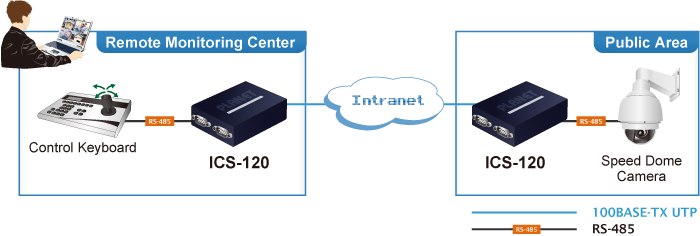
Surveillance Motion Control – Pair Connection Mode

Using pair connection mode via the fiber optic patch cord, the ICS-120 can extend the distance of the deployed devices via RS232, RS422 and RS485 interfaces, making the remote management of these devices from the monitoring center easier and efficient.

Serial Interface

  • Two DB9 interfaces that support RS232, 2-wire RS485, 4-wire RS485 and RS422 operation
  • Asynchronous serial data rates up to 921600bps
  • Data mode includes VCOM, RFC2217, TCP server, TCP client, UDP, remote pairing, Modbus converter server / client and serial telnet modes

Ethernet Interface

  • 1-port 10/100BASE-TX RJ45 with auto MDI/MDI-X function

Management

  • IPv4 and IPv6 dual stack management
  • Remote Management Interfaces
  • - IP-based Web management
    - Telnet console management
    - Windows-based VCOM utility supports searching, monitoring and configuration setting
  • IP NTP (Network Time Protocol) 
  • Standard TCP/IP interface and versatile operation modes
  • Software Protocol supports ICMP, TCP/IP, UDP, HTTP server, DHCP client, Telnet server/client 
  • Serial Operation mode selected via management interface
  • Pair Connection mode for connecting two serial devices over a network
  • Allows a maximum of 4 hosts to be accessed as TCP client mode
  • Firmware upgrade via HTTP protocol
  • Accessible IP security control to prevent illegal users
  • Event notification
  • - Remote syslog server
    - SNMP trap
  • DHCP client for IP address assignment 
  • PLANET Smart Discovery utility automatically finds the client devices on the netwok


Case and Installation

  • Compact size for easy Installation
  • - Standalone -- Wall mountable or DIN-rail mounting (optional accessory)
  • External power adaptor 5V DC, 2A max.
  • Supports 6000 VDC Ethernet ESD protection
  • -10 to 60 degrees C operating temperature
  • Supports extensive LED indicators for network diagnosis
  • Reset button for resetting to factory default
Serial Interface
Serial Port2 x DB9 male
Serial StandardsRS232/RS422/4-wire RS485/2-wire RS485
Baud Rate (Data Rate)50bps to 921Kbps
Data Bits5, 6, 7, 8
Stop Bit1, 1.5, 2
Parity TypeOdd, Even, None, Space, Mark
Flow ControlRTS/CTS and DTR/DSR (RS232 only)
XON/XOFF
SignalsRS232: TxD, RxD, RTS, CTS, DTR, DSR, DCD, GND
RS422: Tx+, Tx-, Rx+, Rx-, GND
4-wire RS485: Tx+, Tx-, Rx+, Rx-, GND
2-wire RS485: Data A (+), Data B (-), GND
Pin Assignment
PinRS232RS422
RS485-4W
RS485-2W
1DCDTxD+--
2RxDTxD---
3TxDRxD-Data-
4DTRRxD+Data+
5GNDGNDGND
6DSR----
7RTS----
8CTS----
9------
Ethernet Interface
Ethernet Ports1 x RJ45
Standard10/100BASE-TX
Distance100m
ESD Protection6KV
Hardware
Dimensions (W x D x H)94 x 70.3 x 26.2mm
Weight189g
LED IndicatorsSystem: Link
TP Port: Link/ Active
Serial Port: Active
Power RequirementsExternal Power Adaptor 5V DC, 2A max.
Power Consumption5.5 watts (max.)
EnclosureMetal
InstallationStandalone, wall-mount , and DIN-rail kit (optional)
Reset Button< 5 sec: System reboot
> 5 sec: Factory default
Management
Management InterfacesWeb management
Telnet Console management
Windows-based VCOM Utility management
SNMPv1, v2c / SNMP trap
UNI-NMS monitoring
PLANET Smart Discovery Utility
IP VersionIPv4 and IPv6
Operation Mode■ TCP server / TCP client
■ UDP client
■ Virtual COM
■ RFC2217
■ Telnet server
■ Pair connection – Remote (Slave)
■ Pair connection – Local (Master)
■ Modbus converter server / client
Virtual COM Utility Platform SupportWindows-based Only:
 Windows XP
 Windows Server 2003
 Windows 7
 Windows Server 2008
 Windows 8 (Must install the latest version of WinPcap)
 Windows Server 2012 (Must install the latest version of WinPcap)
 Windows 10
Fault AlarmRecord: System log / SNMP trap
TimeNTP
SecurityAccessible IP (white list)
SNMPSNMP v1 and v2c
Standards Conformances
Regulatory ComplianceFCC Part 15 Class A,
CE Certification Class A
StandardsIEEE 802.3 10BASE-T
IEEE 802.3u 100BASE-TX
RFC 768 UDP
RFC 793 TFTP
RFC 791 IP
RFC 792 ICMP
RFC 854 Telnet
RFC 958 NTP
RFC 1908 SNMPv2c
RFC 2068 HTTP
RFC 4443 ICMPv6
EIA/TIA RS232/422/485
Regulatory ApprovalRoHS
Environment
Operating Temperature-10 ~ 60 degrees C
Storage Temperature-10 ~ 70 degrees C
Humidity5 ~ 95% (non-condensing)
DateVersionDescriptionDownload
2020/24/071.0

ICS-120

Download Icon
DateVersionDescriptionDownload
2020/03/071.0

Initial release.

Download Icon
DateVersionDescriptionDownload
2020/07/081.0

Initial release.

Download Icon
DateVersionDescriptionDownload
2021/23/031.0

EC Declaration.

Download Icon
DateVersionDescriptionDownload
2021/08/101.155b210805

Bug Fixed –
1. Make up the missing Modbus Converter Server / Client Mode
2. Fixed the problem that the “green” LED would unconditionally turn on when using RS422 and RS485
3. Fixed the problem that Smart Discovery could not scan

Download Icon
DateVersionDescriptionDownload
2020/11/122011041000_2521_1337_1111

1. Supports starting as service mode.
2. Supports simplified Chinese
*Note:This utility is only for the ICS-110, ICS-120, ICS-115A, ICS-2100T, ICS-2102T, ICS-2102TS, ICS-2105AT, ICS-2200T, and ICS-2400T and NOT compatible with ICS-100, ICS-105A, ICS-2100, and ICS-2105A.

Download Icon
2020/31/072.18.1219.1600

1. Support to add Device IP manually.
2. Support to add COM port manually.
3. NOT compatible with ICS-210X series products.

Download Icon

Ordering Information

ICS-120

2-Port RS232/RS422/RS485 Serial Device Server

Ordering Information

ICS-120

2-Port RS232/422/485 Serial Device Server
                                             

Subscribe to PLANET e Newsletter

Receive the latest product information and company news!