Product Meta

  • product_code: IKVM-210-08
  • product_editor_4418_tab_content: <b>Remote Management via Network</b> With PLANET IKVM-210-08, network administrators can control a server room locally or remotely through Internet. No additional software or license fee is needed; multiple users can securely access remote server by using a standard web browser to create an HTTP connection. <p style="text-align: center;"><img class="img-fluid" src="https://www.planet.com.sa/planet-storage/2025/01/IKVM-210-08_16-2_L.png" /></p> <b>Cascade Operation</b> The IKVM-210-08 is easy to install for controlling up to 8 computers/servers. Furthermore, eight KVM switches can be cascaded to enable to control up to 64 servers. <p style="text-align: center;"><img class="img-fluid" src="https://www.planet.com.sa/planet-storage/2025/01/IKVM-210-08-1_L.png" /></p>
  • product_editor_4418_tab_enabled: yes
  • product_editor_4418_tab_content_changed: yes
  • product_editor_4418_tab_title: Applications
  • product_editor_4421_tab_content: <span style="color: #5070ab;"><b>Hardware</b></span> <ul type="disc"> <li>1U rack-mount size and desktop design</li> <li>Standalone machine controls up to 8 sets of computers</li> <li>Up to 2 levels can be cascaded and up to 64 computers can be controlled</li> <li>Front panel status LEDs give a clear indication of the active computers</li> </ul> <span style="color: #5070ab;"><b>Security</b></span> <ul type="disc"> <li>Two-layer password security protection</li> <li>DES, AES and 3DES for data encryption</li> </ul> <span style="color: #5070ab;"><b>Management</b></span> <ul type="disc"> <li>Auto scan mode for monitoring computers</li> <li>Requires no additional software or hardware</li> <li>Computer selection via Port Select Button, Hotkey and On Screen Display (OSD)</li> <li>Hot pluggable: Add or remove computers without having to power down the switch</li> <li>QVS (Quick View Setting): Quickly select your computer by naming its model or serial number</li> </ul> <span style="color: #5070ab;"><b>Remote Access</b></span> <ul type="disc"> <li>Remotely control PC via TCP/IP and a built-in 10/100/1000Mbps Ethernet port</li> <li>High Video Quality: Resolution up to 2048 x 1536 (local side) or 1920 x 1080 (remote side)</li> <li>Sends the key combinations to a remote computer</li> <li>Administrator and multiple users with password protection</li> <li>Use of the absolute synchronistical technology of mouse to ensure the accuracy of the Windows operating system</li> <li>Expedient bandwidth control</li> </ul> <span style="color: #5070ab;"><b>Compatibility</b></span> <ul type="disc"> <li>Multiplatform support -- Windows, Linux and Sun</li> <li>Multibrowser support (IE, Chrome, Firefox)</li> <li>Supports Microsoft Intellimouse, Logitech Net Mouse and other third-party’s PS/2 mice</li> </ul>
  • product_editor_4421_tab_enabled: yes
  • product_editor_4421_tab_content_changed: yes
  • product_editor_4421_tab_title: Key Features
  • product_editor_4422_tab_content:   <div class="table-responsive"> <table class="common_table_sky" style="width: 100%;"> <thead> <tr> <th colspan="2">Hardware</th> </tr> </thead> <tbody> <tr> <td class="align-middle">Number of Ports</td> <td>8 D-sub ports (15-pin)</td> </tr> <tr> <td class="align-middle">Maximum Control of PCs</td> <td>64 by 2-tier star-type cascading (KVM-210-08 x 8)</td> </tr> <tr> <td class="align-middle">PC Ports</td> <td> <table border="0" width="400"> <tbody> <tr> <td width="85"><b>Keyboard:</b></td> <td width="315">PS/2 female + USB type A female</td> </tr> <tr> <td><b>Mouse:</b></td> <td>PS/2 female + USB type A female</td> </tr> <tr> <td><b>Video:</b></td> <td>8 D-sub ports (15 female)</td> </tr> </tbody> </table> </td> </tr> <tr> <td class="align-middle">Console Ports</td> <td> <table border="0" width="399"> <tbody> <tr> <td width="85"><b>Keyboard:</b></td> <td width="315">PS/2 female + USB type A female</td> </tr> <tr> <td><b>Mouse:</b></td> <td>PS/2 female + USB type A female</td> </tr> <tr> <td><b>Video:</b></td> <td>1 D-sub port (15 female)</td> </tr> </tbody> </table> </td> </tr> <tr> <td class="align-middle">LED</td> <td> <table border="0" width="400"> <tbody> <tr> <td width="85"><b>On Line:</b></td> <td width="315">8 (<span style="color: red;">Red</span>)</td> </tr> <tr> <td><b>Selected:</b></td> <td>8 (<span style="color: green;">Green</span>)</td> </tr> </tbody> </table> </td> </tr> <tr> <td class="align-middle">Button</td> <td> <table border="0" width="400"> <tbody> <tr> <td width="85"><b>Reset:</b></td> <td width="315">1 reset button</td> </tr> <tr> <td><b>Select:</b></td> <td>8 select buttons</td> </tr> </tbody> </table> </td> </tr> <tr> <td class="align-middle">Remote Console</td> <td>1 RJ45 port for 10/100/1000BASE-T</td> </tr> <tr> <td class="align-middle">Video Resolution</td> <td>Local side: 2048 x 1536 (max) Remote side: 1920 x 1080 (max)</td> </tr> <tr> <td class="align-middle">Housing</td> <td>Metal</td> </tr> <tr> <td class="align-middle">Dimensions (W x D x H)</td> <td>432 x 155 x 44 mm</td> </tr> <tr> <td class="align-middle">Weight</td> <td>2.22kg</td> </tr> <tr> <td class="align-middle">Power Requirement</td> <td>9V DC, 1A</td> </tr> <tr> <td class="align-middle">Installation</td> <td>1U rack-mountable, desktop</td> </tr> </tbody> <thead> <tr> <th colspan="2">Management</th> </tr> </thead> <tbody> <tr> <td class="align-middle">Supported Protocol</td> <td>TCP, IP, HTTP</td> </tr> <tr> <td class="align-middle">Client Software</td> <td>IPKVM Software</td> </tr> <tr> <td class="align-middle">PC Selection</td> <td>Port select button Hotkeys on keyboard OSD (on screen display)</td> </tr> <tr> <td class="align-middle">Scan Interval</td> <td>5~60 seconds</td> </tr> <tr> <td class="align-middle">Security</td> <td>User password and super password DES, AES and 3DES</td> </tr> </tbody> <thead> <tr> <th colspan="2">Environment & Certification</th> </tr> </thead> <tbody> <tr> <td class="align-middle">Operating Temperature</td> <td>-10 ~ 50 degrees C</td> </tr> <tr> <td class="align-middle">Storage Temperature</td> <td>-20 ~ 60 degrees C</td> </tr> <tr> <td class="align-middle">Operating Humidity</td> <td>0 ~ 90%</td> </tr> <tr> <td class="align-middle">Regulatory</td> <td>CE, FCC</td> </tr> </tbody> </table> </div>
  • product_editor_4422_tab_enabled: yes
  • product_editor_4422_tab_content_changed: yes
  • product_editor_4422_tab_title: Specifications
  • ekit_post_views_count: 509
  • product_editor_4418_tab_sticky_width: pw-content-1
  • product_editor_4418_tab_sticky_position: pw-left-stick
  • product_editor_4421_tab_sticky_width: pw-content-1
  • product_editor_4421_tab_sticky_position: pw-left-stick
  • product_editor_4422_tab_sticky_width: pw-content-1
  • product_editor_4422_tab_sticky_position: pw-left-stick
  • product_editor_4423_tab_content:
  • product_editor_4423_tab_content_changed: yes
  • product_editor_4423_tab_enabled: yes
  • product_editor_4423_tab_title: Downloads
  • product_editor_4423_tab_sticky_width: pw-content-1
  • product_editor_4423_tab_sticky_height: 1
  • product_editor_4423_tab_sticky_position: pw-left-stick
  • product_editor_4424_tab_content:
  • product_editor_4424_tab_content_changed: yes
  • product_editor_4424_tab_enabled: yes
  • product_editor_4424_tab_title: Related Products
  • product_editor_4424_tab_sticky_width: pw-content-1
  • product_editor_4424_tab_sticky_height: 1
  • product_editor_4424_tab_sticky_position: pw-left-stick
  • total_sales: 0
  • accessories_table: <div class="table-responsive"> <div class="table-responsive"> <div class="table-responsive"> <table class="common_table"> <thead> <tr> <th colspan="2">Ordering Information</th> </tr> </thead> <tbody> <tr> <td class="text-center align-middle"> <h3 class="h6 m-0">IKVM-210-08</h3> </td> <td>8-Port Combo IP KVM Switch</td> </tr> </tbody> </table> </div> <div class="table-responsive"> <table class="common_table"> <thead> <tr> <th colspan="2">Accessories</th> </tr> </thead> <tbody> <tr> <td class="text-center align-middle"> <h3 class="h6 m-0">KVM-KC1-1.8</h3> </td> <td>1.8M USB KVM Cable with built-in PS2 to USB Converter</td> </tr> <tr> <td class="text-center align-middle"> <h3 class="h6 m-0">KVM-KC1-3</h3> </td> <td>3M USB KVM Cable with built-in PS2 to USB Converter</td> </tr> <tr> <td class="text-center align-middle"> <h3 class="h6 m-0">KVM-KC1-5</h3> </td> <td>5M USB KVM Cable with built-in PS2 to USB Converter</td> </tr> </tbody> </table> </div> </div> </div>                                          
  • product_label:
  • prouduct_loop_image_transparent_bg_:
  • 6_features_images: a:6:{i:0;s:5:"14844";i:1;s:5:"14847";i:2;s:5:"14846";i:3;s:5:"14849";i:4;s:5:"14845";i:5;s:5:"14848";}
  • datasheet_0_date: 20170414
  • datasheet_0_version: 1.0
  • datasheet_0_description: IKVM-210-08
  • datasheet_0_download_pdf: https://www.planet.com.sa/storage/products/IKVM-210-08/C-KVM-210-08_s.pdf
  • datasheet: 1
  • quick_guide_0_date: 20170116
  • quick_guide_0_version: 1.0
  • quick_guide_0_description: Initial Release for IP Installation Guide
  • quick_guide_0_download_pdf: https://www.planet.com.sa/storage/products/IKVM-210-08/EMQ-IKVM-210%20Series_v1.0.pdf
  • quick_guide_1_date: 20161017
  • quick_guide_1_version: 1.0
  • quick_guide_1_description: Installation Guide for KVM-210-08/16
  • quick_guide_1_download_pdf: https://www.planet.com.sa/storage/products/IKVM-210-08/EMQ-KVM-210-08_16_v1.0.pdf
  • quick_guide: 2
  • users_manual_0_date: 20170112
  • users_manual_0_version: 1.0
  • users_manual_0_description: Initial Release
  • users_manual_0_download_pdf: https://www.planet.com.sa/storage/products/IKVM-210-08/EM-KVM_IKVM-210_Series_v1.0.pdf
  • users_manual: 1
  • ec_declaration:
  • android_app:
  • driver:
  • firmware_0_date: 20220706
  • firmware_0_version: 20220622.1316
  • firmware_0_description: Added HTTPS feature.
  • firmware_0_download_pdf: https://www.planet.com.sa/storage/products/IKVM-210-08/FW-IKVM%20Series_v20220622.1316.zip
  • firmware: 1
  • utility: 4
  • compatible_list:
  • site-sidebar-layout: default
  • ast-site-content-layout: default
  • site-content-style: default
  • site-sidebar-style: default
  • theme-transparent-header-meta: default
  • utility_0_date: 20250102
  • utility_0_version: 3.4
  • utility_0_description: Optimized mouse following performance.
  • utility_0_download_pdf: https://www.planet.com.sa/storage/products/IKVM-210-08/UT-IKVM%20Software_v3.4.zip
  • utility_1_date: 20220602
  • utility_1_version: 2.2
  • utility_1_description: Update for IPKVM.
  • utility_1_download_pdf: https://www.planet.com.sa/storage/products/IKVM-210-08/UT-IKVM%20Sofeware_v2.2.zip
  • utility_2_date: 20170118
  • utility_2_version: 1.02
  • utility_2_description: Initial Release for IPKVM
  • utility_2_download_pdf: https://www.planet.com.sa/storage/products/IKVM-210-08/UT-IKVM%20Software_v1.02.zip
  • utility_3_date: 20140407
  • utility_3_version: 1.0
  • utility_3_description: Initial Release for Smart Discovery
  • utility_3_download_pdf: https://www.planet.com.sa/storage/products/IKVM-210-08/UT-SmartDiscoveryLite_v1.0.zip
  • astra-migrate-meta-layouts: set
  • applications_tab: <p><b>Remote Management via Network</b><br> With PLANET IKVM-210-08, network administrators can control a server room locally or remotely through Internet. No additional software or license fee is needed; multiple users can securely access remote server by using a standard web browser to create an HTTP connection. </p><p style="text-align:center"><img class="img-fluid" src="https://www.planet.com.sa/planet-storage/2025/01/IKVM-210-08_16-2_L.png"></p><p><b>Cascade Operation</b><br> The IKVM-210-08 is easy to install for controlling up to 8 computers/servers. Furthermore, eight KVM switches can be cascaded to enable to control up to 64 servers.<br> </p><p style="text-align:center"><img class="img-fluid" src="https://www.planet.com.sa/planet-storage/2025/01/IKVM-210-08-1_L.png"></p>
  • key_features_tab: <p><font color="#5070ab"><b>Hardware</b></font></p><ul type="disc"><li>1U rack-mount size and desktop design</li><li>Standalone machine controls up to 8 sets of computers</li><li>Up to 2 levels can be cascaded and up to 64 computers can be controlled</li><li>Front panel status LEDs give a clear indication of the active computers</li></ul><br><font color="#5070ab"><b>Security</b></font><ul type="disc"><li>Two-layer password security protection</li><li>DES, AES and 3DES for data encryption</li></ul><br><font color="#5070ab"><b>Management</b></font><ul type="disc"><li>Auto scan mode for monitoring computers</li><li>Requires no additional software or hardware</li><li>Computer selection via Port Select Button, Hotkey and On Screen Display (OSD)</li><li>Hot pluggable: Add or remove computers without having to power down the switch</li><li>QVS (Quick View Setting): Quickly select your computer by naming its model or serial number</li></ul><br><font color="#5070ab"><b>Remote Access</b></font><ul type="disc"><li>Remotely control PC via TCP/IP and a built-in 10/100/1000Mbps Ethernet port</li><li>High Video Quality: Resolution up to 2048 x 1536 (local side) or 1920 x 1080 (remote side)</li><li>Sends the key combinations to a remote computer</li><li>Administrator and multiple users with password protection</li><li>Use of the absolute synchronistical technology of mouse to ensure the accuracy of the Windows operating system</li><li>Expedient bandwidth control</li></ul><br><font color="#5070ab"><b>Compatibility</b></font><ul type="disc"><li>Multiplatform support -- Windows, Linux and Sun</li><li>Multibrowser support (IE, Chrome, Firefox)</li><li>Supports Microsoft Intellimouse, Logitech Net Mouse and other third-party’s PS/2 mice</li></ul>
  • specifications_tab: <table style="width:100%;" class="common_table_sky"><thead><tr><th colspan="2">Hardware</th></tr></thead><tbody><tr><td class="align-middle">Number of Ports</td><td>8 D-sub ports (15-pin)</td></tr><tr><td class="align-middle">Maximum Control of PCs</td><td>64 by 2-tier star-type cascading (KVM-210-08 x 8) </td></tr><tr><td class="align-middle">PC Ports</td><td><table width="400" border="0"><tr><td width="85"><b>Keyboard:</b></td><td width="315">PS/2 female + USB type A female</td></tr><tr><td><b>Mouse:</b></td><td>PS/2 female + USB type A female</td></tr><tr><td><b>Video:</b></td><td>8 D-sub ports (15 female) </td></tr></table></td></tr><tr><td class="align-middle">Console Ports</td><td><table width="399" border="0"> <tr> <td width="85"><b>Keyboard:</b></td> <td width="315">PS/2 female + USB type A female</td> </tr> <tr> <td><b>Mouse:</b></td> <td>PS/2 female + USB type A female</td> </tr> <tr> <td><b>Video:</b></td> <td>1 D-sub port (15 female) </td> </tr></table></td></tr><tr><td class="align-middle">LED</td><td><table width="400" border="0"> <tr> <td width="85"><b>On Line:</b></td> <td width="315">8 (<font color="red">Red</font>)</td> </tr> <tr> <td><b>Selected:</b></td> <td>8 (<font color="green">Green</font>)</td></tr></table></td></tr><tr><td class="align-middle">Button</td><td><table width="400" border="0"> <tr> <td width="85"><b>Reset:</b></td> <td width="315">1 reset button</td> </tr> <tr> <td><b>Select:</b></td> <td>8 select buttons</td></tr></table></td></tr><tr><td class="align-middle">Remote Console</td><td>1 RJ45 port for 10/100/1000BASE-T</td></tr><tr><td class="align-middle">Video Resolution</td><td>Local side: 2048 x 1536 (max)<br /> Remote side: 1920 x 1080 (max)<br /> </td></tr><tr><td class="align-middle">Housing</td><td>Metal</td></tr><tr><td class="align-middle">Dimensions (W x D x H)</td><td>432 x 155 x 44 mm</td></tr><tr><td class="align-middle">Weight</td><td>2.22kg</td></tr><tr><td class="align-middle">Power Requirement</td><td>9V DC, 1A</td></tr><tr><td class="align-middle">Installation</td><td>1U rack-mountable, desktop</td></tr></tbody><thead><tr><th colspan="2">Management</th></tr></thead><tbody><tr><td class="align-middle">Supported Protocol</td><td>TCP, IP, HTTP</td></tr><tr><td class="align-middle">Client Software</td><td>IPKVM Software</td></tr><tr><td class="align-middle">PC Selection</td><td>Port select button<br /> Hotkeys on keyboard<br /> OSD (on screen display)<br /> </td></tr><tr><td class="align-middle">Scan Interval</td><td>5~60 seconds</td></tr><tr><td class="align-middle">Security</td><td>User password and super password<br /> DES, AES and 3DES<br /> </td></tr></tbody><thead><tr><th colspan="2">Environment & Certification</th></tr></thead><tbody><tr><td class="align-middle">Operating Temperature</td><td>-10 ~ 50 degrees C</td></tr><tr><td class="align-middle">Storage Temperature</td><td>-20 ~ 60 degrees C</td></tr><tr><td class="align-middle">Operating Humidity</td><td>0 ~ 90%</td></tr><tr><td class="align-middle">Regulatory</td><td>CE, FCC</td></tr></tbody></table>
  • rank_math_news_sitemap_robots: index
  • rank_math_robots: a:1:{i:0;s:5:"index";}

8-Port Combo IP KVM Switch

» IKVM-210-08

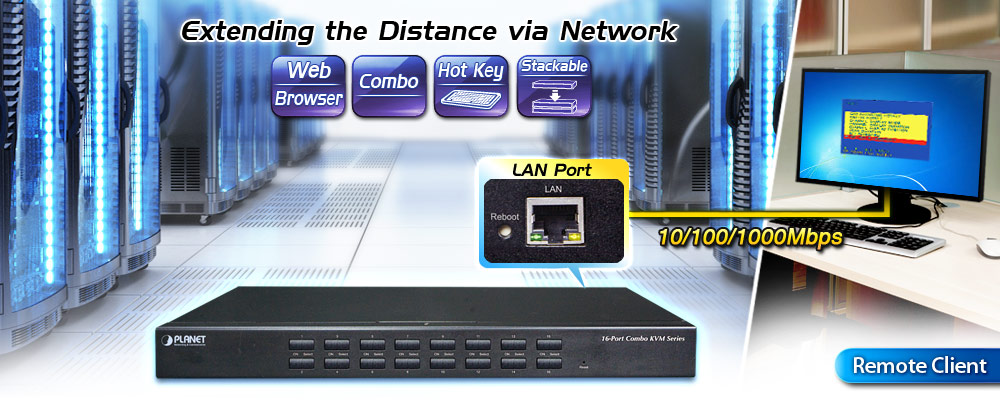
Remotely Access your Servers from Anywhere
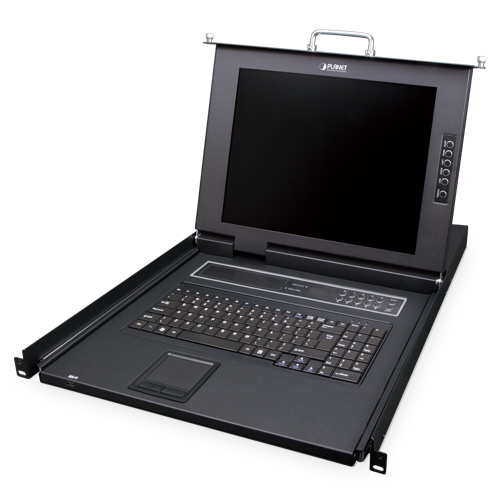
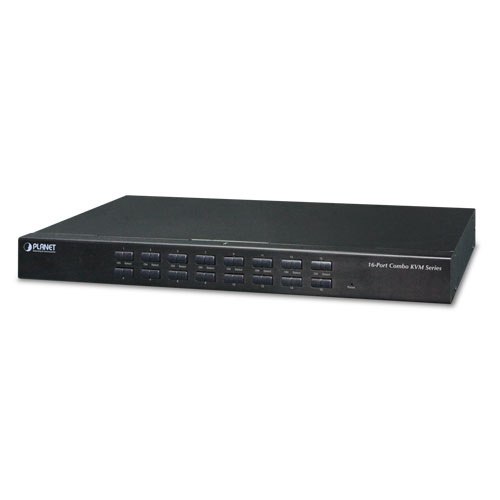
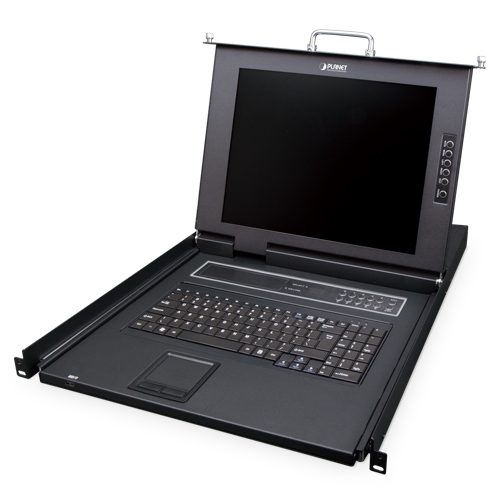
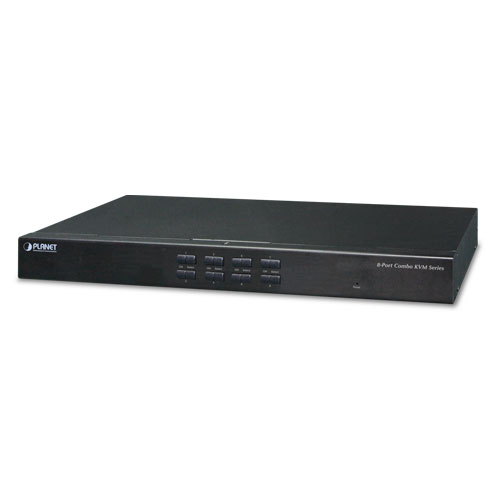
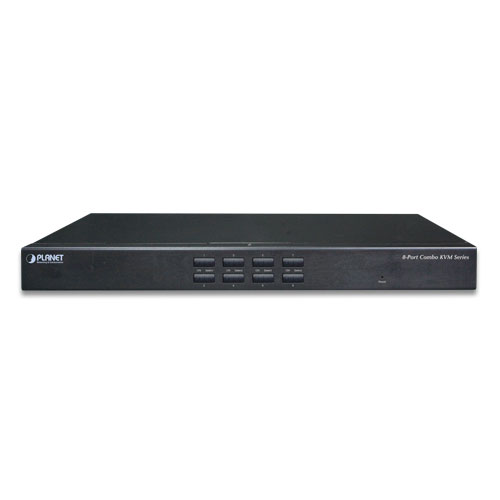
PLANET offers an ideal enterprise 8-port KVM switch solution for company server room or testing facilities. With the innovative IP-based technology, PLANET has turned the traditional KVM switches into true networking devices. The IKVM-210-08 captures, digitizes and compresses video signal, and then transmits it with keyboard and mouse signals through IP network. Multiple remote sites can monitor the same PC server simultaneously.
Multiple Operating Systems Supported
The IKVM-210-08 is the most cost-effective and simple solution for controlling a group of PCs in the network. Multiple computers can be managed via only one single set of monitor, keyboard and mouse directly. No software drivers or system configuration are required. iMac, Power Mac and Sun systems are also supported.

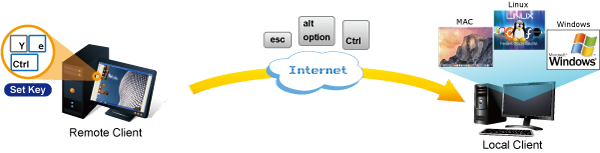
Remote Key Combination
You could set the multiple key combinations at IKVM Series. When you open IKVM software at remote client, you could use these key combinations to control these local PCs with a different OS via the internet.
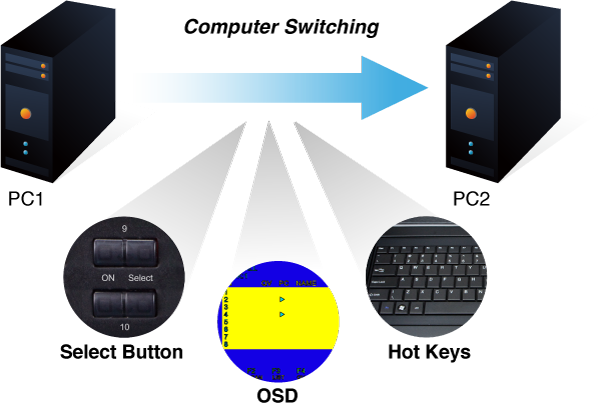
Computer Switching
There are three convenient methods to access any computer connected to the installation:

  • Port select button
  • Hotkeys on keyboard
  • OSD (on screen display) at local client and remote client
Perceptive LED Display
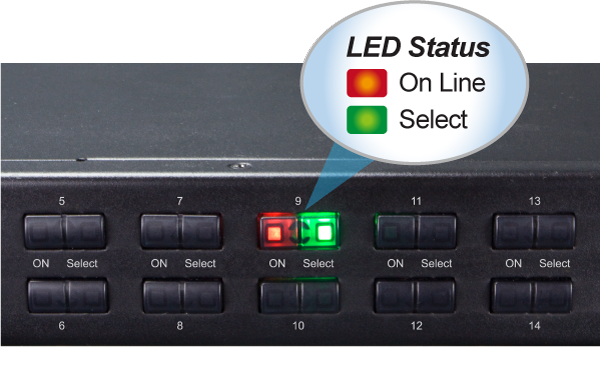
You could check the computer status on the front LED of the IKVM-210-08. “Red” indicates that a computer is connected to the corresponding port and “Green” indicates that the computer connected to the corresponding port has focus.
Security Protection
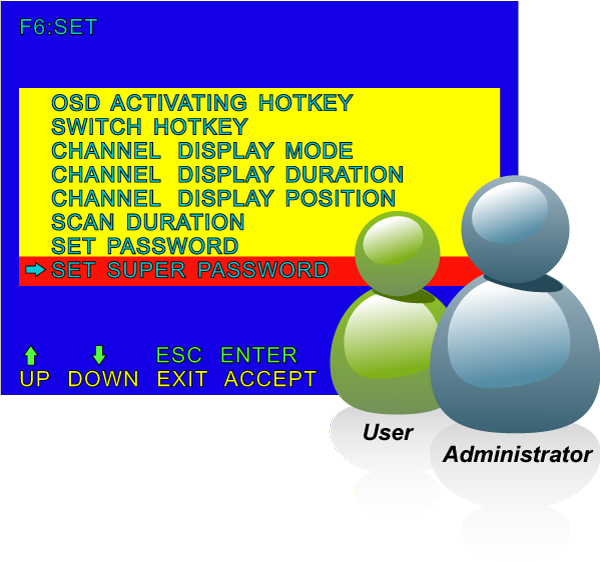
The two-level password security only authorizes up to one user and an administrator with a separate profile for each user. Data encryption options include AES, DES and 3DES, and they can be selected for keyboard, mouse and video signals.
Powerful Mouse/Keyboard Support
In the present computer applications, a mouse has become an indispensable device. The IKVM-210-08 fully supports all models of PS/2 mice on the market. The KVM also supports the PS/2 keyboard port of code set 1/2/3 and further allows you to use the KVM for all kinds of servers, computers or their combination.
Remote Management via Network
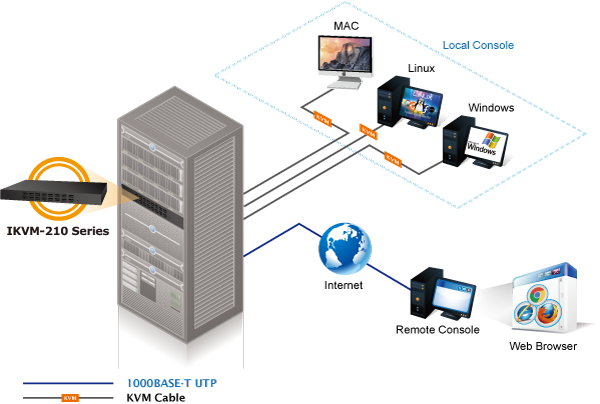
With PLANET IKVM-210-08, network administrators can control a server room locally or remotely through Internet. No additional software or license fee is needed; multiple users can securely access remote server by using a standard web browser to create an HTTP connection.

Cascade Operation
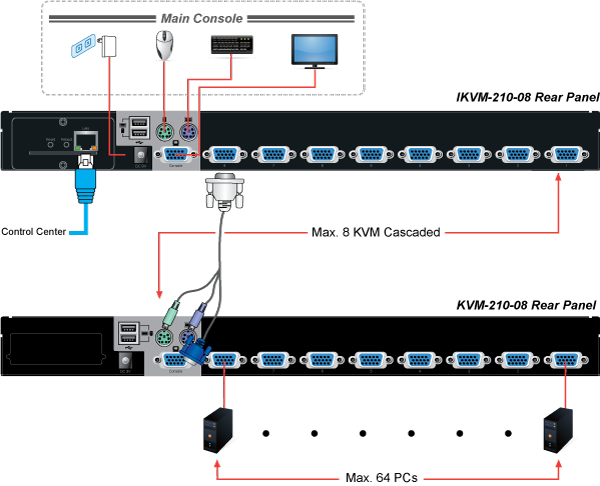
The IKVM-210-08 is easy to install for controlling up to 8 computers/servers. Furthermore, eight KVM switches can be cascaded to enable to control up to 64 servers.

Hardware

  • 1U rack-mount size and desktop design
  • Standalone machine controls up to 8 sets of computers
  • Up to 2 levels can be cascaded and up to 64 computers can be controlled
  • Front panel status LEDs give a clear indication of the active computers

Security
  • Two-layer password security protection
  • DES, AES and 3DES for data encryption

Management
  • Auto scan mode for monitoring computers
  • Requires no additional software or hardware
  • Computer selection via Port Select Button, Hotkey and On Screen Display (OSD)
  • Hot pluggable: Add or remove computers without having to power down the switch
  • QVS (Quick View Setting): Quickly select your computer by naming its model or serial number

Remote Access
  • Remotely control PC via TCP/IP and a built-in 10/100/1000Mbps Ethernet port
  • High Video Quality: Resolution up to 2048 x 1536 (local side) or 1920 x 1080 (remote side)
  • Sends the key combinations to a remote computer
  • Administrator and multiple users with password protection
  • Use of the absolute synchronistical technology of mouse to ensure the accuracy of the Windows operating system
  • Expedient bandwidth control

Compatibility
  • Multiplatform support -- Windows, Linux and Sun
  • Multibrowser support (IE, Chrome, Firefox)
  • Supports Microsoft Intellimouse, Logitech Net Mouse and other third-party’s PS/2 mice
Hardware
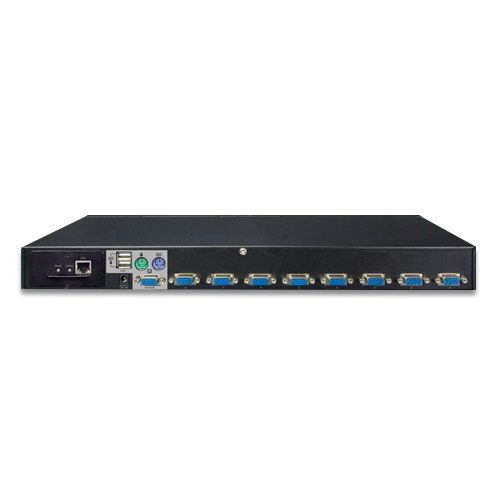
Number of Ports8 D-sub ports (15-pin)
Maximum Control of PCs64 by 2-tier star-type cascading (KVM-210-08 x 8)
PC Ports
Keyboard:PS/2 female + USB type A female
Mouse:PS/2 female + USB type A female
Video:8 D-sub ports (15 female)
Console Ports
Keyboard:PS/2 female + USB type A female
Mouse:PS/2 female + USB type A female
Video:1 D-sub port (15 female)
LED
On Line:8 (Red)
Selected:8 (Green)
Button
Reset:1 reset button
Select:8 select buttons
Remote Console1 RJ45 port for 10/100/1000BASE-T
Video ResolutionLocal side: 2048 x 1536 (max)
Remote side: 1920 x 1080 (max)
HousingMetal
Dimensions (W x D x H)432 x 155 x 44 mm
Weight2.22kg
Power Requirement9V DC, 1A
Installation1U rack-mountable, desktop
Management
Supported ProtocolTCP, IP, HTTP
Client SoftwareIPKVM Software
PC SelectionPort select button
Hotkeys on keyboard
OSD (on screen display)
Scan Interval5~60 seconds
SecurityUser password and super password
DES, AES and 3DES
Environment & Certification
Operating Temperature-10 ~ 50 degrees C
Storage Temperature-20 ~ 60 degrees C
Operating Humidity0 ~ 90%
RegulatoryCE, FCC
DateVersionDescriptionDownload
2017/14/041.0

IKVM-210-08

Download Icon
DateVersionDescriptionDownload
2017/16/011.0

Initial Release for IP Installation Guide

Download Icon
2016/17/101.0

Installation Guide for KVM-210-08/16

Download Icon
DateVersionDescriptionDownload
2017/12/011.0

Initial Release

Download Icon
DateVersionDescriptionDownload
2022/06/0720220622.1316

Added HTTPS feature.

Download Icon
DateVersionDescriptionDownload
2025/02/013.4

Optimized mouse following performance.

Download Icon
2022/02/062.2

Update for IPKVM.

Download Icon
2017/18/011.02

Initial Release for IPKVM

Download Icon
2014/07/041.0

Initial Release for Smart Discovery

Download Icon

Ordering Information

IKVM-210-08

8-Port Combo IP KVM Switch

Ordering Information

IKVM-210-08

8-Port Combo IP KVM Switch
Accessories

KVM-KC1-1.8

1.8M USB KVM Cable with built-in PS2 to USB Converter

KVM-KC1-3

3M USB KVM Cable with built-in PS2 to USB Converter

KVM-KC1-5

5M USB KVM Cable with built-in PS2 to USB Converter
                                         

Subscribe to PLANET e Newsletter

Receive the latest product information and company news!