Product Meta

  • product_code: UNC-NMS
  • product_editor_4418_tab_content: <p><strong>Economical Central Network Management Solution for SMBs </strong></p> <p>PLANET NMS-500 and NMS-1000V controllers help service providers and IT managers control all PLANET network devices at the same time and enable the administrator to effectively manage a local network of up to 100 sites and 102,400 managed nodes simultaneously without having to purchase any license and hardware-based controller, and pay an expensive annual subscription fee.</p> <p> </p> <p>The administrator can automatically discover and configure device profiles, batch provisioning/firmware upgrade, and built-in SAPC (Smart AP Control) that customize Wi-Fi planning against floor maps, and monitor all managed APs through a single Web-based interface. It allows operating across different platforms through virtualization software, which helps SMBs save costs on the need to configure the wireless APs one by one if done manually. Through the device list virtual panel function, the administrator also can do configuration with an NMS remote management switch to modify the network environment in one minute.</p> <p><img style="display: block; margin-left: auto; margin-right: auto;" src="https://www.planet.com.sa/planet-storage/2025/01/UNC-NMS-3.png" alt="" width="700" height="477" /></p> <p> </p> <p> </p> <p><img style="display: block; margin-left: auto; margin-right: auto;" src="https://www.planet.com.sa/planet-storage/2025/01/UNC-NMS-4.png" alt="" width="700" height="355" /></p>
  • product_editor_4418_tab_enabled: yes
  • product_editor_4418_tab_content_changed: yes
  • product_editor_4418_tab_title: Applications
  • product_editor_4421_tab_content: <p><strong>Industrial-grade Physical Hardware</strong></p> <ul> <li>6 x 10/100/1000BASE-T Gigabit Ethernet RJ45 ports (LAN 5 and LAN 6 are bypass ports)</li> <li>1 x LCM for basic system setting</li> <li>2 x LEDs (Power and HDD)</li> <li>2 x USB 3.0 ports for configuration backup and restoration</li> <li>1 x RJ45 Console port interface</li> <li>1 x Factory default button (GPIO)</li> <li>1 x 3-pin AC Power input socket for 100~240V</li> <li>1U Rack-mount</li> </ul> <p> </p> <p> <strong>Network Devices Management</strong></p> <table style="border-collapse: collapse; color: #212529; width: 95.4464%; font-family: 'Didact Gothic', Arial, 'Microsoft JhengHei', sans-serif; font-size: 16px; border: 1px solid #cccccc;" border="1" cellpadding="6"> <tbody> <tr> <td style="width: 26%;" bgcolor="edf0f7">Dashboard</td> <td style="width: 73.2843%;">Providing the at-a-glance view of center system, site summary,  site Map, traffic, PoE network status</td> </tr> <tr> <td style="width: 26%;" bgcolor="edf0f7">Site Management</td> <td style="width: 73.2843%;">To create site list, site map for NMS agent management</td> </tr> <tr> <td style="width: 26%;" bgcolor="edf0f7">Device List</td> <td style="width: 73.2843%;">To management all site devices or filter one site devices list for NMS agent function operation</td> </tr> <tr> <td style="width: 26%;" bgcolor="edf0f7">Statistic</td> <td style="width: 73.2843%;">To show  Top 10 Event Report,  History Comparison function,  Critical Events for devices</td> </tr> <tr> <td style="width: 26%;" bgcolor="edf0f7">Topology Viewer</td> <td style="width: 73.2843%;">A topology of network devices compliant with MQTT, SNMP, ONVIF, Smart Discovery and LLTD Protocol with Map or not</td> </tr> <tr> <td style="width: 26%;" bgcolor="edf0f7">Event Reports</td> <td style="width: 73.2843%;">The status of a network can be reported via network alarm, system log</td> </tr> <tr> <td style="width: 26%;" bgcolor="edf0f7">Alarm System</td> <td style="width: 73.2843%;">Email alerts for the administrator via the SMTP server</td> </tr> <tr> <td style="width: 26%;" bgcolor="edf0f7">Switch Virtual Panel</td> <td style="width: 73.2843%;">To directly configure the switch for basic function</td> </tr> <tr> <td style="width: 26%;" bgcolor="edf0f7">ONVIF IP Cam Snapshot</td> <td style="width: 73.2843%;">Directly catch the managed IP cam snapshot</td> </tr> <tr> <td style="width: 26%;" bgcolor="edf0f7">Batch Provisioning</td> <td style="width: 73.2843%;">Enabling multiple APs to be configured and upgraded at one time by using the designated profile for each site.</td> </tr> <tr> <td style="width: 26%;" bgcolor="edf0f7">Coverage Heat Map</td> <td style="width: 73.2843%;">Real-time signal coverage of APs on the user-defined floor map to optimize Wi-Fi field deployment</td> </tr> <tr> <td style="width: 26%;" bgcolor="edf0f7">Customized Profile</td> <td style="width: 73.2843%;">Allowing the creation and maintenance of multiple wireless profiles</td> </tr> <tr> <td style="width: 26%;" bgcolor="edf0f7">Auto Provisioning</td> <td style="width: 73.2843%;">Multi-AP provisioning with one click</td> </tr> <tr> <td style="width: 26%;" bgcolor="edf0f7"> Cluster Management</td> <td style="width: 73.2843%;"> Simplifying high-density AP management</td> </tr> <tr> <td style="width: 26%;" bgcolor="edf0f7"> Zone Plan</td> <td style="width: 73.2843%;"> Optimizing AP deployment with actual signal coverage</td> </tr> <tr> <td style="width: 26%;" bgcolor="edf0f7"> Authentication</td> <td style="width: 73.2843%;"> Built-in RADIUS server seamlessly integrated into the enterprise network</td> </tr> <tr> <td style="width: 26%;" bgcolor="edf0f7"> User Control</td> <td style="width: 73.2843%;"> Allowing on-demand account creation and user-defined access policy</td> </tr> <tr> <td style="width: 26%;" bgcolor="edf0f7"> Scalability</td> <td style="width: 73.2843%;"> Free system upgrade and AP firmware bulk upgrade capability</td> </tr> <tr> <td style="width: 26%;" bgcolor="edf0f7"> Maximum Scalability</td> <td style="width: 73.2843%;"> 100 sites, 100 site maps, 102,400 nodes</td> </tr> </tbody> </table> <p> </p> <p><strong>Network Management Characteristics</strong></p> <ul> <li>Built-in DHCP Server</li> <li>Built-in RADIUS Server</li> <li>SSL secure access</li> <li>Certification Authentication</li> <li>Web-based GUI management interface</li> <li>SNMP v1, v2c, and v3 management</li> <li>Supports PLANET DDNS/Easy DDNS</li> </ul>
  • product_editor_4421_tab_enabled: yes
  • product_editor_4421_tab_content_changed: yes
  • product_editor_4421_tab_title: Key Features
  • product_editor_4422_tab_content: <div class="table-responsive"> <table class="common_table_sky" style="width: 100%;"> <thead> <tr> <th colspan="2">UNC-NMS</th> </tr> </thead> <tbody> <tr> <td class="align-middle">Product</td> <td>UNC-NMS Universal Network Management Center Central Controller with LCD & 6 10/100/1000T LAN Ports (1024 x 100 nodes)</td> </tr> <tr> <td class="align-middle">Form Factor</td> <td>1U Rack-mount</td> </tr> </tbody> <thead> <tr> <th colspan="2">Physical Specifications</th> </tr> </thead> <tbody> <tr> <td class="align-middle">I/O Interface</td> <td>6 10/100/1000BASE-T Gigabit Ethernet RJ45 ports (LAN 5 and LAN 6 were bypass design) 2 USB 3.0 ports (They cannot be used at the same time.) 1 Factory default button (GPIO) 1 RJ45 Console port interface 2 DB-9 COM1,COM2 (reserve)</td> </tr> <tr> <td class="align-middle">Storage</td> <td>2.5" 64G SATA HDD</td> </tr> <tr> <td class="align-middle">LED</td> <td>2 LED (Power / HDD)</td> </tr> <tr> <td class="align-middle">LCM Size (Active Area)</td> <td>49.45 mm (W) x 9.58 mm (H)</td> </tr> <tr> <td class="align-middle">LCM Button</td> <td>4 touch buttons for enter, exit, up and down</td> </tr> <tr> <td class="align-middle">Dimensions (W x D x H)</td> <td>438 (W) x 180 (D) x 44 mm (H) 17.24” (W) x 7.09” (D) x 1.73” (H)</td> </tr> <tr> <td class="align-middle">Weight</td> <td>3 kg (6.62 lbs)</td> </tr> <tr> <td class="align-middle">Enclosure</td> <td>Metal</td> </tr> <tr> <td class="align-middle">Power Requirements</td> <td>3 pin AC Power input socket AC 100~240V , 65W</td> </tr> </tbody> <thead> <tr> <th colspan="2">Environment & Certification</th> </tr> </thead> <tbody> <tr> <td class="align-middle">Temperature</td> <td>Operating: 0 ~ 50 degrees C Storage: -20 ~ 70 degrees C</td> </tr> <tr> <td class="align-middle">Humidity</td> <td>5 ~ 90% relative humidity (non-condensing)</td> </tr> <tr> <td class="align-middle">MTBF (Hours)</td> <td>100,000</td> </tr> </tbody> <thead> <tr> <th colspan="2">Network Management</th> </tr> </thead> <tbody> <tr> <td class="align-middle">Number of Managed Sites</td> <td>100</td> </tr> <tr> <td class="align-middle">Number of Managed Devices</td> <td>102,400</td> </tr> <tr> <td class="align-middle">Auto Discovery by NMS agent</td> <td>Supports PLANET devices</td> </tr> <tr> <td class="align-middle">Dashboard</td> <td>Providing the at-a-glance view of center system, site summary, site Map, traffic, PoE network status</td> </tr> <tr> <td class="align-middle">Site Management</td> <td>To create site list, site map for NMS agent management</td> </tr> <tr> <td class="align-middle">Device List</td> <td>To manage all site devices or filter one site devices list for NMS agent function operation</td> </tr> <tr> <td class="align-middle">Statistic</td> <td>To show Top 10 Event Report, History Comparison function, Critical Events for devices</td> </tr> <tr> <td class="align-middle">Topology Viewer</td> <td>A topology of network devices compliant with MQTT, SNMP, ONVIF, Smart Discovery and LLTD Protocol with Map or not</td> </tr> <tr> <td class="align-middle">Event Reports</td> <td>The status of a network can be reported via network alarm, system log</td> </tr> <tr> <td class="align-middle">Alarm System</td> <td>Email alerts for the administrator via the SMTP server</td> </tr> <tr> <td class="align-middle">Switch Virtual Panel</td> <td>To directly configure the switch for basic function</td> </tr> <tr> <td class="align-middle">ONVIF IP Cam Snapshot</td> <td>Directly catch the managed IP cam snapshot</td> </tr> <tr> <td class="align-middle">Batch Provisioning</td> <td>Enabling multiple APs to be configured and upgraded at one time by using the designated profile for each site.</td> </tr> <tr> <td class="align-middle">Coverage Heat Map</td> <td>Real-time signal coverage of APs on the user-defined floor map to optimize Wi-Fi field deployment</td> </tr> <tr> <td class="align-middle">Customized Profile</td> <td>Allowing the creation and maintenance of multiple wireless profiles</td> </tr> <tr> <td class="align-middle">Auto Provisioning</td> <td>Multi-AP provisioning with one click</td> </tr> <tr> <td class="align-middle">Cluster Management</td> <td>Simplifying high-density AP management</td> </tr> <tr> <td class="align-middle">Zone Plan</td> <td>Optimizing AP deployment with actual signal coverage</td> </tr> <tr> <td class="align-middle">Authentication</td> <td>Built-in RADIUS server seamlessly integrated into the enterprise network</td> </tr> <tr> <td class="align-middle">User Control</td> <td>Allowing on-demand account creation and user-defined access policy</td> </tr> <tr> <td class="align-middle">Scalability</td> <td>Free system upgrade and AP firmware bulk upgrade capability</td> </tr> </tbody> <thead> <tr> <th colspan="2">Network Services</th> </tr> </thead> <tbody> <tr> <td class="align-middle">Network</td> <td>DDNS Supports PLANET DDNS/Easy DDNS DHCP Built-in DHCP Server for auto IP assignment to APs Management Console; Telnet; SSL; Web browser (Chrome is recommended.); SNMP v1, v2c, v3 Discovery Supports SNMP, ONVIF and PLANET Smart Discovery</td> </tr> <tr> <td class="align-middle">Maintenance</td> <td>Backup System backup and restore to local or USB HDD Reboot Provides system reboot manually or automatically per power schedule Diagnostic Provides IPv4/IPv6 ping and trace route</td> </tr> </tbody> <thead> <tr> <th colspan="2">Standards Conformance</th> </tr> </thead> <tbody> <tr> <td class="align-middle">Regulatory Compliance</td> <td>CE, FCC</td> </tr> <tr> <td class="align-middle">Standards Compliance</td> <td>IEEE 802.3 10BASE-T IEEE 802.3u 100BASE-TX IEEE 802.3ab Gigabit 1000BASE-T</td> </tr> </tbody> </table> </div>
  • product_editor_4422_tab_enabled: yes
  • product_editor_4422_tab_content_changed: yes
  • product_editor_4422_tab_title: Specifications
  • ekit_post_views_count: 536
  • product_editor_4418_tab_sticky_width: pw-content-1
  • product_editor_4418_tab_sticky_position: pw-left-stick
  • product_editor_4421_tab_sticky_width: pw-content-1
  • product_editor_4421_tab_sticky_position: pw-left-stick
  • product_editor_4422_tab_sticky_width: pw-content-1
  • product_editor_4422_tab_sticky_position: pw-left-stick
  • product_editor_4423_tab_content:
  • product_editor_4423_tab_content_changed: yes
  • product_editor_4423_tab_enabled: yes
  • product_editor_4423_tab_title: Downloads
  • product_editor_4423_tab_sticky_width: pw-content-1
  • product_editor_4423_tab_sticky_height: 1
  • product_editor_4423_tab_sticky_position: pw-left-stick
  • product_editor_4424_tab_content:
  • product_editor_4424_tab_content_changed: no
  • product_editor_4424_tab_enabled: yes
  • product_editor_4424_tab_title: Related Products
  • product_editor_4424_tab_sticky_width: pw-content-1
  • product_editor_4424_tab_sticky_height: 1
  • product_editor_4424_tab_sticky_position: pw-left-stick
  • total_sales: 0
  • accessories_table:
  • product_label:
  • prouduct_loop_image_transparent_bg_:
  • 6_features_images: a:9:{i:0;s:5:"14799";i:1;s:5:"14798";i:2;s:5:"14797";i:3;s:5:"14796";i:4;s:5:"14795";i:5;s:5:"14794";i:6;s:5:"14793";i:7;s:5:"14792";i:8;s:5:"14791";}
  • datasheet_0_date: 20231208
  • datasheet_0_version: 1.0
  • datasheet_0_description: UNC-NMS
  • datasheet_0_download_pdf: https://www.planet.com.sa/storage/products/UNC-NMS/C-UNC-NMS_L.pdf
  • datasheet: 1
  • quick_guide_0_date: 20220829
  • quick_guide_0_version: 1.0
  • quick_guide_0_description: Initial release.
  • quick_guide_0_download_pdf: https://www.planet.com.sa/storage/products/UNC-NMS/EMQ-UNC-NMS_v1.0.pdf
  • quick_guide: 1
  • users_manual_0_date: 20241018
  • users_manual_0_version: 1.0
  • users_manual_0_description: Initial release for Configuration Guide.
  • users_manual_0_download_pdf: https://www.planet.com.sa/storage/products/UNC-NMS/UNC-NMS-Configuration%20Guide%20%28Brief%29_v1.0.pdf
  • users_manual: 1
  • ec_declaration:
  • android_app:
  • driver:
  • firmware_0_date: 20240909
  • firmware_0_version: 1.0240816
  • firmware_0_description: Optimize the architecture to enhance both front-end and back-end performance of the platform.
  • firmware_0_download_pdf: https://www.planet.com.sa/storage/products/UNC-NMS/FW-UNC-NMS_v1.0b240816.zip
  • firmware_1_date: 20231208
  • firmware_1_version: 1.0231130
  • firmware_1_description: Initial Release.
  • firmware_1_download_pdf: https://www.planet.com.sa/storage/products/UNC-NMS/FW-UNC-NMS_v1.0b231130.zip
  • firmware: 2
  • utility:
  • compatible_list:
  • site-sidebar-layout: default
  • ast-site-content-layout: default
  • site-content-style: default
  • site-sidebar-style: default
  • theme-transparent-header-meta: default
  • applications_tab: <strong>Economical Central Network Management Solution for SMBs </strong> PLANET NMS-500 and NMS-1000V controllers help service providers and IT managers control all PLANET network devices at the same time and enable the administrator to effectively manage a local network of up to 100 sites and 102,400 managed nodes simultaneously without having to purchase any license and hardware-based controller, and pay an expensive annual subscription fee.   The administrator can automatically discover and configure device profiles, batch provisioning/firmware upgrade, and built-in SAPC (Smart AP Control) that customize Wi-Fi planning against floor maps, and monitor all managed APs through a single Web-based interface. It allows operating across different platforms through virtualization software, which helps SMBs save costs on the need to configure the wireless APs one by one if done manually. Through the device list virtual panel function, the administrator also can do configuration with an NMS remote management switch to modify the network environment in one minute. <img style="display: block; margin-left: auto; margin-right: auto;" src="https://www.planet.com.sa/planet-storage/2025/01/UNC-NMS-3.png" alt="" width="700" height="477" />     <img style="display: block; margin-left: auto; margin-right: auto;" src="https://www.planet.com.sa/planet-storage/2025/01/UNC-NMS-4.png" alt="" width="700" height="355" />
  • key_features_tab: <strong>Industrial-grade Physical Hardware</strong> <ul> <li>6 x 10/100/1000BASE-T Gigabit Ethernet RJ45 ports (LAN 5 and LAN 6 are bypass ports)</li> <li>1 x LCM for basic system setting</li> <li>2 x LEDs (Power and HDD)</li> <li>2 x USB 3.0 ports for configuration backup and restoration</li> <li>1 x RJ45 Console port interface</li> <li>1 x Factory default button (GPIO)</li> <li>1 x 3-pin AC Power input socket for 100~240V</li> <li>1U Rack-mount</li> </ul>   <strong>Network Devices Management</strong> <table style="border-collapse: collapse; color: #212529; width: 95.4464%; font-family: 'Didact Gothic', Arial, 'Microsoft JhengHei', sans-serif; font-size: 16px; border: 1px solid #cccccc;" border="1" cellpadding="6"> <tbody> <tr> <td style="width: 26%;" bgcolor="edf0f7">Dashboard</td> <td style="width: 73.2843%;">Providing the at-a-glance view of center system, site summary,  site Map, traffic, PoE network status</td> </tr> <tr> <td style="width: 26%;" bgcolor="edf0f7">Site Management</td> <td style="width: 73.2843%;">To create site list, site map for NMS agent management</td> </tr> <tr> <td style="width: 26%;" bgcolor="edf0f7">Device List</td> <td style="width: 73.2843%;">To management all site devices or filter one site devices list for NMS agent function operation</td> </tr> <tr> <td style="width: 26%;" bgcolor="edf0f7">Statistic</td> <td style="width: 73.2843%;">To show  Top 10 Event Report,  History Comparison function,  Critical Events for devices</td> </tr> <tr> <td style="width: 26%;" bgcolor="edf0f7">Topology Viewer</td> <td style="width: 73.2843%;">A topology of network devices compliant with MQTT, SNMP, ONVIF, Smart Discovery and LLTD Protocol with Map or not</td> </tr> <tr> <td style="width: 26%;" bgcolor="edf0f7">Event Reports</td> <td style="width: 73.2843%;">The status of a network can be reported via network alarm, system log</td> </tr> <tr> <td style="width: 26%;" bgcolor="edf0f7">Alarm System</td> <td style="width: 73.2843%;">Email alerts for the administrator via the SMTP server</td> </tr> <tr> <td style="width: 26%;" bgcolor="edf0f7">Switch Virtual Panel</td> <td style="width: 73.2843%;">To directly configure the switch for basic function</td> </tr> <tr> <td style="width: 26%;" bgcolor="edf0f7">ONVIF IP Cam Snapshot</td> <td style="width: 73.2843%;">Directly catch the managed IP cam snapshot</td> </tr> <tr> <td style="width: 26%;" bgcolor="edf0f7">Batch Provisioning</td> <td style="width: 73.2843%;">Enabling multiple APs to be configured and upgraded at one time by using the designated profile for each site.</td> </tr> <tr> <td style="width: 26%;" bgcolor="edf0f7">Coverage Heat Map</td> <td style="width: 73.2843%;">Real-time signal coverage of APs on the user-defined floor map to optimize Wi-Fi field deployment</td> </tr> <tr> <td style="width: 26%;" bgcolor="edf0f7">Customized Profile</td> <td style="width: 73.2843%;">Allowing the creation and maintenance of multiple wireless profiles</td> </tr> <tr> <td style="width: 26%;" bgcolor="edf0f7">Auto Provisioning</td> <td style="width: 73.2843%;">Multi-AP provisioning with one click</td> </tr> <tr> <td style="width: 26%;" bgcolor="edf0f7"> Cluster Management</td> <td style="width: 73.2843%;"> Simplifying high-density AP management</td> </tr> <tr> <td style="width: 26%;" bgcolor="edf0f7"> Zone Plan</td> <td style="width: 73.2843%;"> Optimizing AP deployment with actual signal coverage</td> </tr> <tr> <td style="width: 26%;" bgcolor="edf0f7"> Authentication</td> <td style="width: 73.2843%;"> Built-in RADIUS server seamlessly integrated into the enterprise network</td> </tr> <tr> <td style="width: 26%;" bgcolor="edf0f7"> User Control</td> <td style="width: 73.2843%;"> Allowing on-demand account creation and user-defined access policy</td> </tr> <tr> <td style="width: 26%;" bgcolor="edf0f7"> Scalability</td> <td style="width: 73.2843%;"> Free system upgrade and AP firmware bulk upgrade capability</td> </tr> <tr> <td style="width: 26%;" bgcolor="edf0f7"> Maximum Scalability</td> <td style="width: 73.2843%;"> 100 sites, 100 site maps, 102,400 nodes</td> </tr> </tbody> </table>   <strong>Network Management Characteristics</strong> <ul> <li>Built-in DHCP Server</li> <li>Built-in RADIUS Server</li> <li>SSL secure access</li> <li>Certification Authentication</li> <li>Web-based GUI management interface</li> <li>SNMP v1, v2c, and v3 management</li> <li>Supports PLANET DDNS/Easy DDNS</li> </ul>
  • specifications_tab: <table class="common_table_sky" style="width: 100%;"> <thead> <tr> <th colspan="2">UNC-NMS</th> </tr> </thead> <tbody> <tr> <td class="align-middle">Product</td> <td>UNC-NMS Universal Network Management Center Central Controller with LCD & 6 10/100/1000T LAN Ports (1024 x 100 nodes)</td> </tr> <tr> <td class="align-middle">Form Factor</td> <td>1U Rack-mount</td> </tr> </tbody> <thead> <tr> <th colspan="2">Physical Specifications</th> </tr> </thead> <tbody> <tr> <td class="align-middle">I/O Interface</td> <td>6 10/100/1000BASE-T Gigabit Ethernet RJ45 ports (LAN 5 and LAN 6 were bypass design) 2 USB 3.0 ports (They cannot be used at the same time.) 1 Factory default button (GPIO) 1 RJ45 Console port interface 2 DB-9 COM1,COM2 (reserve)</td> </tr> <tr> <td class="align-middle">Storage</td> <td>2.5" 64G SATA HDD</td> </tr> <tr> <td class="align-middle">LED</td> <td>2 LED (Power / HDD)</td> </tr> <tr> <td class="align-middle">LCM Size (Active Area)</td> <td>49.45 mm (W) x 9.58 mm (H)</td> </tr> <tr> <td class="align-middle">LCM Button</td> <td>4 touch buttons for enter, exit, up and down</td> </tr> <tr> <td class="align-middle">Dimensions (W x D x H)</td> <td>438 (W) x 180 (D) x 44 mm (H) 17.24” (W) x 7.09” (D) x 1.73” (H)</td> </tr> <tr> <td class="align-middle">Weight</td> <td>3 kg (6.62 lbs)</td> </tr> <tr> <td class="align-middle">Enclosure</td> <td>Metal</td> </tr> <tr> <td class="align-middle">Power Requirements</td> <td>3 pin AC Power input socket AC 100~240V , 65W</td> </tr> </tbody> <thead> <tr> <th colspan="2">Environment & Certification</th> </tr> </thead> <tbody> <tr> <td class="align-middle">Temperature</td> <td>Operating: 0 ~ 50 degrees C Storage: -20 ~ 70 degrees C</td> </tr> <tr> <td class="align-middle">Humidity</td> <td>5 ~ 90% relative humidity (non-condensing)</td> </tr> <tr> <td class="align-middle">MTBF (Hours)</td> <td>100,000</td> </tr> </tbody> <thead> <tr> <th colspan="2">Network Management</th> </tr> </thead> <tbody> <tr> <td class="align-middle">Number of Managed Sites</td> <td>100</td> </tr> <tr> <td class="align-middle">Number of Managed Devices</td> <td>102,400</td> </tr> <tr> <td class="align-middle">Auto Discovery by NMS agent</td> <td>Supports PLANET devices</td> </tr> <tr> <td class="align-middle">Dashboard</td> <td>Providing the at-a-glance view of center system, site summary, site Map, traffic, PoE network status</td> </tr> <tr> <td class="align-middle">Site Management</td> <td>To create site list, site map for NMS agent management</td> </tr> <tr> <td class="align-middle">Device List</td> <td>To manage all site devices or filter one site devices list for NMS agent function operation</td> </tr> <tr> <td class="align-middle">Statistic</td> <td>To show Top 10 Event Report, History Comparison function, Critical Events for devices</td> </tr> <tr> <td class="align-middle">Topology Viewer</td> <td>A topology of network devices compliant with MQTT, SNMP, ONVIF, Smart Discovery and LLTD Protocol with Map or not</td> </tr> <tr> <td class="align-middle">Event Reports</td> <td>The status of a network can be reported via network alarm, system log</td> </tr> <tr> <td class="align-middle">Alarm System</td> <td>Email alerts for the administrator via the SMTP server</td> </tr> <tr> <td class="align-middle">Switch Virtual Panel</td> <td>To directly configure the switch for basic function</td> </tr> <tr> <td class="align-middle">ONVIF IP Cam Snapshot</td> <td>Directly catch the managed IP cam snapshot</td> </tr> <tr> <td class="align-middle">Batch Provisioning</td> <td>Enabling multiple APs to be configured and upgraded at one time by using the designated profile for each site.</td> </tr> <tr> <td class="align-middle">Coverage Heat Map</td> <td>Real-time signal coverage of APs on the user-defined floor map to optimize Wi-Fi field deployment</td> </tr> <tr> <td class="align-middle">Customized Profile</td> <td>Allowing the creation and maintenance of multiple wireless profiles</td> </tr> <tr> <td class="align-middle">Auto Provisioning</td> <td>Multi-AP provisioning with one click</td> </tr> <tr> <td class="align-middle">Cluster Management</td> <td>Simplifying high-density AP management</td> </tr> <tr> <td class="align-middle">Zone Plan</td> <td>Optimizing AP deployment with actual signal coverage</td> </tr> <tr> <td class="align-middle">Authentication</td> <td>Built-in RADIUS server seamlessly integrated into the enterprise network</td> </tr> <tr> <td class="align-middle">User Control</td> <td>Allowing on-demand account creation and user-defined access policy</td> </tr> <tr> <td class="align-middle">Scalability</td> <td>Free system upgrade and AP firmware bulk upgrade capability</td> </tr> </tbody> <thead> <tr> <th colspan="2">Network Services</th> </tr> </thead> <tbody> <tr> <td class="align-middle">Network</td> <td>DDNS Supports PLANET DDNS/Easy DDNS DHCP Built-in DHCP Server for auto IP assignment to APs Management Console; Telnet; SSL; Web browser (Chrome is recommended.); SNMP v1, v2c, v3 Discovery Supports SNMP, ONVIF and PLANET Smart Discovery</td> </tr> <tr> <td class="align-middle">Maintenance</td> <td>Backup System backup and restore to local or USB HDD Reboot Provides system reboot manually or automatically per power schedule Diagnostic Provides IPv4/IPv6 ping and trace route</td> </tr> </tbody> <thead> <tr> <th colspan="2">Standards Conformance</th> </tr> </thead> <tbody> <tr> <td class="align-middle">Regulatory Compliance</td> <td>CE, FCC</td> </tr> <tr> <td class="align-middle">Standards Compliance</td> <td>IEEE 802.3 10BASE-T IEEE 802.3u 100BASE-TX IEEE 802.3ab Gigabit 1000BASE-T</td> </tr> </tbody> </table>
  • astra-migrate-meta-layouts: set
  • rank_math_news_sitemap_robots: index
  • rank_math_robots: a:1:{i:0;s:5:"index";}

Universal Network Management Central Controller with LCD & 6 10/100/1000T LAN Ports (1024 x 100 nodes)

» UNC-NMS

Universal Network Management Central Controller with LCD

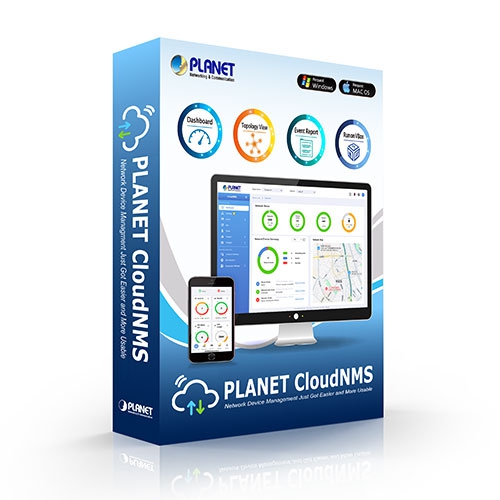
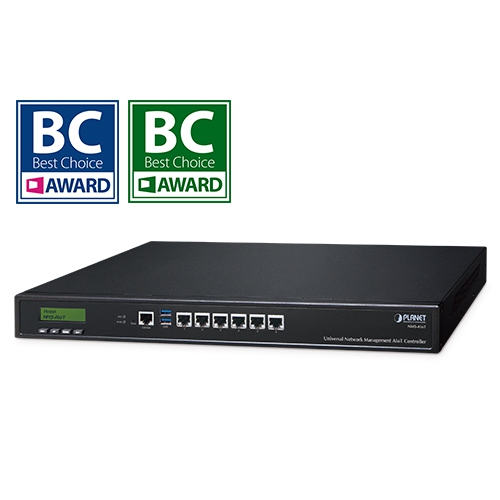
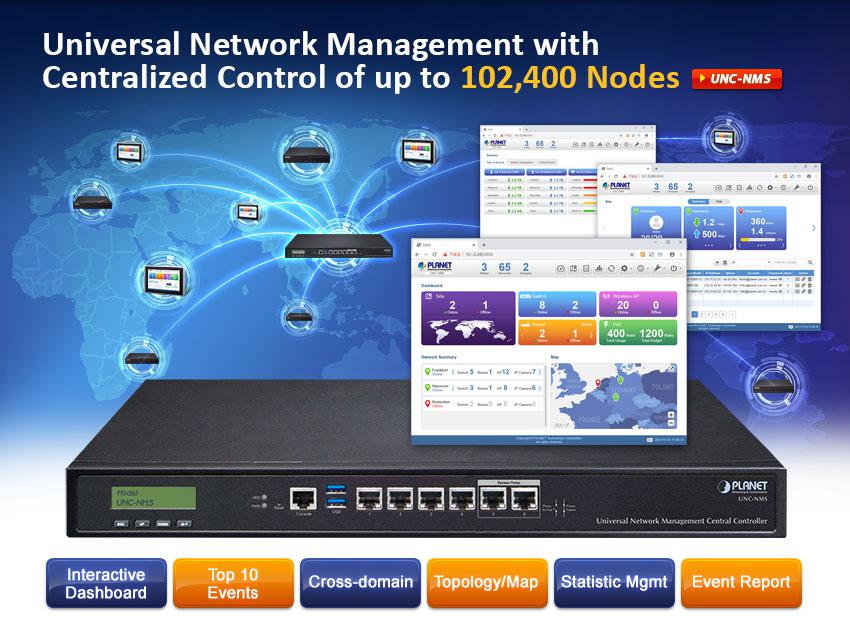
PLANET’s UNC-NMS Network Management Central Controllers can directly monitor 102,400 nodes by monitoring NMS-500 or NMS-1000V up to 100 sites. However, the deployed devices, such as managed switches, media converters, routers, smart APs, VoIP phones, IP cameras, etc., have to be compliant with the MQTT Protocol, SNMP Protocol, ONVIF Protocol and PLANET Smart Discovery utility. These enable the administrator to centrally manage these nodes from a central office, greatly boosting network and power management efficiency.


PLANET NMS solution features intuitive dashboard, topology and map viewing to make network management efficient and effective.

The exclusive product features for PLANET NMS solution include:

  • Centralized control of up to 102,400 nodes
  • System upgrade and license (free of charge)
  • Intuitive and user-friendly management functions
 

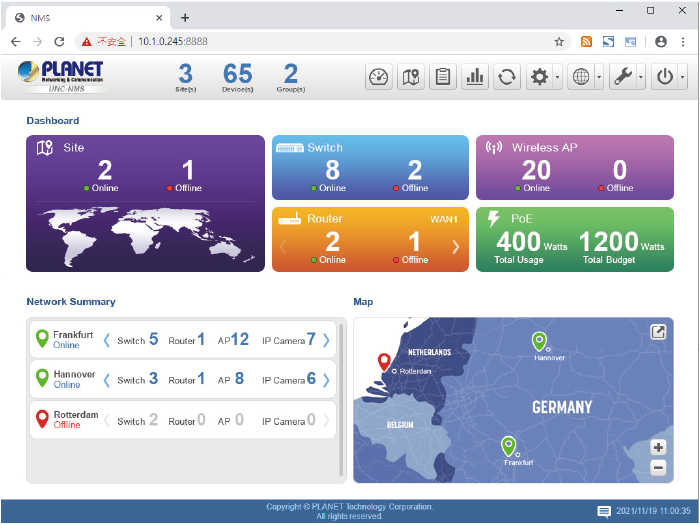
Interactive Dashboard Shows Network Statuses in an Instant 

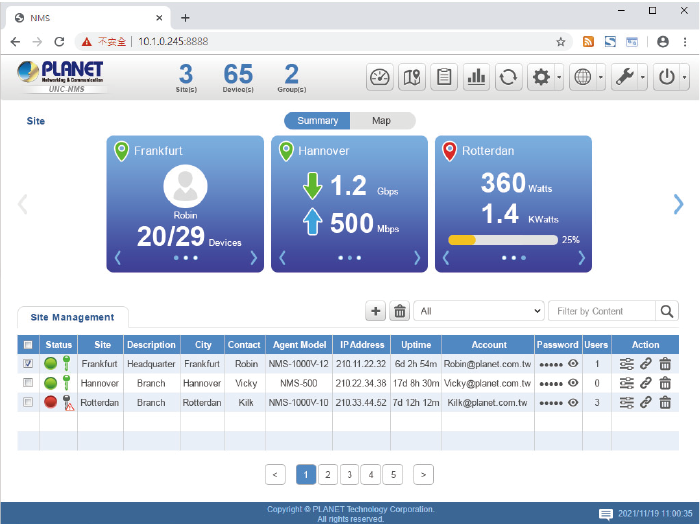
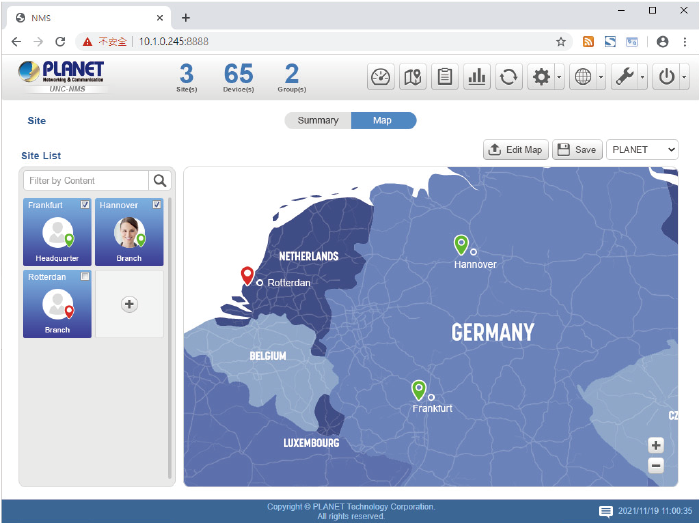
The NMS Controller’s interactive dashboard includes all the managed sites of network routers, switches, access points and PoE statistics. The administrator can quickly overview the status of each device from the Network Summary and Mapping window. Through each dashboard function button, the administrator can quickly link to the detailed current status. The site management page of deployed nodes can be monitored and managed in the VPN network environment. Status on a faulty event or log-in page is also displayed, thus immediately knowing where the disconnection issue comes from.


Watch Over Network within Minutes

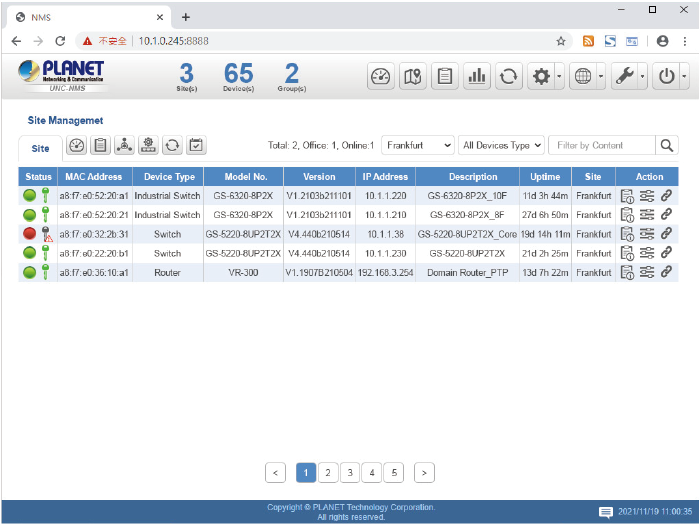
The Device list information web page presents a list of managed devices, an NMS agent dashboard, topology view, AP control, and event and log viewing function. It provides the at-a-glance and efficient summary of your management network. It lets you have a valuable information on the current wired and wireless network statuses via data-driven graphical charts for each site. The topology viewer and event reports enable you to visualize the system usage and node status in real time so as to address whatever issue they may have.


Optimizing Multiple Sites with Topology Viewer (with Maps)

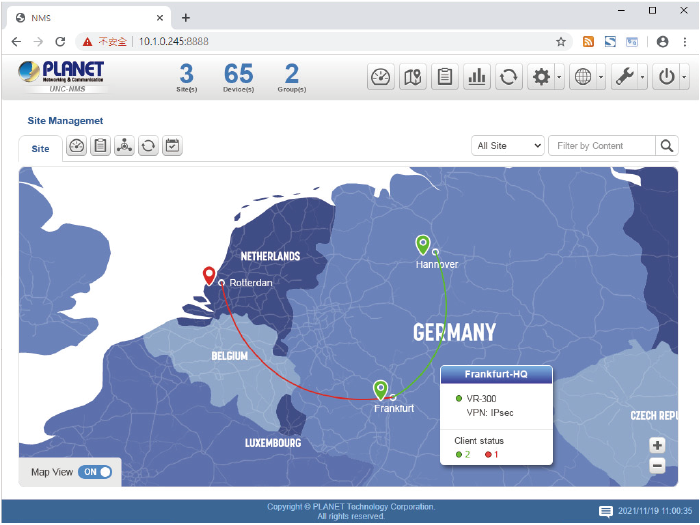
With the site maps, each site can be located according to the map, thus helping the administrator quickly overview the NMS agent and saving time and cost of on-site support and monitoring. The current statuses of NMS agents are shown in real time to optimize the site-to-site VPN network performance. The NMS Center Controller can provide up to 100 sites for all managed NMS agents.
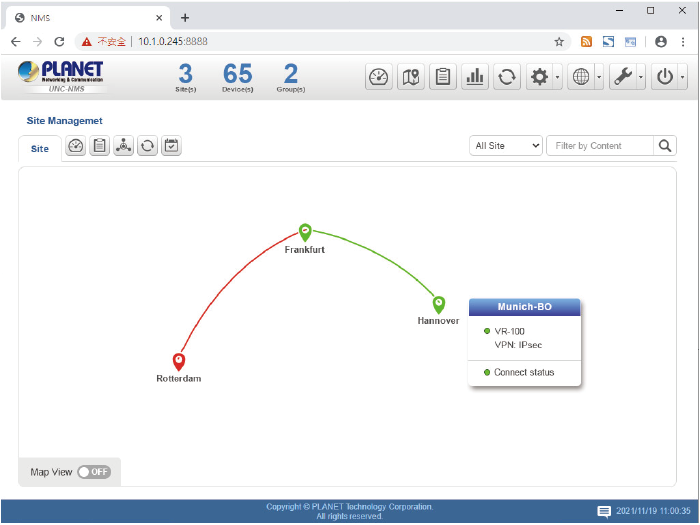
 

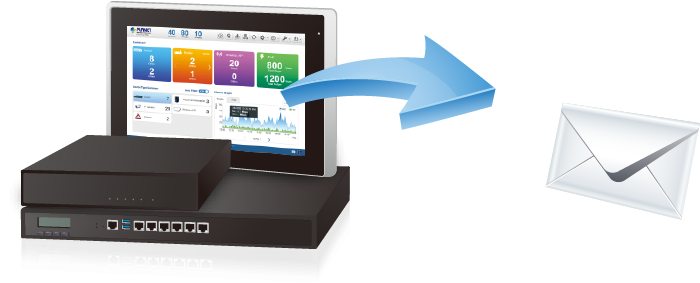
Real-time Centralized Monitoring with E-mail Alarm Function

As the NMS controllers can display a topology view of the deployed powered devices, they can detect which device is online (Green) or offline (Red). The real-time centralized monitoring of these devices can help the administrator know what the current statuses of these devices are. Pop-up alerts shown on the touch panel tell where the problems are. The e-mail alarm function is designed to send an email alert to the administrator via the SMTP server where syslog information can be found once an abnormality is detected. This can prompt the administrator to quickly fix the identified problem in the network.
 

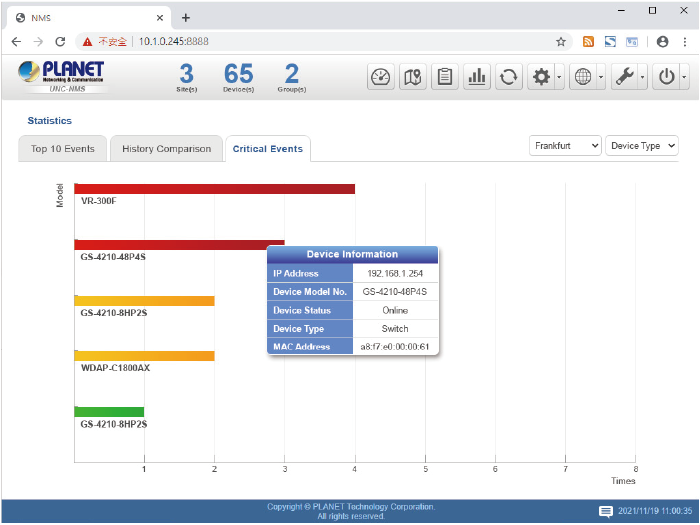
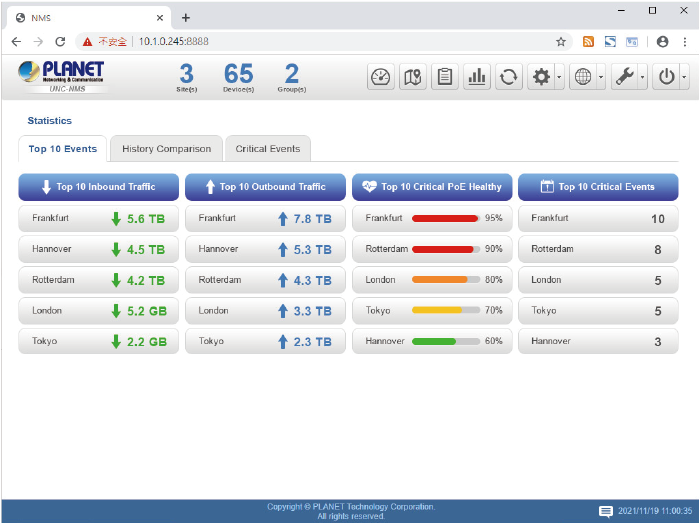
Statistics for Top 10 Events to Manage Network Traffic and PoE Power

The NMS statistic page lists the top 10 inbound and outbound traffic, PoE health, and critical events. It can help administrator to analyze which device is having abnormal power consumption, abnormally high temperature, illegal time of usage, and the near end of life cycle in order to avoid network crash.
 

Power Consumption Analysis and Unloading Management Mechanism

The NMS Controllers provide raw data records for PoE device power usage. Through the history statistics, the administrator can flexibly operate in whatever power is in demand. For energy savings and carbon reduction, the NMS system can help enterprises to save energy by unloading the low priority devices and ensure the safety and stability of electricity consumption in the overall environment of company, factory, etc.
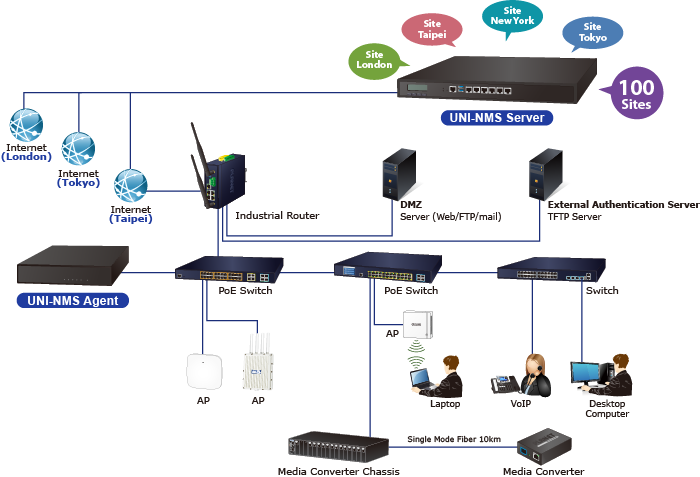
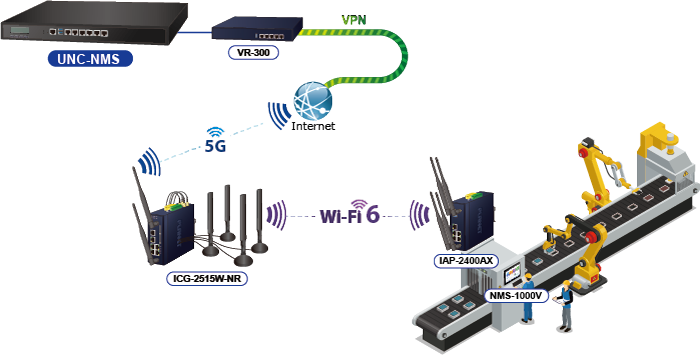
 

Economical Central Network Management Solution for SMBs 

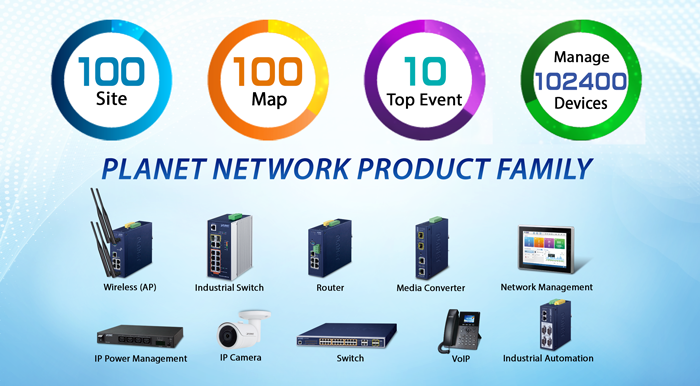
PLANET NMS-500 and NMS-1000V controllers help service providers and IT managers control all PLANET network devices at the same time and enable the administrator to effectively manage a local network of up to 100 sites and 102,400 managed nodes simultaneously without having to purchase any license and hardware-based controller, and pay an expensive annual subscription fee.


The administrator can automatically discover and configure device profiles, batch provisioning/firmware upgrade, and built-in SAPC (Smart AP Control) that customize Wi-Fi planning against floor maps, and monitor all managed APs through a single Web-based interface. It allows operating across different platforms through virtualization software, which helps SMBs save costs on the need to configure the wireless APs one by one if done manually. Through the device list virtual panel function, the administrator also can do configuration with an NMS remote management switch to modify the network environment in one minute.


Industrial-grade Physical Hardware

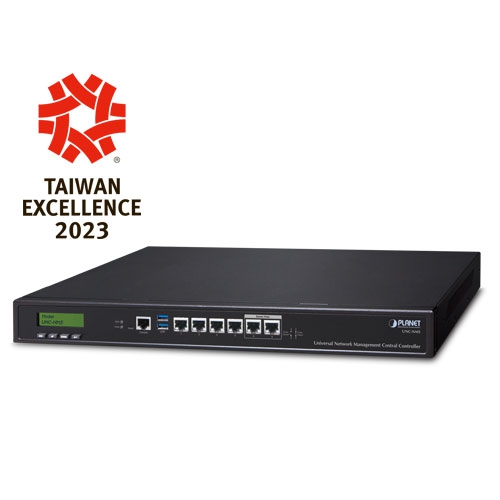
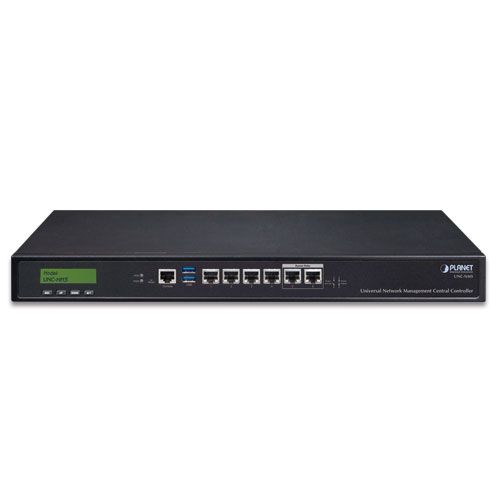
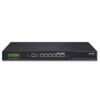
  • 6 x 10/100/1000BASE-T Gigabit Ethernet RJ45 ports (LAN 5 and LAN 6 are bypass ports)
  • 1 x LCM for basic system setting
  • 2 x LEDs (Power and HDD)
  • 2 x USB 3.0 ports for configuration backup and restoration
  • 1 x RJ45 Console port interface
  • 1 x Factory default button (GPIO)
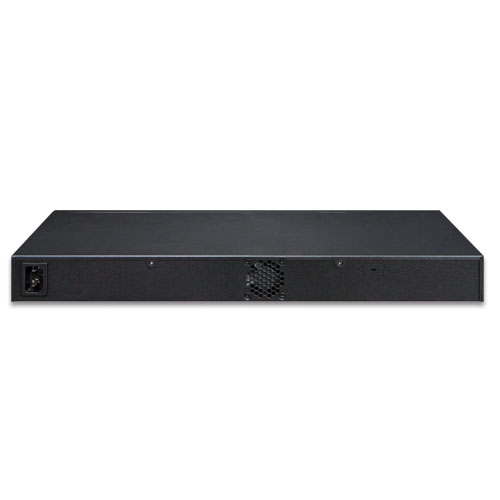
  • 1 x 3-pin AC Power input socket for 100~240V
  • 1U Rack-mount


Network Devices Management

DashboardProviding the at-a-glance view of center system, site summary,  site Map, traffic, PoE network status
Site ManagementTo create site list, site map for NMS agent management
Device ListTo management all site devices or filter one site devices list for NMS agent function operation
StatisticTo show  Top 10 Event Report,  History Comparison function,  Critical Events for devices
Topology ViewerA topology of network devices compliant with MQTT, SNMP, ONVIF, Smart Discovery and LLTD Protocol with Map or not
Event ReportsThe status of a network can be reported via network alarm, system log
Alarm SystemEmail alerts for the administrator via the SMTP server
Switch Virtual PanelTo directly configure the switch for basic function
ONVIF IP Cam SnapshotDirectly catch the managed IP cam snapshot
Batch ProvisioningEnabling multiple APs to be configured and upgraded at one time by using the designated profile for each site.
Coverage Heat MapReal-time signal coverage of APs on the user-defined floor map to optimize Wi-Fi field deployment
Customized ProfileAllowing the creation and maintenance of multiple wireless profiles
Auto ProvisioningMulti-AP provisioning with one click
 Cluster Management Simplifying high-density AP management
 Zone Plan Optimizing AP deployment with actual signal coverage
 Authentication Built-in RADIUS server seamlessly integrated into the enterprise network
 User Control Allowing on-demand account creation and user-defined access policy
 Scalability Free system upgrade and AP firmware bulk upgrade capability
 Maximum Scalability 100 sites, 100 site maps, 102,400 nodes


Network Management Characteristics

  • Built-in DHCP Server
  • Built-in RADIUS Server
  • SSL secure access
  • Certification Authentication
  • Web-based GUI management interface
  • SNMP v1, v2c, and v3 management
  • Supports PLANET DDNS/Easy DDNS
UNC-NMS
ProductUNC-NMS
Universal Network Management Center Central Controller with LCD & 6 10/100/1000T LAN Ports (1024 x 100 nodes)
Form Factor1U Rack-mount
Physical Specifications
I/O Interface6 10/100/1000BASE-T Gigabit Ethernet RJ45 ports (LAN 5 and LAN 6 were bypass design)
2 USB 3.0 ports (They cannot be used at the same time.)
1 Factory default button (GPIO)
1 RJ45 Console port interface
2 DB-9 COM1,COM2 (reserve)
Storage2.5″ 64G SATA HDD
LED2 LED (Power / HDD)
LCM Size (Active Area)49.45 mm (W) x 9.58 mm (H)
LCM Button4 touch buttons for enter, exit, up and down
Dimensions (W x D x H)438 (W) x 180 (D) x 44 mm (H)
17.24” (W) x 7.09” (D) x 1.73” (H)
Weight3 kg (6.62 lbs)
EnclosureMetal
Power Requirements3 pin AC Power input socket
AC 100~240V , 65W
Environment & Certification
TemperatureOperating: 0 ~ 50 degrees C
Storage: -20 ~ 70 degrees C
Humidity5 ~ 90% relative humidity (non-condensing)
MTBF (Hours)100,000
Network Management
Number of Managed Sites100
Number of Managed Devices102,400
Auto Discovery by NMS agentSupports PLANET devices
DashboardProviding the at-a-glance view of center system, site summary, site Map, traffic, PoE network status
Site ManagementTo create site list, site map for NMS agent management
Device ListTo manage all site devices or filter one site devices list for NMS agent function operation
StatisticTo show Top 10 Event Report, History Comparison function, Critical Events for devices
Topology ViewerA topology of network devices compliant with MQTT, SNMP, ONVIF, Smart Discovery and LLTD Protocol with Map or not
Event ReportsThe status of a network can be reported via network alarm, system log
Alarm SystemEmail alerts for the administrator via the SMTP server
Switch Virtual PanelTo directly configure the switch for basic function
ONVIF IP Cam SnapshotDirectly catch the managed IP cam snapshot
Batch ProvisioningEnabling multiple APs to be configured and upgraded at one time by using the designated profile for each site.
Coverage Heat MapReal-time signal coverage of APs on the user-defined floor map to optimize Wi-Fi field deployment
Customized ProfileAllowing the creation and maintenance of multiple wireless profiles
Auto ProvisioningMulti-AP provisioning with one click
Cluster ManagementSimplifying high-density AP management
Zone PlanOptimizing AP deployment with actual signal coverage
AuthenticationBuilt-in RADIUS server seamlessly integrated into the enterprise network
User ControlAllowing on-demand account creation and user-defined access policy
ScalabilityFree system upgrade and AP firmware bulk upgrade capability
Network Services
NetworkDDNS
Supports PLANET DDNS/Easy DDNS

DHCP
Built-in DHCP Server for auto IP assignment to APs

Management
Console; Telnet; SSL; Web browser (Chrome is recommended.);
SNMP v1, v2c, v3

Discovery
Supports SNMP, ONVIF and PLANET Smart Discovery

MaintenanceBackup
System backup and restore to local or USB HDD

Reboot
Provides system reboot manually or automatically per power schedule

Diagnostic
Provides IPv4/IPv6 ping and trace route

Standards Conformance
Regulatory ComplianceCE, FCC
Standards ComplianceIEEE 802.3 10BASE-T
IEEE 802.3u 100BASE-TX
IEEE 802.3ab Gigabit 1000BASE-T
DateVersionDescriptionDownload
2023/08/121.0

UNC-NMS

Download Icon
DateVersionDescriptionDownload
2022/29/081.0

Initial release.

Download Icon
DateVersionDescriptionDownload
2024/18/101.0

Initial release for Configuration Guide.

Download Icon
DateVersionDescriptionDownload
2024/09/091.0240816

Optimize the architecture to enhance both front-end and back-end performance of the platform.

Download Icon
2023/08/121.0231130

Initial Release.

Download Icon

Ordering Information

UNC-NMS

Universal Network Management Central Controller with LCD & 6 10/100/1000T LAN Ports (1024 x 100 nodes)

Subscribe to PLANET e Newsletter

Receive the latest product information and company news!