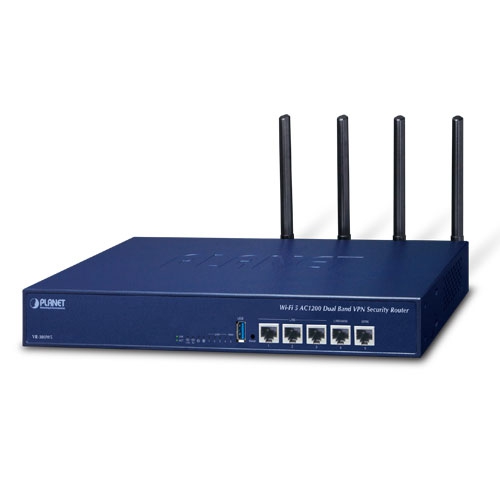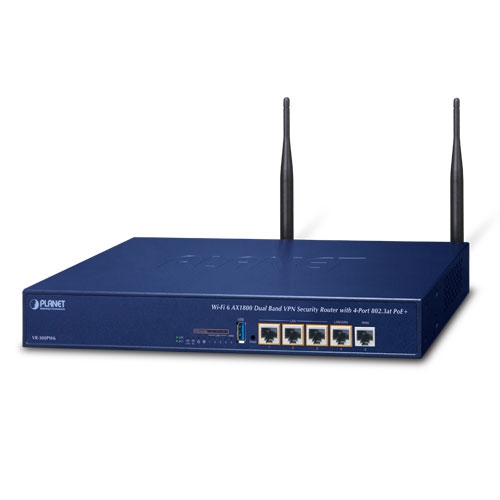
Product Meta

  • product_code: VR-300
  • product_editor_4418_tab_content: <strong>Improving Network Efficiency</strong> It is applicable to the small-scale sector (from 60 to 100 people), using a 13-inch desktop design, with five Gigabit ports (WAN/LAN). It provides higher performance with all Gigabit Ethernet interfaces which offer faster speeds for your network applications. The Gigabit user-defined interfaces flexibly fulfill the network requirement nowadays, and the High-Availability and Dual-WAN interfaces enable the VR-300 to support outbound load balancing and WAN fail-over features. <p style="text-align: center;"><img src="https://www.planet.com.sa/planet-storage/2025/01/VR-300_VR-300P-2.png" alt="" width="700" height="218" /></p>   Furthermore, the VR-300 can connect dual IPv4/v6 WANs with up to two different ISPs and supports many popular security features including Content Filtering to block specific URL feature that can automatically resolve the IP address corresponding to all. Users’ network can be easily managed by just typing the URL of the websites like Facebook, YouTube and Yahoo. <p style="text-align: center;"><img src="https://www.planet.com.sa/planet-storage/2025/01/VR-300_VR-300P-7.png" alt="" width="700" height="276" /></p>   The VR-300 has link redundancy, MAC/IP filtering, outbound load balancing, QoS and many more functions to make the entire network system better. It creates a stable and qualified VPN security connection for many important applications such as VoIP, video conferencing and data transmission. The VR-300’s economical price with complete network security management features make it an inevitable choice for the next-generation office network load balancer. <p style="text-align: center;"><img src="https://www.planet.com.sa/planet-storage/2025/01/VR-300_VR-300P-9.png" alt="" width="700" height="623" /></p>  
  • product_editor_4418_tab_enabled: yes
  • product_editor_4418_tab_content_changed: yes
  • product_editor_4418_tab_title: Applications
  • product_editor_4421_tab_content: <span style="color: #5070ab;"><strong>Highlights</strong></span> <ul> <li>Dual-WAN failover and Dual-WAN load balancing</li> <li>SSL VPN and robust hybrid VPN (IPSec/PPTP/L2TP over IPSec)</li> <li>Stateful Packet Inspection (SPI) firewall and content filtering</li> <li>Blocks DoS/DDOS attack, port range forwarding</li> <li>High Availability, AP Controller, Captive Portal and RADIUS</li> <li>IPv6, SNMP, PLANET DDNS and Universal Network Management System</li> </ul>   <span style="color: #5070ab;"><strong>Hardware</strong></span> <ul> <li>5 10/100/1000BASE-T RJ45 ports</li> <li>1 undefined Ethernet port (LAN/WAN) for Dual-WAN function</li> <li>1 USB 3.0 port for system configuration backup and restore</li> <li>Reset button and Fanless design</li> <li>Desktop installation or rack mounting</li> </ul>   <span style="color: #5070ab;"><strong>IP Routing Feature</strong></span> <ul> <li>Static Route</li> <li>Dynamic Route</li> <li>OSPF</li> </ul>   <span style="color: #5070ab;"><strong>Firewall Security</strong></span> <ul> <li>Cybersecurity</li> <li>Stateful Packet Inspection (SPI) firewall</li> <li>Blocks DoS/DDoS attack</li> <li>Content Filtering</li> <li>MAC Filtering and IP Filtering</li> <li>NAT ALGs (Application Layer Gateway)</li> <li>Blocks SYN/ICMP Flooding</li> </ul>   <span style="color: #5070ab;"><strong>VPN Features</strong></span> <ul> <li>IPSec/Remote Server (Net-to-Net, Host-to-Net), GRE, PPTP Server, L2TP Server, SSL Server/Client (Open VPN)</li> <li>Max. Connection Tunnel Entries: 60 VPN tunnels,</li> <li>Encryption methods: DES, 3DES, AES, AES-128/192/256</li> <li>Authentication methods: MD5, SHA-1, SHA-256, SHA-384, SHA-512</li> </ul>   <span style="color: #5070ab;"><strong>Networking</strong></span> <ul> <li>Outbound load balancing</li> <li>Failover for dual-WAN</li> <li>High Availability</li> <li>Captive Portal</li> <li>RADIUS Server/Client</li> <li>Static IP/PPPoE/DHCP client for WAN</li> <li>DHCP server/NTP client for LAN</li> <li>Protocols: TCP/IP, UDP, ARP, IPv4, IPv6</li> <li>Port forwarding, QoS, DMZ, IGMP, UPnP, SNMPv1,v2c, v3</li> <li>MAC address clone</li> <li>DDNS: PLANET DDNS, Easy DDNS, DynDNS and No-IP</li> </ul>   <span style="color: #5070ab;"><strong>Others</strong></span> <ul> <li>Setup wizard</li> <li>Dashboard for real-time system overview</li> <li>Supported access by HTTP or HTTPS</li> <li>Auto reboot</li> <li>PLANET Smart Discovery utility/UNI-NMS supported</li> </ul>  
  • product_editor_4421_tab_enabled: yes
  • product_editor_4421_tab_content_changed: yes
  • product_editor_4421_tab_title: Key Features
  • product_editor_4422_tab_content:   <div class="table-responsive"> <table class="common_table_sky" style="width: 100%;"> <thead> <tr> <th colspan="2">Hardware Specifications</th> </tr> </thead> <tbody> <tr> <td class="align-middle">Ethernet</td> <td>5 10/100/1000BASE-T RJ45 Ethernet ports including 3 LAN ports (Port-1 to Port-3) 1 LAN/WAN port (Port-4) 1 WAN port (Port-5)</td> </tr> <tr> <td class="align-middle">USB Port</td> <td>1 USB 3.0 port for system configuration backup and restore</td> </tr> <tr> <td class="align-middle">Reset Button</td> <td>Reset to factory default</td> </tr> <tr> <td class="align-middle">Thermal Fan</td> <td>Fanless</td> </tr> <tr> <td class="align-middle">LED Indicators</td> <td>PWR (Green) Internet (Green) LAN/WAN (Green)</td> </tr> <tr> <td class="align-middle">Installation</td> <td>Desktop installation or rack mounting</td> </tr> <tr> <td class="align-middle">Power Requirements</td> <td>100-240V AC, 1A max.</td> </tr> <tr> <td class="align-middle">Power Consumption</td> <td>13W max.</td> </tr> <tr> <td class="align-middle">Weight</td> <td>1.4kg</td> </tr> <tr> <td class="align-middle">Dimensions (W x D x H)</td> <td>330.2 x 153 x 44 mm</td> </tr> <tr> <td class="align-middle">Enclosure</td> <td>Metal</td> </tr> </tbody> <thead> <tr> <th colspan="2">Security Service</th> </tr> </thead> <tbody> <tr> <td class="align-middle">Firewall Security</td> <td>Cybersecurity Stateful Packet Inspection (SPI) DoS/DDoS Attack Defense</td> </tr> <tr> <td class="align-middle">ALG (Application Layer Gateway)</td> <td>SIP, RTSP, FTP, H.323, TFTP</td> </tr> <tr> <td class="align-middle">NAT</td> <td>Port forwarding DMZ Host UPnP</td> </tr> <tr> <td class="align-middle">Content Filtering</td> <td>MAC filtering IP filtering Web filtering</td> </tr> <tr> <td class="align-middle">Bandwidth Management</td> <td>Outbound load balancing Failover for dual-WAN QoS (Quality of Service)</td> </tr> </tbody> <thead> <tr> <th colspan="2">Networking</th> </tr> </thead> <tbody> <tr> <td class="align-middle">Operation Mode</td> <td>Routing mode</td> </tr> <tr> <td class="align-middle">Routing Protocol</td> <td>Static Route, Dynamic Route (RIP), OSPF</td> </tr> <tr> <td class="align-middle">VLAN</td> <td>802.1q Tag-based, Port-based, Multi-VLAN</td> </tr> <tr> <td class="align-middle">Multicast</td> <td>IGMP Proxy</td> </tr> <tr> <td class="align-middle">NAT Throughput</td> <td>Max. 900Mbps</td> </tr> <tr> <td class="align-middle">Outbound Load Balancing</td> <td>Supported algorithms: Weight</td> </tr> <tr> <td class="align-middle">Protocol</td> <td>IPv4, IPv6, TCP/IP, UDP, ARP, HTTP, HTTPS, NTP, DNS, PLANET DDNS, PLANET Easy DDNS, DHCP, PPPoE, SNMPv1/v2c/v3,</td> </tr> <tr> <td class="align-middle">Key Features</td> <td>HA (High Availability) Captive Portal RADIUS Server/Client AP Control</td> </tr> </tbody> <thead> <tr> <th colspan="2">VPN</th> </tr> </thead> <tbody> <tr> <td class="align-middle">VPN Function</td> <td>IPSec/Remote Server (Net-to-Net, Host-to-Net) GRE PPTP Server L2TP Server SSL Server/Client (Open VPN)</td> </tr> <tr> <td class="align-middle">VPN Tunnels</td> <td>Max. 60</td> </tr> <tr> <td class="align-middle">VPN Throughput</td> <td>Max. 60Mbps</td> </tr> <tr> <td class="align-middle">Encryption Methods</td> <td>DES, 3DES, AES or AES-128/192/256 encrypting</td> </tr> <tr> <td class="align-middle">Authentication Methods</td> <td>MD5/SHA-1/SHA-256/SHA-384/SHA-512 authentication algorithm</td> </tr> </tbody> <thead> <tr> <th colspan="2">Management</th> </tr> </thead> <tbody> <tr> <td class="align-middle">Basic Management Interfaces</td> <td>Web browser SNMP v1, v2c PLANET Smart Discovery utility/UNI-NMS supported</td> </tr> <tr> <td class="align-middle">Secure Management Interfaces</td> <td>SSHv2, TLSv1.2, SNMP v3</td> </tr> <tr> <td class="align-middle">System Log</td> <td>System Event Log</td> </tr> <tr> <td class="align-middle">Others</td> <td>Setup wizard Dashboard System Status/Service Statistics Connections Status Auto reboot Diagnostics</td> </tr> </tbody> <thead> <tr> <th colspan="2">Standards Conformance</th> </tr> </thead> <tbody> <tr> <td class="align-middle">Regulatory Compliance</td> <td>CE, FCC</td> </tr> </tbody> <thead> <tr> <th colspan="2">Environment Specifications</th> </tr> </thead> <tbody> <tr> <td class="align-middle">Operating</td> <td>Temperature: 0 ~ 50 degrees C Relative Humidity: 5 ~ 95% (non-condensing)</td> </tr> <tr> <td class="align-middle">Storage</td> <td>Temperature: -10 ~ 60 degrees C Relative Humidity: 5 ~ 95% (non-condensing)</td> </tr> </tbody> </table> </div>
  • product_editor_4422_tab_enabled: yes
  • product_editor_4422_tab_content_changed: yes
  • product_editor_4422_tab_title: Specifications
  • ekit_post_views_count: 547
  • product_editor_4418_tab_sticky_width: pw-content-1
  • product_editor_4418_tab_sticky_position: pw-left-stick
  • product_editor_4421_tab_sticky_width: pw-content-1
  • product_editor_4421_tab_sticky_position: pw-left-stick
  • product_editor_4422_tab_sticky_width: pw-content-1
  • product_editor_4422_tab_sticky_position: pw-left-stick
  • product_editor_4423_tab_content:
  • product_editor_4423_tab_content_changed: yes
  • product_editor_4423_tab_enabled: yes
  • product_editor_4423_tab_title: Downloads
  • product_editor_4423_tab_sticky_width: pw-content-1
  • product_editor_4423_tab_sticky_height: 1
  • product_editor_4423_tab_sticky_position: pw-left-stick
  • product_editor_4424_tab_content:
  • product_editor_4424_tab_content_changed: yes
  • product_editor_4424_tab_enabled: yes
  • product_editor_4424_tab_title: Related Products
  • product_editor_4424_tab_sticky_width: pw-content-1
  • product_editor_4424_tab_sticky_height: 1
  • product_editor_4424_tab_sticky_position: pw-left-stick
  • total_sales: 0
  • accessories_table: <div class="table-responsive"> <table class="common_table"> <thead> <tr> <th colspan="2">Ordering Information</th> </tr> </thead> <tbody> <tr> <td class="text-center align-middle"> <h3 class="h6 m-0">VR-300</h3> </td> <td>Enterprise 5-Port 10/100/1000T VPN Security Router</td> </tr> </tbody> </table> </div>            
  • product_label:
  • prouduct_loop_image_transparent_bg_:
  • 6_features_images: a:6:{i:0;s:5:"15915";i:1;s:5:"15914";i:2;s:5:"15913";i:3;s:5:"15912";i:4;s:5:"15911";i:5;s:5:"15910";}
  • datasheet_0_date: 20210220
  • datasheet_0_version: 1.0
  • datasheet_0_description: VR-300
  • datasheet_0_download_pdf: https://www.planet.com.sa/storage/products/VR-300/C-VR-300_L.pdf
  • datasheet: 1
  • quick_guide_0_date: 20240913
  • quick_guide_0_version: 1.3
  • quick_guide_0_description: Added PSTI function.
  • quick_guide_0_download_pdf: https://www.planet.com.sa/storage/products/VR-300/EMQ-VR-100_300%20Series_v1.3.pdf
  • quick_guide_1_date: 20221220
  • quick_guide_1_version: 1.2
  • quick_guide_1_description: Add VR-300FW-NR.
  • quick_guide_1_download_pdf: https://www.planet.com.sa/storage/products/VR-300/EMQ-VR-100_300%20Series_v1.2.pdf
  • quick_guide_2_date: 20211014
  • quick_guide_2_version: 1.1
  • quick_guide_2_description: Update pictures and modify description
  • quick_guide_2_download_pdf: https://www.planet.com.sa/storage/products/VR-300/EMQ-VR-100_VR-300%20Series_v1.1.pdf
  • quick_guide_3_date: 20190705
  • quick_guide_3_version: 1.0
  • quick_guide_3_description: Initial release
  • quick_guide_3_download_pdf: https://www.planet.com.sa/storage/products/VR-300/EMQ-VR-100_VR-300%20Series_v1.0.pdf
  • quick_guide: 4
  • users_manual_0_date: 20230531
  • users_manual_0_version: 1.3
  • users_manual_0_description: Add VR-300FW-NR.
  • users_manual_0_download_pdf: https://www.planet.com.sa/storage/products/VR-300/EM-VR-300%20series_v1.3.pdf
  • users_manual_1_date: 20211105
  • users_manual_1_version: 1.2
  • users_manual_1_description: Combine manual for VR-300 series(VR-300, VR-300P, VR-300F, VR-300FP, VR-300W5, VR-300PW5, VR-300W6, VR-300PW6, VR-300W6, VR-300PW6A)
  • users_manual_1_download_pdf: https://www.planet.com.sa/storage/products/VR-300/EM-VR-300%20series_v1.2.pdf
  • users_manual: 2
  • ec_declaration:
  • android_app:
  • driver:
  • firmware_0_date: 20240910
  • firmware_0_version: 1.2102b240830
  • firmware_0_description: Function added: 1. Built a PLANET Login page. 2. AP Controller supports AP for WDAP-C3000AX, WDAP-3000AX and WDAP-W3000AX. 3. AP Controller supports 128 APs. 4. Added PSTI function. FW upgrade for PSTIA (Product Security and Telecommunications Infrastructure Act) *Note: After updating the firmware, you will need to enter the product's MAC code at the first login. Please record the MAC code before proceeding with the update.
  • firmware_0_download_pdf: https://www.planet.com.sa/storage/products/VR-300/FW-VR-300_v1.2102b240830.zip
  • firmware_1_date: 20230901
  • firmware_1_version: 1.2102b230802
  • firmware_1_description: 1.Added VLAN Isolation function. 2.Enhanced IP Filtering function.
  • firmware_1_download_pdf: https://www.planet.com.sa/storage/products/VR-300/FW-VR-300_v1.2102b230802.zip
  • firmware_2_date: 20230414
  • firmware_2_version: 1.2102b230331
  • firmware_2_description: Supports Planet 802.11ac APs, WDAP-W1200AC and WDAP-C7210E(V2) for AP control feature.
  • firmware_2_download_pdf: https://www.planet.com.sa/storage/products/VR-300/FW_VR-300_v1.2102b230331.zip
  • firmware_3_date: 20220518
  • firmware_3_version: 1.2102b220422
  • firmware_3_description: AP controller support : IAP-1800AX, IAP-2400AX, WDAP-W1800AXU.
  • firmware_3_download_pdf: https://www.planet.com.sa/storage/products/VR-300/FW-VR-300_v1.2102b220422.zip
  • firmware_4_date: 20220122
  • firmware_4_version: 1.2102b220121
  • firmware_4_description: 1. Add SD-WAN feature 2. Support Planet 802.11ax APs
  • firmware_4_download_pdf: https://www.planet.com.sa/storage/products/VR-300/FW-VR-300_v1.2102b220121.zip
  • firmware: 5
  • utility:
  • compatible_list:
  • site-sidebar-layout: default
  • ast-site-content-layout: default
  • site-content-style: default
  • site-sidebar-style: default
  • theme-transparent-header-meta: default
  • astra-migrate-meta-layouts: set
  • applications_tab: <p><strong>Improving Network Efficiency</strong></p><p>It is applicable to the small-scale sector (from 60 to 100 people), using a 13-inch desktop design, with five Gigabit ports (WAN/LAN). It provides higher performance with all Gigabit Ethernet interfaces which offer faster speeds for your network applications. The Gigabit user-defined interfaces flexibly fulfill the network requirement nowadays, and the High-Availability and Dual-WAN interfaces enable the VR-300 to support outbound load balancing and WAN fail-over features.</p><p style="text-align: center;"><img src="https://www.planet.com.sa/planet-storage/2025/01/VR-300_VR-300P-2.png" alt="" width="700" height="218"></p><p> </p><p>Furthermore, the VR-300 can connect dual IPv4/v6 WANs with up to two different ISPs and supports many popular security features including Content Filtering to block specific URL feature that can automatically resolve the IP address corresponding to all. Users’ network can be easily managed by just typing the URL of the websites like Facebook, YouTube and Yahoo.</p><p style="text-align: center;"><img src="https://www.planet.com.sa/planet-storage/2025/01/VR-300_VR-300P-7.png" alt="" width="700" height="276"></p><p> </p><p>The VR-300 has link redundancy, MAC/IP filtering, outbound load balancing, QoS and many more functions to make the entire network system better. It creates a stable and qualified VPN security connection for many important applications such as VoIP, video conferencing and data transmission. The VR-300’s economical price with complete network security management features make it an inevitable choice for the next-generation office network load balancer.</p><p style="text-align: center;"><img src="https://www.planet.com.sa/planet-storage/2025/01/VR-300_VR-300P-9.png" alt="" width="700" height="623"></p><p> </p>
  • key_features_tab: <p><span style="color: #5070ab;"><strong>Highlights</strong></span></p><ul> <li>Dual-WAN failover and Dual-WAN load balancing</li> <li>SSL VPN and robust hybrid VPN (IPSec/PPTP/L2TP over IPSec)</li> <li>Stateful Packet Inspection (SPI) firewall and content filtering</li> <li>Blocks DoS/DDOS attack, port range forwarding</li> <li>High Availability, AP Controller, Captive Portal and RADIUS</li> <li>IPv6, SNMP, PLANET DDNS and Universal Network Management System</li> </ul><p> </p><p><span style="color: #5070ab;"><strong>Hardware</strong></span></p><ul> <li>5 10/100/1000BASE-T RJ45 ports</li> <li>1 undefined Ethernet port (LAN/WAN) for Dual-WAN function</li> <li>1 USB 3.0 port for system configuration backup and restore</li> <li>Reset button and Fanless design</li> <li>Desktop installation or rack mounting </li> </ul><p> </p><p><span style="color: #5070ab;"><strong>IP Routing Feature</strong></span></p><ul> <li>Static Route</li> <li>Dynamic Route</li> <li>OSPF</li> </ul><p> </p><p><span style="color: #5070ab;"><strong>Firewall Security</strong></span></p><ul> <li>Cybersecurity</li> <li>Stateful Packet Inspection (SPI) firewall</li> <li>Blocks DoS/DDoS attack </li> <li>Content Filtering</li> <li>MAC Filtering and IP Filtering</li> <li>NAT ALGs (Application Layer Gateway)</li> <li>Blocks SYN/ICMP Flooding </li> </ul><p> </p><p><span style="color: #5070ab;"><strong>VPN Features</strong></span></p><ul> <li>IPSec/Remote Server (Net-to-Net, Host-to-Net), GRE, PPTP Server, L2TP Server, SSL Server/Client (Open VPN)</li> <li>Max. Connection Tunnel Entries: 60 VPN tunnels,</li> <li>Encryption methods: DES, 3DES, AES, AES-128/192/256</li> <li>Authentication methods: MD5, SHA-1, SHA-256, SHA-384, SHA-512</li> </ul><p> </p><p><span style="color: #5070ab;"><strong>Networking</strong></span></p><ul> <li>Outbound load balancing</li> <li>Failover for dual-WAN</li> <li>High Availability</li> <li>Captive Portal</li> <li>RADIUS Server/Client</li> <li>Static IP/PPPoE/DHCP client for WAN</li> <li>DHCP server/NTP client for LAN</li> <li>Protocols: TCP/IP, UDP, ARP, IPv4, IPv6</li> <li>Port forwarding, QoS, DMZ, IGMP, UPnP, SNMPv1,v2c, v3</li> <li>MAC address clone</li> <li>DDNS: PLANET DDNS, Easy DDNS, DynDNS and No-IP</li> </ul><p> </p><p><span style="color: #5070ab;"><strong>Others</strong></span></p><ul> <li>Setup wizard</li> <li>Dashboard for real-time system overview</li> <li>Supported access by HTTP or HTTPS</li> <li>Auto reboot</li> <li>PLANET Smart Discovery utility/UNI-NMS supported</li> </ul><p> </p>
  • specifications_tab: <table style="width:100%;" class="common_table_sky"><thead><tr><th colspan="2">Hardware Specifications</th></tr></thead><tbody><tr><td class="align-middle">Ethernet</td><td>5 10/100/1000BASE-T RJ45 Ethernet ports including <br /> 3 LAN ports (Port-1 to Port-3)<br /> 1 LAN/WAN port (Port-4)<br /> 1 WAN port (Port-5)</td></tr><tr><td class="align-middle">USB Port</td><td>1 USB 3.0 port for system configuration backup and restore</td></tr><tr><td class="align-middle">Reset Button</td><td>Reset to factory default</td></tr><tr><td class="align-middle">Thermal Fan</td><td>Fanless</td></tr><tr><td class="align-middle">LED Indicators</td><td>PWR (Green)<br /> Internet (Green)<br /> LAN/WAN (Green)</td></tr><tr><td class="align-middle">Installation</td><td>Desktop installation or rack mounting</td></tr><tr><td class="align-middle">Power Requirements</td><td>100-240V AC, 1A max.</td></tr><tr><td class="align-middle">Power Consumption</td><td>13W max.</td></tr><tr><td class="align-middle">Weight</td><td>1.4kg</td></tr><tr><td class="align-middle">Dimensions (W x D x H)</td><td>330.2 x 153 x 44 mm</td></tr><tr><td class="align-middle">Enclosure</td><td>Metal</td></tr></tbody><thead><tr><th colspan="2">Security Service</th></tr></thead><tbody><tr><td class="align-middle">Firewall Security</td><td>Cybersecurity<br /> Stateful Packet Inspection (SPI)<br /> DoS/DDoS Attack Defense</td></tr><tr><td class="align-middle">ALG (Application Layer Gateway)</td><td>SIP, RTSP, FTP, H.323, TFTP</td></tr><tr><td class="align-middle">NAT</td><td>Port forwarding<br /> DMZ Host<br /> UPnP</td></tr><tr><td class="align-middle">Content Filtering</td><td>MAC filtering<br /> IP filtering<br /> Web filtering</td></tr><tr><td class="align-middle">Bandwidth Management</td><td>Outbound load balancing<br /> Failover for dual-WAN<br /> QoS (Quality of Service)</td></tr></tbody><thead><tr><th colspan="2">Networking</th></tr></thead><tbody><tr><td class="align-middle">Operation Mode</td><td>Routing mode</td></tr><tr><td class="align-middle">Routing Protocol</td><td>Static Route, Dynamic Route (RIP), OSPF</td></tr><tr><td class="align-middle">VLAN</td><td>802.1q Tag-based, Port-based, Multi-VLAN</td></tr><tr><td class="align-middle">Multicast</td><td>IGMP Proxy</td></tr><tr><td class="align-middle">NAT Throughput</td><td>Max. 900Mbps</td></tr><tr><td class="align-middle">Outbound Load Balancing</td><td>Supported algorithms: Weight</td></tr><tr><td class="align-middle">Protocol</td><td>IPv4, IPv6, TCP/IP, UDP, ARP, HTTP, HTTPS, NTP, DNS, PLANET DDNS, PLANET Easy DDNS, DHCP, PPPoE, SNMPv1/v2c/v3,</td></tr><tr><td class="align-middle">Key Features</td><td>HA (High Availability)<br /> Captive Portal<br /> RADIUS Server/Client<br /> AP Control</td></tr></tbody><thead><tr><th colspan="2">VPN</th></tr></thead><tbody><tr><td class="align-middle">VPN Function</td><td>IPSec/Remote Server (Net-to-Net, Host-to-Net)<br /> GRE<br /> PPTP Server<br /> L2TP Server<br /> SSL Server/Client (Open VPN)</td></tr><tr><td class="align-middle">VPN Tunnels</td><td>Max. 60</td></tr><tr><td class="align-middle">VPN Throughput</td><td>Max. 60Mbps</td></tr><tr><td class="align-middle">Encryption Methods</td><td>DES, 3DES, AES or AES-128/192/256 encrypting</td></tr><tr><td class="align-middle">Authentication Methods</td><td>MD5/SHA-1/SHA-256/SHA-384/SHA-512 authentication algorithm</td></tr></tbody><thead><tr><th colspan="2">Management</th></tr></thead><tbody><tr><td class="align-middle">Basic Management Interfaces</td><td>Web browser <br /> SNMP v1, v2c<br /> PLANET Smart Discovery utility/UNI-NMS supported</td></tr><tr><td class="align-middle">Secure Management Interfaces</td><td>SSHv2, TLSv1.2, SNMP v3</td></tr><tr><td class="align-middle">System Log</td><td>System Event Log</td></tr><tr><td class="align-middle">Others</td><td>Setup wizard<br /> Dashboard<br /> System Status/Service<br /> Statistics<br /> Connections Status<br /> Auto reboot<br /> Diagnostics</td></tr></tbody><thead><tr><th colspan="2">Standards Conformance</th></tr></thead><tbody><tr><td class="align-middle">Regulatory Compliance</td><td>CE, FCC</td></tr></tbody><thead><tr><th colspan="2">Environment Specifications</th></tr></thead><tbody><tr><td class="align-middle">Operating</td><td>Temperature: 0 ~ 50 degrees C<br /> Relative Humidity: 5 ~ 95% (non-condensing)</td></tr><tr><td class="align-middle">Storage</td><td>Temperature: -10 ~ 60 degrees C<br /> Relative Humidity: 5 ~ 95% (non-condensing)</td></tr></tbody></table>
  • rank_math_news_sitemap_robots: index
  • rank_math_robots: a:1:{i:0;s:5:"index";}
  • rank_math_internal_links_processed: 1

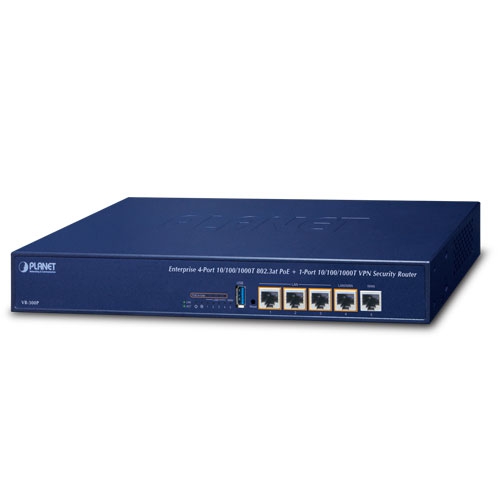
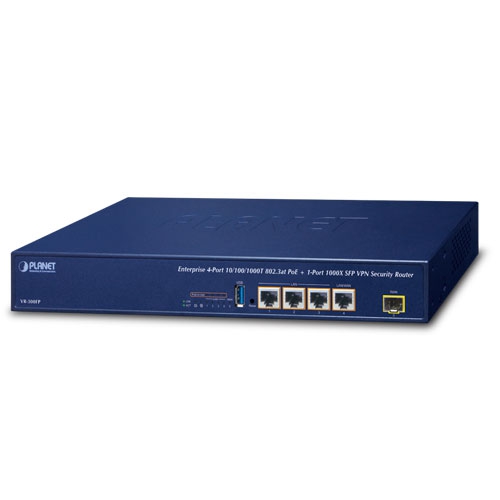
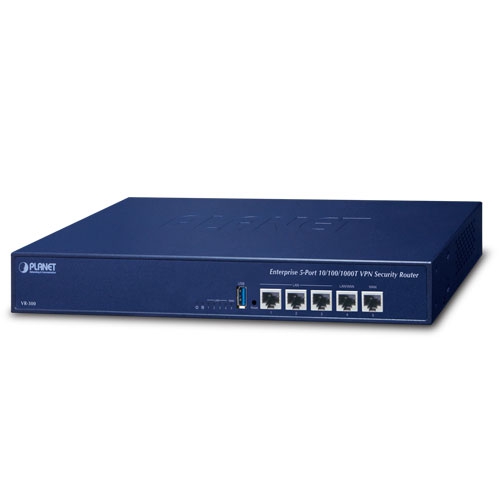
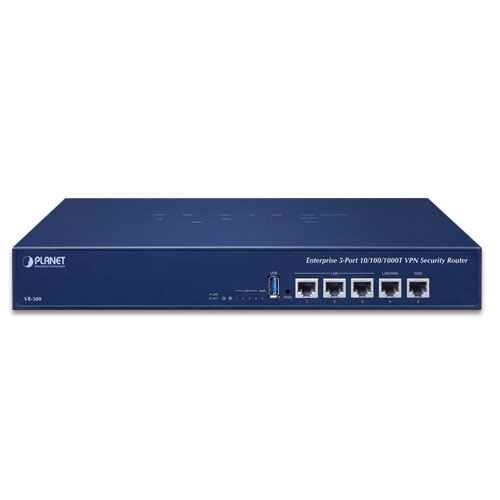
Enterprise 5-Port 10/100/1000T VPN Security Router

» VR-300

Powerful VPN Security Solution 

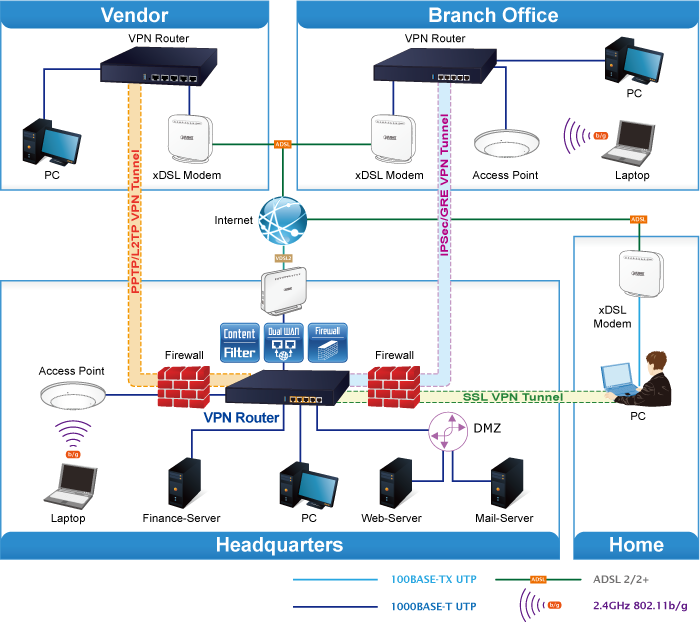
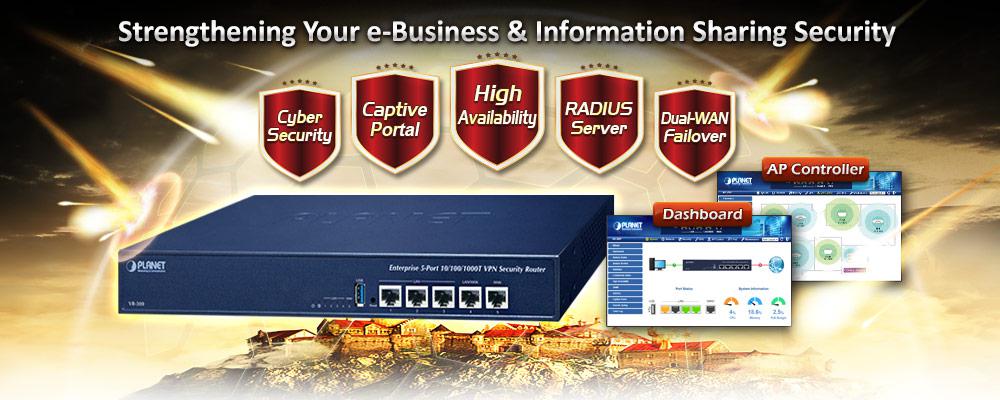
The innovation of the Internet has created tremendous worldwide opportunities for e-business and information sharing. It has become essential for businesses to focus more on network security issues. The demand for information security has become the primary concern for the enterprises. To fulfill this demand, PLANET has launched the VR-300 VPN Security Router, an all-in-one appliance that carries several main categories across your network security deployments: Cyber Security, SPI firewall security protection, policy auditing (Content Filtering, VPN Tunnel and MAC/IP Filtering), AP Controller, Captive Portal, RADIUS and easy management (Setup Wizard, DHCP Server and Dashboard). Furthermore, its Dual-WAN Failover, Outbound Load Balance and High-Availability features can improve the network efficiency while the web-based interface provides friendly and consistent user experience.
 

Wi-Fi Deployments and Authentication with Simplified Management

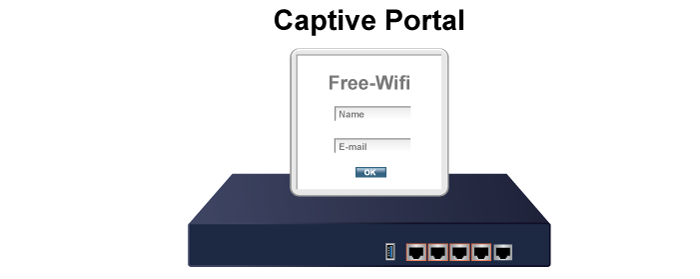
The VR-300 also provides a built-in AP Controller, Captive Portal, RADIUS and a DHCP server to facilitate small and medium businesses to deploy secure employee and guest access services without any additional server. The VR-300 can offer a secure Wi-Fi network with easy installation for your business.
 

Centralized Remote Control of Managed APs*

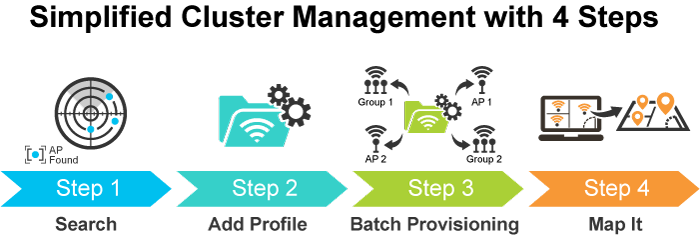
The VR-300 provides centralized management of PLANET Smart AP series via a user-friendly Web GUI. It’s easy to configure AP for the wireless SSID, radio band and security settings. With a four-step configuration process, different purposes of wireless profiles can be simultaneously delivered to multiple APs or AP groups to minimize deployment time, effort and cost.
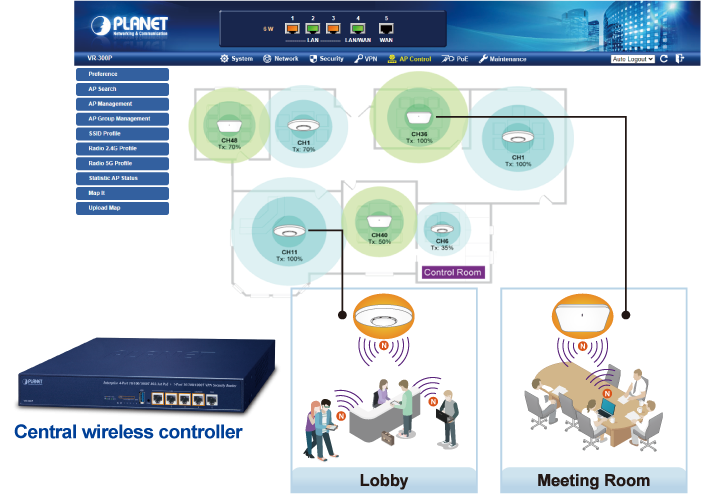
 

For example, to configure multiple Smart APs of the same model, the VR-300 allows clustering them to a managed group for unified management. According to requirements, wireless APs can be flexibly expanded or removed from a wireless AP group at any time. The AP cluster benefits bulk provision and bulk firmware upgrade through single entry point instead of having to configure settings in each of them separately.
 

Ideal High-Availability VPN Security Router Solution for SMBs

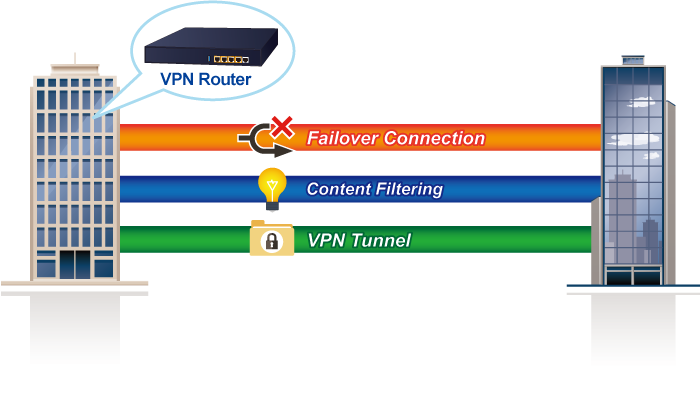
The VR-300 provides complete data security and privacy for accessing and exchanging most sensitive data, built-in IPSec VPN function with DES/3DES/AES encryption and MD5/SHA-1/SHA-256/SHA-384/SHA-512 authentication, and GRE, SSL, PPTP and L2TP server mechanism. The full VPN capability in the VR-300 makes the connection secure, more flexible, and more capable.
 

Excellent Ability in Threat Defense

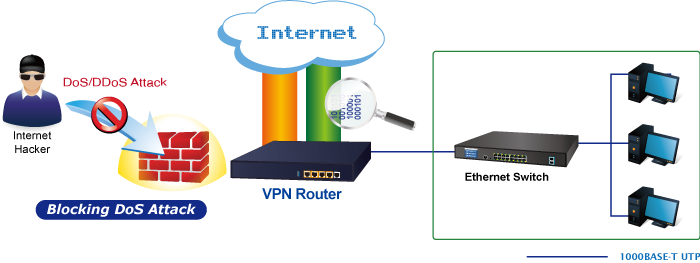
The VR-300’s built-in SPI (stateful packet inspection) firewall and DoS/DDoS attack mitigation functions provide high efficiency and extensive protection for your network. Thus, virtual server and DMZ functions can let you set up servers in the Intranet and still provide services to the Internet users.
 

Cybersecurity Network Solution to Minimize Security Risks

The cybersecurity feature included to protect the switch management in a mission-critical network virtually needs no effort and cost to install. For efficient management, the VR-300 is equipped with HTTPS web and SNMP management interfaces. With the built-in web-based management interface, the VR-300 offers an easy-to-use, platform independent management and configuration facility. The VR-300 supports SNMP and it can be managed via any management software based on the standard SNMP protocol.
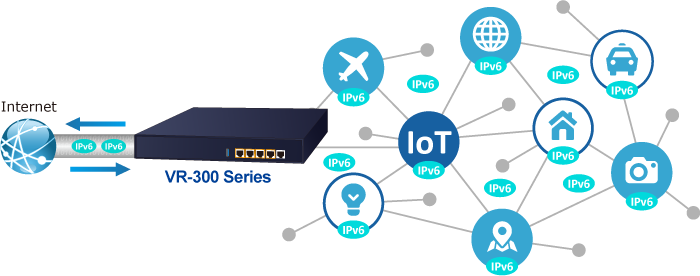
 

Improving Network Efficiency

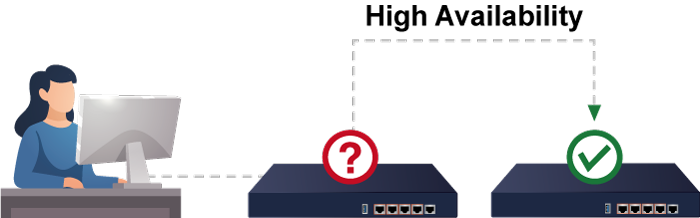
It is applicable to the small-scale sector (from 60 to 100 people), using a 13-inch desktop design, with five Gigabit ports (WAN/LAN). It provides higher performance with all Gigabit Ethernet interfaces which offer faster speeds for your network applications. The Gigabit user-defined interfaces flexibly fulfill the network requirement nowadays, and the High-Availability and Dual-WAN interfaces enable the VR-300 to support outbound load balancing and WAN fail-over features.


Furthermore, the VR-300 can connect dual IPv4/v6 WANs with up to two different ISPs and supports many popular security features including Content Filtering to block specific URL feature that can automatically resolve the IP address corresponding to all. Users’ network can be easily managed by just typing the URL of the websites like Facebook, YouTube and Yahoo.


The VR-300 has link redundancy, MAC/IP filtering, outbound load balancing, QoS and many more functions to make the entire network system better. It creates a stable and qualified VPN security connection for many important applications such as VoIP, video conferencing and data transmission. The VR-300’s economical price with complete network security management features make it an inevitable choice for the next-generation office network load balancer.


Highlights

  • Dual-WAN failover and Dual-WAN load balancing
  • SSL VPN and robust hybrid VPN (IPSec/PPTP/L2TP over IPSec)
  • Stateful Packet Inspection (SPI) firewall and content filtering
  • Blocks DoS/DDOS attack, port range forwarding
  • High Availability, AP Controller, Captive Portal and RADIUS
  • IPv6, SNMP, PLANET DDNS and Universal Network Management System


Hardware

  • 5 10/100/1000BASE-T RJ45 ports
  • 1 undefined Ethernet port (LAN/WAN) for Dual-WAN function
  • 1 USB 3.0 port for system configuration backup and restore
  • Reset button and Fanless design
  • Desktop installation or rack mounting 


IP Routing Feature

  • Static Route
  • Dynamic Route
  • OSPF


Firewall Security

  • Cybersecurity
  • Stateful Packet Inspection (SPI) firewall
  • Blocks DoS/DDoS attack 
  • Content Filtering
  • MAC Filtering and IP Filtering
  • NAT ALGs (Application Layer Gateway)
  • Blocks SYN/ICMP Flooding 


VPN Features

  • IPSec/Remote Server (Net-to-Net, Host-to-Net), GRE, PPTP Server, L2TP Server, SSL Server/Client (Open VPN)
  • Max. Connection Tunnel Entries: 60 VPN tunnels,
  • Encryption methods: DES, 3DES, AES, AES-128/192/256
  • Authentication methods: MD5, SHA-1, SHA-256, SHA-384, SHA-512


Networking

  • Outbound load balancing
  • Failover for dual-WAN
  • High Availability
  • Captive Portal
  • RADIUS Server/Client
  • Static IP/PPPoE/DHCP client for WAN
  • DHCP server/NTP client for LAN
  • Protocols: TCP/IP, UDP, ARP, IPv4, IPv6
  • Port forwarding, QoS, DMZ, IGMP, UPnP, SNMPv1,v2c, v3
  • MAC address clone
  • DDNS: PLANET DDNS, Easy DDNS, DynDNS and No-IP


Others

  • Setup wizard
  • Dashboard for real-time system overview
  • Supported access by HTTP or HTTPS
  • Auto reboot
  • PLANET Smart Discovery utility/UNI-NMS supported


Hardware Specifications
Ethernet5 10/100/1000BASE-T RJ45 Ethernet ports including
3 LAN ports (Port-1 to Port-3)
1 LAN/WAN port (Port-4)
1 WAN port (Port-5)
USB Port1 USB 3.0 port for system configuration backup and restore
Reset ButtonReset to factory default
Thermal FanFanless
LED IndicatorsPWR (Green)
Internet (Green)
LAN/WAN (Green)
InstallationDesktop installation or rack mounting
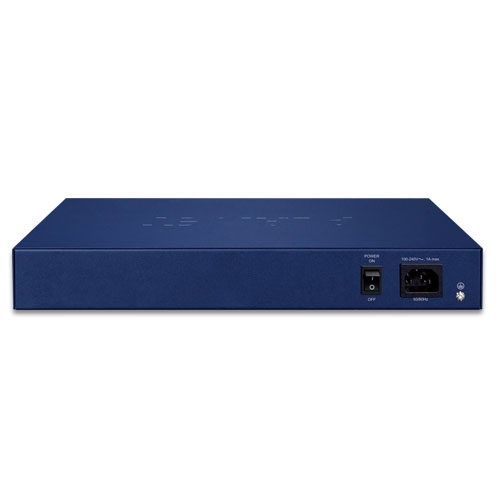
Power Requirements100-240V AC, 1A max.
Power Consumption13W max.
Weight1.4kg
Dimensions (W x D x H)330.2 x 153 x 44 mm
EnclosureMetal
Security Service
Firewall SecurityCybersecurity
Stateful Packet Inspection (SPI)
DoS/DDoS Attack Defense
ALG (Application Layer Gateway)SIP, RTSP, FTP, H.323, TFTP
NATPort forwarding
DMZ Host
UPnP
Content FilteringMAC filtering
IP filtering
Web filtering
Bandwidth ManagementOutbound load balancing
Failover for dual-WAN
QoS (Quality of Service)
Networking
Operation ModeRouting mode
Routing ProtocolStatic Route, Dynamic Route (RIP), OSPF
VLAN802.1q Tag-based, Port-based, Multi-VLAN
MulticastIGMP Proxy
NAT ThroughputMax. 900Mbps
Outbound Load BalancingSupported algorithms: Weight
ProtocolIPv4, IPv6, TCP/IP, UDP, ARP, HTTP, HTTPS, NTP, DNS, PLANET DDNS, PLANET Easy DDNS, DHCP, PPPoE, SNMPv1/v2c/v3,
Key FeaturesHA (High Availability)
Captive Portal
RADIUS Server/Client
AP Control
VPN
VPN FunctionIPSec/Remote Server (Net-to-Net, Host-to-Net)
GRE
PPTP Server
L2TP Server
SSL Server/Client (Open VPN)
VPN TunnelsMax. 60
VPN ThroughputMax. 60Mbps
Encryption MethodsDES, 3DES, AES or AES-128/192/256 encrypting
Authentication MethodsMD5/SHA-1/SHA-256/SHA-384/SHA-512 authentication algorithm
Management
Basic Management InterfacesWeb browser
SNMP v1, v2c
PLANET Smart Discovery utility/UNI-NMS supported
Secure Management InterfacesSSHv2, TLSv1.2, SNMP v3
System LogSystem Event Log
OthersSetup wizard
Dashboard
System Status/Service
Statistics
Connections Status
Auto reboot
Diagnostics
Standards Conformance
Regulatory ComplianceCE, FCC
Environment Specifications
OperatingTemperature: 0 ~ 50 degrees C
Relative Humidity: 5 ~ 95% (non-condensing)
StorageTemperature: -10 ~ 60 degrees C
Relative Humidity: 5 ~ 95% (non-condensing)
DateVersionDescriptionDownload
2021/20/021.0

VR-300

Download Icon
DateVersionDescriptionDownload
2024/13/091.3

Added PSTI function.

Download Icon
2022/20/121.2

Add VR-300FW-NR.

Download Icon
2021/14/101.1

Update pictures and modify description

Download Icon
2019/05/071.0

Initial release

Download Icon
DateVersionDescriptionDownload
2023/31/051.3

Add VR-300FW-NR.

Download Icon
2021/05/111.2

Combine manual for VR-300 series(VR-300, VR-300P, VR-300F, VR-300FP, VR-300W5, VR-300PW5, VR-300W6, VR-300PW6, VR-300W6, VR-300PW6A)

Download Icon
DateVersionDescriptionDownload
2024/10/091.2102b240830

Function added:
1. Built a PLANET Login page.
2. AP Controller supports AP for WDAP-C3000AX, WDAP-3000AX and WDAP-W3000AX.
3. AP Controller supports 128 APs.
4. Added PSTI function.
FW upgrade for PSTIA (Product Security and Telecommunications Infrastructure Act)
*Note: After updating the firmware, you will need to enter the product’s MAC code at the first login. Please record the MAC code before proceeding with the update.

Download Icon
2023/01/091.2102b230802

1.Added VLAN Isolation function.
2.Enhanced IP Filtering function.

Download Icon
2023/14/041.2102b230331

Supports Planet 802.11ac APs, WDAP-W1200AC and WDAP-C7210E(V2) for AP control feature.

Download Icon
2022/18/051.2102b220422

AP controller support : IAP-1800AX, IAP-2400AX, WDAP-W1800AXU.

Download Icon
2022/22/011.2102b220121

1. Add SD-WAN feature
2. Support Planet 802.11ax APs

Download Icon

Ordering Information

VR-300

Enterprise 5-Port 10/100/1000T VPN Security Router

Ordering Information

VR-300

Enterprise 5-Port 10/100/1000T VPN Security Router
           

Subscribe to PLANET e Newsletter

Receive the latest product information and company news!