Product Meta

  • product_code: WDAP-C7210E
  • product_editor_4418_tab_content: <strong>Extremely High Speed and Dual Band Make Wi-Fi Transmission More Powerful</strong> The WDAP-C7210E delivers the Dual Band technology to avoid signal interference and ensure the best Wi-Fi performance. It allows you to check e-mails and surf the Internet via the 2.4GHz band and simultaneously watch High-Definition (HD) video or any other multimedia application via 5GHz band. Moreover, the Gigabit Ethernet port of the WDAP-C7210E offers ultra-fast wired connections that utilize the maximum wireless bandwidth; therefore, users will have real wireless speed over 100Mbps. With outstanding stability of high-speed wireless transmission, the WDAP-C7210E can provide users with excellent experience in multimedia streaming with your mobile devices anywhere, anytime.   <p style="text-align: center;"><img src="https://www.planet.com.sa/planet-storage/2025/01/WDAP-C7210E-71.png" alt="" width="700" height="393" /></p>
  • product_editor_4418_tab_enabled: yes
  • product_editor_4418_tab_content_changed: yes
  • product_editor_4418_tab_title: Applications
  • product_editor_4421_tab_content: <strong>Industrial Compliant Wireless LAN and LAN</strong> <ul> <li>Compliant with the IEEE 802.11a/b/g/n/ac wireless technology</li> <li>Equipped with 10/100/1000Mbps RJ45 ports, auto MDI/MDI-X supported</li> </ul>   <strong>RF Interface Characteristics</strong> <ul> <li>802.11ac Wave 2 2T2R MIMO architecture with data rate of up to 1200Mbps (300Mbps at 2.4GHz and 867Mbps at 5GHz)</li> <li>High output power with multiply-adjustable transmit power control</li> </ul>   <strong>Multiple Operation Modes and Wireless Features</strong> <ul> <li>Multiple operation modes: Access Point, Gateway, Repeater mode</li> <li>WMM (Wi-Fi multimedia) provides higher priority to multimedia transmitting over wireless</li> <li>Coverage threshold to limit the weak signal of clients occupying session</li> <li>Real-time Wi-Fi channel analysis chart and client limit control for better performance</li> <li>Support Terminal Fast Roaming with 802.11k, 802.11v, and 802.11r</li> </ul>   <strong>Secure Network Connection</strong> <ul> <li>Full encryption supported: WAP-PSK/WPA2-PSK, WPA2-PSK, WPA2-PSK/ WPA3-PSK, WPA3-PSK, WPA/WPA2 Enterprise, WPA2 Enterprise and 802.1X RADIUS authentication</li> <li>Supports 802.1Q VLAN and SSID-to-VLAN mapping</li> <li>Supports IP/Port/MAC address/URL filtering, DoS, SPI Firewall</li> <li>Supports DMZ and Port forwarding</li> <li>Bandwidth control per IP address to increase network stability</li> </ul>   <strong>Easy Deployment and Management</strong> <ul> <li>Supports PLANET AP Controllers in AP mode</li> <li>Self-healing mechanism through system auto reboot setting</li> <li>System status monitoring through remote syslog server</li> <li>Gateway mode supports PLANET DDNS/Easy DDNS, Captive Portal, RADIUS Server/Client</li> <li>PLANET Smart Discovery Utility for deployment management</li> <li>PLANET NMS system and CloudViewer for deployment management at the same time</li> </ul>
  • product_editor_4421_tab_enabled: yes
  • product_editor_4421_tab_content_changed: yes
  • product_editor_4421_tab_title: Key Features
  • product_editor_4422_tab_content:   <div class="table-responsive"> <table class="common_table_sky" style="width: 100%;"> <thead> <tr> <th colspan="2">Hardware Specifications</th> </tr> </thead> <tbody> <tr> <td class="align-middle">Interfaces</td> <td>LAN 2 x 10/100/1000BASE-T RJ45 port Auto-negotiation and auto MDI/MDI-X</td> </tr> <tr> <td class="align-middle">Antennas</td> <td>Gain:2 x 2.4GHz internal 5dBi antenna, 2 x 5GHz internal 4dBi antenna</td> </tr> <tr> <td class="align-middle">Reset Button</td> <td>Reset button on the rear side (Press over 7 seconds to reset the device to factory default)</td> </tr> <tr> <td class="align-middle">LED Indicators</td> <td>SYS, 2.4GHz, 5GHz</td> </tr> <tr> <td class="align-middle">Dimensions (W x D x H)</td> <td>186 x 186 x 35.8mm</td> </tr> <tr> <td class="align-middle">Weight</td> <td>380 ±5g</td> </tr> <tr> <td class="align-middle">Power Requirements</td> <td>48V DC IN, 0.5A, IEEE 802.3at PoE+ or 12V DC IN, 1.0</td> </tr> <tr> <td class="align-middle">Power Consumption</td> <td>< 12W</td> </tr> <tr> <td class="align-middle">Mounting</td> <td>Ceiling Mount</td> </tr> </tbody> <thead> <tr> <th colspan="2">Wireless Interface Specifications</th> </tr> </thead> <tbody> <tr> <td class="align-middle">Standard</td> <td>IEEE 802.11ac IEEE 802.11n IEEE 802.11a IEEE 802.11b IEEE 802.11g IEEE 802.11i IEEE 802.3 10BASE-T IEEE 802.3u 100BASE-TX IEEE 802.3ab 1000BASE-T IEEE 802.3x flow control IEEE 802.11k, 802.11v, and 802.11r</td> </tr> <tr> <td class="align-middle">Media Access Control</td> <td>CSMA/CA</td> </tr> <tr> <td class="align-middle">Data Modulation</td> <td>802.11ac: OFDM (BPSK / QPSK / 16QAM / 64QAM / 256QAM) 802.11a/g/n: OFDM (BPSK / QPSK / 16QAM / 64QAM) 802.11b: DSSS (DBPSK / DQPSK / CCK)</td> </tr> <tr> <td class="align-middle">Band Mode</td> <td>2.4G / 5G concurrent mode</td> </tr> <tr> <td class="align-middle">Frequency Range</td> <td><b>2.4GHz:</b> FCC: 2.412~2.462GHz ETSI: 2.412~2.472GHz <b>5GHz:</b> FCC: 5.180~5.32240GHz, 5.500745~5.825GHz ETSI: 5.180~5.320GHz, 5.500~5.180~5.700GHz</td> </tr> <tr> <td class="align-middle">Operating Channels</td> <td><b>2.4GHz: </b> FCC: 1, 2, 3, 4, 5, 6, 7, 8, 9, 10, 11 ETSI: 1, 2, 3, 4, 5, 6, 7, 8, 9, 10, 11, 12, 13 <b>5GHz:</b> FCC: 36, 40, 44, 48, 52, 56, 60, 64, 100, 104, 108, 112, 116, 120, 124, 128, 132, 136, 140, 149, 153, 157, 161, 165 (24 Channels) ETSI: 36, 40, 44, 48, 52, 56, 60, 64, 100, 104, 108, 112, 116, 120, 124, 128, 132, 136, 140 (19 Channels) <b>*5GHz channel list will vary in different countries according to their regulations.</b></td> </tr> <tr> <td class="align-middle">Max. Transmit Power (dBm)</td> <td>FCC: up to 22 ± 1dBm ETSI: < 20dBm (EIRP)</td> </tr> <tr> <td class="align-middle">Receive Sensitivity</td> <td> <table class="table-bordered-bone" cellpadding="0"> <tbody> <tr> <td align="middle" bgcolor="#7f9cd3" width="200"><span style="color: #ffffff;">Network Mode</span></td> <td align="middle" bgcolor="#7f9cd3" width="200"><span style="color: #ffffff;">Data Rate</span></td> <td align="middle" bgcolor="#7f9cd3" width="200"><span style="color: #ffffff;">Receive Sensitivity (dBm)</span></td> </tr> <tr> <td colspan="3" valign="middle" bgcolor="#7f9cd3" width="0"><span style="color: #ffffff;">2.4GHz</span></td> </tr> <tr> <td align="middle" valign="”middle”" width="100">802.11b</td> <td valign="middle" width="100">1Mbps 11Mbps</td> <td valign="middle" width="200">-99 -92</td> </tr> <tr> <td align="middle" valign="”middle”" width="100">802.11g</td> <td valign="middle" width="100">6Mbps 54Mbps</td> <td valign="middle" width="200">-95 -82</td> </tr> <tr> <td align="middle" valign="”middle”" width="100">802.11n HT20</td> <td valign="middle" width="100">MCS0/MCS8 MCS7/MCS15</td> <td valign="middle" width="200">-95 -77</td> </tr> <tr> <td align="middle" valign="”middle”" width="100">802.11n HT40</td> <td valign="middle" width="100">MCS0/MCS8 MCS7/MCS15</td> <td valign="middle" width="200">-93 -75</td> </tr> <tr> <td colspan="3" valign="middle" bgcolor="#7f9cd3" width="0"><span style="color: #ffffff;">5GHz</span></td> </tr> <tr> <td align="middle" valign="”middle”" width="100">802.11a</td> <td valign="middle" width="100">6Mbps 54Mbps</td> <td valign="middle" width="200">-92 -75</td> </tr> <tr> <td align="middle" valign="”middle”" width="100">802.11n HT20</td> <td valign="middle" width="100">MCS0/MCS8 MCS7/MCS15</td> <td valign="middle" width="200">-91 -72</td> </tr> <tr> <td align="middle" valign="”middle”" width="100">802.11n HT40</td> <td valign="middle" width="100">MCS0/MCS8 MCS7/MCS15</td> <td valign="middle" width="200">-88 -70</td> </tr> <tr> <td align="middle" valign="”middle”" width="100">802.11ac VHT20</td> <td valign="middle" width="100">MCS0 MCS8</td> <td valign="middle" width="200">-92 -70</td> </tr> <tr> <td align="middle" valign="”middle”" width="100">802.11ac VHT40</td> <td valign="middle" width="100">MCS0 MCS9</td> <td valign="middle" width="200">-89 -65</td> </tr> <tr> <td align="middle" valign="”middle”" width="100">802.11ac VHT80</td> <td valign="middle" width="100">MCS0 MCS9</td> <td valign="middle" width="200">-87 -61</td> </tr> </tbody> </table> </td> </tr> </tbody> <thead> <tr> <th colspan="2">Software Features</th> </tr> </thead> <tbody> <tr> <td class="align-middle">LAN</td> <td>Static IP / Dynamic IP Supports IP-MAC binding</td> </tr> <tr> <td class="align-middle">WAN</td> <td>Static IP Dynamic IP PPPoE PPTP L2TP</td> </tr> <tr> <td class="align-middle">Wireless Mode</td> <td>Access Point Gateway Repeater</td> </tr> <tr> <td class="align-middle">Channel Width</td> <td>20MHz, 40MHz, 80MHz</td> </tr> <tr> <td class="align-middle">Encryption Security</td> <td>WPA, WPA-PSK, WPA2, WPA2-PSK, WPA3-PSK, 802.1X</td> </tr> <tr> <td class="align-middle">Wireless Security</td> <td>Enable/Disable SSID Broadcast Wireless max. 32 MAC addresses filtering User Isolation</td> </tr> <tr> <td class="align-middle">Max. SSIDs</td> <td>8 (4 per radio)</td> </tr> <tr> <td class="align-middle">Max. Clients</td> <td>64 per radio</td> </tr> <tr> <td class="align-middle">Max. WDS Peers</td> <td>4</td> </tr> <tr> <td class="align-middle">Wireless QoS</td> <td>Supports Wi-Fi Multimedia (WMM)</td> </tr> <tr> <td class="align-middle">Wireless Advanced</td> <td>Auto Channel Selection 5-level Transmit Power Control (Max.100%, Efficient 75%, Enhanced 50%, Standard 25% or Min. 15%) Client Limit Control, Coverage Threshold Wi-Fi channel analysis chart Fast Roaming</td> </tr> <tr> <td class="align-middle">Status Monitoring</td> <td>Device status, Wireless client List PLANET Smart Discovery DHCP client table System Log supports remote syslog server</td> </tr> <tr> <td class="align-middle">VLAN</td> <td>IEEE 802.1Q VLAN (VID: 1~4094) SSID-to-VLAN mapping up to 4 SSIDs</td> </tr> <tr> <td class="align-middle">Self-healing</td> <td>Supports auto reboot settings per day/hour</td> </tr> <tr> <td class="align-middle">Management</td> <td>Remote management through PLANET DDNS/ Easy DDNS Configuration backup and restore Supports UPnP Supports IGMP Proxy Supports PPTP/L2TP/IPSec VPN Pass-through SNMP v1/v2c/v3 support, MIB I/II, Private MIB</td> </tr> <tr> <td class="align-middle">Central Management</td> <td>Applicable controllers: NMS-500, NMS-1000V</td> </tr> </tbody> <thead> <tr> <th colspan="2">Environment & Certification</th> </tr> </thead> <tbody> <tr> <td class="align-middle">Temperature</td> <td>Operating: 0 ~ 40 degrees C Storage: -40 ~ 70 degrees C</td> </tr> <tr> <td class="align-middle">Humidity</td> <td>Operating: 10 ~ 90% (non-condensing) Storage: 5 ~ 90% (non-condensing)</td> </tr> <tr> <td class="align-middle">Regulatory</td> <td>CE, RoHS</td> </tr> </tbody> </table> </div>
  • product_editor_4422_tab_enabled: yes
  • product_editor_4422_tab_content_changed: yes
  • product_editor_4422_tab_title: Specifications
  • product_editor_4418_tab_sticky_width: pw-content-1
  • product_editor_4418_tab_sticky_position: pw-left-stick
  • product_editor_4421_tab_sticky_width: pw-content-1
  • product_editor_4421_tab_sticky_position: pw-left-stick
  • product_editor_4422_tab_sticky_width: pw-content-1
  • product_editor_4422_tab_sticky_position: pw-left-stick
  • product_editor_4423_tab_content:
  • product_editor_4423_tab_content_changed: yes
  • product_editor_4423_tab_enabled: yes
  • product_editor_4423_tab_title: Downloads
  • product_editor_4423_tab_sticky_width: pw-content-1
  • product_editor_4423_tab_sticky_height: 1
  • product_editor_4423_tab_sticky_position: pw-left-stick
  • product_editor_4424_tab_content:
  • product_editor_4424_tab_content_changed: yes
  • product_editor_4424_tab_enabled: yes
  • product_editor_4424_tab_title: Related Products
  • product_editor_4424_tab_sticky_width: pw-content-1
  • product_editor_4424_tab_sticky_height: 1
  • product_editor_4424_tab_sticky_position: pw-left-stick
  • total_sales: 0
  • product_label:
  • prouduct_loop_image_transparent_bg_:
  • 6_features_images: a:6:{i:0;s:5:"14474";i:1;s:5:"14473";i:2;s:5:"14472";i:3;s:5:"14471";i:4;s:5:"14470";i:5;s:5:"14469";}
  • datasheet_0_date: 20230512
  • datasheet_0_version: 1.0
  • datasheet_0_description: WDAP-C7210E
  • datasheet_0_download_pdf: https://www.planet.com.sa/storage/products/WDAP-C7210E/C-WDAP-C7210Ev2_L.pdf
  • datasheet: 1
  • quick_guide_0_date: 20221130
  • quick_guide_0_version: 2.0
  • quick_guide_0_description: Release for hardware version 2.0.
  • quick_guide_0_download_pdf: https://www.planet.com.sa/storage/products/WDAP-C7210E/EMQ-WDAP-C7210E_v2.0.pdf
  • quick_guide: 1
  • users_manual_0_date: 20230512
  • users_manual_0_version: 2.0
  • users_manual_0_description: Release for hardwar version 2.0.
  • users_manual_0_download_pdf: https://www.planet.com.sa/storage/products/WDAP-C7210E/EM-WDAP-C7210E_v2.0.pdf
  • users_manual: 1
  • ec_declaration_0_date: 20230621
  • ec_declaration_0_version: 2.0
  • ec_declaration_0_description: EC Declaration.
  • ec_declaration_0_download_pdf: https://www.planet.com.sa/storage/products/WDAP-C7210E/WDAP-C7210Ev2.pdf
  • ec_declaration: 1
  • android_app:
  • driver:
  • firmware_0_date: 20250114
  • firmware_0_version: 2.2102250102
  • firmware_0_description: [Release for hardware version 2.0.] Function added: - Added PSTI function. <b>FW upgrade for PSTIA</b> (Product Security and Telecommunications Infrastructure Act) <b>*Note:</b> After updating the firmware, you will need to enter the product's MAC code at the first login. Please record the MAC code before proceeding with the update.
  • firmware_0_download_pdf: https://www.planet.com.sa/storage/products/WDAP-C7210E/FW-WDAP-C7210E%28V2%29_V2.2_v2.2102b250102.zip
  • firmware_1_date: 20230602
  • firmware_1_version: 2.2102230519
  • firmware_1_description: [Release for hardware version 2.0.] Added support for CloudViewerPro app.
  • firmware_1_download_pdf: https://www.planet.com.sa/storage/products/WDAP-C7210E/FW_WDAP-C7210E%28V2%29-V2.1_v2.2102b230519.zip
  • firmware_2_date: 20230331
  • firmware_2_version: 2.2102230310
  • firmware_2_description: Release for hardware version 2.0.
  • firmware_2_download_pdf: https://www.planet.com.sa/storage/products/WDAP-C7210E/FW_WDAP-C7210E%28V2%29-V2.0_v2.2102b230310.zip
  • firmware: 3
  • utility:
  • compatible_list:
  • site-sidebar-layout: default
  • ast-site-content-layout: default
  • site-content-style: default
  • site-sidebar-style: default
  • theme-transparent-header-meta: default
  • ekit_post_views_count: 546
  • accessories_table: <table class="common_table"> <thead> <tr> <th colspan="2">Ordering Information</th> </tr> </thead> <tbody> <tr> <td class="text-center align-middle"> <h3 class="h6 m-0">WDAP-C7210E</h3> </td> <td>1200Mbps 802.11ac Wave 2 Dual Band Ceiling-mount Wireless Access Point w/802.3at PoE+ and 2 10/100/1000T LAN Ports</td> </tr> </tbody> </table>                                
  • astra-migrate-meta-layouts: set
  • applications_tab: <strong>Extremely High Speed and Dual Band Make Wi-Fi Transmission More Powerful</strong> The WDAP-C7210E delivers the Dual Band technology to avoid signal interference and ensure the best Wi-Fi performance. It allows you to check e-mails and surf the Internet via the 2.4GHz band and simultaneously watch High-Definition (HD) video or any other multimedia application via 5GHz band. Moreover, the Gigabit Ethernet port of the WDAP-C7210E offers ultra-fast wired connections that utilize the maximum wireless bandwidth; therefore, users will have real wireless speed over 100Mbps. With outstanding stability of high-speed wireless transmission, the WDAP-C7210E can provide users with excellent experience in multimedia streaming with your mobile devices anywhere, anytime.   <p style="text-align: center;"><img src="https://www.planet.com.sa/planet-storage/2025/01/WDAP-C7210E-71.png" alt="" width="700" height="393" /></p>
  • key_features_tab: <strong>Industrial Compliant Wireless LAN and LAN</strong> <ul> <li>Compliant with the IEEE 802.11a/b/g/n/ac wireless technology</li> <li>Equipped with 10/100/1000Mbps RJ45 ports, auto MDI/MDI-X supported</li> </ul>   <strong>RF Interface Characteristics</strong> <ul> <li>802.11ac Wave 2 2T2R MIMO architecture with data rate of up to 1200Mbps (300Mbps at 2.4GHz and 867Mbps at 5GHz)</li> <li>High output power with multiply-adjustable transmit power control</li> </ul>   <strong>Multiple Operation Modes and Wireless Features</strong> <ul> <li>Multiple operation modes: Access Point, Gateway, Repeater mode</li> <li>WMM (Wi-Fi multimedia) provides higher priority to multimedia transmitting over wireless</li> <li>Coverage threshold to limit the weak signal of clients occupying session</li> <li>Real-time Wi-Fi channel analysis chart and client limit control for better performance</li> <li>Support Terminal Fast Roaming with 802.11k, 802.11v, and 802.11r</li> </ul>   <strong>Secure Network Connection</strong> <ul> <li>Full encryption supported: WAP-PSK/WPA2-PSK, WPA2-PSK, WPA2-PSK/ WPA3-PSK, WPA3-PSK, WPA/WPA2 Enterprise, WPA2 Enterprise and 802.1X RADIUS authentication</li> <li>Supports 802.1Q VLAN and SSID-to-VLAN mapping</li> <li>Supports IP/Port/MAC address/URL filtering, DoS, SPI Firewall</li> <li>Supports DMZ and Port forwarding</li> <li>Bandwidth control per IP address to increase network stability</li> </ul>   <strong>Easy Deployment and Management</strong> <ul> <li>Supports PLANET AP Controllers in AP mode</li> <li>Self-healing mechanism through system auto reboot setting</li> <li>System status monitoring through remote syslog server</li> <li>Gateway mode supports PLANET DDNS/Easy DDNS, Captive Portal, RADIUS Server/Client</li> <li>PLANET Smart Discovery Utility for deployment management</li> <li>PLANET NMS system and CloudViewer for deployment management at the same time</li> </ul>
  • specifications_tab:   <div class="table-responsive"> <table class="common_table_sky" style="width: 100%;"> <thead> <tr> <th colspan="2">Hardware Specifications</th> </tr> </thead> <tbody> <tr> <td class="align-middle">Interfaces</td> <td>LAN 2 x 10/100/1000BASE-T RJ45 port Auto-negotiation and auto MDI/MDI-X</td> </tr> <tr> <td class="align-middle">Antennas</td> <td>Gain:2 x 2.4GHz internal 5dBi antenna, 2 x 5GHz internal 4dBi antenna</td> </tr> <tr> <td class="align-middle">Reset Button</td> <td>Reset button on the rear side (Press over 7 seconds to reset the device to factory default)</td> </tr> <tr> <td class="align-middle">LED Indicators</td> <td>SYS, 2.4GHz, 5GHz</td> </tr> <tr> <td class="align-middle">Dimensions (W x D x H)</td> <td>186 x 186 x 35.8mm</td> </tr> <tr> <td class="align-middle">Weight</td> <td>380 ±5g</td> </tr> <tr> <td class="align-middle">Power Requirements</td> <td>48V DC IN, 0.5A, IEEE 802.3at PoE+ or 12V DC IN, 1.0</td> </tr> <tr> <td class="align-middle">Power Consumption</td> <td>< 12W</td> </tr> <tr> <td class="align-middle">Mounting</td> <td>Ceiling Mount</td> </tr> </tbody> <thead> <tr> <th colspan="2">Wireless Interface Specifications</th> </tr> </thead> <tbody> <tr> <td class="align-middle">Standard</td> <td>IEEE 802.11ac IEEE 802.11n IEEE 802.11a IEEE 802.11b IEEE 802.11g IEEE 802.11i IEEE 802.3 10BASE-T IEEE 802.3u 100BASE-TX IEEE 802.3ab 1000BASE-T IEEE 802.3x flow control IEEE 802.11k, 802.11v, and 802.11r</td> </tr> <tr> <td class="align-middle">Media Access Control</td> <td>CSMA/CA</td> </tr> <tr> <td class="align-middle">Data Modulation</td> <td>802.11ac: OFDM (BPSK / QPSK / 16QAM / 64QAM / 256QAM) 802.11a/g/n: OFDM (BPSK / QPSK / 16QAM / 64QAM) 802.11b: DSSS (DBPSK / DQPSK / CCK)</td> </tr> <tr> <td class="align-middle">Band Mode</td> <td>2.4G / 5G concurrent mode</td> </tr> <tr> <td class="align-middle">Frequency Range</td> <td><b>2.4GHz:</b> FCC: 2.412~2.462GHz ETSI: 2.412~2.472GHz <b>5GHz:</b> FCC: 5.180~5.32240GHz, 5.500745~5.825GHz ETSI: 5.180~5.320GHz, 5.500~5.180~5.700GHz</td> </tr> <tr> <td class="align-middle">Operating Channels</td> <td><b>2.4GHz: </b> FCC: 1, 2, 3, 4, 5, 6, 7, 8, 9, 10, 11 ETSI: 1, 2, 3, 4, 5, 6, 7, 8, 9, 10, 11, 12, 13 <b>5GHz:</b> FCC: 36, 40, 44, 48, 52, 56, 60, 64, 100, 104, 108, 112, 116, 120, 124, 128, 132, 136, 140, 149, 153, 157, 161, 165 (24 Channels) ETSI: 36, 40, 44, 48, 52, 56, 60, 64, 100, 104, 108, 112, 116, 120, 124, 128, 132, 136, 140 (19 Channels) <b>*5GHz channel list will vary in different countries according to their regulations.</b></td> </tr> <tr> <td class="align-middle">Max. Transmit Power (dBm)</td> <td>FCC: up to 22 ± 1dBm ETSI: < 20dBm (EIRP)</td> </tr> <tr> <td class="align-middle">Receive Sensitivity</td> <td> <table class="table-bordered-bone" cellpadding="0"> <tbody> <tr> <td align="middle" bgcolor="#7f9cd3" width="200"><span style="color: #ffffff;">Network Mode</span></td> <td align="middle" bgcolor="#7f9cd3" width="200"><span style="color: #ffffff;">Data Rate</span></td> <td align="middle" bgcolor="#7f9cd3" width="200"><span style="color: #ffffff;">Receive Sensitivity (dBm)</span></td> </tr> <tr> <td colspan="3" valign="middle" bgcolor="#7f9cd3" width="0"><span style="color: #ffffff;">2.4GHz</span></td> </tr> <tr> <td align="middle" valign="”middle”" width="100">802.11b</td> <td valign="middle" width="100">1Mbps 11Mbps</td> <td valign="middle" width="200">-99 -92</td> </tr> <tr> <td align="middle" valign="”middle”" width="100">802.11g</td> <td valign="middle" width="100">6Mbps 54Mbps</td> <td valign="middle" width="200">-95 -82</td> </tr> <tr> <td align="middle" valign="”middle”" width="100">802.11n HT20</td> <td valign="middle" width="100">MCS0/MCS8 MCS7/MCS15</td> <td valign="middle" width="200">-95 -77</td> </tr> <tr> <td align="middle" valign="”middle”" width="100">802.11n HT40</td> <td valign="middle" width="100">MCS0/MCS8 MCS7/MCS15</td> <td valign="middle" width="200">-93 -75</td> </tr> <tr> <td colspan="3" valign="middle" bgcolor="#7f9cd3" width="0"><span style="color: #ffffff;">5GHz</span></td> </tr> <tr> <td align="middle" valign="”middle”" width="100">802.11a</td> <td valign="middle" width="100">6Mbps 54Mbps</td> <td valign="middle" width="200">-92 -75</td> </tr> <tr> <td align="middle" valign="”middle”" width="100">802.11n HT20</td> <td valign="middle" width="100">MCS0/MCS8 MCS7/MCS15</td> <td valign="middle" width="200">-91 -72</td> </tr> <tr> <td align="middle" valign="”middle”" width="100">802.11n HT40</td> <td valign="middle" width="100">MCS0/MCS8 MCS7/MCS15</td> <td valign="middle" width="200">-88 -70</td> </tr> <tr> <td align="middle" valign="”middle”" width="100">802.11ac VHT20</td> <td valign="middle" width="100">MCS0 MCS8</td> <td valign="middle" width="200">-92 -70</td> </tr> <tr> <td align="middle" valign="”middle”" width="100">802.11ac VHT40</td> <td valign="middle" width="100">MCS0 MCS9</td> <td valign="middle" width="200">-89 -65</td> </tr> <tr> <td align="middle" valign="”middle”" width="100">802.11ac VHT80</td> <td valign="middle" width="100">MCS0 MCS9</td> <td valign="middle" width="200">-87 -61</td> </tr> </tbody> </table> </td> </tr> </tbody> <thead> <tr> <th colspan="2">Software Features</th> </tr> </thead> <tbody> <tr> <td class="align-middle">LAN</td> <td>Static IP / Dynamic IP Supports IP-MAC binding</td> </tr> <tr> <td class="align-middle">WAN</td> <td>Static IP Dynamic IP PPPoE PPTP L2TP</td> </tr> <tr> <td class="align-middle">Wireless Mode</td> <td>Access Point Gateway Repeater</td> </tr> <tr> <td class="align-middle">Channel Width</td> <td>20MHz, 40MHz, 80MHz</td> </tr> <tr> <td class="align-middle">Encryption Security</td> <td>WPA, WPA-PSK, WPA2, WPA2-PSK, WPA3-PSK, 802.1X</td> </tr> <tr> <td class="align-middle">Wireless Security</td> <td>Enable/Disable SSID Broadcast Wireless max. 32 MAC addresses filtering User Isolation</td> </tr> <tr> <td class="align-middle">Max. SSIDs</td> <td>8 (4 per radio)</td> </tr> <tr> <td class="align-middle">Max. Clients</td> <td>64 per radio</td> </tr> <tr> <td class="align-middle">Max. WDS Peers</td> <td>4</td> </tr> <tr> <td class="align-middle">Wireless QoS</td> <td>Supports Wi-Fi Multimedia (WMM)</td> </tr> <tr> <td class="align-middle">Wireless Advanced</td> <td>Auto Channel Selection 5-level Transmit Power Control (Max.100%, Efficient 75%, Enhanced 50%, Standard 25% or Min. 15%) Client Limit Control, Coverage Threshold Wi-Fi channel analysis chart Fast Roaming</td> </tr> <tr> <td class="align-middle">Status Monitoring</td> <td>Device status, Wireless client List PLANET Smart Discovery DHCP client table System Log supports remote syslog server</td> </tr> <tr> <td class="align-middle">VLAN</td> <td>IEEE 802.1Q VLAN (VID: 1~4094) SSID-to-VLAN mapping up to 4 SSIDs</td> </tr> <tr> <td class="align-middle">Self-healing</td> <td>Supports auto reboot settings per day/hour</td> </tr> <tr> <td class="align-middle">Management</td> <td>Remote management through PLANET DDNS/ Easy DDNS Configuration backup and restore Supports UPnP Supports IGMP Proxy Supports PPTP/L2TP/IPSec VPN Pass-through SNMP v1/v2c/v3 support, MIB I/II, Private MIB</td> </tr> <tr> <td class="align-middle">Central Management</td> <td>Applicable controllers: NMS-500, NMS-1000V</td> </tr> </tbody> <thead> <tr> <th colspan="2">Environment & Certification</th> </tr> </thead> <tbody> <tr> <td class="align-middle">Temperature</td> <td>Operating: 0 ~ 40 degrees C Storage: -40 ~ 70 degrees C</td> </tr> <tr> <td class="align-middle">Humidity</td> <td>Operating: 10 ~ 90% (non-condensing) Storage: 5 ~ 90% (non-condensing)</td> </tr> <tr> <td class="align-middle">Regulatory</td> <td>CE, RoHS</td> </tr> </tbody> </table> </div>
  • rank_math_news_sitemap_robots: index
  • rank_math_robots: a:1:{i:0;s:5:"index";}
  • rank_math_internal_links_processed: 1

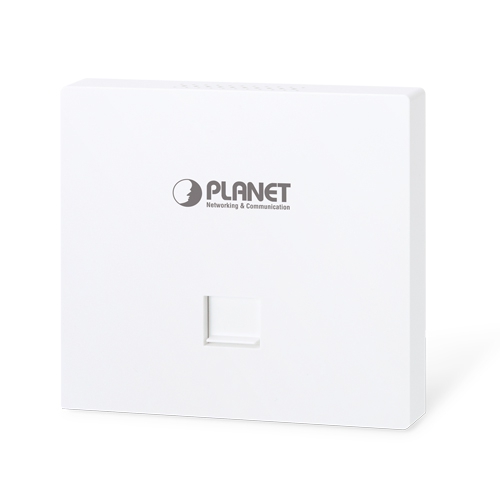
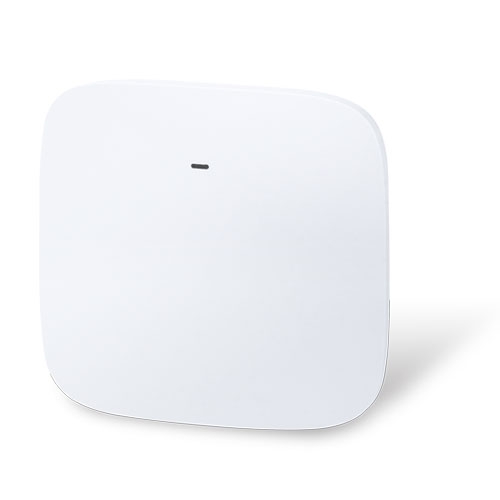
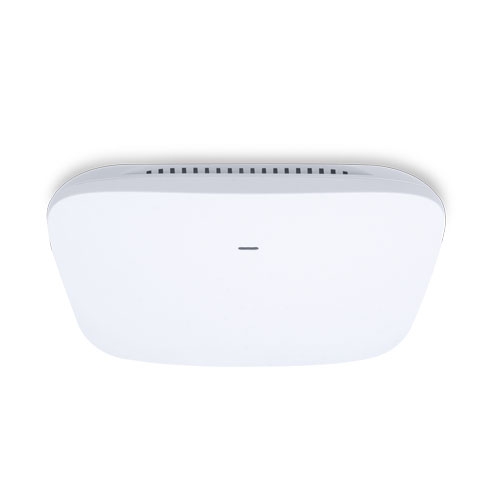
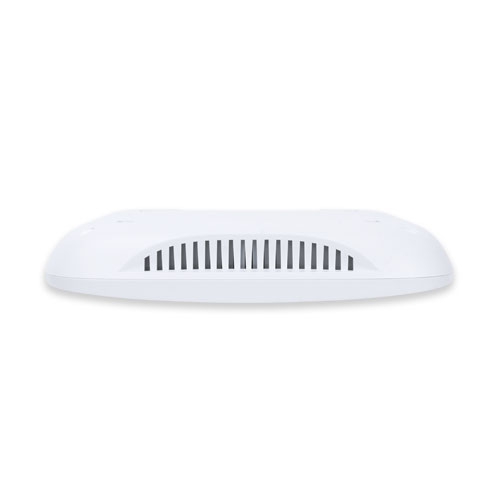
1200Mbps 802.11ac Wave 2 Dual Band Ceiling-mount Wireless Access Point w/802.3at PoE+ and 2 10/100/1000T LAN Ports

» WDAP-C7210E

Ultra-high-speed, Wave 2 MU-MIMO Wireless LAN Solution

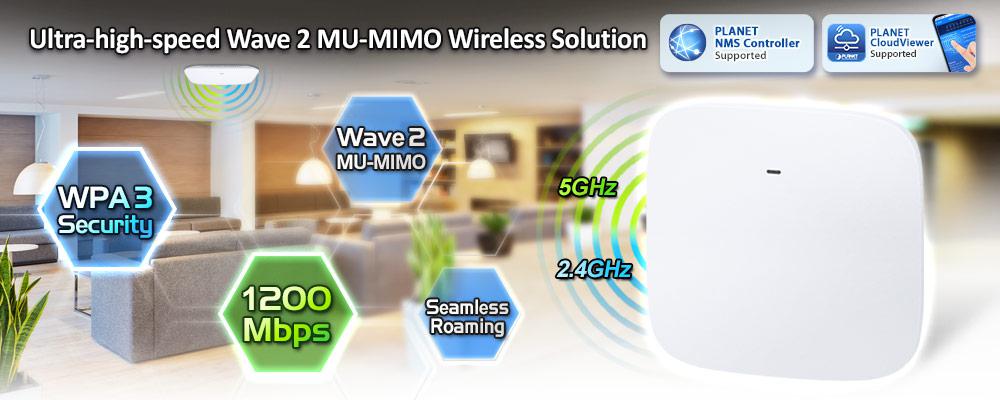
PLANET WDAP-C7210E 1200Mbps Wave 2 Dual Band 802.11ac Wireless AP supports central management through PLANET NMS controllers. With IEEE 802.11ac Wave 2 MU-MIMO 2T2R dual-band technology, the WDAP-C7210E provides a maximum wireless speed of 867Mbps at 5GHz and 300Mbps at 2.4GHz. The new version of the WDAP-C7210E  not only has more powerful performance but also supports PLANET CloudViewer app for remotely monitoring devices from anywhere.
 

Benefits of MU-MIMO under 802.11ac Wave 2

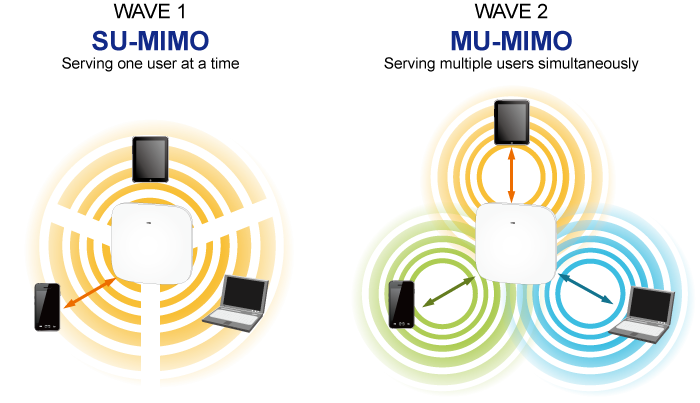
With the MU-MIMO Wave 2 technology, the WDAP-C7210E, installed in public areas such as hotspots, airports and conferences, reduces the frustration that Wi-Fi users often experience in downloading web pages, e-mail file attachments and media contents. For cellular operators, the WDAP-C7210E provides a better Wi-Fi user experience, reducing the likelihood of users turning off Wi-Fi and putting more load on the cellular network. For enterprises, this technology also can solve Wi-Fi congestion issues in open work spaces and conference rooms.
 

Powerful Dual-band WLAN Solution

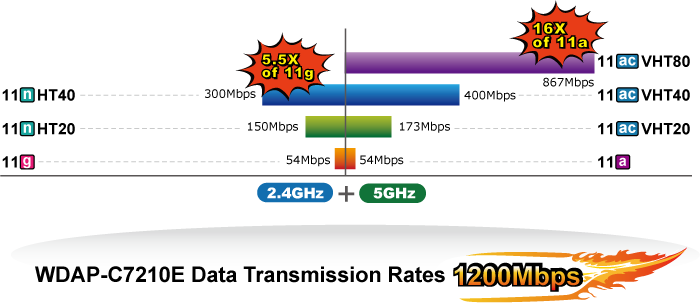
PLANET WDAP-C7210E, adopting the IEEE 802.11ac Wave 2 standard, provides a high-speed transmission of power and data, meaning two remote nodes in the 5GHz frequency band can be bridged. The 2.4GHz wireless connection can also be used simultaneously. Furthermore, the WDAP-C7210E adopts the high-class Qualcomm Atheros SoC (System-on-a-Chip), which provides higher stability to meet the stringent requirements of the solution.


Enhanced Security and Rigorous Authentication 

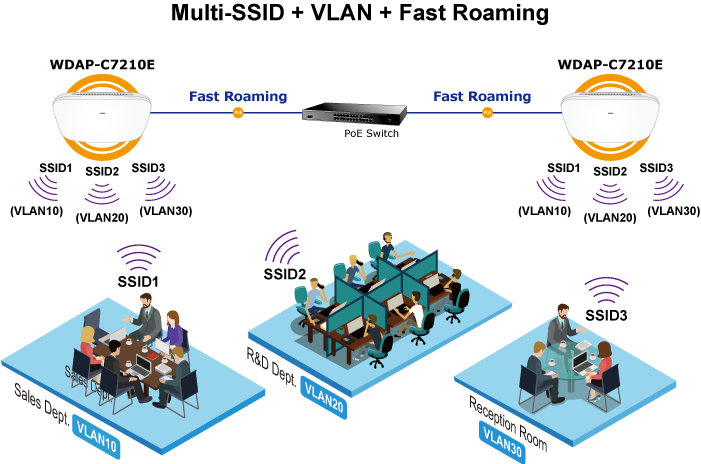
The WDAP-C7210E supports WPA / WPA2, WPA-PSK, WPA2-PSK and WPS3-PSK wireless encryptions, the advanced WPA2-AES mechanism and 802.1X RADIUS authentication, which can effectively prevent eavesdropping by unauthorized users or bandwidth occupied by unauthenticated wireless access. Furthermore, any users are granted or denied access to the wireless LAN network based on the ACL (Access Control List) that the administrator pre-established. For management purposes, the IEEE 802.1Q VLAN supported allows multiple VLAN tags to be mapped to multiple SSIDs to distinguish the wireless access.


Multiple Operation Modes for Various Applications

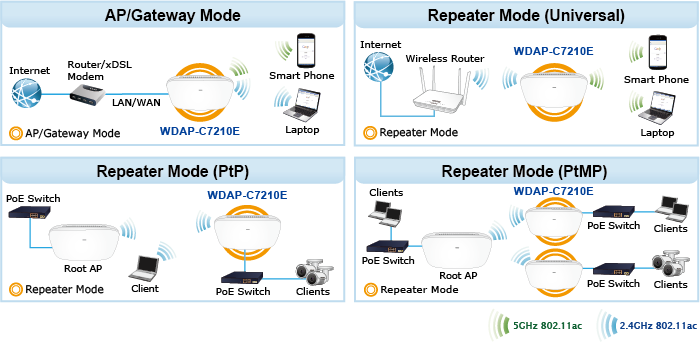
The WDAP-C7210E supports AP, Gateway and Repeater mode, through which it provides more flexibility for users when wireless network is established. Compared with general wireless access points, the WDAP-C7210E offers more powerful and flexible capability for wireless clients.
 

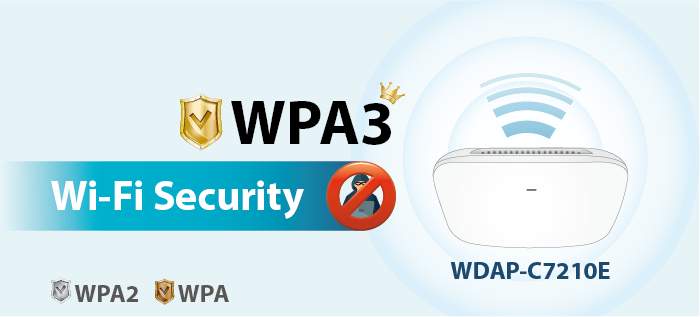
WPA3 Next Generation Security for Your WLAN Solution

WPA3 is the next generation Wi-Fi security technology that provides the most advanced security protocol to the market. WPA3 makes your connection more secure by preventing hackers from easily cracking your password no matter how simplified the password is. WPA3 can also provide more reliable password-based authentication, so it can better protect the security of individual users.


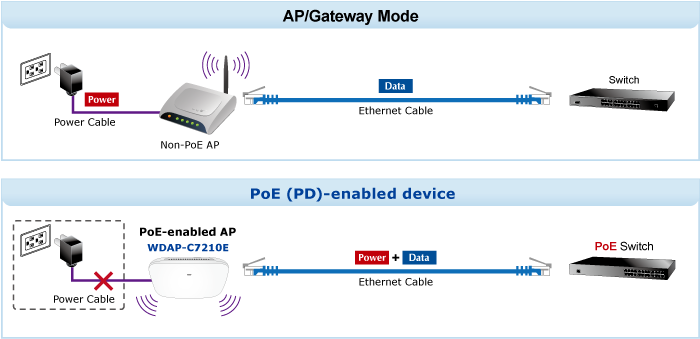
Ceiling-mount Design for Your Environment

With the standard IEEE802.3at Power over Ethernet (PoE) design, the WDAP-C7210E can be easily installed in the areas where power outlets are not available. By supporting the standard IEEE 802.3at PoE PD power scheme, the WDAP-C7210E can be powered and networked by a single UTP cable, effectively eliminating the needs of dedicated electrical outlets on the ceiling and reducing the cabling cost. Furthermore, the system administrator is able to arrange the PoE schedule of the WDAP-C7210E by working with the managed PoE switch.


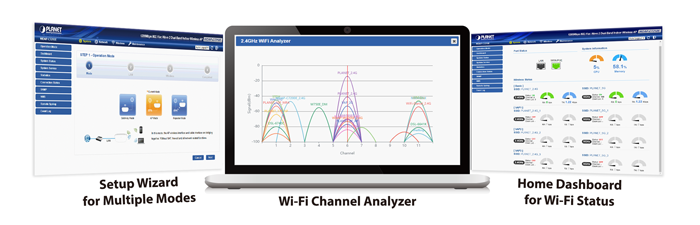
Optimized Efficiency in AP Management 

The brand-new GUI configuration wizard helps the system administrator easily set up the WDAP-C7210E step by step. Besides, the built-in Wi-Fi analyzer provides real-time channel utilization to prevent channel overlapping to assure greater performance. With the automatic transmission power mechanism, distance control and scheduled reboot setting, the WDAP-C7210E is easy for the administrator to deploy and manage without on-site maintenance. Moreover, you can use PLANET NMS controller series, WS switch series, VR series, ICG-2515 router series, and AP control function to deliver wireless profiles to multiple APs simultaneously, thus making the central management simple.

*Note: The WDAP-C7210E and WDAP-C7210E (V2) are two different devices. Please make sure the model is right before setting it with NMS equipment. Check the model name from the label to make sure that the firmware is upgraded on the right version of the AP.
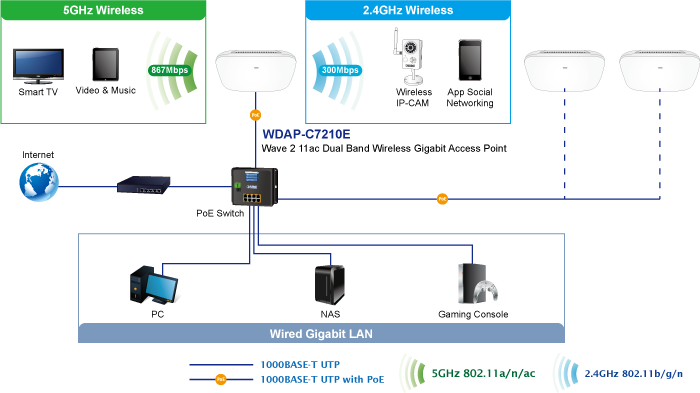
Extremely High Speed and Dual Band Make Wi-Fi Transmission More Powerful The WDAP-C7210E delivers the Dual Band technology to avoid signal interference and ensure the best Wi-Fi performance. It allows you to check e-mails and surf the Internet via the 2.4GHz band and simultaneously watch High-Definition (HD) video or any other multimedia application via 5GHz band. Moreover, the Gigabit Ethernet port of the WDAP-C7210E offers ultra-fast wired connections that utilize the maximum wireless bandwidth; therefore, users will have real wireless speed over 100Mbps. With outstanding stability of high-speed wireless transmission, the WDAP-C7210E can provide users with excellent experience in multimedia streaming with your mobile devices anywhere, anytime.  

Industrial Compliant Wireless LAN and LAN
  • Compliant with the IEEE 802.11a/b/g/n/ac wireless technology
  • Equipped with 10/100/1000Mbps RJ45 ports, auto MDI/MDI-X supported
  RF Interface Characteristics
  • 802.11ac Wave 2 2T2R MIMO architecture with data rate of up to 1200Mbps (300Mbps at 2.4GHz and 867Mbps at 5GHz)
  • High output power with multiply-adjustable transmit power control
  Multiple Operation Modes and Wireless Features
  • Multiple operation modes: Access Point, Gateway, Repeater mode
  • WMM (Wi-Fi multimedia) provides higher priority to multimedia transmitting over wireless
  • Coverage threshold to limit the weak signal of clients occupying session
  • Real-time Wi-Fi channel analysis chart and client limit control for better performance
  • Support Terminal Fast Roaming with 802.11k, 802.11v, and 802.11r
  Secure Network Connection
  • Full encryption supported: WAP-PSK/WPA2-PSK, WPA2-PSK, WPA2-PSK/ WPA3-PSK, WPA3-PSK, WPA/WPA2 Enterprise, WPA2 Enterprise and 802.1X RADIUS authentication
  • Supports 802.1Q VLAN and SSID-to-VLAN mapping
  • Supports IP/Port/MAC address/URL filtering, DoS, SPI Firewall
  • Supports DMZ and Port forwarding
  • Bandwidth control per IP address to increase network stability
  Easy Deployment and Management
  • Supports PLANET AP Controllers in AP mode
  • Self-healing mechanism through system auto reboot setting
  • System status monitoring through remote syslog server
  • Gateway mode supports PLANET DDNS/Easy DDNS, Captive Portal, RADIUS Server/Client
  • PLANET Smart Discovery Utility for deployment management
  • PLANET NMS system and CloudViewer for deployment management at the same time
 
Hardware Specifications
InterfacesLAN 2 x 10/100/1000BASE-T RJ45 port Auto-negotiation and auto MDI/MDI-X
AntennasGain:2 x 2.4GHz internal 5dBi antenna, 2 x 5GHz internal 4dBi antenna
Reset ButtonReset button on the rear side (Press over 7 seconds to reset the device to factory default)
LED IndicatorsSYS, 2.4GHz, 5GHz
Dimensions (W x D x H)186 x 186 x 35.8mm
Weight380 ±5g
Power Requirements48V DC IN, 0.5A, IEEE 802.3at PoE+ or 12V DC IN, 1.0
Power Consumption< 12W
MountingCeiling Mount
Wireless Interface Specifications
StandardIEEE 802.11ac IEEE 802.11n IEEE 802.11a IEEE 802.11b IEEE 802.11g IEEE 802.11i IEEE 802.3 10BASE-T IEEE 802.3u 100BASE-TX IEEE 802.3ab 1000BASE-T IEEE 802.3x flow control IEEE 802.11k, 802.11v, and 802.11r
Media Access ControlCSMA/CA
Data Modulation802.11ac: OFDM (BPSK / QPSK / 16QAM / 64QAM / 256QAM) 802.11a/g/n: OFDM (BPSK / QPSK / 16QAM / 64QAM) 802.11b: DSSS (DBPSK / DQPSK / CCK)
Band Mode2.4G / 5G concurrent mode
Frequency Range2.4GHz: FCC: 2.412~2.462GHz ETSI: 2.412~2.472GHz 5GHz: FCC: 5.180~5.32240GHz, 5.500745~5.825GHz ETSI: 5.180~5.320GHz, 5.500~5.180~5.700GHz
Operating Channels2.4GHz: FCC: 1, 2, 3, 4, 5, 6, 7, 8, 9, 10, 11 ETSI: 1, 2, 3, 4, 5, 6, 7, 8, 9, 10, 11, 12, 13 5GHz: FCC: 36, 40, 44, 48, 52, 56, 60, 64, 100, 104, 108, 112, 116, 120, 124, 128, 132, 136, 140, 149, 153, 157, 161, 165 (24 Channels) ETSI: 36, 40, 44, 48, 52, 56, 60, 64, 100, 104, 108, 112, 116, 120, 124, 128, 132, 136, 140 (19 Channels) *5GHz channel list will vary in different countries according to their regulations.
Max. Transmit Power (dBm)FCC: up to 22 ± 1dBm ETSI: < 20dBm (EIRP)
Receive Sensitivity
Network ModeData RateReceive Sensitivity (dBm)
2.4GHz
802.11b1Mbps 11Mbps-99 -92
802.11g6Mbps 54Mbps-95 -82
802.11n HT20MCS0/MCS8 MCS7/MCS15-95 -77
802.11n HT40MCS0/MCS8 MCS7/MCS15-93 -75
5GHz
802.11a6Mbps 54Mbps-92 -75
802.11n HT20MCS0/MCS8 MCS7/MCS15-91 -72
802.11n HT40MCS0/MCS8 MCS7/MCS15-88 -70
802.11ac VHT20MCS0 MCS8-92 -70
802.11ac VHT40MCS0 MCS9-89 -65
802.11ac VHT80MCS0 MCS9-87 -61
Software Features
LANStatic IP / Dynamic IP Supports IP-MAC binding
WANStatic IP Dynamic IP PPPoE PPTP L2TP
Wireless ModeAccess Point Gateway Repeater
Channel Width20MHz, 40MHz, 80MHz
Encryption SecurityWPA, WPA-PSK, WPA2, WPA2-PSK, WPA3-PSK, 802.1X
Wireless SecurityEnable/Disable SSID Broadcast Wireless max. 32 MAC addresses filtering User Isolation
Max. SSIDs8 (4 per radio)
Max. Clients64 per radio
Max. WDS Peers4
Wireless QoSSupports Wi-Fi Multimedia (WMM)
Wireless AdvancedAuto Channel Selection 5-level Transmit Power Control (Max.100%, Efficient 75%, Enhanced 50%, Standard 25% or Min. 15%) Client Limit Control, Coverage Threshold Wi-Fi channel analysis chart Fast Roaming
Status MonitoringDevice status, Wireless client List PLANET Smart Discovery DHCP client table System Log supports remote syslog server
VLANIEEE 802.1Q VLAN (VID: 1~4094) SSID-to-VLAN mapping up to 4 SSIDs
Self-healingSupports auto reboot settings per day/hour
ManagementRemote management through PLANET DDNS/ Easy DDNS Configuration backup and restore Supports UPnP Supports IGMP Proxy Supports PPTP/L2TP/IPSec VPN Pass-through SNMP v1/v2c/v3 support, MIB I/II, Private MIB
Central ManagementApplicable controllers: NMS-500, NMS-1000V
Environment & Certification
TemperatureOperating: 0 ~ 40 degrees C Storage: -40 ~ 70 degrees C
HumidityOperating: 10 ~ 90% (non-condensing) Storage: 5 ~ 90% (non-condensing)
RegulatoryCE, RoHS
DateVersionDescriptionDownload
2023/12/051.0

WDAP-C7210E

Download Icon
DateVersionDescriptionDownload
2022/30/112.0

Release for hardware version 2.0.

Download Icon
DateVersionDescriptionDownload
2023/12/052.0

Release for hardwar version 2.0.

Download Icon
DateVersionDescriptionDownload
2023/21/062.0

EC Declaration.

Download Icon
DateVersionDescriptionDownload
2025/14/012.2102250102

[Release for hardware version 2.0.]
Function added:
– Added PSTI function.
FW upgrade for PSTIA (Product Security and Telecommunications Infrastructure Act)
*Note: After updating the firmware, you will need to enter the product’s MAC code at the first login. Please record the MAC code before proceeding with the update.

Download Icon
2023/02/062.2102230519

[Release for hardware version 2.0.]
Added support for CloudViewerPro app.

Download Icon
2023/31/032.2102230310

Release for hardware version 2.0.

Download Icon

Ordering Information

WDAP-C7210E

1200Mbps 802.11ac Wave 2 Dual Band Ceiling-mount Wireless Access Point w/802.3at PoE+ and 2 10/100/1000T LAN Ports

Ordering Information

WDAP-C7210E

1200Mbps 802.11ac Wave 2 Dual Band Ceiling-mount Wireless Access Point w/802.3at PoE+ and 2 10/100/1000T LAN Ports
                               

Subscribe to PLANET e Newsletter

Receive the latest product information and company news!