

بيانات المنتج

  • رمز المنتج: ICS-120
  • product_editor_4418_tab_content: <strong>Access Control System – Traditional System Application</strong> Most of the enterprises and government use access control plate and Mifare or RFID to authorize entrance identity. Traditionally, the access control machines use RS232 or RS485 serial interface with their cables connecting to login server. By applying the ICS-120 Serial Device Server, the access control machine is able to extend the network over longer distances via Ethernet interfaces. In addition, the ICS-120 can be linked to an xDSL router to get the internet access capability so that the access control can be set and monitored over the internet. <img style="display: block; margin-left: auto; margin-right: auto;" src="https://www.planet.com.sa/wp-content/uploads/2025/01/ICS-120-1.png" alt="" width="700" height="430" /> <strong>Process Control</strong> To monitor, configure and manage the robotic conveyer including other production machines, PLC (programmable logical control) is required to drive the above manufacturing process. The ICS-120 can be set to the TCP server mode and connected to the PLC.  Thus, the administrator can configure and set command settings through Fast Ethernet intranet to remotely control the PLC, without having to stand by the I/O machine. <img style="display: block; margin-left: auto; margin-right: auto;" src="https://www.planet.com.sa/wp-content/uploads/2025/01/ICS-120-2.png" alt="" width="700" height="423" /> <strong>RTU Data Collect – UDP Mode</strong> Connect with RTU (remote terminal unit) to collect and monitor the data of waves, signal and power utilization. The ICS-120 can be used to set up UDP mode and send data over Fast Ethernet to local server or over Internet to remote server automatically. <img style="display: block; margin-left: auto; margin-right: auto;" src="https://www.planet.com.sa/wp-content/uploads/2025/01/ICS-120-3.png" alt="" width="700" height="326" /> <strong>Surveillance Motion Control – Pair Connection Mode</strong> Using pair connection mode via the fiber optic patch cord, the ICS-120 can extend the distance of the deployed devices via RS232, RS422 and RS485 interfaces, making the remote management of these devices from the monitoring center easier and efficient. <img style="display: block; margin-left: auto; margin-right: auto;" src="https://www.planet.com.sa/wp-content/uploads/2025/01/ICS-120-4.png" alt="" width="700" height="236" />
  • product_editor_4418_tab_enabled: نعم
  • product_editor_4418_tab_content_changed: نعم
  • product_editor_4418_tab_title: التطبيقات
  • product_editor_4421_tab_content: <span style="color: #5070ab;"><strong>واجهة تسلسلية</strong></span> <ul> <li>Two DB9 interfaces that support RS232, 2-wire RS485, 4-wire RS485 and RS422 operation</li> <li>Asynchronous serial data rates up to 921600bps</li> <li>Data mode includes VCOM, RFC2217, TCP server, TCP client, UDP, remote pairing, Modbus converter server / client and serial telnet modes</li> </ul> <span style="color: #5070ab;"><strong>واجهة إيثرنت</strong></span> <ul> <li>1-port 10/100BASE-TX RJ45 with auto MDI/MDI-X function</li> </ul> <p style="box-sizing: border-box; margin-top: 0px; margin-bottom: 1rem; color: #212529; font-family: 'Didact Gothic', Arial, 'Microsoft JhengHei', sans-serif; font-size: 16px;"><span style="box-sizing: border-box; color: #5070ab;"><span style="box-sizing: border-box; font-weight: bolder;">إدارة</span></span></p> <ul style="box-sizing: border-box; margin: 0px;" type="disc"> <li style="list-style-type: none;"> <ul style="box-sizing: border-box; margin: 0px;" type="disc"> <li style="box-sizing: border-box;"><span style="color: #212529; font-family: 'Didact Gothic', Arial, 'Microsoft JhengHei', sans-serif;"><span style="font-size: 16px;">إدارة المكدس المزدوج لـ IPv4 و IPv6</span></span></li> <li style="box-sizing: border-box;"><span style="color: #212529; font-family: 'Didact Gothic', Arial, 'Microsoft JhengHei', sans-serif;"><span style="font-size: 16px;">Remote Management Interfaces</span></span></li> </ul> </li> </ul> - IP-based Web management <ul style="box-sizing: border-box; margin: 0px;" type="disc">- Telnet console management</ul> <ul style="box-sizing: border-box; margin: 0px;" type="disc"> <li style="list-style-type: none;"> <ul style="box-sizing: border-box; margin: 0px;" type="disc">- Windows-based VCOM utility supports searching, monitoring and configuration setting <li style="box-sizing: border-box;"><span style="color: #212529; font-family: 'Didact Gothic', Arial, 'Microsoft JhengHei', sans-serif;"><span style="font-size: 16px;">IP NTP (Network Time Protocol) </span></span></li> <li style="box-sizing: border-box;"><span style="color: #212529; font-family: 'Didact Gothic', Arial, 'Microsoft JhengHei', sans-serif;"><span style="font-size: 16px;">Standard TCP/IP interface and versatile operation modes</span></span></li> <li style="box-sizing: border-box;"><span style="color: #212529; font-family: 'Didact Gothic', Arial, 'Microsoft JhengHei', sans-serif;"><span style="font-size: 16px;">Software Protocol supports ICMP, TCP/IP, UDP, HTTP server, DHCP client, Telnet server/client </span></span></li> <li style="box-sizing: border-box;"><span style="color: #212529; font-family: 'Didact Gothic', Arial, 'Microsoft JhengHei', sans-serif;"><span style="font-size: 16px;">Serial Operation mode selected via management interface</span></span></li> <li style="box-sizing: border-box;"><span style="color: #212529; font-family: 'Didact Gothic', Arial, 'Microsoft JhengHei', sans-serif;"><span style="font-size: 16px;">Pair Connection mode for connecting two serial devices over a network</span></span></li> <li style="box-sizing: border-box;"><span style="color: #212529; font-family: 'Didact Gothic', Arial, 'Microsoft JhengHei', sans-serif;"><span style="font-size: 16px;">Allows a maximum of 4 hosts to be accessed as TCP client mode</span></span></li> <li style="box-sizing: border-box;"><span style="color: #212529; font-family: 'Didact Gothic', Arial, 'Microsoft JhengHei', sans-serif;"><span style="font-size: 16px;">Firmware upgrade via HTTP protocol</span></span></li> <li style="box-sizing: border-box;"><span style="color: #212529; font-family: 'Didact Gothic', Arial, 'Microsoft JhengHei', sans-serif;"><span style="font-size: 16px;">Accessible IP security control to prevent illegal users</span></span></li> <li style="box-sizing: border-box;"><span style="color: #212529; font-family: 'Didact Gothic', Arial, 'Microsoft JhengHei', sans-serif;"><span style="font-size: 16px;">Event notification</span></span></li> </ul> </li> </ul> - Remote syslog server <ul style="box-sizing: border-box; margin: 0px;" type="disc">- SNMP trap</ul> <ul style="box-sizing: border-box; margin: 0px;" type="disc"> <li style="box-sizing: border-box;">DHCP client for IP address assignment</li> <li style="box-sizing: border-box;">PLANET Smart Discovery utility automatically finds the client devices on the netwok</li> </ul> <p style="box-sizing: border-box; margin-top: 0px; margin-bottom: 1rem; color: #212529; font-family: 'Didact Gothic', Arial, 'Microsoft JhengHei', sans-serif; font-size: 16px;"><span style="box-sizing: border-box; color: #5070ab;"><span style="box-sizing: border-box; font-weight: bolder;">العلبة والتركيب</span></span></p> <ul> <li style="list-style-type: none;"> <ul> <li style="box-sizing: border-box;">Compact size for easy Installation</li> </ul> </li> </ul> - Standalone -- Wall mountable or DIN-rail mounting (optional accessory) <ul> <li><span style="color: #212529; font-family: 'Didact Gothic', Arial, 'Microsoft JhengHei', sans-serif; font-size: 16px;">External power adaptor 5V DC, 2A max.</span></li> <li style="box-sizing: border-box;">يدعم حماية من التفريغ الكهروستاتيكي عبر الإيثرنت بجهد 6000 فولت تيار مستمر</li> <li style="box-sizing: border-box;">-10 to 60 degrees C operating temperature</li> <li style="box-sizing: border-box;">يدعم مؤشرات LED واسعة النطاق لتشخيص الشبكة</li> <li style="box-sizing: border-box;">Reset button for resetting to factory default</li> </ul>
  • product_editor_4421_tab_enabled: نعم
  • product_editor_4421_tab_content_changed: نعم
  • product_editor_4421_tab_title: الميزات الرئيسية
  • product_editor_4422_tab_content:   <div class="table-responsive"> <table class="common_table_sky" style="width: 100%;"> <thead> <tr> <th colspan="2">واجهة تسلسلية</th> </tr> </thead> <tbody> <tr> <td class="align-middle">منفذ تسلسلي</td> <td>2 x DB9 male</td> </tr> <tr> <td class="align-middle">معايير التسلسل</td> <td>RS232/RS422/4-wire RS485/2-wire RS485</td> </tr> <tr> <td class="align-middle">معدل الباود (معدل نقل البيانات)</td> <td>من 50 بت في الثانية إلى 921 كيلوبت في الثانية</td> </tr> <tr> <td class="align-middle">بتات البيانات</td> <td>5, 6, 7, 8</td> </tr> <tr> <td class="align-middle">مانع التوقف</td> <td>1, 1.5, 2</td> </tr> <tr> <td class="align-middle">نوع التكافؤ</td> <td>فردي، زوجي، لا شيء، مسافة، علامة</td> </tr> <tr> <td class="align-middle">التحكم في التدفق</td> <td>RTS/CTS and DTR/DSR (RS232 only) XON/XOFF</td> </tr> <tr> <td class="align-middle">الإشارات</td> <td>RS232: TxD, RxD, RTS, CTS, DTR, DSR, DCD, GND RS422: Tx+, Tx-, Rx+, Rx-, GND 4-wire RS485: Tx+, Tx-, Rx+, Rx-, GND 2-wire RS485: Data A (+), Data B (-), GND</td> </tr> <tr> <td class="align-middle">تخصيص رمز التعريف الشخصي</td> <td> <table class="table-bordered-bone" cellpadding="6"> <tbody> <tr> <td valign="middle" bgcolor="7f9cd3" width="40"><span style="color: #ffffff;">دبوس</span></td> <td valign="middle" bgcolor="7f9cd3" width="100"><span style="color: #ffffff;">RS232</span></td> <td valign="middle" bgcolor="7f9cd3" width="100"><span style="color: #ffffff;">RS422 RS485-4W</span></td> <td valign="middle" bgcolor="7f9cd3" width="100"><span style="color: #ffffff;">RS485-2W</span></td> </tr> <tr> <td valign="middle" bgcolor="edf0f7">1</td> <td valign="middle" bgcolor="FFFFFF">DCD</td> <td valign="middle" bgcolor="FFFFFF">TxD+</td> <td valign="middle" bgcolor="FFFFFF">--</td> </tr> <tr> <td valign="middle" bgcolor="edf0f7">2</td> <td valign="middle" bgcolor="FFFFFF">RxD</td> <td valign="middle" bgcolor="FFFFFF">TxD-</td> <td valign="middle" bgcolor="FFFFFF">--</td> </tr> <tr> <td valign="middle" bgcolor="edf0f7">3</td> <td valign="middle" bgcolor="FFFFFF">TxD</td> <td valign="middle" bgcolor="FFFFFF">RxD-</td> <td valign="middle" bgcolor="FFFFFF">بيانات-</td> </tr> <tr> <td valign="middle" bgcolor="edf0f7">4</td> <td valign="middle" bgcolor="FFFFFF">DTR</td> <td valign="middle" bgcolor="FFFFFF">RxD+</td> <td valign="middle" bgcolor="FFFFFF">بيانات+</td> </tr> <tr> <td valign="middle" bgcolor="edf0f7">5</td> <td valign="middle" bgcolor="FFFFFF">أرضي</td> <td valign="middle" bgcolor="FFFFFF">أرضي</td> <td valign="middle" bgcolor="FFFFFF">أرضي</td> </tr> <tr> <td valign="middle" bgcolor="edf0f7">6</td> <td valign="middle" bgcolor="FFFFFF">DSR</td> <td valign="middle" bgcolor="FFFFFF">--</td> <td valign="middle" bgcolor="FFFFFF">--</td> </tr> <tr> <td valign="middle" bgcolor="edf0f7">7</td> <td valign="middle" bgcolor="FFFFFF">RTS</td> <td valign="middle" bgcolor="FFFFFF">--</td> <td valign="middle" bgcolor="FFFFFF">--</td> </tr> <tr> <td valign="middle" bgcolor="edf0f7">8</td> <td valign="middle" bgcolor="FFFFFF">متلازمة النفق الرسغي</td> <td valign="middle" bgcolor="FFFFFF">--</td> <td valign="middle" bgcolor="FFFFFF">--</td> </tr> <tr> <td valign="middle" bgcolor="edf0f7">9</td> <td valign="middle" bgcolor="FFFFFF">--</td> <td valign="middle" bgcolor="FFFFFF">--</td> <td valign="middle" bgcolor="FFFFFF">--</td> </tr> </tbody> </table> </td> </tr> </tbody> <thead> <tr> <th colspan="2">واجهة إيثرنت</th> </tr> </thead> <tbody> <tr> <td class="align-middle">منافذ إيثرنت</td> <td>1 x RJ45</td> </tr> <tr> <td class="align-middle">معيار</td> <td>10/100BASE-TX</td> </tr> <tr> <td class="align-middle">مسافة</td> <td>100 متر</td> </tr> <tr> <td class="align-middle">حماية من التفريغ الكهروستاتيكي</td> <td>6 كيلو فولت</td> </tr> </tbody> <thead> <tr> <th colspan="2">الأجهزة</th> </tr> </thead> <tbody> <tr> <td class="align-middle">الأبعاد (العرض × العمق × الارتفاع)</td> <td>94 x 70.3 x 26.2mm</td> </tr> <tr> <td class="align-middle">وزن</td> <td>189g</td> </tr> <tr> <td class="align-middle">مؤشرات LED</td> <td>System: Link TP Port: Link/ Active Serial Port: Active</td> </tr> <tr> <td class="align-middle">متطلبات الطاقة</td> <td>External Power Adaptor 5V DC, 2A max.</td> </tr> <tr> <td class="align-middle">استهلاك الطاقة</td> <td>5.5 watts (max.)</td> </tr> <tr> <td class="align-middle">حاوية</td> <td>معدن</td> </tr> <tr> <td class="align-middle">تثبيت</td> <td>Standalone, wall-mount , and DIN-rail kit (optional)</td> </tr> <tr> <td class="align-middle">زر إعادة الضبط</td> <td>أقل من 5 ثوانٍ: إعادة تشغيل النظام &gt; 5 ثوانٍ: إعدادات المصنع الافتراضية</td> </tr> </tbody> <thead> <tr> <th colspan="2">إدارة</th> </tr> </thead> <tbody> <tr> <td class="align-middle">واجهات الإدارة</td> <td>Web management Telnet Console management Windows-based VCOM Utility management SNMPv1, v2c / SNMP trap UNI-NMS monitoring PLANET Smart Discovery Utility</td> </tr> <tr> <td class="align-middle">IP Version</td> <td>IPv4 and IPv6</td> </tr> <tr> <td class="align-middle">وضع التشغيل</td> <td>■ TCP server / TCP client ■ UDP client ■ Virtual COM ■ RFC2217 ■ Telnet server ■ Pair connection – Remote (Slave) ■ Pair connection – Local (Master) ■ Modbus converter server / client</td> </tr> <tr> <td class="align-middle">Virtual COM Utility Platform Support</td> <td>Windows-based Only: Windows XP Windows Server 2003 Windows 7 Windows Server 2008 Windows 8 (Must install the latest version of WinPcap) Windows Server 2012 (Must install the latest version of WinPcap) Windows 10</td> </tr> <tr> <td class="align-middle">Fault Alarm</td> <td>Record: System log / SNMP trap</td> </tr> <tr> <td class="align-middle">Time</td> <td>بروتوكول التتبع الوطني</td> </tr> <tr> <td class="align-middle">حماية</td> <td>Accessible IP (white list)</td> </tr> <tr> <td class="align-middle">بروتوكول إدارة الشبكة البسيط (SNMP)</td> <td>SNMP v1 and v2c</td> </tr> </tbody> <thead> <tr> <th colspan="2">Standards Conformances</th> </tr> </thead> <tbody> <tr> <td class="align-middle">الامتثال التنظيمي</td> <td>FCC Part 15 Class A, CE Certification Class A</td> </tr> <tr> <td class="align-middle">المعايير</td> <td>IEEE 802.3 10BASE-T IEEE 802.3u 100BASE-TX RFC 768 UDP RFC 793 TFTP RFC 791 IP RFC 792 ICMP RFC 854 Telnet RFC 958 NTP RFC 1908 SNMPv2c RFC 2068 HTTP RFC 4443 ICMPv6 EIA/TIA RS232/422/485</td> </tr> <tr> <td class="align-middle">الموافقة التنظيمية</td> <td>RoHS</td> </tr> </tbody> <thead> <tr> <th colspan="2">بيئة</th> </tr> </thead> <tbody> <tr> <td class="align-middle">درجة حرارة التشغيل</td> <td>-10 ~ 60 درجة مئوية</td> </tr> <tr> <td class="align-middle">درجة حرارة التخزين</td> <td>-10 ~ 70 درجة مئوية</td> </tr> <tr> <td class="align-middle">رطوبة</td> <td>5 ~ 95% (غير مكثف)</td> </tr> </tbody> </table> </div>
  • product_editor_4422_tab_enabled: نعم
  • product_editor_4422_tab_content_changed: نعم
  • product_editor_4422_tab_title: تحديد
  • عدد مشاهدات منشورات ekit: 693
  • product_editor_4418_tab_sticky_width: pw-content-1
  • product_editor_4418_tab_sticky_position: pw-left-stick
  • product_editor_4421_tab_sticky_width: pw-content-1
  • product_editor_4421_tab_sticky_position: pw-left-stick
  • product_editor_4422_tab_sticky_width: pw-content-1
  • product_editor_4422_tab_sticky_position: pw-left-stick
  • product_editor_4423_tab_content:
  • product_editor_4423_tab_content_changed: نعم
  • product_editor_4423_tab_enabled: نعم
  • product_editor_4423_tab_title: التنزيلات
  • product_editor_4423_tab_sticky_width: pw-content-1
  • product_editor_4423_tab_sticky_height: 1
  • product_editor_4423_tab_sticky_position: pw-left-stick
  • product_editor_4424_tab_content:
  • product_editor_4424_tab_content_changed: نعم
  • product_editor_4424_tab_enabled: نعم
  • product_editor_4424_tab_title: المنتجات ذات الصلة
  • product_editor_4424_tab_sticky_width: pw-content-1
  • product_editor_4424_tab_sticky_height: 1
  • product_editor_4424_tab_sticky_position: pw-left-stick
  • إجمالي المبيعات: 0
  • جدول الملحقات: <table class="common_table"> <thead> <tr> <th colspan="2">معلومات الطلب</th> </tr> </thead> <tbody> <tr> <td class="text-center align-middle"> <h3 class="h6 m-0">ICS-120</h3> </td> <td>2-Port RS232/422/485 Serial Device Server</td> </tr> </tbody> </table>                                              
  • product_label:
  • prouduct_loop_image_transparent_bg_:
  • 6_features_images: a:5:{i:0;s:5:"16513";i:1;s:5:"16512";i:2;s:5:"16511";i:3;s:5:"16509";i:4;s:5:"16510";}
  • datasheet_0_date: 20200724
  • datasheet_0_version: 1.0
  • وصف ورقة البيانات 0: ICS-120
  • datasheet_0_download_pdf: https://www.planet.com.sa/storage/products/ICS-120/C-ICS-120_L.pdf
  • ورقة البيانات: 1
  • quick_guide_0_date: 20200703
  • quick_guide_0_version: 1.0
  • quick_guide_0_description: الإصدار الأولي.
  • quick_guide_0_download_pdf: https://www.planet.com.sa/storage/products/ICS-120/EMQ-ICS-120_v1.0.pdf
  • دليل سريع: 1
  • users_manual_0_date: 20200807
  • دليل المستخدم_الإصدار_0: 1.0
  • وصف دليل المستخدم 0: الإصدار الأولي.
  • users_manual_0_download_pdf: https://www.planet.com.sa/storage/products/ICS-120/EM-ICS-11x_v1.0.pdf
  • دليل المستخدم: 1
  • ec_declaration_0_date: 20210323
  • ec_declaration_0_version: 1.0
  • ec_declaration_0_description: إعلان المفوضية الأوروبية.
  • ec_declaration_0_download_pdf: https://www.planet.com.sa/storage/products/ICS-120/ICS-120.pdf
  • ec_declaration: 1
  • تطبيق أندرويد:
  • السائق:
  • firmware_0_date: 20211008
  • firmware_0_version: 1.155b210805
  • firmware_0_description: Bug Fixed - 1. Make up the missing Modbus Converter Server / Client Mode 2. Fixed the problem that the "green" LED would unconditionally turn on when using RS422 and RS485 3. Fixed the problem that Smart Discovery could not scan
  • firmware_0_download_pdf: https://www.planet.com.sa/storage/products/ICS-120/FW-ICS-11x_120_v1.155b210805.zip
  • البرامج الثابتة: 1
  • utility_0_date: 20201211
  • utility_0_version: 2011041000_2521_1337_1111
  • utility_0_description: 1. Supports starting as service mode. 2. Supports simplified Chinese *Note:This utility is only for the ICS-110, ICS-120, ICS-115A, ICS-2100T, ICS-2102T, ICS-2102TS, ICS-2105AT, ICS-2200T, and ICS-2400T and NOT compatible with ICS-100, ICS-105A, ICS-2100, and ICS-2105A.
  • utility_0_download_pdf: https://www.planet.com.sa/storage/products/ICS-120/UT-VCOM_v2011041000_2521_1337_1111.zip
  • utility_1_date: 20200731
  • utility_1_version: 2.18.1219.1600
  • وصف الأداة 1: 1. Support to add Device IP manually. 2. Support to add COM port manually. 3. NOT compatible with ICS-210X series products.
  • utility_1_download_pdf: https://www.planet.com.sa/storage/products/ICS-120/UT-VCOM_v2.18.1219.1600.zip
  • جدوى: 2
  • قائمة_التوافق:
  • تخطيط الشريط الجانبي للموقع: تقصير
  • ast-site-content-layout: تقصير
  • نمط محتوى الموقع: تقصير
  • نمط الشريط الجانبي للموقع: تقصير
  • theme-transparent-header-meta: تقصير
  • astra-migrate-meta-layouts: تعيين
  • علامة تبويب التطبيقات: <p><strong>Access Control System – Traditional System Application</strong></p><p>Most of the enterprises and government use access control plate and Mifare or RFID to authorize entrance identity. Traditionally, the access control machines use RS232 or RS485 serial interface with their cables connecting to login server. By applying the ICS-120 Serial Device Server, the access control machine is able to extend the network over longer distances via Ethernet interfaces. In addition, the ICS-120 can be linked to an xDSL router to get the internet access capability so that the access control can be set and monitored over the internet.</p><p><img style="display: block; margin-left: auto; margin-right: auto;" src="https://www.planet.com.sa/wp-content/uploads/2025/01/ICS-120-1.png" alt="" width="700" height="430"></p><p><strong>Process Control</strong></p><p>To monitor, configure and manage the robotic conveyer including other production machines, PLC (programmable logical control) is required to drive the above manufacturing process. The ICS-120 can be set to the TCP server mode and connected to the PLC.  Thus, the administrator can configure and set command settings through Fast Ethernet intranet to remotely control the PLC, without having to stand by the I/O machine.</p><p><img style="display: block; margin-left: auto; margin-right: auto;" src="https://www.planet.com.sa/wp-content/uploads/2025/01/ICS-120-2.png" alt="" width="700" height="423"></p><p><strong>RTU Data Collect – UDP Mode</strong></p><p>Connect with RTU (remote terminal unit) to collect and monitor the data of waves, signal and power utilization. The ICS-120 can be used to set up UDP mode and send data over Fast Ethernet to local server or over Internet to remote server automatically.</p><p><img style="display: block; margin-left: auto; margin-right: auto;" src="https://www.planet.com.sa/wp-content/uploads/2025/01/ICS-120-3.png" alt="" width="700" height="326"></p><p><strong>Surveillance Motion Control – Pair Connection Mode</strong></p><p>Using pair connection mode via the fiber optic patch cord, the ICS-120 can extend the distance of the deployed devices via RS232, RS422 and RS485 interfaces, making the remote management of these devices from the monitoring center easier and efficient.</p><p><img style="display: block; margin-left: auto; margin-right: auto;" src="https://www.planet.com.sa/wp-content/uploads/2025/01/ICS-120-4.png" alt="" width="700" height="236"></p>
  • key_features_tab: <p><span style="color: #5070ab;"><strong>واجهة تسلسلية</strong></span></p><ul> <li>Two DB9 interfaces that support RS232, 2-wire RS485, 4-wire RS485 and RS422 operation</li> <li>Asynchronous serial data rates up to 921600bps</li> <li>Data mode includes VCOM, RFC2217, TCP server, TCP client, UDP, remote pairing, Modbus converter server / client and serial telnet modes</li> </ul><p><span style="color: #5070ab;"><strong>واجهة إيثرنت</strong></span></p><ul> <li>1-port 10/100BASE-TX RJ45 with auto MDI/MDI-X function</li> </ul><p style="box-sizing: border-box; margin-top: 0px; margin-bottom: 1rem; color: #212529; font-family: 'Didact Gothic', Arial, 'Microsoft JhengHei', sans-serif; font-size: 16px;"><span style="box-sizing: border-box; color: #5070ab;"><span style="box-sizing: border-box; font-weight: bolder;">إدارة</span></span></p><ul style="box-sizing: border-box; margin: 0px;" type="disc"> <li style="box-sizing: border-box;"><span style="color: #212529; font-family: 'Didact Gothic', Arial, 'Microsoft JhengHei', sans-serif;"><span style="font-size: 16px;">إدارة المكدس المزدوج لـ IPv4 و IPv6</span></span></li> <li style="box-sizing: border-box;"><span style="color: #212529; font-family: 'Didact Gothic', Arial, 'Microsoft JhengHei', sans-serif;"><span style="font-size: 16px;">Remote Management Interfaces</span></span></li> - IP-based Web management</ul><ul style="box-sizing: border-box; margin: 0px;" type="disc">- Telnet console management</ul><ul style="box-sizing: border-box; margin: 0px;" type="disc">- Windows-based VCOM utility supports searching, monitoring and configuration setting <li style="box-sizing: border-box;"><span style="color: #212529; font-family: 'Didact Gothic', Arial, 'Microsoft JhengHei', sans-serif;"><span style="font-size: 16px;">IP NTP (Network Time Protocol) </span></span></li> <li style="box-sizing: border-box;"><span style="color: #212529; font-family: 'Didact Gothic', Arial, 'Microsoft JhengHei', sans-serif;"><span style="font-size: 16px;">Standard TCP/IP interface and versatile operation modes</span></span></li> <li style="box-sizing: border-box;"><span style="color: #212529; font-family: 'Didact Gothic', Arial, 'Microsoft JhengHei', sans-serif;"><span style="font-size: 16px;">Software Protocol supports ICMP, TCP/IP, UDP, HTTP server, DHCP client, Telnet server/client </span></span></li> <li style="box-sizing: border-box;"><span style="color: #212529; font-family: 'Didact Gothic', Arial, 'Microsoft JhengHei', sans-serif;"><span style="font-size: 16px;">Serial Operation mode selected via management interface</span></span></li> <li style="box-sizing: border-box;"><span style="color: #212529; font-family: 'Didact Gothic', Arial, 'Microsoft JhengHei', sans-serif;"><span style="font-size: 16px;">Pair Connection mode for connecting two serial devices over a network</span></span></li> <li style="box-sizing: border-box;"><span style="color: #212529; font-family: 'Didact Gothic', Arial, 'Microsoft JhengHei', sans-serif;"><span style="font-size: 16px;">Allows a maximum of 4 hosts to be accessed as TCP client mode</span></span></li> <li style="box-sizing: border-box;"><span style="color: #212529; font-family: 'Didact Gothic', Arial, 'Microsoft JhengHei', sans-serif;"><span style="font-size: 16px;">Firmware upgrade via HTTP protocol</span></span></li> <li style="box-sizing: border-box;"><span style="color: #212529; font-family: 'Didact Gothic', Arial, 'Microsoft JhengHei', sans-serif;"><span style="font-size: 16px;">Accessible IP security control to prevent illegal users</span></span></li> <li style="box-sizing: border-box;"><span style="color: #212529; font-family: 'Didact Gothic', Arial, 'Microsoft JhengHei', sans-serif;"><span style="font-size: 16px;">Event notification</span></span></li> - Remote syslog server</ul><ul style="box-sizing: border-box; margin: 0px;" type="disc">- SNMP trap</ul><ul style="box-sizing: border-box; margin: 0px;" type="disc"> <li style="box-sizing: border-box;">DHCP client for IP address assignment </li> <li style="box-sizing: border-box;">PLANET Smart Discovery utility automatically finds the client devices on the netwok</li> </ul><p style="box-sizing: border-box; margin-top: 0px; margin-bottom: 1rem; color: #212529; font-family: 'Didact Gothic', Arial, 'Microsoft JhengHei', sans-serif; font-size: 16px;"> </p><p style="box-sizing: border-box; margin-top: 0px; margin-bottom: 1rem; color: #212529; font-family: 'Didact Gothic', Arial, 'Microsoft JhengHei', sans-serif; font-size: 16px;"><span style="box-sizing: border-box; color: #5070ab;"><span style="box-sizing: border-box; font-weight: bolder;">العلبة والتركيب</span></span></p><ul> <li style="box-sizing: border-box;">Compact size for easy Installation</li> - Standalone -- Wall mountable or DIN-rail mounting (optional accessory) <li><span style="color: #212529; font-family: 'Didact Gothic', Arial, 'Microsoft JhengHei', sans-serif; font-size: 16px;">External power adaptor 5V DC, 2A max.</span></li> <li style="box-sizing: border-box;">يدعم حماية من التفريغ الكهروستاتيكي عبر الإيثرنت بجهد 6000 فولت تيار مستمر</li> <li style="box-sizing: border-box;">-10 to 60 degrees C operating temperature</li> <li style="box-sizing: border-box;">يدعم مؤشرات LED واسعة النطاق لتشخيص الشبكة</li> <li style="box-sizing: border-box;">Reset button for resetting to factory default</li> </ul>
  • علامة تبويب المواصفات: <table style="width:100%;" class="common_table_sky"><thead><tr><th colspan="2">واجهة تسلسلية</th></tr></thead><tbody><tr><td class="align-middle">منفذ تسلسلي</td><td>2 x DB9 male</td></tr><tr><td class="align-middle">معايير التسلسل</td><td>RS232/RS422/4-wire RS485/2-wire RS485</td></tr><tr><td class="align-middle">معدل الباود (معدل نقل البيانات)</td><td>من 50 بت في الثانية إلى 921 كيلوبت في الثانية</td></tr><tr><td class="align-middle">بتات البيانات</td><td>5, 6, 7, 8</td></tr><tr><td class="align-middle">مانع التوقف</td><td>1, 1.5, 2</td></tr><tr><td class="align-middle">نوع التكافؤ</td><td>فردي، زوجي، لا شيء، مسافة، علامة</td></tr><tr><td class="align-middle">التحكم في التدفق</td><td>RTS/CTS and DTR/DSR (RS232 only) <br /> XON/XOFF</td></tr><tr><td class="align-middle">الإشارات</td><td>RS232: TxD, RxD, RTS, CTS, DTR, DSR, DCD, GND<br /> RS422: Tx+, Tx-, Rx+, Rx-, GND<br /> 4-wire RS485: Tx+, Tx-, Rx+, Rx-, GND<br /> 2-wire RS485: Data A (+), Data B (-), GND</td></tr><tr><td class="align-middle">تخصيص رمز التعريف الشخصي</td><td><table class="table-bordered-bone" cellpadding="6"> <tr> <td width="40" valign="middle" bgcolor="7f9cd3"><font color="#FFFFFF">دبوس</font></td> <td width="100" valign="middle" bgcolor="7f9cd3"><font color="#FFFFFF">RS232</font></td> <td width="100" valign="middle" bgcolor="7f9cd3"><font color="#FFFFFF">RS422<br>RS485-4W</font></td> <td width="100" valign="middle" bgcolor="7f9cd3"><font color="#FFFFFF">RS485-2W</font></td> </tr> <tr> <td valign="middle" bgcolor="edf0f7">1</td> <td valign="middle" bgcolor="FFFFFF">DCD</td> <td valign="middle" bgcolor="FFFFFF">TxD+</td> <td valign="middle" bgcolor="FFFFFF">--</td> </tr> <tr> <td valign="middle" bgcolor="edf0f7">2</td> <td valign="middle" bgcolor="FFFFFF">RxD</td> <td valign="middle" bgcolor="FFFFFF">TxD-</td> <td valign="middle" bgcolor="FFFFFF">--</td> </tr> <tr> <td valign="middle" bgcolor="edf0f7">3</td> <td valign="middle" bgcolor="FFFFFF">TxD</td> <td valign="middle" bgcolor="FFFFFF">RxD-</td> <td valign="middle" bgcolor="FFFFFF">بيانات-</td> </tr> <tr> <td valign="middle" bgcolor="edf0f7">4</td> <td valign="middle" bgcolor="FFFFFF">DTR</td> <td valign="middle" bgcolor="FFFFFF">RxD+</td> <td valign="middle" bgcolor="FFFFFF">بيانات+</td> </tr> <tr> <td valign="middle" bgcolor="edf0f7">5</td> <td valign="middle" bgcolor="FFFFFF">أرضي</td> <td valign="middle" bgcolor="FFFFFF">أرضي</td> <td valign="middle" bgcolor="FFFFFF">أرضي</td> </tr> <tr> <td valign="middle" bgcolor="edf0f7">6</td> <td valign="middle" bgcolor="FFFFFF">DSR</td> <td valign="middle" bgcolor="FFFFFF">--</td> <td valign="middle" bgcolor="FFFFFF">--</td> </tr> <tr> <td valign="middle" bgcolor="edf0f7">7</td> <td valign="middle" bgcolor="FFFFFF">RTS</td> <td valign="middle" bgcolor="FFFFFF">--</td> <td valign="middle" bgcolor="FFFFFF">--</td> </tr> <tr> <td valign="middle" bgcolor="edf0f7">8</td> <td valign="middle" bgcolor="FFFFFF">متلازمة النفق الرسغي</td> <td valign="middle" bgcolor="FFFFFF">--</td> <td valign="middle" bgcolor="FFFFFF">--</td> </tr> <tr> <td valign="middle" bgcolor="edf0f7">9</td> <td valign="middle" bgcolor="FFFFFF">--</td> <td valign="middle" bgcolor="FFFFFF">--</td> <td valign="middle" bgcolor="FFFFFF">--</td> </tr></table></td></tr></tbody><thead><tr><th colspan="2">واجهة إيثرنت</th></tr></thead><tbody><tr><td class="align-middle">منافذ إيثرنت</td><td>1 x RJ45</td></tr><tr><td class="align-middle">معيار</td><td>10/100BASE-TX</td></tr><tr><td class="align-middle">مسافة</td><td>100 متر</td></tr><tr><td class="align-middle">حماية من التفريغ الكهروستاتيكي</td><td>6 كيلو فولت</td></tr></tbody><thead><tr><th colspan="2">الأجهزة</th></tr></thead><tbody><tr><td class="align-middle">الأبعاد (العرض × العمق × الارتفاع)</td><td>94 x 70.3 x 26.2mm</td></tr><tr><td class="align-middle">وزن</td><td>189g</td></tr><tr><td class="align-middle">مؤشرات LED</td><td>System: Link<br /> TP Port: Link/ Active<br /> Serial Port: Active</td></tr><tr><td class="align-middle">متطلبات الطاقة</td><td>External Power Adaptor 5V DC, 2A max.</td></tr><tr><td class="align-middle">استهلاك الطاقة</td><td>5.5 watts (max.)</td></tr><tr><td class="align-middle">حاوية</td><td>معدن</td></tr><tr><td class="align-middle">تثبيت</td><td>Standalone, wall-mount , and DIN-rail kit (optional)</td></tr><tr><td class="align-middle">زر إعادة الضبط</td><td>أقل من 5 ثوانٍ: إعادة تشغيل النظام<br /> &gt; 5 ثوانٍ: إعدادات المصنع الافتراضية</td></tr></tbody><thead><tr><th colspan="2">إدارة</th></tr></thead><tbody><tr><td class="align-middle">واجهات الإدارة</td><td>Web management<br /> Telnet Console management<br /> إدارة أدوات VCOM المستندة إلى نظام التشغيل Windows<br /> SNMPv1, v2c / SNMP trap<br /> UNI-NMS monitoring<br /> أداة اكتشاف بلانيت الذكية</td></tr><tr><td class="align-middle">IP Version</td><td>IPv4 and IPv6</td></tr><tr><td class="align-middle">وضع التشغيل</td><td>■ TCP server / TCP client<br /> ■ UDP client<br /> ■ Virtual COM<br /> ■ RFC2217<br /> ■ Telnet server<br /> ■ Pair connection – Remote (Slave)<br /> ■ Pair connection – Local (Master)<br /> ■ Modbus converter server / client</td></tr><tr><td class="align-middle">Virtual COM Utility Platform Support</td><td>Windows-based Only:<br />  Windows XP<br />  Windows Server 2003<br />  Windows 7<br />  Windows Server 2008<br />  Windows 8 (Must install the latest version of WinPcap)<br />  Windows Server 2012 (Must install the latest version of WinPcap)<br />  Windows 10</td></tr><tr><td class="align-middle">Fault Alarm</td><td>Record: System log / SNMP trap</td></tr><tr><td class="align-middle">Time</td><td>بروتوكول التتبع الوطني</td></tr><tr><td class="align-middle">حماية</td><td>Accessible IP (white list)</td></tr><tr><td class="align-middle">بروتوكول إدارة الشبكة البسيط (SNMP)</td><td>SNMP v1 and v2c</td></tr></tbody><thead><tr><th colspan="2">Standards Conformances</th></tr></thead><tbody><tr><td class="align-middle">الامتثال التنظيمي</td><td>FCC Part 15 Class A, <br /> شهادة CE من الفئة أ</td></tr><tr><td class="align-middle">المعايير</td><td>IEEE 802.3 10BASE-T<br /> IEEE 802.3u 100BASE-TX<br /> RFC 768 UDP<br /> بروتوكول نقل الملفات البسيط RFC 793<br /> RFC 791 IP<br /> RFC 792 ICMP<br /> RFC 854 Telnet<br /> RFC 958 NTP<br /> RFC 1908 SNMPv2c<br /> RFC 2068 HTTP<br /> RFC 4443 ICMPv6<br /> EIA/TIA RS232/422/485</td></tr><tr><td class="align-middle">الموافقة التنظيمية</td><td>RoHS</td></tr></tbody><thead><tr><th colspan="2">بيئة</th></tr></thead><tbody><tr><td class="align-middle">درجة حرارة التشغيل</td><td>-10 ~ 60 درجة مئوية</td></tr><tr><td class="align-middle">درجة حرارة التخزين</td><td>-10 ~ 70 درجة مئوية</td></tr><tr><td class="align-middle">رطوبة</td><td>5 ~ 95% (غير مكثف)</td></tr></tbody></table>
  • rank_math_news_sitemap_robots: فِهرِس
  • rank_math_robots: a:1:{i:0;s:5:"index";}
  • rank_math_internal_links_processed: 1
  • rank_math_focus_keyword: ICS-120

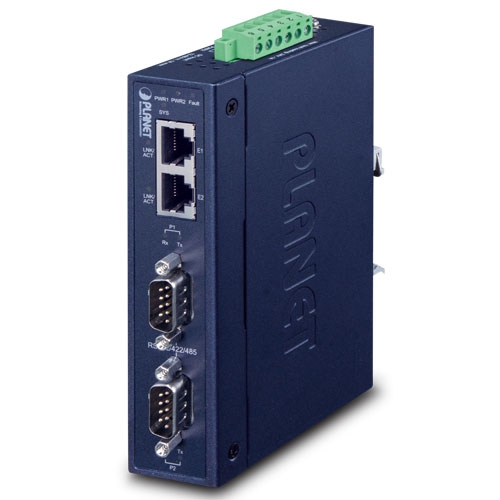
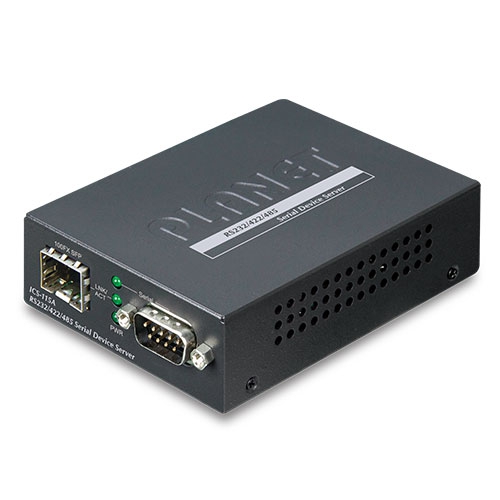
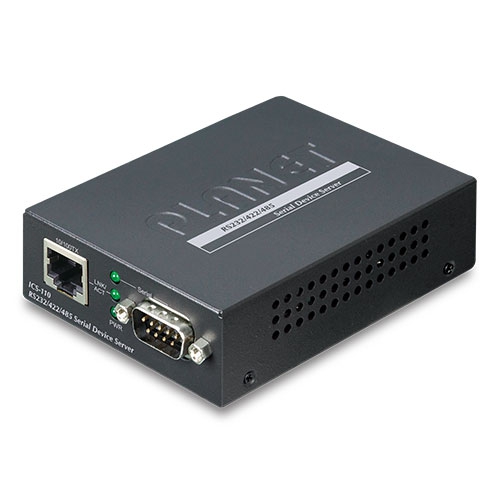
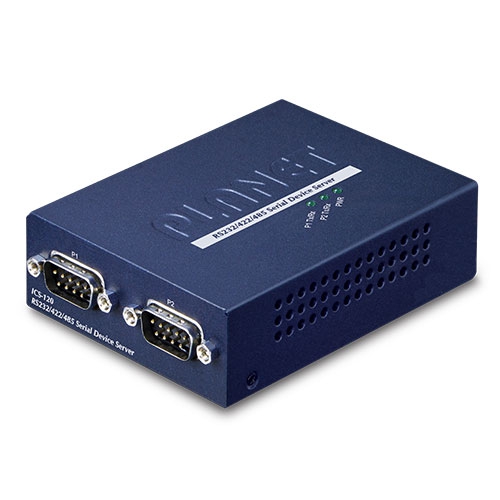
2-Port RS232/RS422/RS485 Serial Device Server

» ICS-120

Cost-effective Solution for RS232/422/485 Serial-to-Ethernet Application

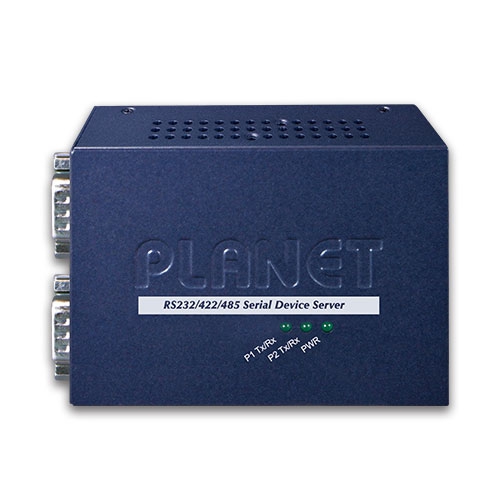
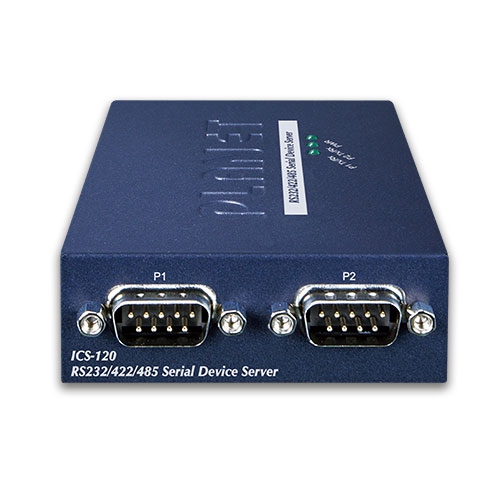
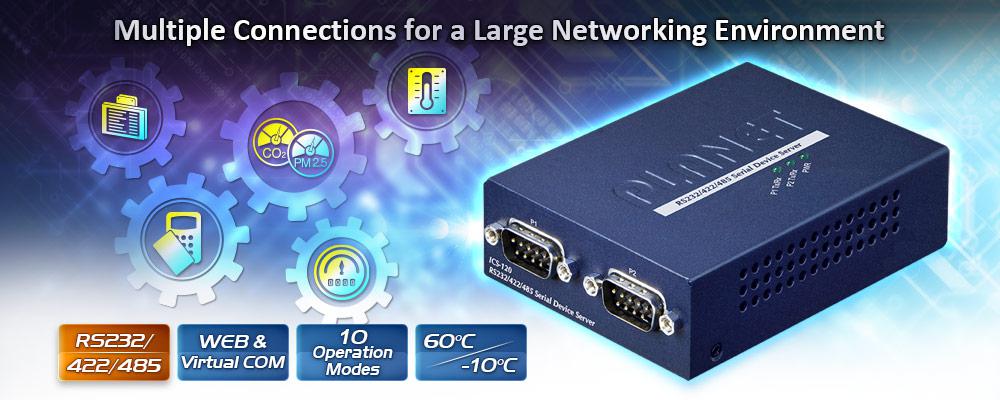
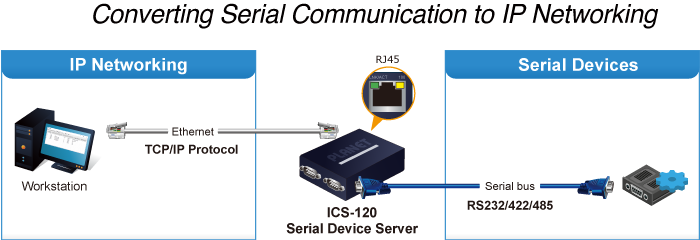
PLANET ICS-120 Serial Device Server is specially designed to convert two serial RS232/RS422/RS485 communication interfaces into Fast Ethernet networking to extend the network distance efficiently and inexpensively. 
edm ICS 120

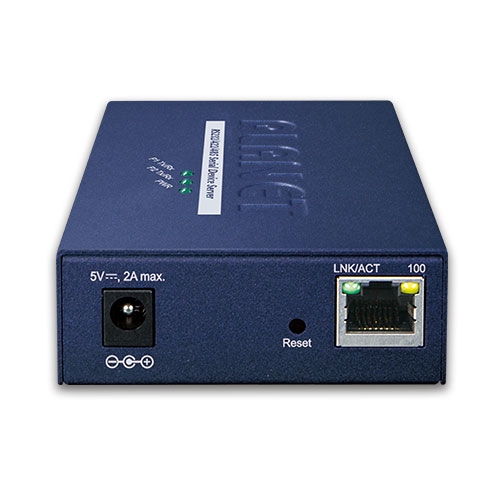
There is one 10/100BASE-TX RJ45 port in the ICS-120, making connected serial equipment become IP-based, and able to also connect to a TCP/IP networking immediately. And its operating temperature ranging from -10 to 60 degrees C is designed for all your network requirements. 

The ICS-120 is a time-saving and cost-effective solution for users and system integrators to quickly transform their serial devices into the Ethernet network with no need of replacing the existing serial devices and software system.
ICS 120 5

Remote Management 

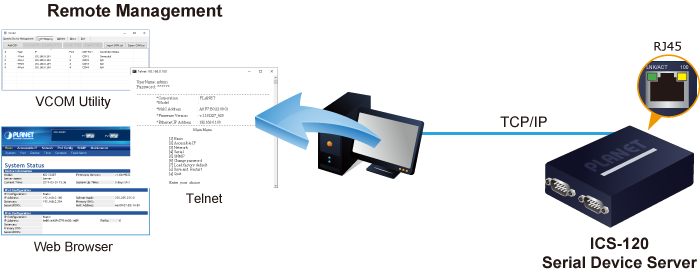
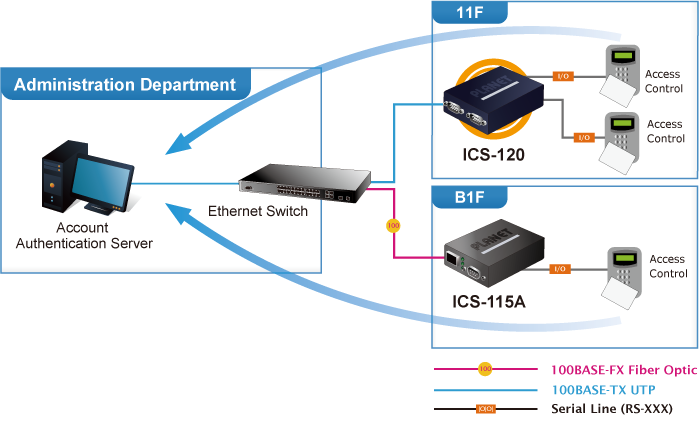
As the ICS-120 provides easy serial-to-Ethernet connectivity and connection to a TCP/IP network, the remote network system can thus be managed efficiently via its Web, telnet, and VCOM management interfaces. It supports both application and serial operation modes for alarm or IP address connection, which saves the administrator’s time in detecting and locating network problems without visual inspection of the cabling and devices. Multiple connection options are available for a large networking environment as well.
ICS 120 6

Access Control System – Traditional System Application

Most of the enterprises and government use access control plate and Mifare or RFID to authorize entrance identity. Traditionally, the access control machines use RS232 or RS485 serial interface with their cables connecting to login server. By applying the ICS-120 Serial Device Server, the access control machine is able to extend the network over longer distances via Ethernet interfaces. In addition, the ICS-120 can be linked to an xDSL router to get the internet access capability so that the access control can be set and monitored over the internet.

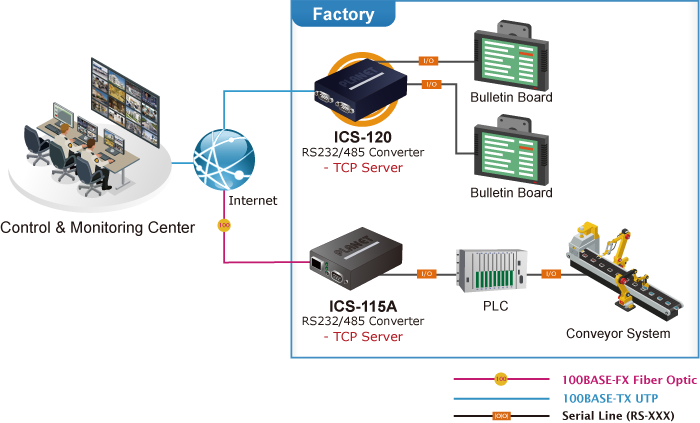
Process Control

To monitor, configure and manage the robotic conveyer including other production machines, PLC (programmable logical control) is required to drive the above manufacturing process. The ICS-120 can be set to the TCP server mode and connected to the PLC.  Thus, the administrator can configure and set command settings through Fast Ethernet intranet to remotely control the PLC, without having to stand by the I/O machine.

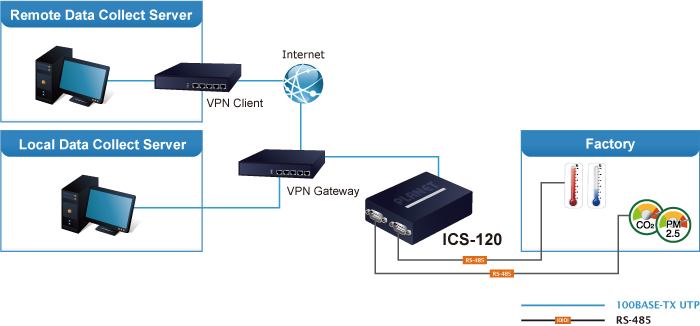
RTU Data Collect – UDP Mode

Connect with RTU (remote terminal unit) to collect and monitor the data of waves, signal and power utilization. The ICS-120 can be used to set up UDP mode and send data over Fast Ethernet to local server or over Internet to remote server automatically.

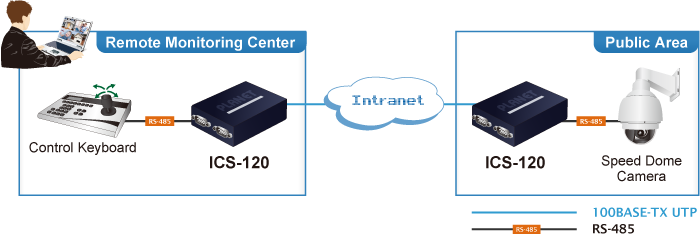
Surveillance Motion Control – Pair Connection Mode

Using pair connection mode via the fiber optic patch cord, the ICS-120 can extend the distance of the deployed devices via RS232, RS422 and RS485 interfaces, making the remote management of these devices from the monitoring center easier and efficient.

واجهة تسلسلية

  • Two DB9 interfaces that support RS232, 2-wire RS485, 4-wire RS485 and RS422 operation
  • Asynchronous serial data rates up to 921600bps
  • Data mode includes VCOM, RFC2217, TCP server, TCP client, UDP, remote pairing, Modbus converter server / client and serial telnet modes

واجهة إيثرنت

  • 1-port 10/100BASE-TX RJ45 with auto MDI/MDI-X function

إدارة

  • إدارة المكدس المزدوج لـ IPv4 و IPv6
  • Remote Management Interfaces
  • - IP-based Web management
    - Telnet console management
    - Windows-based VCOM utility supports searching, monitoring and configuration setting
  • IP NTP (Network Time Protocol) 
  • Standard TCP/IP interface and versatile operation modes
  • Software Protocol supports ICMP, TCP/IP, UDP, HTTP server, DHCP client, Telnet server/client 
  • Serial Operation mode selected via management interface
  • Pair Connection mode for connecting two serial devices over a network
  • Allows a maximum of 4 hosts to be accessed as TCP client mode
  • Firmware upgrade via HTTP protocol
  • Accessible IP security control to prevent illegal users
  • Event notification
  • - Remote syslog server
    - SNMP trap
  • DHCP client for IP address assignment 
  • PLANET Smart Discovery utility automatically finds the client devices on the netwok


العلبة والتركيب

  • Compact size for easy Installation
  • - Standalone -- Wall mountable or DIN-rail mounting (optional accessory)
  • External power adaptor 5V DC, 2A max.
  • يدعم حماية من التفريغ الكهروستاتيكي عبر الإيثرنت بجهد 6000 فولت تيار مستمر
  • -10 to 60 degrees C operating temperature
  • يدعم مؤشرات LED واسعة النطاق لتشخيص الشبكة
  • Reset button for resetting to factory default
واجهة تسلسلية
منفذ تسلسلي2 x DB9 male
معايير التسلسلRS232/RS422/4-wire RS485/2-wire RS485
معدل الباود (معدل نقل البيانات)من 50 بت في الثانية إلى 921 كيلوبت في الثانية
بتات البيانات5, 6, 7, 8
مانع التوقف1, 1.5, 2
نوع التكافؤفردي، زوجي، لا شيء، مسافة، علامة
التحكم في التدفقRTS/CTS and DTR/DSR (RS232 only)
XON/XOFF
الإشاراتRS232: TxD, RxD, RTS, CTS, DTR, DSR, DCD, GND
RS422: Tx+, Tx-, Rx+, Rx-, GND
4-wire RS485: Tx+, Tx-, Rx+, Rx-, GND
2-wire RS485: Data A (+), Data B (-), GND
تخصيص رمز التعريف الشخصي
دبوسRS232RS422
RS485-4W
RS485-2W
1DCDTxD+--
2RxDTxD---
3TxDRxD-بيانات-
4DTRRxD+بيانات+
5أرضيأرضيأرضي
6DSR----
7RTS----
8متلازمة النفق الرسغي----
9------
واجهة إيثرنت
منافذ إيثرنت1 x RJ45
معيار10/100BASE-TX
مسافة100 متر
حماية من التفريغ الكهروستاتيكي6 كيلو فولت
الأجهزة
الأبعاد (العرض × العمق × الارتفاع)94 x 70.3 x 26.2mm
وزن189g
مؤشرات LEDSystem: Link
TP Port: Link/ Active
Serial Port: Active
متطلبات الطاقةExternal Power Adaptor 5V DC, 2A max.
استهلاك الطاقة5.5 watts (max.)
حاويةمعدن
تثبيتStandalone, wall-mount , and DIN-rail kit (optional)
زر إعادة الضبطأقل من 5 ثوانٍ: إعادة تشغيل النظام
> 5 ثوانٍ: إعدادات المصنع الافتراضية
إدارة
واجهات الإدارةWeb management
Telnet Console management
إدارة أدوات VCOM المستندة إلى نظام التشغيل Windows
SNMPv1, v2c / SNMP trap
UNI-NMS monitoring
أداة اكتشاف بلانيت الذكية
IP VersionIPv4 and IPv6
وضع التشغيل■ TCP server / TCP client
■ UDP client
■ Virtual COM
■ RFC2217
■ Telnet server
■ Pair connection – Remote (Slave)
■ Pair connection – Local (Master)
■ Modbus converter server / client
Virtual COM Utility Platform SupportWindows-based Only:
 Windows XP
 Windows Server 2003
 Windows 7
 Windows Server 2008
 Windows 8 (Must install the latest version of WinPcap)
 Windows Server 2012 (Must install the latest version of WinPcap)
 Windows 10
Fault AlarmRecord: System log / SNMP trap
Timeبروتوكول التتبع الوطني
حمايةAccessible IP (white list)
بروتوكول إدارة الشبكة البسيط (SNMP)SNMP v1 and v2c
Standards Conformances
الامتثال التنظيميFCC Part 15 Class A,
شهادة CE من الفئة أ
المعاييرIEEE 802.3 10BASE-T
IEEE 802.3u 100BASE-TX
RFC 768 UDP
بروتوكول نقل الملفات البسيط RFC 793
RFC 791 IP
RFC 792 ICMP
RFC 854 Telnet
RFC 958 NTP
RFC 1908 SNMPv2c
RFC 2068 HTTP
RFC 4443 ICMPv6
EIA/TIA RS232/422/485
الموافقة التنظيميةRoHS
بيئة
درجة حرارة التشغيل-10 ~ 60 درجة مئوية
درجة حرارة التخزين-10 ~ 70 درجة مئوية
رطوبة5 ~ 95% (غير مكثف)
تاريخإصداروصفتحميل
2020/24/071.0

ICS-120

Download Icon
تاريخإصداروصفتحميل
2020/03/071.0

الإصدار الأولي.

Download Icon
تاريخإصداروصفتحميل
2020/07/081.0

الإصدار الأولي.

Download Icon
تاريخإصداروصفتحميل
2021/23/031.0

إعلان المفوضية الأوروبية.

Download Icon
تاريخإصداروصفتحميل
2021/08/101.155b210805

Bug Fixed –
1. Make up the missing Modbus Converter Server / Client Mode
2. Fixed the problem that the “green” LED would unconditionally turn on when using RS422 and RS485
3. Fixed the problem that Smart Discovery could not scan

Download Icon
تاريخإصداروصفتحميل
2020/11/122011041000_2521_1337_1111

1. Supports starting as service mode.
2. Supports simplified Chinese
*Note:This utility is only for the ICS-110, ICS-120, ICS-115A, ICS-2100T, ICS-2102T, ICS-2102TS, ICS-2105AT, ICS-2200T, and ICS-2400T and NOT compatible with ICS-100, ICS-105A, ICS-2100, and ICS-2105A.

Download Icon
2020/31/072.18.1219.1600

1. Support to add Device IP manually.
2. Support to add COM port manually.
3. NOT compatible with ICS-210X series products.

Download Icon

معلومات الطلب

ICS-120

2-Port RS232/RS422/RS485 Serial Device Server

معلومات الطلب

ICS-120

2-Port RS232/422/485 Serial Device Server
                                             
✉

انضم إلى قائمتنا البريدية

احصل على آخر الأخبار والعروض والتحديثات من شركة بلانيت تكنولوجي مباشرة إلى بريدك الإلكتروني.

نحن نحترم خصوصيتك. يمكنك إلغاء الاشتراك في أي وقت.

اشترك في النشرة الإخبارية الإلكترونية لـ PLANET

احصل على أحدث معلومات المنتجات وأخبار الشركة!