

بيانات المنتج

  • رمز المنتج: IKVM-210-16
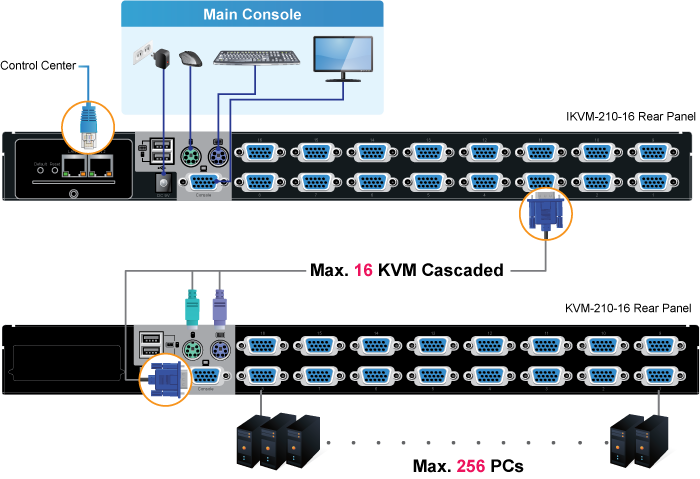
  • product_editor_4418_tab_content: <b>Remote Management via Network</b> With PLANET IKVM-210-16, network administrators can control a server room locally or remotely through Internet. No additional software or license fee is needed; multiple users can securely access remote server by using a standard web browser to create an HTTP connection. <p style="text-align: center;"><img class="img-fluid" src="https://www.planet.com.sa/wp-content/uploads/2025/01/IKVM-210-08_16-2_L.png" /></p> <b>Cascade Operation</b> The IKVM-210-16 is easy to install for controlling up to 16 computers/servers. Furthermore, sixteen KVM switches can be cascaded to enable to control up to 256 servers. <p style="text-align: center;"><img class="img-fluid" src="https://www.planet.com.sa/wp-content/uploads/2025/01/IKVM-210-16-1_L.png" /></p>
  • product_editor_4418_tab_enabled: نعم
  • product_editor_4418_tab_content_changed: نعم
  • product_editor_4418_tab_title: التطبيقات
  • product_editor_4421_tab_content: <span style="color: #5070ab;"><b>الأجهزة</b></span> <ul type="disc"> <li>1U rack-mount size and desktop design</li> <li>Standalone machine controls up to 16 sets of computers</li> <li>Up to 2 levels can be cascaded and up to 256 computers can be controlled</li> <li>Front panel status LEDs give a clear indication of the active computers</li> </ul> <span style="color: #5070ab;"><b>حماية</b></span> <ul type="disc"> <li>Two-layer password security protection</li> <li>DES, AES and 3DES for data encryption</li> </ul> <span style="color: #5070ab;"><b>إدارة</b></span> <ul type="disc"> <li>Auto scan mode for monitoring computers</li> <li>Requires no additional software or hardware</li> <li>Computer selection via Port Select Button, Hotkey and On Screen Display (OSD)</li> <li>Hot pluggable: Add or remove computers without having to power down the switch</li> <li>QVS (Quick View Setting): Quickly select your computer by naming its model or serial number</li> </ul> <span style="color: #5070ab;"><b>Remote Access</b></span> <ul type="disc"> <li>Remotely control PC via TCP/IP and a built-in 10/100/1000Mbps Ethernet port</li> <li>High Video Quality: Resolution up to 2048 x 1536 (local side) or 1920 x 1080 (remote side)</li> <li>Sends the key combinations to a remote computer</li> <li>Administrator and multiple users with password protection</li> <li>Use of the absolute synchronistical technology of mouse to ensure the accuracy of the Windows operating system</li> <li>Expedient bandwidth control</li> </ul> <span style="color: #5070ab;"><b>Compatibility</b></span> <ul type="disc"> <li>Multiplatform support -- Windows, Linux and Sun</li> <li>Multibrowser support (IE, Chrome, Firefox)</li> <li>Supports Microsoft Intellimouse, Logitech Net Mouse and other third-party’s PS/2 mice</li> </ul>
  • product_editor_4421_tab_enabled: نعم
  • product_editor_4421_tab_content_changed: نعم
  • product_editor_4421_tab_title: الميزات الرئيسية
  • product_editor_4422_tab_content:   <div class="table-responsive"> <table class="common_table_sky" style="width: 100%;"> <thead> <tr> <th colspan="2">الأجهزة</th> </tr> </thead> <tbody> <tr> <td class="align-middle">Number of Ports</td> <td>16 D-sub ports (15-pin)</td> </tr> <tr> <td class="align-middle">Maximum Control of PCs</td> <td>256 computers with 16 cascaded KVM switches (KVM-210-16)</td> </tr> <tr> <td class="align-middle">PC Ports</td> <td> <table border="0" width="400"> <tbody> <tr> <td width="85"><b>Keyboard:</b></td> <td width="315">PS/2 female + USB type A female</td> </tr> <tr> <td><b>Mouse:</b></td> <td>PS/2 female + USB type A female</td> </tr> <tr> <td><b>Video:</b></td> <td>16 D-sub ports (15 female)</td> </tr> </tbody> </table> </td> </tr> <tr> <td class="align-middle">Console Ports</td> <td> <table border="0" width="399"> <tbody> <tr> <td width="85"><b>Keyboard:</b></td> <td width="315">PS/2 female + USB type A female</td> </tr> <tr> <td><b>Mouse:</b></td> <td>PS/2 female + USB type A female</td> </tr> <tr> <td><b>Video:</b></td> <td>1 D-sub port (15 female)</td> </tr> </tbody> </table> </td> </tr> <tr> <td class="align-middle">قاد</td> <td> <table border="0" width="400"> <tbody> <tr> <td width="85"><b>On Line:</b></td> <td width="315">16 (<span style="color: red;">أحمر</span>)</td> </tr> <tr> <td><b>Selected:</b></td> <td>16 (<span style="color: green;">أخضر</span>)</td> </tr> </tbody> </table> </td> </tr> <tr> <td class="align-middle">زر</td> <td> <table border="0" width="400"> <tbody> <tr> <td width="85"><b>Reset:</b></td> <td width="315">زر إعادة الضبط 1</td> </tr> <tr> <td><b>Select:</b></td> <td>16 select buttons</td> </tr> </tbody> </table> </td> </tr> <tr> <td class="align-middle">Remote Console</td> <td>1 RJ45 port for 10/100/1000BASE-T</td> </tr> <tr> <td class="align-middle">دقة الفيديو</td> <td>Local side: 2048 x 1536 (max) Remote side: 1920 x 1080 (max)</td> </tr> <tr> <td class="align-middle">السكن</td> <td>معدن</td> </tr> <tr> <td class="align-middle">الأبعاد (العرض × العمق × الارتفاع)</td> <td>432 x 155 x 44 mm</td> </tr> <tr> <td class="align-middle">وزن</td> <td>2.22kg</td> </tr> <tr> <td class="align-middle">متطلبات الطاقة</td> <td>9V DC, 1A</td> </tr> <tr> <td class="align-middle">تثبيت</td> <td>1U rack-mountable, desktop</td> </tr> </tbody> <thead> <tr> <th colspan="2">إدارة</th> </tr> </thead> <tbody> <tr> <td class="align-middle">Supported Protocol</td> <td>TCP, IP, HTTP</td> </tr> <tr> <td class="align-middle">Client Software</td> <td>IPKVM Software</td> </tr> <tr> <td class="align-middle">PC Selection</td> <td>Port select button Hotkeys on keyboard OSD (on screen display)</td> </tr> <tr> <td class="align-middle">Scan Interval</td> <td>5~60 seconds</td> </tr> <tr> <td class="align-middle">حماية</td> <td>User password and super password DES, AES and 3DES</td> </tr> </tbody> <thead> <tr> <th colspan="2">البيئة والشهادات</th> </tr> </thead> <tbody> <tr> <td class="align-middle">درجة حرارة التشغيل</td> <td>-10 ~ 50 درجة مئوية</td> </tr> <tr> <td class="align-middle">درجة حرارة التخزين</td> <td>-20 ~ 60 degrees C</td> </tr> <tr> <td class="align-middle">رطوبة التشغيل</td> <td>0 ~ 90%</td> </tr> <tr> <td class="align-middle">التنظيمي</td> <td>CE، FCC</td> </tr> </tbody> </table> </div>
  • product_editor_4422_tab_enabled: نعم
  • product_editor_4422_tab_content_changed: نعم
  • product_editor_4422_tab_title: تحديد
  • عدد مشاهدات منشورات ekit: 693
  • product_editor_4418_tab_sticky_width: pw-content-1
  • product_editor_4418_tab_sticky_position: pw-left-stick
  • product_editor_4421_tab_sticky_width: pw-content-1
  • product_editor_4421_tab_sticky_position: pw-left-stick
  • product_editor_4422_tab_sticky_width: pw-content-1
  • product_editor_4422_tab_sticky_position: pw-left-stick
  • product_editor_4423_tab_content:
  • product_editor_4423_tab_content_changed: نعم
  • product_editor_4423_tab_enabled: نعم
  • product_editor_4423_tab_title: التنزيلات
  • product_editor_4423_tab_sticky_width: pw-content-1
  • product_editor_4423_tab_sticky_height: 1
  • product_editor_4423_tab_sticky_position: pw-left-stick
  • product_editor_4424_tab_content:
  • product_editor_4424_tab_content_changed: نعم
  • product_editor_4424_tab_enabled: نعم
  • product_editor_4424_tab_title: المنتجات ذات الصلة
  • product_editor_4424_tab_sticky_width: pw-content-1
  • product_editor_4424_tab_sticky_height: 1
  • product_editor_4424_tab_sticky_position: pw-left-stick
  • إجمالي المبيعات: 0
  • جدول الملحقات: <div class="table-responsive"> <div class="table-responsive"> <div class="table-responsive"> <div class="table-responsive"> <table class="common_table"> <thead> <tr> <th colspan="2">معلومات الطلب</th> </tr> </thead> <tbody> <tr> <td class="text-center align-middle"> <h3 class="h6 m-0">IKVM-210-16</h3> </td> <td>16-Port Combo IP KVM Switch</td> </tr> </tbody> </table> </div> <div class="table-responsive"> <table class="common_table"> <thead> <tr> <th colspan="2">مُكَمِّلات</th> </tr> </thead> <tbody> <tr> <td class="text-center align-middle"> <h3 class="h6 m-0">KVM-KC1-1.8</h3> </td> <td>1.8M USB KVM Cable with built-in PS2 to USB Converter</td> </tr> <tr> <td class="text-center align-middle"> <h3 class="h6 m-0">KVM-KC1-3</h3> </td> <td>3M USB KVM Cable with built-in PS2 to USB Converter</td> </tr> <tr> <td class="text-center align-middle"> <h3 class="h6 m-0">KVM-KC1-5</h3> </td> <td>5M USB KVM Cable with built-in PS2 to USB Converter</td> </tr> </tbody> </table> </div> </div> </div> </div>                                          
  • product_label:
  • prouduct_loop_image_transparent_bg_:
  • 6_features_images: a:6:{i:0;s:5:"14890";i:1;s:5:"14893";i:2;s:5:"14892";i:3;s:5:"14895";i:4;s:5:"14891";i:5;s:5:"14894";}
  • ورقة البيانات: 1
  • دليل سريع: 2
  • دليل المستخدم: 1
  • ec_declaration:
  • تطبيق أندرويد:
  • السائق:
  • البرامج الثابتة: 1
  • جدوى: 4
  • قائمة_التوافق:
  • تخطيط الشريط الجانبي للموقع: تقصير
  • ast-site-content-layout: تقصير
  • نمط محتوى الموقع: تقصير
  • نمط الشريط الجانبي للموقع: تقصير
  • theme-transparent-header-meta: تقصير
  • datasheet_0_date: 20170414
  • datasheet_0_version: 1.0
  • وصف ورقة البيانات 0: IKVM-210-16
  • datasheet_0_download_pdf: https://www.planet.com.sa/storage/products/IKVM-210-16/C-IKVM-210-16_s.pdf
  • quick_guide_0_date: 20170116
  • quick_guide_0_version: 1.0
  • quick_guide_0_description: Initial Release for IP Installation Guide
  • quick_guide_0_download_pdf: https://www.planet.com.sa/storage/products/IKVM-210-16/EMQ-IKVM-210%20Series_v1.0.pdf
  • quick_guide_1_date: 20161017
  • quick_guide_1_version: 1.0
  • quick_guide_1_description: Installation Guide for KVM-210-08/16
  • quick_guide_1_download_pdf: https://www.planet.com.sa/storage/products/IKVM-210-16/EMQ-KVM-210-08_16_v1.0.pdf
  • users_manual_0_date: 20170112
  • دليل المستخدم_الإصدار_0: 1.0
  • وصف دليل المستخدم 0: الإصدار الأولي
  • users_manual_0_download_pdf: https://www.planet.com.sa/storage/products/IKVM-210-16/EM-KVM_IKVM-210_Series_v1.0.pdf
  • firmware_0_date: 20220706
  • firmware_0_version: 20220622.1316
  • firmware_0_description: Added HTTPS feature.
  • firmware_0_download_pdf: https://www.planet.com.sa/storage/products/IKVM-210-16/FW-IKVM%20Series_v20220622.1316.zip
  • utility_0_date: 20250102
  • utility_0_version: 3.4
  • utility_0_description: Optimized mouse following performance.
  • utility_0_download_pdf: https://www.planet.com.sa/storage/products/IKVM-210-16/UT-IKVM%20Software_v3.4.zip
  • utility_1_date: 20220602
  • utility_1_version: 2.2
  • وصف الأداة 1: Update for IPKVM.
  • utility_1_download_pdf: https://www.planet.com.sa/storage/products/IKVM-210-16/UT-IKVM%20Sofeware_v2.2.zip
  • utility_2_date: 20170118
  • utility_2_version: 1.02
  • utility_2_description: Initial Release for IPKVM
  • utility_2_download_pdf: https://www.planet.com.sa/storage/products/IKVM-210-16/UT-IKVM%20Software_v1.02.zip
  • utility_3_date: 20140407
  • utility_3_version: 1.0
  • utility_3_description: Initial Release for Smart Discovery
  • utility_3_download_pdf: https://www.planet.com.sa/storage/products/IKVM-210-16/UT-SmartDiscoveryLite_v1.0.zip
  • astra-migrate-meta-layouts: تعيين
  • علامة تبويب التطبيقات: <p><strong>Remote Management via Network</strong><br> With PLANET IKVM-210-16, network administrators can control a server room locally or remotely through Internet. No additional software or license fee is needed; multiple users can securely access remote server by using a standard web browser to create an HTTP connection.<p style="text-align: center;"><img class="img-fluid" src="https://www.planet.com.sa/wp-content/uploads/2025/01/IKVM-210-08_16-2_L.png"></p><p><strong>Cascade Operation</strong><br> The IKVM-210-16 is easy to install for controlling up to 16 computers/servers. Furthermore, sixteen KVM switches can be cascaded to enable to control up to 256 servers.</p><p> </p><p style="text-align: center;"><img src="https://www.planet.com.sa/wp-content/uploads/2025/01/IKVM-210-08_16v2.1-3.png" alt="" width="700" height="479"></p></p>
  • key_features_tab: <p><span style="color: #5070ab;"><strong>الأجهزة</strong></span><ul type="disc"> <li>1U rack-mount size and desktop design</li> <li>Standalone machine controls up to 16 sets of computers</li> <li>Up to 2 levels can be cascaded and up to 256 computers can be controlled</li> <li>Front panel status LEDs give a clear indication of the active computers</li> </ul><p><br> <span style="color: #5070ab;"><strong>حماية</strong></span></p><ul type="disc"> <li>Two-layer password security protection</li> <li>DES, AES and 3DES for data encryption</li> </ul><p><br> <span style="color: #5070ab;"><strong>إدارة</strong></span></p><ul type="disc"> <li>Auto scan mode for monitoring computers</li> <li>Requires no additional software or hardware</li> <li>Computer selection via Port Select Button, Hotkey and On Screen Display (OSD)</li> <li>Hot pluggable: Add or remove computers without having to power down the switch</li> <li>QVS (Quick View Setting): Quickly select your computer by naming its model or serial number</li> </ul><p><br> <span style="color: #5070ab;"><strong>Remote Access</strong></span></p><ul type="disc"> <li>Remotely control PC via TCP/IP and a built-in dual 10/100/1000Mbps Ethernet port</li> <li>High Video Quality: Resolution up to 2048 x 1536 (local side) or 1920 x 1080 (remote side)</li> <li>Sends the key combinations to a remote computer</li> <li>Administrator and multiple users with password protection</li> <li>Use of the absolute synchronistical technology of mouse to ensure the accuracy of the Windows operating system</li> <li>Expedient bandwidth control</li> </ul><p><br> <span style="color: #5070ab;"><strong>Compatibility</strong></span></p><ul type="disc"> <li>Multiplatform support -- Windows, Linux and Sun</li> <li>Multibrowser support (IE, Chrome, Firefox)</li> <li>Supports Microsoft Intellimouse, Logitech Net Mouse and other third-party’s PS/2 mice</li> </ul></p>
  • علامة تبويب المواصفات: <table style="width:100%;" class="common_table_sky"><thead><tr><th colspan="2">الأجهزة</th></tr></thead><tbody><tr><td class="align-middle">Number of Ports</td><td>16 D-sub ports (15-pin)</td></tr><tr><td class="align-middle">Maximum Control of PCs</td><td>256 computers with 16 cascaded KVM switches (KVM-210-16) </td></tr><tr><td class="align-middle">PC Ports</td><td><table width="400" border="0"><tr><td width="85"><b>Keyboard:</b></td><td width="315">PS/2 female + USB type A female</td></tr><tr><td><b>Mouse:</b></td><td>PS/2 female + USB type A female</td></tr><tr><td><b>Video:</b></td><td>16 D-sub ports (15 female) </td></tr></table></td></tr><tr><td class="align-middle">Console Ports</td><td><table width="399" border="0"> <tr> <td width="85"><b>Keyboard:</b></td> <td width="315">PS/2 female + USB type A female</td> </tr> <tr> <td><b>Mouse:</b></td> <td>PS/2 female + USB type A female</td> </tr> <tr> <td><b>Video:</b></td> <td>1 D-sub port (15 female) </td> </tr></table></td></tr><tr><td class="align-middle">قاد</td><td><table width="400" border="0"> <tr> <td width="85"><b>On Line:</b></td> <td width="315">16 (<font color="red">أحمر</font>)</td> </tr> <tr> <td><b>Selected:</b></td> <td>16 (<font color="green">أخضر</font>)</td></tr></table></td></tr><tr><td class="align-middle">زر</td><td><table width="400" border="0"> <tr> <td width="85"><b>Reset:</b></td> <td width="315">زر إعادة الضبط 1</td> </tr> <tr> <td><b>Select:</b></td> <td>16 select buttons</td></tr></table></td></tr><tr><td class="align-middle">Remote Console</td><td>2 RJ45 port for 10/100/1000BASE-T</td></tr><tr><td class="align-middle">دقة الفيديو</td><td>Local side: 2048 x 1536 (max)<br /> Remote side: 1920 x 1080 (max)<br /> </td></tr><tr><td class="align-middle">السكن</td><td>معدن</td></tr><tr><td class="align-middle">الأبعاد (العرض × العمق × الارتفاع)</td><td>432 x 155 x 44 mm</td></tr><tr><td class="align-middle">وزن</td><td>2.22kg</td></tr><tr><td class="align-middle">متطلبات الطاقة</td><td>9V DC, 1A</td></tr><tr><td class="align-middle">تثبيت</td><td>1U rack-mountable, desktop</td></tr></tbody><thead><tr><th colspan="2">إدارة</th></tr></thead><tbody><tr><td class="align-middle">Supported Protocol</td><td>TCP, IP, HTTP</td></tr><tr><td class="align-middle">Client Software</td><td>IPKVM Software</td></tr><tr><td class="align-middle">PC Selection</td><td>Port select button<br /> Hotkeys on keyboard<br /> OSD (on screen display)<br /> </td></tr><tr><td class="align-middle">Scan Interval</td><td>5~60 seconds</td></tr><tr><td class="align-middle">حماية</td><td>User password and super password<br /> DES, AES and 3DES<br /> </td></tr></tbody><thead><tr><th colspan="2">البيئة والشهادات</th></tr></thead><tbody><tr><td class="align-middle">درجة حرارة التشغيل</td><td>-10 ~ 50 درجة مئوية</td></tr><tr><td class="align-middle">درجة حرارة التخزين</td><td>-20 ~ 60 degrees C</td></tr><tr><td class="align-middle">رطوبة التشغيل</td><td>0 ~ 90%</td></tr><tr><td class="align-middle">التنظيمي</td><td>CE، FCC</td></tr></tbody></table>
  • rank_math_news_sitemap_robots: فِهرِس
  • rank_math_robots: a:1:{i:0;s:5:"index";}
  • rank_math_internal_links_processed: 1
  • rank_math_focus_keyword: IKVM-210-16

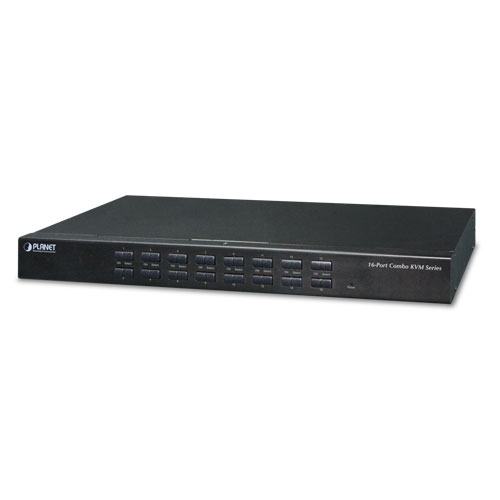
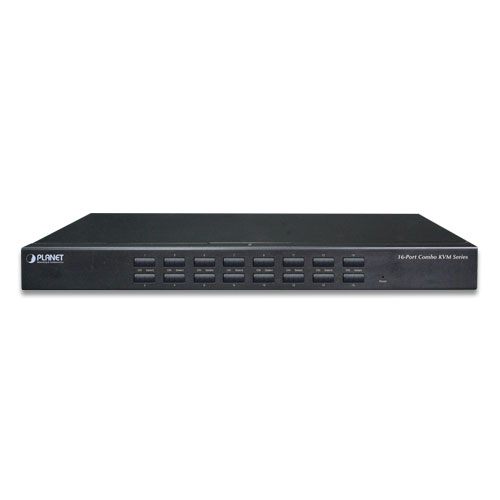
16-Port Combo IP KVM Switch

» IKVM-210-16

Remotely Access your Servers from Anywhere
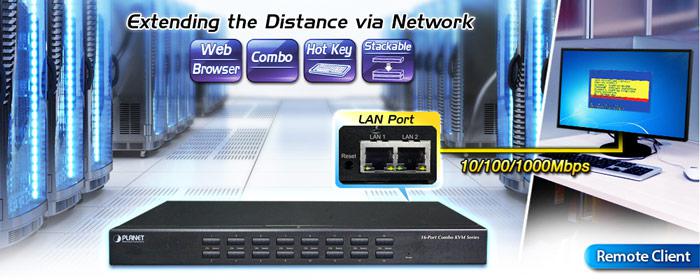
PLANET offers an ideal enterprise 16-port KVM switch solution for company server room or testing facilities. With the innovative IP-based technology, PLANET has turned the traditional KVM switches into true networking devices. The IKVM-210-16 captures, digitizes and compresses video signal, and then transmits it with keyboard and mouse signals through IP network. Multiple remote sites can monitor the same PC server simultaneously.
 

IKVM 210 08 16v2.1 1


Multiple Operating Systems Supported
The IKVM-210-16 is the most cost-effective and simple solution for controlling a group of PCs in the network. Multiple computers can be managed via only one single set of monitor, keyboard and mouse directly. No software drivers or system configuration are required. iMac, Power Mac and Sun systems are also supported.

 

IKVM 210 08 16 1 L


Remote Key Combination
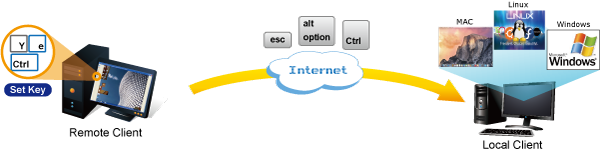
You could set the multiple key combinations at IKVM Series. When you open IKVM software at remote client, you could use these key combinations to control these local PCs with a different OS via the internet.
 

IKVM 210 Series 1 L


Computer Switching
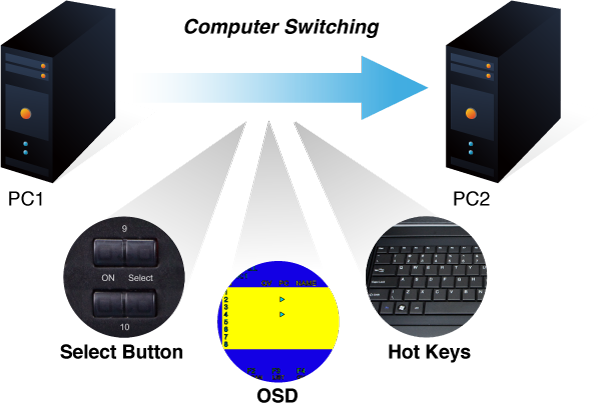
There are three convenient methods to access any computer connected to the installation:

  • Port select button
  • Hotkeys on keyboard
  • OSD (on screen display) at local client and remote client
 

KVM 210 08 16 2 L


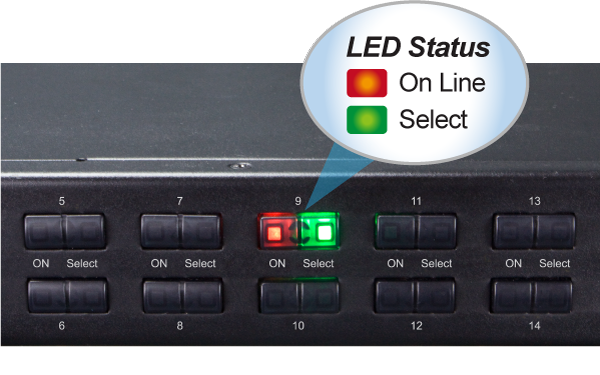
Perceptive LED Display
You could check the computer status on the front LED of the IKVM-210-16. “Red” indicates that a computer is connected to the corresponding port and “Green” indicates that the computer connected to the corresponding port has focus.
 

KVM 210 08 16 1 L

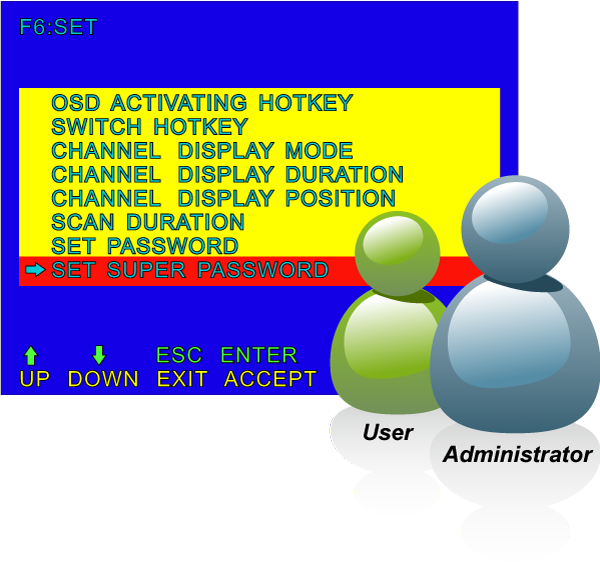
Security Protection
The two-level password security only authorizes up to one user and an administrator with a separate profile for each user. Data encryption options include AES, DES and 3DES, and they can be selected for keyboard, mouse and video signals.
 

KVM 210 08 16 08M 16M 1 L

Powerful Mouse/Keyboard Support
In the present computer applications, a mouse has become an indispensable device. The IKVM-210-16 fully supports all models of PS/2 mice on the market. The KVM also supports the PS/2 keyboard port of code set 1/2/3 and further allows you to use the KVM for all kinds of servers, computers or their combination. 
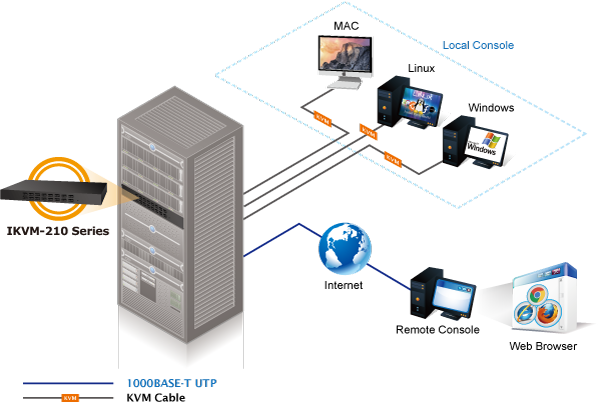
Remote Management via Network
With PLANET IKVM-210-16, network administrators can control a server room locally or remotely through Internet. No additional software or license fee is needed; multiple users can securely access remote server by using a standard web browser to create an HTTP connection.

Cascade Operation
The IKVM-210-16 is easy to install for controlling up to 16 computers/servers. Furthermore, sixteen KVM switches can be cascaded to enable to control up to 256 servers.


الأجهزة

  • 1U rack-mount size and desktop design
  • Standalone machine controls up to 16 sets of computers
  • Up to 2 levels can be cascaded and up to 256 computers can be controlled
  • Front panel status LEDs give a clear indication of the active computers


حماية

  • Two-layer password security protection
  • DES, AES and 3DES for data encryption


إدارة

  • Auto scan mode for monitoring computers
  • Requires no additional software or hardware
  • Computer selection via Port Select Button, Hotkey and On Screen Display (OSD)
  • Hot pluggable: Add or remove computers without having to power down the switch
  • QVS (Quick View Setting): Quickly select your computer by naming its model or serial number


Remote Access

  • Remotely control PC via TCP/IP and a built-in dual 10/100/1000Mbps Ethernet port
  • High Video Quality: Resolution up to 2048 x 1536 (local side) or 1920 x 1080 (remote side)
  • Sends the key combinations to a remote computer
  • Administrator and multiple users with password protection
  • Use of the absolute synchronistical technology of mouse to ensure the accuracy of the Windows operating system
  • Expedient bandwidth control


Compatibility

  • Multiplatform support -- Windows, Linux and Sun
  • Multibrowser support (IE, Chrome, Firefox)
  • Supports Microsoft Intellimouse, Logitech Net Mouse and other third-party’s PS/2 mice

الأجهزة
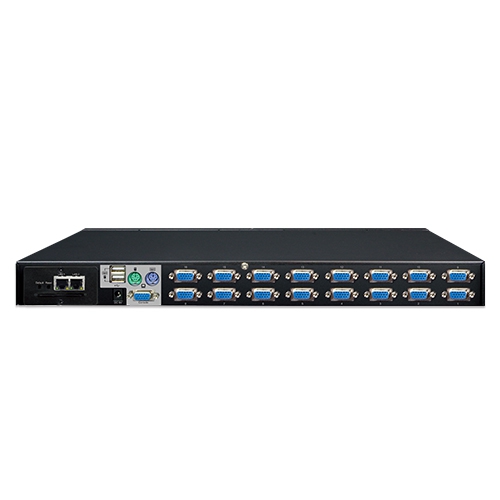
Number of Ports16 D-sub ports (15-pin)
Maximum Control of PCs256 computers with 16 cascaded KVM switches (KVM-210-16)
PC Ports
Keyboard:PS/2 female + USB type A female
Mouse:PS/2 female + USB type A female
Video:16 D-sub ports (15 female)
Console Ports
Keyboard:PS/2 female + USB type A female
Mouse:PS/2 female + USB type A female
Video:1 D-sub port (15 female)
قاد
On Line:16 (أحمر)
Selected:16 (أخضر)
زر
Reset:زر إعادة الضبط 1
Select:16 select buttons
Remote Console2 RJ45 port for 10/100/1000BASE-T
دقة الفيديوLocal side: 2048 x 1536 (max)
Remote side: 1920 x 1080 (max)
السكنمعدن
الأبعاد (العرض × العمق × الارتفاع)432 x 155 x 44 mm
وزن2.22kg
متطلبات الطاقة9V DC, 1A
تثبيت1U rack-mountable, desktop
إدارة
Supported ProtocolTCP, IP, HTTP
Client SoftwareIPKVM Software
PC SelectionPort select button
Hotkeys on keyboard
OSD (on screen display)
Scan Interval5~60 seconds
حمايةUser password and super password
DES, AES and 3DES
البيئة والشهادات
درجة حرارة التشغيل-10 ~ 50 درجة مئوية
درجة حرارة التخزين-20 ~ 60 degrees C
رطوبة التشغيل0 ~ 90%
التنظيميCE، FCC
تاريخإصداروصفتحميل
2017/14/041.0

IKVM-210-16

Download Icon
تاريخإصداروصفتحميل
2017/16/011.0

Initial Release for IP Installation Guide

Download Icon
2016/17/101.0

Installation Guide for KVM-210-08/16

Download Icon
تاريخإصداروصفتحميل
2017/12/011.0

الإصدار الأولي

Download Icon
تاريخإصداروصفتحميل
2022/06/0720220622.1316

Added HTTPS feature.

Download Icon
تاريخإصداروصفتحميل
2025/02/013.4

Optimized mouse following performance.

Download Icon
2022/02/062.2

Update for IPKVM.

Download Icon
2017/18/011.02

Initial Release for IPKVM

Download Icon
2014/07/041.0

Initial Release for Smart Discovery

Download Icon

معلومات الطلب

IKVM-210-16

16-Port Combo IP KVM Switch

معلومات الطلب

IKVM-210-16

16-Port Combo IP KVM Switch
مُكَمِّلات

KVM-KC1-1.8

1.8M USB KVM Cable with built-in PS2 to USB Converter

KVM-KC1-3

3M USB KVM Cable with built-in PS2 to USB Converter

KVM-KC1-5

5M USB KVM Cable with built-in PS2 to USB Converter
                                         
✉

انضم إلى قائمتنا البريدية

احصل على آخر الأخبار والعروض والتحديثات من شركة بلانيت تكنولوجي مباشرة إلى بريدك الإلكتروني.

نحن نحترم خصوصيتك. يمكنك إلغاء الاشتراك في أي وقت.

اشترك في النشرة الإخبارية الإلكترونية لـ PLANET

احصل على أحدث معلومات المنتجات وأخبار الشركة!