

بيانات المنتج

  • إجمالي المبيعات: 0
  • رمز المنتج: بلانيت كلاود إن إم إس
  • علامة تبويب التطبيقات: <p>CloudNMS is ideal for Small and Medium-sized Businesses (SMBs), Managed Service Providers (MSPs), and enterprise IT teams seeking a cost-efficient, scalable, and future-proof way to manage their network infrastructure.</p> <p><strong>Economical Central Network Management Solution for SMBs, MSPs, and Enterprises</strong></p> <p>CloudNMS is ideal for SMBs, MSPs, and enterprise IT teams seeking a cost-efficient, scalable, and future-proof way to manage network infrastructure. It supports up to 100 organizations and unlimited nodes — all without hardware controllers, licenses, or costly subscriptions.</p> <p>Administrators can auto-discover devices, apply profiles, batch provision firmware, and optimize Wi-Fi with Smart AP Control (SAPC). A unified web interface with virtualization support simplifies cross-platform operations, reducing manual setup and cutting costs.</p> <p> </p>
  • key_features_tab: <ul> <li><strong>24/7 Mobile Access</strong> – Manage your network anytime, anywhere.</li> <li><strong>Quick Onboarding</strong> – Add devices instantly via QR code.</li> <li><strong>Interactive Dashboard</strong> – Real-time view of network health and alerts.</li> <li><strong>Comprehensive Device Overview</strong> — Access real-time information for all devices managed by CloudNMS.</li> <li><strong>Device Management Capabilities</strong> <ul> <li><strong>Wireless Access Point (AP)</strong> <ul> <li>System information (firmware version, IP address)</li> <li>Operation mode of the AP</li> <li>Wi-Fi status and connectivity</li> <li>Wi-Fi security settings</li> <li>Connected client information</li> <li>AP LED status control</li> </ul> </li> <li><strong>يُحوّل</strong> <ul> <li>Port status and configuration</li> <li>VLAN monitoring and settings</li> <li>PoE power status and usage</li> <li>Real-time traffic statistics</li> <li>Layer 2 features: Spanning Tree Protocol (STP), SNMP, ERPS ring</li> </ul> </li> <li><strong>جهاز التوجيه</strong> <ul> <li>Port status</li> <li>WAN status monitoring and settings</li> <li>Wireless/PoE power status and usage</li> <li>Real-time traffic statistics</li> </ul> </li> </ul> </li> <li><strong>Device Management</strong> – Monitor & control APs, Switches, Routers, and more.</li> <li><strong>Extended Support</strong> – Media converters, PDUs, IP Cameras, IP Phones, HaLow IoT, etc.</li> <li><strong>Smart Notifications</strong> – Push alerts for downtime, traffic, and security events.</li> <li><strong>No Extra Hardware</strong> – Cloud-based, no server required.</li> <li><strong>Enterprise Security</strong> – SSO, and role-based access control.</li> <li><strong>OTA Firmware Updates</strong> – Safe and seamless remote upgrades.</li> <li><strong>Cross-Platform</strong> – Available on Android and iOS.</li> </ul>
  • علامة تبويب المواصفات: <table class="common_table_sky" style="width: 100%;"> <thead> <tr> <th colspan="2">إدارة الشبكة</th> </tr> </thead> <tbody> <tr> <td class="align-middle">عدد الأجهزة المُدارة</td> <td>Unlimited</td> </tr> <tr> <td class="align-middle">لوحة التحكم</td> <td>Providing the at-a-glance view of center system, site summary, site Map, traffic, PoE network status</td> </tr> <tr> <td class="align-middle">Site Management</td> <td>To create site list, site map for Cloud-based device management</td> </tr> <tr> <td class="align-middle">تحكم المستخدم</td> <td>السماح بإنشاء الحسابات عند الطلب وسياسة الوصول التي يحددها المستخدم</td> </tr> <tr> <td class="align-middle">قائمة الأجهزة</td> <td>To manage all site devices or filter one site devices list for Cloud-based device function operation</td> </tr> <tr> <td class="align-middle">Statistic</td> <td>To show latest Event Report, History Comparison function, Critical Events for devices</td> </tr> <tr> <td class="align-middle">Topology Viewer</td> <td>A topology of network devices compliant with MQTT, SNMP, ONVIF and LLDP Protocol with Map or not</td> </tr> <tr> <td class="align-middle">تقارير الأحداث</td> <td>يمكن الإبلاغ عن حالة الشبكة عبر إنذار الشبكة وسجل النظام</td> </tr> <tr> <td class="align-middle">نظام إنذار</td> <td>تنبيهات البريد الإلكتروني للمسؤول عبر خادم SMTP</td> </tr> <tr> <td class="align-middle">Switch Virtual Panel</td> <td>To directly configure the switch for basic function</td> </tr> <tr> <td class="align-middle">ONVIF IP Cam Snapshot*</td> <td>Directly catch the managed IP cam snapshot</td> </tr> <tr> <td class="align-middle">Batch Provisioning*</td> <td>Enabling multiple APs to be configured and upgraded at one time by using the designated profile for each site.</td> </tr> <tr> <td class="align-middle">Coverage Heat Map*</td> <td>تغطية إشارة نقاط الوصول في الوقت الفعلي على خريطة الطابق التي يحددها المستخدم لتحسين نشر شبكة Wi-Fi الميدانية</td> </tr> <tr> <td class="align-middle">Customized Profile*</td> <td>السماح بإنشاء وصيانة ملفات تعريف لاسلكية متعددة</td> </tr> <tr> <td class="align-middle">Auto Provisioning*</td> <td>توفير نقاط وصول متعددة بنقرة واحدة</td> </tr> <tr> <td class="align-middle">Cluster Management*</td> <td>تبسيط إدارة نقاط البيع عالية الكثافة</td> </tr> <tr> <td class="align-middle">Scalability*</td> <td>إمكانية ترقية النظام مجانًا وترقية البرامج الثابتة لنقاط الوصول بشكل جماعي</td> </tr> </tbody> </table>
  • عدد مشاهدات منشورات ekit: 334
  • ورقة البيانات:
  • دليل سريع:
  • دليل المستخدم:
  • ec_declaration:
  • تطبيق أندرويد:
  • السائق:
  • البرامج الثابتة:
  • جدوى:
  • قائمة_التوافق:
  • جدول الملحقات:
  • product_label:
  • prouduct_loop_image_transparent_bg_:
  • 6_features_images:
  • تخطيط الشريط الجانبي للموقع: تقصير
  • ast-site-content-layout: تقصير
  • نمط محتوى الموقع: تقصير
  • نمط الشريط الجانبي للموقع: تقصير
  • theme-transparent-header-meta: تقصير
  • rank_math_news_sitemap_robots: فِهرِس
  • rank_math_robots: a:1:{i:0;s:5:"index";}
  • rank_math_internal_links_processed: 1
  • rank_math_focus_keyword: بلانيت كلاود إن إم إس
  • rank_math_seo_score: 72
  • hide_related_products_tab: 0
  • hide_downloads_tab: 0
  • astra-migrate-meta-layouts: تعيين

نظام إدارة الشبكة العالمي القائم على السحابة

» PLANET CloudNMS

Get Started with PLANET CloudNMS

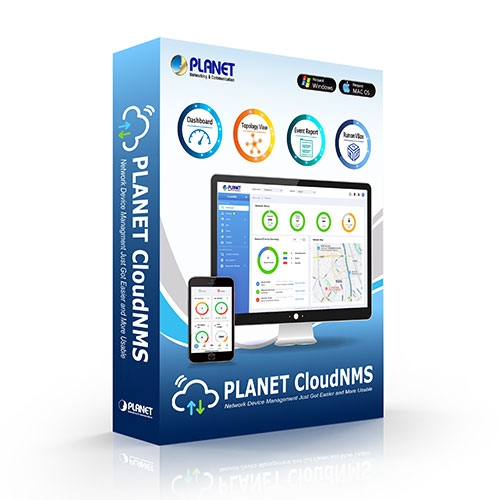
PLANET is proud to announce CloudNMS, the next-generation cloud-based network management platform evolved from our proven UNI-NMS. CloudNMS combines centralized on-premises experience with secure, scalable cloud integration, enabling seamless cross-domain monitoring and control. Together with the CloudNMS App, it delivers a unified Web + Mobile experience, so IT teams can manage and monitor networks anytime, anywhere — empowered by AI-driven analytics and automation. CloudNMS brings following benefits:

  • No hardware controller required, reducing capital expenditure
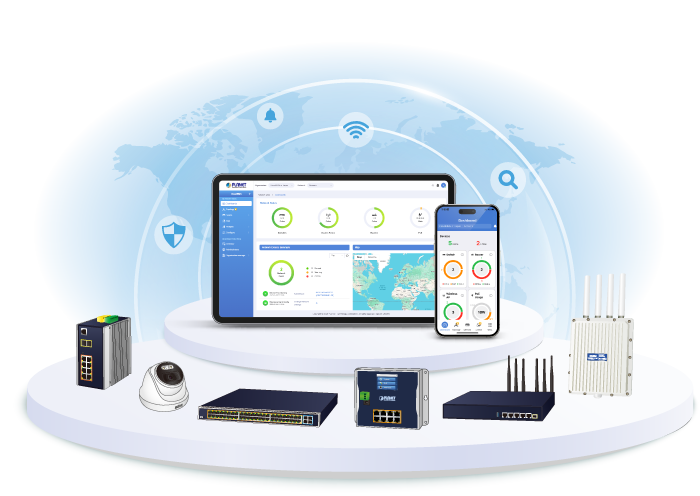
  • Centralized management of all PLANET devices
  • Simple and fast deployment
  • Flexible and scalable to support future growth
  • Secure and reliable cloud infrastructure
PLANET PLANET CloudNMS

Cloud-Based Advantage

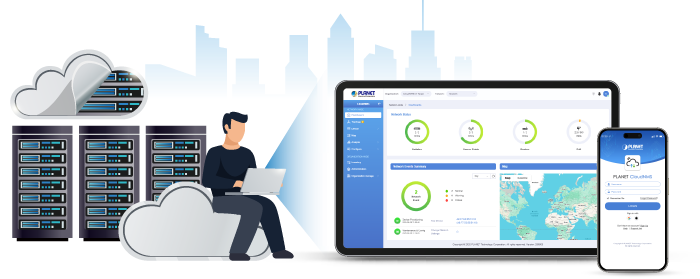
CloudNMS eliminates the need for hardware-based controllers. Users simply register an account, log in through a web browser, and gain instant access to their network management dashboard.
CloudNMS APP 4

Seamless Device Registration

By simply entering CloudNMS account credentials into each PLANET Managed Switch or Wireless Access Point, devices automatically register when connected to the Internet. All managed devices then appear in the CloudNMS dashboard — without manual setup.

  • Centralized control for multi-site networks
  • Secure, web-based management interface accessible anytime, anywhere
  • Interactive dashboard with real-time health and PoE statistics
  • Automatic topology and map visualization
  • Instant event alerts with email notifications
  • Batch device configuration and firmware upgrades
CloudNMS APP 1

PLANET CloudNMS solution features intuitive dashboard, topology and map viewing to make network management efficient and effective.

تشمل الميزات الحصرية لحلول PLANET NMS ما يلي:

  • Centralized control of unlimited nodes
  • System upgrade and license (free of charge)
  • Intuitive و user-friendly management functions
CloudNMS APP 5

Interactive Dashboard for Instant Network Visibility

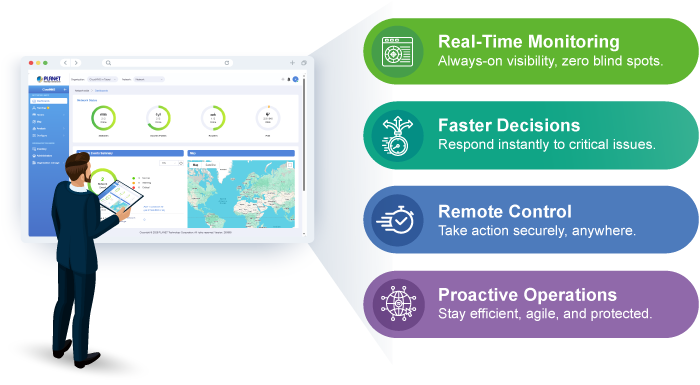
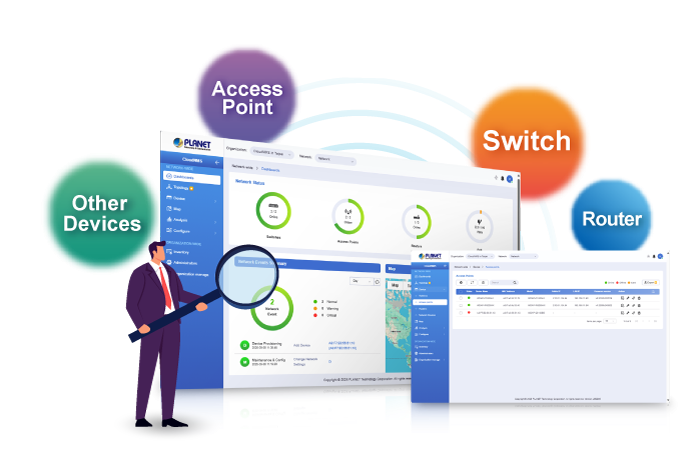
The CloudNMS interactive dashboard provides a unified view of routers, switches, access points, and PoE statistics across all managed sites. Administrators can instantly see overall network health, drill down into device details with one click, and monitor deployed nodes from a centralized site management page. Faulty events and login issues are displayed in real time, allowing IT teams to quickly identify and resolve disconnection problems.

شاهد الشبكة في غضون دقائق

The device list web page consolidates managed devices, organizational dashboards, topology views, AP controls, and event logs into a single interface. It delivers an at-a-glance summary of both wired and wireless network status, supported by data-driven charts for each site. With real-time topology and event reports, administrators can easily visualize system usage and node conditions to quickly address emerging issues.

Optimizing Multiple Sites with Topology Viewer (with Maps)

The organization map allows administrators to locate and monitor devices across all sites, providing a clear overview of cloud-based resources. Real-time status updates improve efficiency while reducing the need for on-site support and maintenance costs. CloudNMS supports up to 100 sites, ensuring scalable management for large distributed networks.

Real-time Centralized Monitoring with E-mail and App Alarm Function

CloudNMS provides a topology view of all powered devices, showing their real-time status as online (green) or offline (red). Centralized monitoring helps administrators instantly understand network conditions and identify issues. Pop-up notifications indicate problem locations, while the email alarm function uses SMTP to deliver detailed syslog-based alerts when abnormalities occur — enabling IT teams to quickly resolve problems.

Statistics for Events to Manage Network Traffic and PoE Power

The CloudNMS statistic page lists inbound and outbound traffic, PoE health, and critical events. It can help administrator to analyze which device is having abnormal power consumption, abnormally high temperature, illegal time of usage, and the near end of life cycle in order to avoid network crash.

Power Consumption Analysis and Unloading Management Mechanism

The CloudNMS provides raw data records for PoE device power usage. Through the history statistics, the administrator can flexibly operate in whatever power is in demand. For energy savings and carbon reduction, the CloudNMS system can help enterprises to save energy by unloading the low priority devices and ensure the safety and stability of electricity consumption in the overall environment of company, factory, etc.
CloudNMS is ideal for Small and Medium-sized Businesses (SMBs), Managed Service Providers (MSPs), and enterprise IT teams seeking a cost-efficient, scalable, and future-proof way to manage their network infrastructure.

Economical Central Network Management Solution for SMBs, MSPs, and Enterprises

CloudNMS is ideal for SMBs, MSPs, and enterprise IT teams seeking a cost-efficient, scalable, and future-proof way to manage network infrastructure. It supports up to 100 organizations and unlimited nodes — all without hardware controllers, licenses, or costly subscriptions.

Administrators can auto-discover devices, apply profiles, batch provision firmware, and optimize Wi-Fi with Smart AP Control (SAPC). A unified web interface with virtualization support simplifies cross-platform operations, reducing manual setup and cutting costs.


  • 24/7 Mobile Access – Manage your network anytime, anywhere.
  • Quick Onboarding – Add devices instantly via QR code.
  • Interactive Dashboard – Real-time view of network health and alerts.
  • Comprehensive Device Overview — Access real-time information for all devices managed by CloudNMS.
  • Device Management Capabilities
    • Wireless Access Point (AP)
      • System information (firmware version, IP address)
      • Operation mode of the AP
      • Wi-Fi status and connectivity
      • Wi-Fi security settings
      • Connected client information
      • AP LED status control
    • يُحوّل
      • Port status and configuration
      • VLAN monitoring and settings
      • PoE power status and usage
      • Real-time traffic statistics
      • Layer 2 features: Spanning Tree Protocol (STP), SNMP, ERPS ring
    • جهاز التوجيه
      • Port status
      • WAN status monitoring and settings
      • Wireless/PoE power status and usage
      • Real-time traffic statistics
  • Device Management – Monitor & control APs, Switches, Routers, and more.
  • Extended Support – Media converters, PDUs, IP Cameras, IP Phones, HaLow IoT, etc.
  • Smart Notifications – Push alerts for downtime, traffic, and security events.
  • No Extra Hardware – Cloud-based, no server required.
  • Enterprise Security – SSO, and role-based access control.
  • OTA Firmware Updates – Safe and seamless remote upgrades.
  • Cross-Platform – Available on Android and iOS.
إدارة الشبكة
عدد الأجهزة المُدارةUnlimited
لوحة التحكمProviding the at-a-glance view of center system, site summary, site Map, traffic, PoE network status
Site ManagementTo create site list, site map for Cloud-based device management
تحكم المستخدمالسماح بإنشاء الحسابات عند الطلب وسياسة الوصول التي يحددها المستخدم
قائمة الأجهزةTo manage all site devices or filter one site devices list for Cloud-based device function operation
StatisticTo show latest Event Report, History Comparison function, Critical Events for devices
Topology ViewerA topology of network devices compliant with MQTT, SNMP, ONVIF and LLDP Protocol with Map or not
تقارير الأحداثيمكن الإبلاغ عن حالة الشبكة عبر إنذار الشبكة وسجل النظام
نظام إنذارتنبيهات البريد الإلكتروني للمسؤول عبر خادم SMTP
Switch Virtual PanelTo directly configure the switch for basic function
ONVIF IP Cam Snapshot*Directly catch the managed IP cam snapshot
Batch Provisioning*Enabling multiple APs to be configured and upgraded at one time by using the designated profile for each site.
Coverage Heat Map*تغطية إشارة نقاط الوصول في الوقت الفعلي على خريطة الطابق التي يحددها المستخدم لتحسين نشر شبكة Wi-Fi الميدانية
Customized Profile*السماح بإنشاء وصيانة ملفات تعريف لاسلكية متعددة
Auto Provisioning*توفير نقاط وصول متعددة بنقرة واحدة
Cluster Management*تبسيط إدارة نقاط البيع عالية الكثافة
Scalability*إمكانية ترقية النظام مجانًا وترقية البرامج الثابتة لنقاط الوصول بشكل جماعي

معلومات الطلب

بلانيت كلاود إن إم إس

نظام إدارة الشبكة العالمي القائم على السحابة

✉

انضم إلى قائمتنا البريدية

احصل على آخر الأخبار والعروض والتحديثات من شركة بلانيت تكنولوجي مباشرة إلى بريدك الإلكتروني.

نحن نحترم خصوصيتك. يمكنك إلغاء الاشتراك في أي وقت.

اشترك في النشرة الإخبارية الإلكترونية لـ PLANET

احصل على أحدث معلومات المنتجات وأخبار الشركة!