

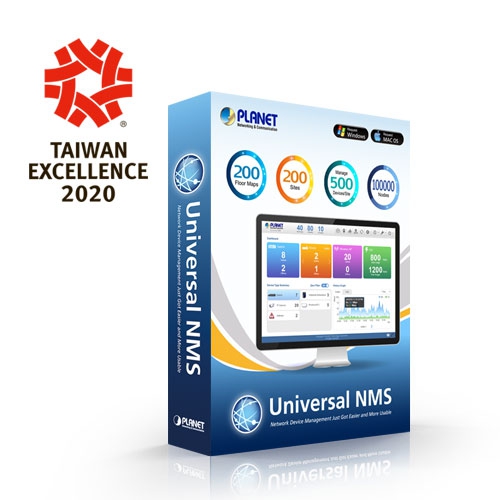
بيانات المنتج

  • رمز المنتج: UNI-NMS / UNI-NMS-LITE
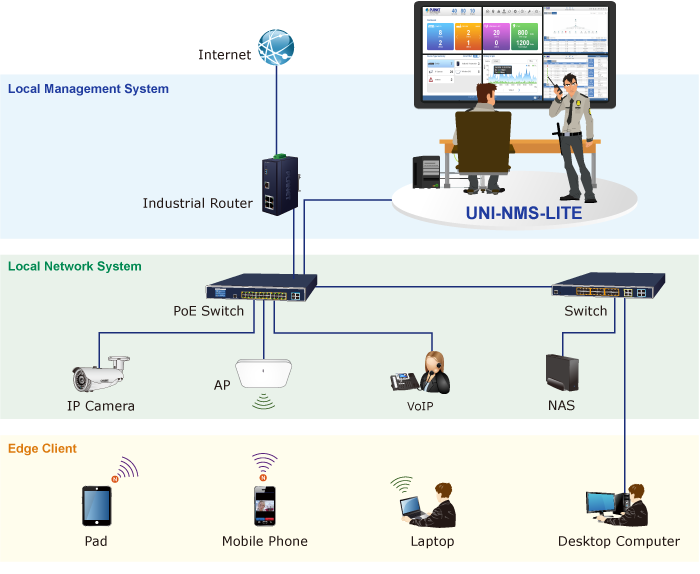
  • product_editor_4418_tab_content: <strong>حل اقتصادي لإدارة الشبكة المركزية للشركات الصغيرة والمتوسطة </strong> PLANET UNI-NMS-LITE helps service providers and IT managers control all PLANET network devices at the same time and enables administrators to effectively manage up to 100 managed nodes for free simultaneously without purchasing any license, hardware controller and expensive annual subscription fee.   The administrator can automatically discover and configure device profiles, batch provisioning/firmware upgrade, and built-in SAPC (Smart AP Control) that customize Wi-Fi planning against floor maps, and monitor all managed APs through single web-based interface. It allows operating across different platforms through virtualization software. Such design avoids the need to configure the wireless APs one by one and provides more profits to SMB users.   <p style="text-align: center;"><img src="https://www.planet.com.sa/wp-content/uploads/2025/01/UNI-NMS-LITE-11.png" alt="" width="700" height="575" /></p> <p style="text-align: left;"></p> <p style="text-align: left;"><strong>[ملاحظات]</strong></p> <p style="padding-left: 30px;"><strong>جهاز التوجيه: </strong> قم بتسجيل الدخول إلى واجهة مستخدم الويب الخاصة بجهاز التوجيه و <strong>تفعيل بروتوكول إدارة الشبكة البسيط (SNMP)</strong> و <strong>Remote Management </strong>وظيفة.</p> <p style="padding-left: 30px;"><strong>يُحوّل:</strong> قم بتسجيل الدخول إلى واجهة مستخدم الويب الخاصة بالمفتاح و <strong>تفعيل بروتوكولي SNMP وLLDP</strong> و <strong>Remote Management</strong> وظيفة.</p> <p style="padding-left: 30px;"><strong>وكالة أسوشيتد برس:</strong> قم بتسجيل الدخول إلى واجهة مستخدم الويب الخاصة بـ AP لـ <strong>configure the AP to “Managed AP”.</strong> In support of SNMP AP,</p> <p style="padding-left: 30px;"><strong>تفعيل بروتوكول إدارة الشبكة البسيط (SNMP)</strong> وظيفة.</p> <p style="padding-left: 30px;"><strong>كاميرا IP:</strong> ال <strong>ONVIF</strong> هذه الخاصية مفعلة افتراضياً.</p> <p style="text-align: left; padding-left: 30px;"></p>
  • product_editor_4418_tab_enabled: نعم
  • product_editor_4418_tab_content_changed: نعم
  • product_editor_4418_tab_title: التطبيقات
  • product_editor_4421_tab_content: <ul> <li><strong>Dashboard: </strong>Providing the at-a-glance view of system, device summary, traffic, and PoE network status</li> <li><strong>Setup Wizard:</strong>  إرشادات سهلة الاستخدام خطوة بخطوة</li> <li><strong>Node Discovery:  </strong>للكشف عن الأجهزة المُدارة بواسطة PLANET والمتاحة، والسماح بتجميع نقاط الوصول لتسريع إدارة نقاط الوصول.</li> <li><strong>Topology Viewer:  </strong>مخطط طوبولوجيا لأجهزة الشبكة المتوافقة مع بروتوكولات SNMP و ONVIF و Smart Discovery و LLTD</li> <li><strong>Switch Virtual Panel (*1):  </strong>To show switch panel and easily configure the switch. Show PoE/Traffic usage statistical history graph form each port and total</li> <li><strong>IP Cam Snapshot (*1):  </strong>Quickly snapshot button for plant IP camera</li> <li><strong>Event Reports: </strong> The status of a network can be reported via network alarm, and system log</li> <li><strong>Batch Provisioning:</strong>  Enabling multiple APs to be configured and upgraded at one time by using the designated profile.</li> <li><strong>Coverage Heat Map: </strong> تغطية إشارة نقاط الوصول في الوقت الفعلي على خريطة الطابق التي يحددها المستخدم لتحسين نشر شبكة Wi-Fi الميدانية</li> <li><strong>Customized Profile: </strong> السماح بإنشاء وصيانة ملفات تعريف لاسلكية متعددة</li> <li><strong>Auto Provision: </strong> توفير نقاط وصول متعددة بنقرة واحدة</li> <li><strong>Cluster Management: </strong> تبسيط إدارة نقاط البيع عالية الكثافة</li> <li><strong>Zone Plan: </strong> تحسين نشر نقاط الوصول مع تغطية الإشارة الفعلية</li> <li><strong>Scalability:</strong>  إمكانية ترقية النظام مجانًا وترقية البرامج الثابتة لنقاط الوصول بشكل جماعي</li> </ul> Remark: *1 New features will be added through system updates.
  • product_editor_4421_tab_enabled: نعم
  • product_editor_4421_tab_content_changed: نعم
  • product_editor_4421_tab_title: الميزات الرئيسية
  • product_editor_4422_tab_content:   <div class="table-responsive"> <table class="common_table_sky" style="width: 100%;"> <thead> <tr> <th colspan="2">UNI-NMS-LITE Management Features (of PLANET managed devices)</th> </tr> </thead> <tbody> <tr> <td class="align-middle">Maximum Managed Nodes</td> <td>100</td> </tr> <tr> <td class="align-middle">Maximum AP Groups</td> <td>8</td> </tr> <tr> <td class="align-middle">Maximum APs per AP Group</td> <td>100 (limited to the same model)</td> </tr> <tr> <td class="align-middle">Maximum SSID Profiles</td> <td>8</td> </tr> <tr> <td class="align-middle">Maximum Radio Profiles</td> <td>8</td> </tr> <tr> <td class="align-middle">Maximum Concurrent Clients</td> <td>400+</td> </tr> <tr> <td class="align-middle">Maximum Floor Maps</td> <td>1</td> </tr> <tr> <td class="align-middle">Compatible Devices</td> <td>Support PLANET MQTT, SNMP, ONVIF and Smart Discovery Products</td> </tr> <tr> <td class="align-middle">Centralized Network Devices Management</td> <td>■ Auto discovery of devices with one touch ■ Device list with filtering function ■ Remotely control each managed device via hyperlink ■ Switch virtual panel with configuration function (*1) ■ Easy to build multiple sites in a network ■ Topology view of each site of network devices with LLDP Protocol (*2) ■ Event report on site issues via system log and syslog ■ Device alive checking ■ AP controller (SAPC Software function) ■ Floor map viewing ■ Dashboard viewing</td> </tr> </tbody> <thead> <tr> <th colspan="2">Wireless AP Controller Features</th> </tr> </thead> <tbody> <tr> <td class="align-middle">Centralized AP Management</td> <td>■ AP group management (bulk provision, upgrade, reboot, LED control) ■ AP provisioning ■ AP SSID, radio configuration ■ AP bulk firmware up grade ■ Remote AP power reboot ■ Floor map viewing ■ Floor map import, custom map export* ■ Real-time AP signal coverage display ■ Real-time AP and wireless client status monitoring ■ Real-time graphical statistics viewing ■ Real-time wireless channel distribution</td> </tr> <tr> <td class="align-middle">نوع التشفير</td> <td>64-/128-bit WEP, WPA, WPA-PSK, WPA2, WPA2-PSK, 802.1x Authentication</td> </tr> <tr> <td class="align-middle">أمان لاسلكي</td> <td>Enable/Disable SSID Broadcast AP Isolation</td> </tr> <tr> <td class="align-middle">Multiple SSIDs per Frequency Band</td> <td>Up to 4</td> </tr> <tr> <td class="align-middle">RF Control</td> <td>Output power Auto channel Traffic shaping per frequency band IAPP L2 roaming</td> </tr> </tbody> <thead> <tr> <th colspan="2">System Management Features</th> </tr> </thead> <tbody> <tr> <td class="align-middle">Management Interface</td> <td>Web-based user interface</td> </tr> <tr> <td class="align-middle">إدارة النظام</td> <td>Management IP/port Login account modification System upgrade</td> </tr> <tr> <td class="align-middle">Supported Display Type</td> <td>Switch, Industrial switch, Media Conversion, Wireless (AP), VoIP, IP Camera</td> </tr> </tbody> <thead> <tr> <th colspan="2">System Requirements</th> </tr> </thead> <tbody> <tr> <td class="align-middle">Minimum Hardware Requirements</td> <td>CPU: Intel Core i5 3.4 GHz dual-core or above RAM: minimum 4 GB HDD: 40 GB (Actual requirement is dependent on log size)</td> </tr> <tr> <td class="align-middle">OS Supported</td> <td>Microsoft Windows 7/8/8.1/10 Mac OS X 10.8/10.9/10.10/10.11 (*1) Note: Supported OS is dependent on virtualization product</td> </tr> <tr> <td class="align-middle">Virtualization</td> <td>Oracle VirtualBox 6.1 or later</td> </tr> <tr> <td class="align-middle">Browser Supported</td> <td>Chrome 31.0 or later Firefox 34.0 or later</td> </tr> <tr> <td class="align-middle"></td> <td><b>Remarks:</b> <b>*1 New features will be added through system updates</b>. <b>*2 Topology ring display</b></td> </tr> </tbody> </table> </div>
  • product_editor_4422_tab_enabled: نعم
  • product_editor_4422_tab_content_changed: نعم
  • product_editor_4422_tab_title: تحديد
  • عدد مشاهدات منشورات ekit: 757
  • product_editor_4418_tab_sticky_width: pw-content-1
  • product_editor_4418_tab_sticky_position: pw-left-stick
  • product_editor_4421_tab_sticky_width: pw-content-1
  • product_editor_4421_tab_sticky_position: pw-left-stick
  • product_editor_4422_tab_sticky_width: pw-content-1
  • product_editor_4422_tab_sticky_position: pw-left-stick
  • product_editor_4423_tab_content:
  • product_editor_4423_tab_content_changed: نعم
  • product_editor_4423_tab_enabled: نعم
  • product_editor_4423_tab_title: التنزيلات
  • product_editor_4423_tab_sticky_width: pw-content-1
  • product_editor_4423_tab_sticky_height: 1
  • product_editor_4423_tab_sticky_position: pw-left-stick
  • product_editor_4424_tab_content:
  • product_editor_4424_tab_content_changed: نعم
  • product_editor_4424_tab_enabled: نعم
  • product_editor_4424_tab_title: المنتجات ذات الصلة
  • product_editor_4424_tab_sticky_width: pw-content-1
  • product_editor_4424_tab_sticky_height: 1
  • product_editor_4424_tab_sticky_position: pw-left-stick
  • إجمالي المبيعات: 0
  • جدول الملحقات: <div class="table-responsive"></div> <table class="common_table"> <thead> <tr> <th colspan="2">معلومات الطلب</th> </tr> </thead> <tbody> <tr> <td class="text-center align-middle"> <h3 class="h6 m-0">NMS-500</h3> </td> <td>Universal Network Management Controller</td> </tr> <tr> <td class="text-center align-middle"> <h3 class="h6 m-0">NMS-1000V-10</h3> </td> <td>Universal Network Management Controller with 10” LCD Touch Screen</td> </tr> <tr> <td class="text-center align-middle"> <h3 class="h6 m-0">NMS-1000V-12</h3> </td> <td>Universal Network Management Controller with 12” LCD Touch Screen</td> </tr> </tbody> </table>                                          
  • product_label:
  • prouduct_loop_image_transparent_bg_:
  • 6_features_images:
  • datasheet_0_date: 20211112
  • datasheet_0_version: 1.0
  • وصف ورقة البيانات 0: UNI-NMS-LITE
  • datasheet_0_download_pdf: https://www.planet.com.sa/storage/products/UNI-NMS-LITE/C-UNI-NMS-LITE_v1.1_L.pdf
  • ورقة البيانات: 1
  • quick_guide_0_date: 20210427
  • quick_guide_0_version: 1.0
  • quick_guide_0_description: UNI-NMS-LITE Initial release. (Software download link, please refer to Installation Guide & Quick User Guide)
  • quick_guide_0_download_pdf: https://www.planet.com.sa/storage/products/UNI-NMS-LITE/FW-UNI-NMS-LITE_v1.0b211018.zip
  • دليل سريع: 1
  • دليل المستخدم:
  • ec_declaration:
  • تطبيق أندرويد:
  • السائق:
  • firmware_0_date: 20211105
  • firmware_0_version: 1.0b211018
  • firmware_0_description: [UNI-NMS-LITE] Supports PLANET devices up to 100 nodes.
  • firmware_0_download_pdf: https://www.planet.com.sa/storage/products/UNI-NMS-LITE/UNI-NMS-LITE-Software%20Installation%20Guide%20and%20Quick%20User%20Guide_v1.0.pdf
  • البرامج الثابتة: 1
  • جدوى:
  • قائمة_التوافق:
  • تخطيط الشريط الجانبي للموقع: تقصير
  • ast-site-content-layout: تقصير
  • نمط محتوى الموقع: تقصير
  • نمط الشريط الجانبي للموقع: تقصير
  • theme-transparent-header-meta: تقصير
  • علامة تبويب التطبيقات: <strong>حل اقتصادي لإدارة الشبكة المركزية للشركات الصغيرة والمتوسطة </strong> PLANET UNI-NMS-LITE helps service providers and IT managers control all PLANET network devices at the same time and enables administrators to effectively manage up to 100 managed nodes for free simultaneously without purchasing any license, hardware controller and expensive annual subscription fee.   The administrator can automatically discover and configure device profiles, batch provisioning/firmware upgrade, and built-in SAPC (Smart AP Control) that customize Wi-Fi planning against floor maps, and monitor all managed APs through single web-based interface. It allows operating across different platforms through virtualization software. Such design avoids the need to configure the wireless APs one by one and provides more profits to SMB users.   <p style="text-align: center;"><img src="https://www.planet.com.sa/wp-content/uploads/2025/01/UNI-NMS-LITE-11.png" alt="" width="700" height="575" /></p> <p style="text-align: left;"></p> <p style="text-align: left;"><strong>[ملاحظات]</strong></p> <p style="padding-left: 30px;"><strong>جهاز التوجيه: </strong> قم بتسجيل الدخول إلى واجهة مستخدم الويب الخاصة بجهاز التوجيه و <strong>تفعيل بروتوكول إدارة الشبكة البسيط (SNMP)</strong> و <strong>Remote Management </strong>وظيفة.</p> <p style="padding-left: 30px;"><strong>يُحوّل:</strong> قم بتسجيل الدخول إلى واجهة مستخدم الويب الخاصة بالمفتاح و <strong>تفعيل بروتوكولي SNMP وLLDP</strong> و <strong>Remote Management</strong> وظيفة.</p> <p style="padding-left: 30px;"><strong>وكالة أسوشيتد برس:</strong> قم بتسجيل الدخول إلى واجهة مستخدم الويب الخاصة بـ AP لـ <strong>configure the AP to “Managed AP”.</strong> In support of SNMP AP,</p> <p style="padding-left: 30px;"><strong>تفعيل بروتوكول إدارة الشبكة البسيط (SNMP)</strong> وظيفة.</p> <p style="padding-left: 30px;"><strong>كاميرا IP:</strong> ال <strong>ONVIF</strong> هذه الخاصية مفعلة افتراضياً.</p> <p style="text-align: left; padding-left: 30px;"></p>
  • key_features_tab: <ul> <li><strong>Dashboard: </strong>Providing the at-a-glance view of system, device summary, traffic, and PoE network status</li> <li><strong>Setup Wizard:</strong>  إرشادات سهلة الاستخدام خطوة بخطوة</li> <li><strong>Node Discovery:  </strong>للكشف عن الأجهزة المُدارة بواسطة PLANET والمتاحة، والسماح بتجميع نقاط الوصول لتسريع إدارة نقاط الوصول.</li> <li><strong>Topology Viewer:  </strong>مخطط طوبولوجيا لأجهزة الشبكة المتوافقة مع بروتوكولات SNMP و ONVIF و Smart Discovery و LLTD</li> <li><strong>Switch Virtual Panel (*1):  </strong>To show switch panel and easily configure the switch. Show PoE/Traffic usage statistical history graph form each port and total</li> <li><strong>IP Cam Snapshot (*1):  </strong>Quickly snapshot button for plant IP camera</li> <li><strong>Event Reports: </strong> The status of a network can be reported via network alarm, and system log</li> <li><strong>Batch Provisioning:</strong>  Enabling multiple APs to be configured and upgraded at one time by using the designated profile.</li> <li><strong>Coverage Heat Map: </strong> تغطية إشارة نقاط الوصول في الوقت الفعلي على خريطة الطابق التي يحددها المستخدم لتحسين نشر شبكة Wi-Fi الميدانية</li> <li><strong>Customized Profile: </strong> السماح بإنشاء وصيانة ملفات تعريف لاسلكية متعددة</li> <li><strong>Auto Provision: </strong> توفير نقاط وصول متعددة بنقرة واحدة</li> <li><strong>Cluster Management: </strong> تبسيط إدارة نقاط البيع عالية الكثافة</li> <li><strong>Zone Plan: </strong> تحسين نشر نقاط الوصول مع تغطية الإشارة الفعلية</li> <li><strong>Scalability:</strong>  إمكانية ترقية النظام مجانًا وترقية البرامج الثابتة لنقاط الوصول بشكل جماعي</li> </ul>   Remark: *1 New features will be added through system updates.
  • علامة تبويب المواصفات: <table class="common_table_sky" style="width: 100%;"> <thead> <tr> <th colspan="2">UNI-NMS-LITE Management Features (of PLANET managed devices)</th> </tr> </thead> <tbody> <tr> <td class="align-middle">Maximum Managed Nodes</td> <td>100</td> </tr> <tr> <td class="align-middle">Maximum AP Groups</td> <td>8</td> </tr> <tr> <td class="align-middle">Maximum APs per AP Group</td> <td>100 (limited to the same model)</td> </tr> <tr> <td class="align-middle">Maximum SSID Profiles</td> <td>8</td> </tr> <tr> <td class="align-middle">Maximum Radio Profiles</td> <td>8</td> </tr> <tr> <td class="align-middle">Maximum Concurrent Clients</td> <td>400+</td> </tr> <tr> <td class="align-middle">Maximum Floor Maps</td> <td>1</td> </tr> <tr> <td class="align-middle">Compatible Devices</td> <td>Support PLANET MQTT, SNMP, ONVIF and Smart Discovery Products</td> </tr> <tr> <td class="align-middle">Centralized Network Devices Management</td> <td>■ Auto discovery of devices with one touch ■ Device list with filtering function ■ Remotely control each managed device via hyperlink ■ Switch virtual panel with configuration function (*1) ■ Easy to build multiple sites in a network ■ Topology view of each site of network devices with LLDP Protocol (*2) ■ Event report on site issues via system log and syslog ■ Device alive checking ■ AP controller (SAPC Software function) ■ Floor map viewing ■ Dashboard viewing</td> </tr> </tbody> <thead> <tr> <th colspan="2">Wireless AP Controller Features</th> </tr> </thead> <tbody> <tr> <td class="align-middle">Centralized AP Management</td> <td>■ AP group management (bulk provision, upgrade, reboot, LED control) ■ AP provisioning ■ AP SSID, radio configuration ■ AP bulk firmware up grade ■ Remote AP power reboot ■ Floor map viewing ■ Floor map import, custom map export* ■ Real-time AP signal coverage display ■ Real-time AP and wireless client status monitoring ■ Real-time graphical statistics viewing ■ Real-time wireless channel distribution</td> </tr> <tr> <td class="align-middle">نوع التشفير</td> <td>64-/128-bit WEP, WPA, WPA-PSK, WPA2, WPA2-PSK, 802.1x Authentication</td> </tr> <tr> <td class="align-middle">أمان لاسلكي</td> <td>Enable/Disable SSID Broadcast AP Isolation</td> </tr> <tr> <td class="align-middle">Multiple SSIDs per Frequency Band</td> <td>Up to 4</td> </tr> <tr> <td class="align-middle">RF Control</td> <td>Output power Auto channel Traffic shaping per frequency band IAPP L2 roaming</td> </tr> </tbody> <thead> <tr> <th colspan="2">System Management Features</th> </tr> </thead> <tbody> <tr> <td class="align-middle">Management Interface</td> <td>Web-based user interface</td> </tr> <tr> <td class="align-middle">إدارة النظام</td> <td>Management IP/port Login account modification System upgrade</td> </tr> <tr> <td class="align-middle">Supported Display Type</td> <td>Switch, Industrial switch, Media Conversion, Wireless (AP), VoIP, IP Camera</td> </tr> </tbody> <thead> <tr> <th colspan="2">System Requirements</th> </tr> </thead> <tbody> <tr> <td class="align-middle">Minimum Hardware Requirements</td> <td>CPU: Intel Core i5 3.4 GHz dual-core or above RAM: minimum 4 GB HDD: 40 GB (Actual requirement is dependent on log size)</td> </tr> <tr> <td class="align-middle">OS Supported</td> <td>Microsoft Windows 7/8/8.1/10 Mac OS X 10.8/10.9/10.10/10.11 (*1) Note: Supported OS is dependent on virtualization product</td> </tr> <tr> <td class="align-middle">Virtualization</td> <td>Oracle VirtualBox 6.1 or later</td> </tr> <tr> <td class="align-middle">Browser Supported</td> <td>Chrome 31.0 or later Firefox 34.0 or later</td> </tr> </tbody> </table>
  • astra-migrate-meta-layouts: تعيين
  • rank_math_news_sitemap_robots: فِهرِس
  • rank_math_robots: a:1:{i:0;s:5:"index";}
  • rank_math_internal_links_processed: 1

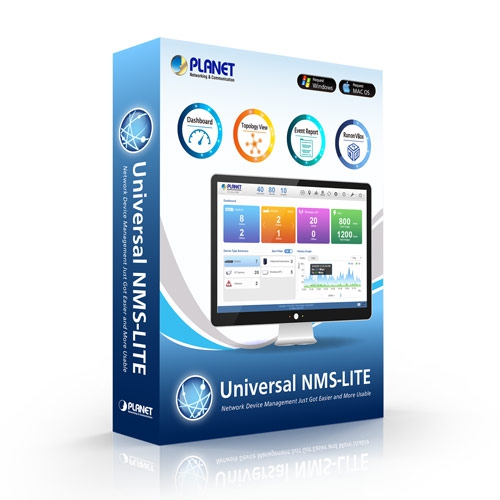
برنامج نظام إدارة الشبكة العالمي (النسخة الخفيفة)

» UNI-NMS / UNI-NMS-LITE

Universal Network Management System for Central Management

PLANET’s Universal Network Management System (UNI-NMS-LITE) incorporated in a workstation or PC can monitor all the deployed wired or wireless PoE industrial–grade network devices, such as managed switches, media converters, routers, smart APs, VoIP phones, IP cameras, etc. compliant with the MQTT Protocol, SNMP Protocol, ONVIF Protocol and PLANET Smart Discovery utility. It thus enables the administrator to centrally manage the network from a central office, greatly boosting network and power management efficiency. With its user authentication management, the UNI-NMS series enhances data transmission security in the modern network automation systems.
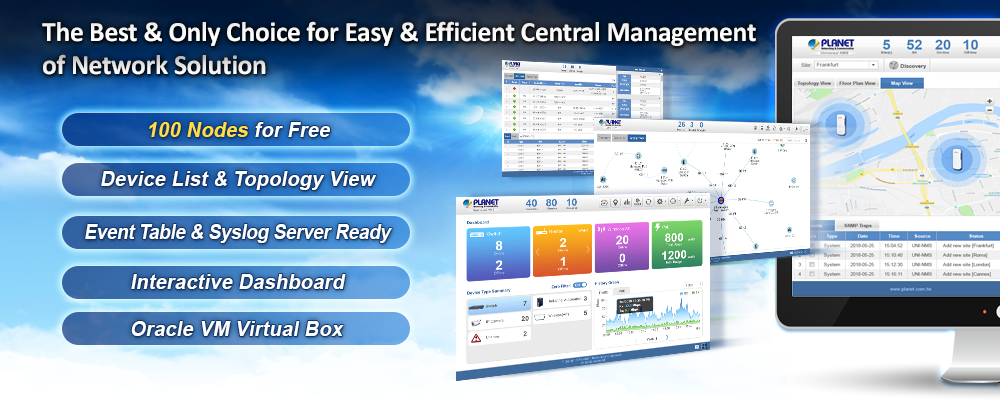
UNI NMS LITE 9

شاهد الشبكة في غضون دقائق

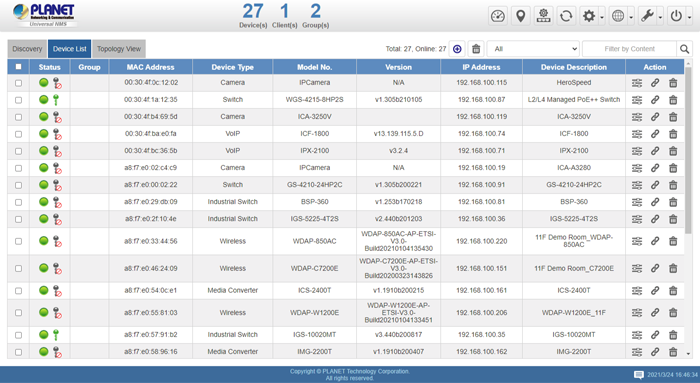
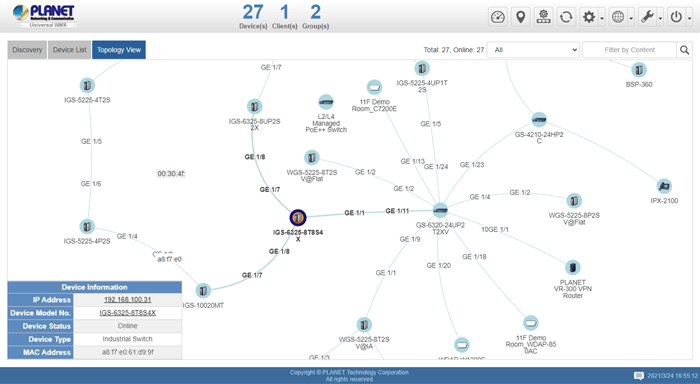
The domain information web page presents a managed devices list and topology view, providing the at-a-glance and efficient summary of your management network. It lets you have a valuable information on the current wired and wireless network statuses via data-driven graphical charts. The topology view and event reports enable you to visualize the system usage and node status in real time so as to address whatever issue they may have.
 

UNI NMS LITE 52

 UNI NMS LITE 61


Switch Virtual Panel with Configuration Function

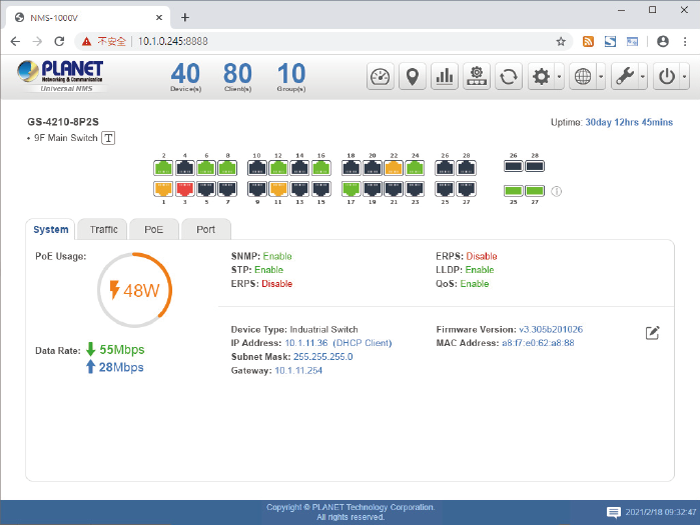
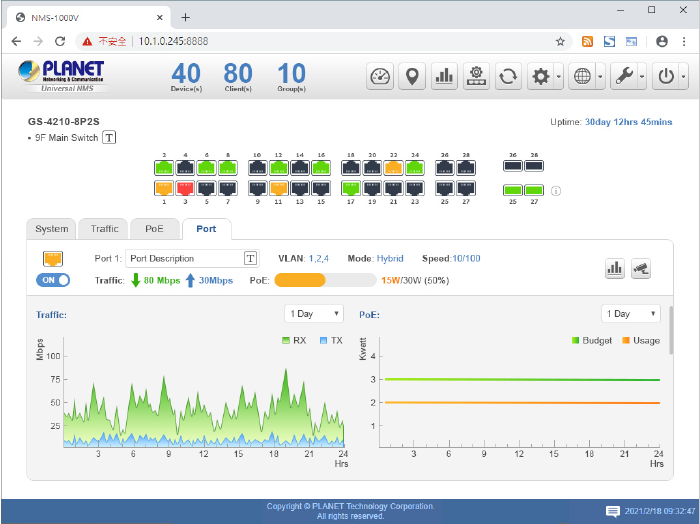
ال UNI-NMS series enhances the switch by showing more information from devices list info. icon. It provides administrator with a faster way to manage switch and easily configure the system in NMS web UI. It also offers the PoE/Traffic usage statistical history graph from each port. If the network site has PLANET IP camera in device list, it can quickly do a snapshot of the video status on the site.
 

UNI NMS LITE 7

UNI NMS LITE 8


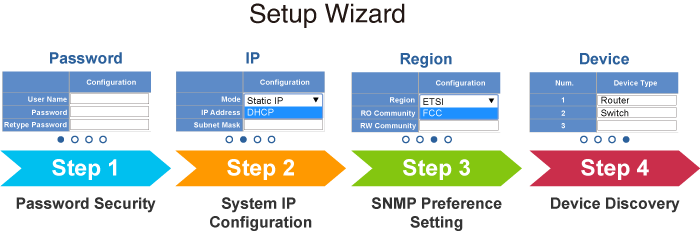
معالج إعداد سهل الاستخدام

ال UNI-NMS-LITE enhances user experience by providing more user-friendly wizard and clear step-by-step guidance on each related function. Just like an app, it reduces training time and allows even non-technical users to be able to set up management network system within minutes.


NMS 1000V 21


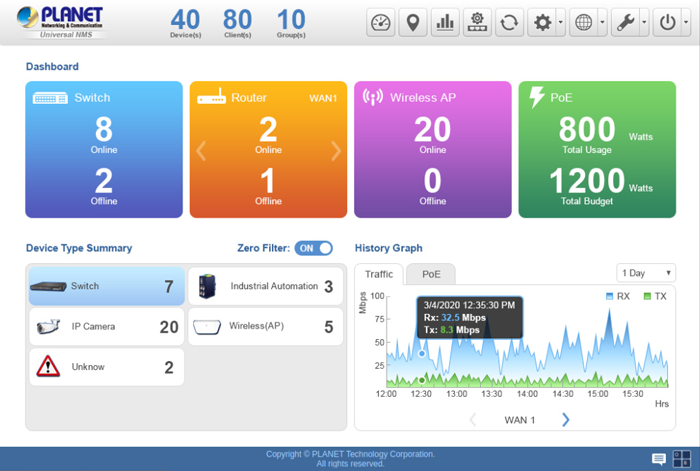
Interactive Dashboard Shows Network Statuses in an Instant 

ال UNI-NMS-LITE’s interactive dashboard includes local site network router, switch, access point statistics and WAN traffic/PoE history graph. The administrator can quickly view the status of a device, knowing whether it is online or offline. An alert through the pop-up message can be seen on the touch panel, immediately knowing what the system event is and where the disconnection issue comes from.


NMS 1000V 6


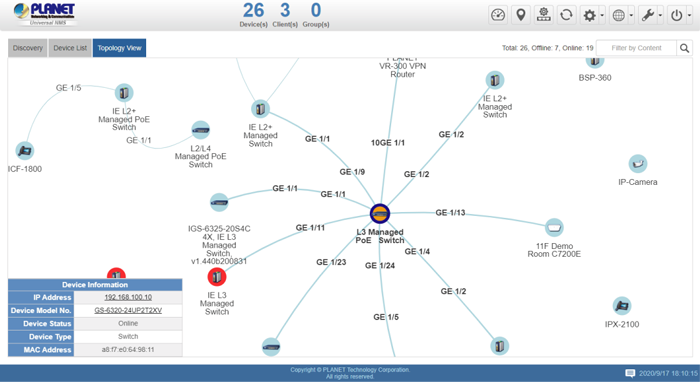
Real-time Centralized Monitoring

As the UNI-NMS-LITE can come out with a topology view of the network of the deployed powered devices, it enables to detect which device is online (Blue) or offline (أحمر). The real-time centralized monitoring of these devices can help the administrator know what the current statuses of these devices are.
 

UNI NMS LITE 31

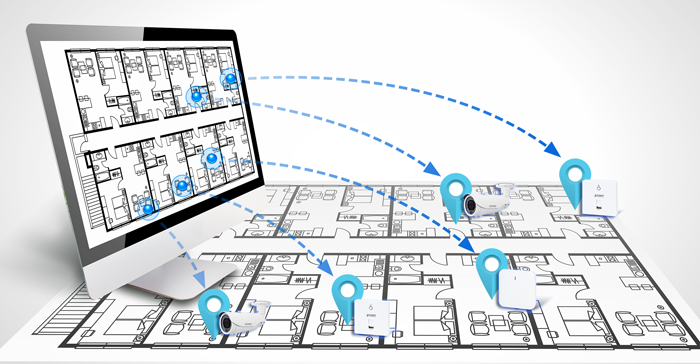
تحسين نشر شبكة Wi-Fi باستخدام خرائط الطوابق 

بفضل خرائط الأرضيات، يُمكن تحديد مواقع الأجهزة وفقًا لتوزيعها الميداني، مما يوفر الوقت والجهد المبذولين في الدعم والمراقبة الميدانية. تُعرض الحالة الراهنة للأجهزة في الوقت الفعلي، وتُظهر خريطة الكثافة تغطية إشارة الشبكة اللاسلكية وقوتها، مما يُساعد المسؤول على ضبط تداخل الأجهزة المتجاورة بدقة في أي وقت لتحسين أداء الشبكة اللاسلكية.
 

 NMS 500 5

Browser-based Control on VM Eliminates Limitation of OS

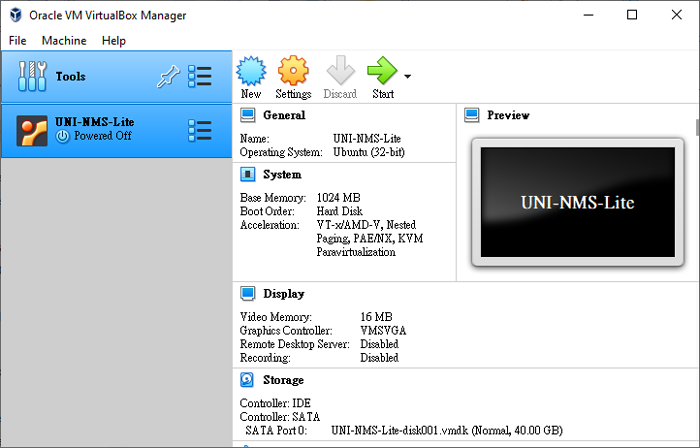
Designed to provide more flexibility, the UNI-NMS-LITE utilizes the Oracle VM VirtualBox technology to enable to import software image under different OS platforms, capable of operating from anywhere via web browser and network adapter that are able to access managed nodes on a DHCP-enabled network, thus controlling multiple devices through single PC, laptop or tablet which eliminates the hardware limitation of general hardware controllers. For better performance and more scalability, users just need to upgrade the personal equipment without replacing the original hardware controller. PLANET UNI-NMS-LITE is a value-added software which makes your network central management solution more efficient without any hardware installation and extra expensive budget.

※ Using Chrome browser is recommended.
UNI NMS LITE 4

حل اقتصادي لإدارة الشبكة المركزية للشركات الصغيرة والمتوسطة 

PLANET UNI-NMS-LITE helps service providers and IT managers control all PLANET network devices at the same time and enables administrators to effectively manage up to 100 managed nodes for free simultaneously without purchasing any license, hardware controller and expensive annual subscription fee.


The administrator can automatically discover and configure device profiles, batch provisioning/firmware upgrade, and built-in SAPC (Smart AP Control) that customize Wi-Fi planning against floor maps, and monitor all managed APs through single web-based interface. It allows operating across different platforms through virtualization software. Such design avoids the need to configure the wireless APs one by one and provides more profits to SMB users.


[ملاحظات]

جهاز التوجيه:  قم بتسجيل الدخول إلى واجهة مستخدم الويب الخاصة بجهاز التوجيه و تفعيل بروتوكول إدارة الشبكة البسيط (SNMP) و Remote Management وظيفة.

يُحوّل: قم بتسجيل الدخول إلى واجهة مستخدم الويب الخاصة بالمفتاح و تفعيل بروتوكولي SNMP وLLDP و Remote Management وظيفة.

وكالة أسوشيتد برس: قم بتسجيل الدخول إلى واجهة مستخدم الويب الخاصة بـ AP لـ configure the AP to “Managed AP”. In support of SNMP AP,

تفعيل بروتوكول إدارة الشبكة البسيط (SNMP) وظيفة.

كاميرا IP: ال ONVIF هذه الخاصية مفعلة افتراضياً.

  • Dashboard: Providing the at-a-glance view of system, device summary, traffic, and PoE network status
  • Setup Wizard:  إرشادات سهلة الاستخدام خطوة بخطوة
  • Node Discovery:  للكشف عن الأجهزة المُدارة بواسطة PLANET والمتاحة، والسماح بتجميع نقاط الوصول لتسريع إدارة نقاط الوصول.
  • Topology Viewer:  مخطط طوبولوجيا لأجهزة الشبكة المتوافقة مع بروتوكولات SNMP و ONVIF و Smart Discovery و LLTD
  • Switch Virtual Panel (*1):  To show switch panel and easily configure the switch. Show PoE/Traffic usage statistical history graph form each port and total
  • IP Cam Snapshot (*1):  Quickly snapshot button for plant IP camera
  • Event Reports:  The status of a network can be reported via network alarm, and system log
  • Batch Provisioning:  Enabling multiple APs to be configured and upgraded at one time by using the designated profile.
  • Coverage Heat Map:  تغطية إشارة نقاط الوصول في الوقت الفعلي على خريطة الطابق التي يحددها المستخدم لتحسين نشر شبكة Wi-Fi الميدانية
  • Customized Profile:  السماح بإنشاء وصيانة ملفات تعريف لاسلكية متعددة
  • Auto Provision:  توفير نقاط وصول متعددة بنقرة واحدة
  • Cluster Management:  تبسيط إدارة نقاط البيع عالية الكثافة
  • Zone Plan:  تحسين نشر نقاط الوصول مع تغطية الإشارة الفعلية
  • Scalability:  إمكانية ترقية النظام مجانًا وترقية البرامج الثابتة لنقاط الوصول بشكل جماعي

  Remark: *1 New features will be added through system updates.

UNI-NMS-LITE Management Features (of PLANET managed devices)
Maximum Managed Nodes100
Maximum AP Groups8
Maximum APs per AP Group100 (limited to the same model)
Maximum SSID Profiles8
Maximum Radio Profiles8
Maximum Concurrent Clients400+
Maximum Floor Maps1
Compatible DevicesSupport PLANET MQTT, SNMP, ONVIF and Smart Discovery Products
Centralized Network Devices Management■ Auto discovery of devices with one touch
■ Device list with filtering function
■ Remotely control each managed device via hyperlink
■ Switch virtual panel with configuration function (*1)
■ Easy to build multiple sites in a network
■ Topology view of each site of network devices with LLDP Protocol (*2)
■ Event report on site issues via system log and syslog
■ Device alive checking
■ AP controller (SAPC Software function)
■ Floor map viewing
■ Dashboard viewing
Wireless AP Controller Features
Centralized AP Management■ AP group management (bulk provision, upgrade, reboot, LED control)
■ AP provisioning
■ AP SSID, radio configuration
■ AP bulk firmware up grade
■ Remote AP power reboot
■ Floor map viewing
■ Floor map import, custom map export*
■ Real-time AP signal coverage display
■ Real-time AP and wireless client status monitoring
■ Real-time graphical statistics viewing
■ Real-time wireless channel distribution
نوع التشفير64-/128-bit WEP, WPA, WPA-PSK, WPA2, WPA2-PSK, 802.1x Authentication
أمان لاسلكيتفعيل/تعطيل بث اسم الشبكة اللاسلكية (SSID)
AP Isolation
Multiple SSIDs per Frequency BandUp to 4
RF ControlOutput power
Auto channel
Traffic shaping per frequency band
IAPP L2 roaming
System Management Features
Management InterfaceWeb-based user interface
إدارة النظامManagement IP/port
Login account modification
System upgrade
Supported Display TypeSwitch, Industrial switch, Media Conversion, Wireless (AP), VoIP, IP Camera
System Requirements
Minimum Hardware RequirementsCPU: Intel Core i5 3.4 GHz dual-core or above
RAM: minimum 4 GB
HDD: 40 GB (Actual requirement is dependent on log size)
OS SupportedMicrosoft Windows 7/8/8.1/10
Mac OS X 10.8/10.9/10.10/10.11 (*1)
Note: Supported OS is dependent on virtualization product
VirtualizationOracle VirtualBox 6.1 or later
Browser SupportedChrome 31.0 or later
Firefox 34.0 or later
تاريخإصداروصفتحميل
2021/12/111.0

UNI-NMS-LITE

Download Icon
تاريخإصداروصفتحميل
2021/27/041.0

UNI-NMS-LITE Initial release. (Software download link, please refer to Installation Guide & Quick User Guide)

Download Icon
تاريخإصداروصفتحميل
2021/05/111.0b211018

[UNI-NMS-LITE]
Supports PLANET devices up to 100 nodes.

Download Icon

معلومات الطلب

UNI-NMS / UNI-NMS-LITE

برنامج نظام إدارة الشبكة العالمي (النسخة الخفيفة)

معلومات الطلب

NMS-500

Universal Network Management Controller

NMS-1000V-10

Universal Network Management Controller with 10” LCD Touch Screen

NMS-1000V-12

Universal Network Management Controller with 12” LCD Touch Screen
                                         
✉

انضم إلى قائمتنا البريدية

احصل على آخر الأخبار والعروض والتحديثات من شركة بلانيت تكنولوجي مباشرة إلى بريدك الإلكتروني.

نحن نحترم خصوصيتك. يمكنك إلغاء الاشتراك في أي وقت.

اشترك في النشرة الإخبارية الإلكترونية لـ PLANET

احصل على أحدث معلومات المنتجات وأخبار الشركة!