

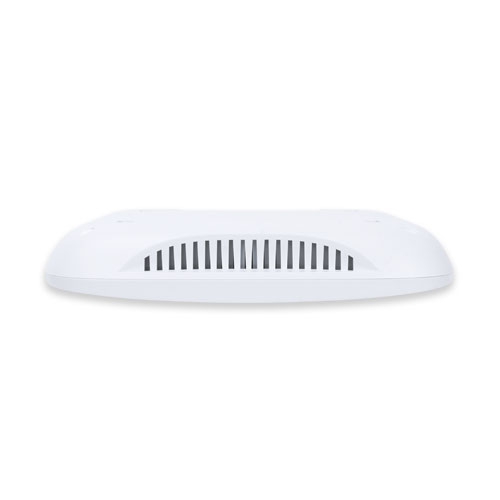
بيانات المنتج

  • رمز المنتج: WDAP-C7210E
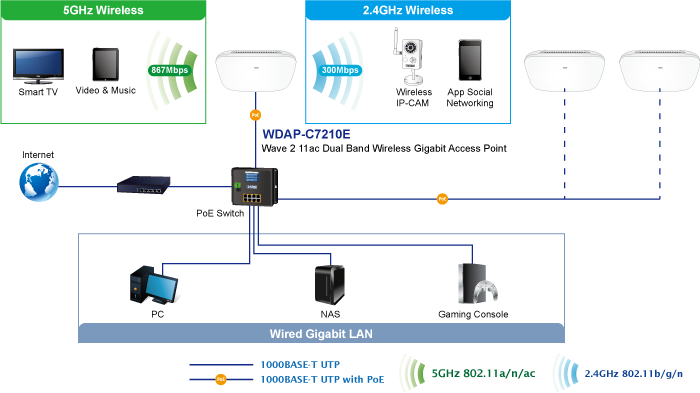
  • product_editor_4418_tab_content: <strong>Extremely High Speed and Dual Band Make Wi-Fi Transmission More Powerful</strong> The WDAP-C7210E delivers the Dual Band technology to avoid signal interference and ensure the best Wi-Fi performance. It allows you to check e-mails and surf the Internet via the 2.4GHz band and simultaneously watch High-Definition (HD) video or any other multimedia application via 5GHz band. Moreover, the Gigabit Ethernet port of the WDAP-C7210E offers ultra-fast wired connections that utilize the maximum wireless bandwidth; therefore, users will have real wireless speed over 100Mbps. With outstanding stability of high-speed wireless transmission, the WDAP-C7210E can provide users with excellent experience in multimedia streaming with your mobile devices anywhere, anytime.   <p style="text-align: center;"><img src="https://www.planet.com.sa/wp-content/uploads/2025/01/WDAP-C7210E-71.png" alt="" width="700" height="393" /></p>
  • product_editor_4418_tab_enabled: نعم
  • product_editor_4418_tab_content_changed: نعم
  • product_editor_4418_tab_title: التطبيقات
  • product_editor_4421_tab_content: <strong>شبكة محلية لاسلكية وشبكة محلية متوافقة مع المعايير الصناعية</strong> <ul> <li>Compliant with the IEEE 802.11a/b/g/n/ac wireless technology</li> <li>Equipped with 10/100/1000Mbps RJ45 ports, auto MDI/MDI-X supported</li> </ul>   <strong>خصائص واجهة الترددات الراديوية</strong> <ul> <li>802.11ac Wave 2 2T2R MIMO architecture with data rate of up to 1200Mbps (300Mbps at 2.4GHz and 867Mbps at 5GHz)</li> <li>قدرة خرج عالية مع تحكم متعدد في قدرة الإرسال</li> </ul>   <strong>أوضاع تشغيل متعددة وميزات لاسلكية</strong> <ul> <li>Multiple operation modes: Access Point, Gateway, Repeater mode</li> <li>توفر تقنية WMM (الوسائط المتعددة عبر الواي فاي) أولوية أعلى لنقل الوسائط المتعددة عبر الشبكة اللاسلكية</li> <li>عتبة التغطية للحد من ضعف إشارة العملاء الذين يشغلون الجلسة</li> <li>مخطط تحليل قناة Wi-Fi في الوقت الفعلي والتحكم في حدود العملاء لتحسين الأداء</li> <li>يدعم التجوال السريع للأجهزة الطرفية باستخدام معايير 802.11k و802.11v و802.11r</li> </ul>   <strong>اتصال شبكة آمن</strong> <ul> <li>Full encryption supported: WAP-PSK/WPA2-PSK, WPA2-PSK, WPA2-PSK/ WPA3-PSK, WPA3-PSK, WPA/WPA2 Enterprise, WPA2 Enterprise and 802.1X RADIUS authentication</li> <li>يدعم بروتوكول VLAN 802.1Q وتعيين SSID إلى VLAN</li> <li>يدعم تصفية عناوين IP/المنافذ/عناوين MAC/عناوين URL، وهجمات حجب الخدمة (DoS)، وجدار الحماية SPI</li> <li>Supports DMZ and Port forwarding</li> <li>التحكم في عرض النطاق الترددي لكل عنوان IP لزيادة استقرار الشبكة</li> </ul>   <strong>Easy Deployment and Management</strong> <ul> <li>Supports PLANET AP Controllers in AP mode</li> <li>آلية الإصلاح الذاتي من خلال إعداد إعادة التشغيل التلقائي للنظام</li> <li>System status monitoring through remote syslog server</li> <li>Gateway mode supports PLANET DDNS/Easy DDNS, Captive Portal, RADIUS Server/Client</li> <li>أداة PLANET Smart Discovery لإدارة عمليات النشر</li> <li>PLANET NMS system and CloudViewer for deployment management at the same time</li> </ul>
  • product_editor_4421_tab_enabled: نعم
  • product_editor_4421_tab_content_changed: نعم
  • product_editor_4421_tab_title: الميزات الرئيسية
  • product_editor_4422_tab_content:   <div class="table-responsive"> <table class="common_table_sky" style="width: 100%;"> <thead> <tr> <th colspan="2">مواصفات الأجهزة</th> </tr> </thead> <tbody> <tr> <td class="align-middle">واجهات</td> <td>LAN 2 x 10/100/1000BASE-T RJ45 port Auto-negotiation and auto MDI/MDI-X</td> </tr> <tr> <td class="align-middle">Antennas</td> <td>Gain:2 x 2.4GHz internal 5dBi antenna, 2 x 5GHz internal 4dBi antenna</td> </tr> <tr> <td class="align-middle">زر إعادة الضبط</td> <td>Reset button on the rear side (Press over 7 seconds to reset the device to factory default)</td> </tr> <tr> <td class="align-middle">مؤشرات LED</td> <td>SYS, 2.4GHz, 5GHz</td> </tr> <tr> <td class="align-middle">الأبعاد (العرض × العمق × الارتفاع)</td> <td>186 x 186 x 35.8mm</td> </tr> <tr> <td class="align-middle">وزن</td> <td>380 ±5g</td> </tr> <tr> <td class="align-middle">متطلبات الطاقة</td> <td>48V DC IN, 0.5A, IEEE 802.3at PoE+ or 12V DC IN, 1.0</td> </tr> <tr> <td class="align-middle">استهلاك الطاقة</td> <td>< 12W</td> </tr> <tr> <td class="align-middle">التركيب</td> <td>Ceiling Mount</td> </tr> </tbody> <thead> <tr> <th colspan="2">Wireless Interface Specifications</th> </tr> </thead> <tbody> <tr> <td class="align-middle">معيار</td> <td>IEEE 802.11ac IEEE 802.11n IEEE 802.11a IEEE 802.11b IEEE 802.11g IEEE 802.11i IEEE 802.3 10BASE-T IEEE 802.3u 100BASE-TX IEEE 802.3ab 1000BASE-T IEEE 802.3x flow control IEEE 802.11k, 802.11v, and 802.11r</td> </tr> <tr> <td class="align-middle">التحكم في الوصول إلى الوسائط</td> <td>CSMA/CA</td> </tr> <tr> <td class="align-middle">Data Modulation</td> <td>802.11ac: OFDM (BPSK / QPSK / 16QAM / 64QAM / 256QAM) 802.11a/g/n: OFDM (BPSK / QPSK / 16QAM / 64QAM) 802.11b: DSSS (DBPSK / DQPSK / CCK)</td> </tr> <tr> <td class="align-middle">وضع النطاق</td> <td>2.4G / 5G concurrent mode</td> </tr> <tr> <td class="align-middle">نطاق التردد</td> <td><b>2.4GHz:</b> FCC: 2.412~2.462GHz ETSI: 2.412~2.472GHz <b>5GHz:</b> FCC: 5.180~5.32240GHz, 5.500745~5.825GHz ETSI: 5.180~5.320GHz, 5.500~5.180~5.700GHz</td> </tr> <tr> <td class="align-middle">قنوات التشغيل</td> <td><b>2.4GHz: </b> FCC: 1, 2, 3, 4, 5, 6, 7, 8, 9, 10, 11 ETSI: 1, 2, 3, 4, 5, 6, 7, 8, 9, 10, 11, 12, 13 <b>5GHz:</b> FCC: 36, 40, 44, 48, 52, 56, 60, 64, 100, 104, 108, 112, 116, 120, 124, 128, 132, 136, 140, 149, 153, 157, 161, 165 (24 Channels) ETSI: 36, 40, 44, 48, 52, 56, 60, 64, 100, 104, 108, 112, 116, 120, 124, 128, 132, 136, 140 (19 Channels) <b>*تختلف قائمة قنوات 5 جيجاهرتز في البلدان المختلفة وفقًا للوائحها.</b></td> </tr> <tr> <td class="align-middle">أقصى قدرة إرسال (ديسيبل ميلي واط)</td> <td>FCC: up to 22 ± 1dBm ETSI: &lt; 20 ديسيبل ميلي واط (EIRP)</td> </tr> <tr> <td class="align-middle">حساسية الاستقبال</td> <td> <table class="table-bordered-bone" cellpadding="0"> <tbody> <tr> <td align="middle" bgcolor="#7f9cd3" width="200"><span style="color: #ffffff;">وضع الشبكة</span></td> <td align="middle" bgcolor="#7f9cd3" width="200"><span style="color: #ffffff;">معدل نقل البيانات</span></td> <td align="middle" bgcolor="#7f9cd3" width="200"><span style="color: #ffffff;">حساسية الاستقبال (ديسيبل ميلي واط)</span></td> </tr> <tr> <td colspan="3" valign="middle" bgcolor="#7f9cd3" width="0"><span style="color: #ffffff;">2.4 جيجاهرتز</span></td> </tr> <tr> <td align="middle" valign="”middle”" width="100">802.11b</td> <td valign="middle" width="100">1Mbps 11Mbps</td> <td valign="middle" width="200">-99 -92</td> </tr> <tr> <td align="middle" valign="”middle”" width="100">802.11g</td> <td valign="middle" width="100">6Mbps 54Mbps</td> <td valign="middle" width="200">-95 -82</td> </tr> <tr> <td align="middle" valign="”middle”" width="100">802.11n HT20</td> <td valign="middle" width="100">MCS0/MCS8 MCS7/MCS15</td> <td valign="middle" width="200">-95 -77</td> </tr> <tr> <td align="middle" valign="”middle”" width="100">802.11n HT40</td> <td valign="middle" width="100">MCS0/MCS8 MCS7/MCS15</td> <td valign="middle" width="200">-93 -75</td> </tr> <tr> <td colspan="3" valign="middle" bgcolor="#7f9cd3" width="0"><span style="color: #ffffff;">5 جيجاهرتز</span></td> </tr> <tr> <td align="middle" valign="”middle”" width="100">802.11a</td> <td valign="middle" width="100">6Mbps 54Mbps</td> <td valign="middle" width="200">-92 -75</td> </tr> <tr> <td align="middle" valign="”middle”" width="100">802.11n HT20</td> <td valign="middle" width="100">MCS0/MCS8 MCS7/MCS15</td> <td valign="middle" width="200">-91 -72</td> </tr> <tr> <td align="middle" valign="”middle”" width="100">802.11n HT40</td> <td valign="middle" width="100">MCS0/MCS8 MCS7/MCS15</td> <td valign="middle" width="200">-88 -70</td> </tr> <tr> <td align="middle" valign="”middle”" width="100">802.11ac VHT20</td> <td valign="middle" width="100">MCS0 MCS8</td> <td valign="middle" width="200">-92 -70</td> </tr> <tr> <td align="middle" valign="”middle”" width="100">802.11ac VHT40</td> <td valign="middle" width="100">MCS0 MCS9</td> <td valign="middle" width="200">-89 -65</td> </tr> <tr> <td align="middle" valign="”middle”" width="100">802.11ac VHT80</td> <td valign="middle" width="100">MCS0 MCS9</td> <td valign="middle" width="200">-87 -61</td> </tr> </tbody> </table> </td> </tr> </tbody> <thead> <tr> <th colspan="2">Software Features</th> </tr> </thead> <tbody> <tr> <td class="align-middle">شبكة محلية</td> <td>Static IP / Dynamic IP Supports IP-MAC binding</td> </tr> <tr> <td class="align-middle">شبكة واسعة النطاق</td> <td>Static IP Dynamic IP PPPoE PPTP L2TP</td> </tr> <tr> <td class="align-middle">الوضع اللاسلكي</td> <td>Access Point Gateway Repeater</td> </tr> <tr> <td class="align-middle">عرض القناة</td> <td>20 ميجاهرتز، 40 ميجاهرتز، 80 ميجاهرتز</td> </tr> <tr> <td class="align-middle">أمان التشفير</td> <td>WPA, WPA-PSK, WPA2, WPA2-PSK, WPA3-PSK, 802.1X</td> </tr> <tr> <td class="align-middle">أمان لاسلكي</td> <td>Enable/Disable SSID Broadcast Wireless max. 32 MAC addresses filtering User Isolation</td> </tr> <tr> <td class="align-middle">الحد الأقصى لشبكات SSID</td> <td>8 (4 per radio)</td> </tr> <tr> <td class="align-middle">الحد الأقصى للعملاء</td> <td>64 per radio</td> </tr> <tr> <td class="align-middle">أقصى عدد من نظراء WDS</td> <td>4</td> </tr> <tr> <td class="align-middle">جودة الخدمة اللاسلكية</td> <td>يدعم تقنية الوسائط المتعددة عبر الواي فاي (WMM)</td> </tr> <tr> <td class="align-middle">تقنية لاسلكية متطورة</td> <td>Auto Channel Selection 5-level Transmit Power Control (Max.100%, Efficient 75%, Enhanced 50%, Standard 25% or Min. 15%) Client Limit Control, Coverage Threshold Wi-Fi channel analysis chart Fast Roaming</td> </tr> <tr> <td class="align-middle">مراقبة الحالة</td> <td>Device status, Wireless client List PLANET Smart Discovery DHCP client table System Log supports remote syslog server</td> </tr> <tr> <td class="align-middle">شبكة VLAN</td> <td>IEEE 802.1Q VLAN (VID: 1~4094) SSID-to-VLAN mapping up to 4 SSIDs</td> </tr> <tr> <td class="align-middle">الشفاء الذاتي</td> <td>يدعم إعدادات إعادة التشغيل التلقائي يوميًا/ساعيًا</td> </tr> <tr> <td class="align-middle">إدارة</td> <td>Remote management through PLANET DDNS/ Easy DDNS Configuration backup and restore Supports UPnP Supports IGMP Proxy Supports PPTP/L2TP/IPSec VPN Pass-through SNMP v1/v2c/v3 support, MIB I/II, Private MIB</td> </tr> <tr> <td class="align-middle">الإدارة المركزية</td> <td>Applicable controllers: NMS-500, NMS-1000V</td> </tr> </tbody> <thead> <tr> <th colspan="2">البيئة والشهادات</th> </tr> </thead> <tbody> <tr> <td class="align-middle">درجة حرارة</td> <td>Operating: 0 ~ 40 degrees C Storage: -40 ~ 70 degrees C</td> </tr> <tr> <td class="align-middle">رطوبة</td> <td>Operating: 10 ~ 90% (non-condensing) Storage: 5 ~ 90% (non-condensing)</td> </tr> <tr> <td class="align-middle">التنظيمي</td> <td>حاصلة على شهادتي CE و RoHS</td> </tr> </tbody> </table> </div>
  • product_editor_4422_tab_enabled: نعم
  • product_editor_4422_tab_content_changed: نعم
  • product_editor_4422_tab_title: تحديد
  • product_editor_4418_tab_sticky_width: pw-content-1
  • product_editor_4418_tab_sticky_position: pw-left-stick
  • product_editor_4421_tab_sticky_width: pw-content-1
  • product_editor_4421_tab_sticky_position: pw-left-stick
  • product_editor_4422_tab_sticky_width: pw-content-1
  • product_editor_4422_tab_sticky_position: pw-left-stick
  • product_editor_4423_tab_content:
  • product_editor_4423_tab_content_changed: نعم
  • product_editor_4423_tab_enabled: نعم
  • product_editor_4423_tab_title: التنزيلات
  • product_editor_4423_tab_sticky_width: pw-content-1
  • product_editor_4423_tab_sticky_height: 1
  • product_editor_4423_tab_sticky_position: pw-left-stick
  • product_editor_4424_tab_content:
  • product_editor_4424_tab_content_changed: نعم
  • product_editor_4424_tab_enabled: نعم
  • product_editor_4424_tab_title: المنتجات ذات الصلة
  • product_editor_4424_tab_sticky_width: pw-content-1
  • product_editor_4424_tab_sticky_height: 1
  • product_editor_4424_tab_sticky_position: pw-left-stick
  • إجمالي المبيعات: 0
  • product_label:
  • prouduct_loop_image_transparent_bg_:
  • 6_features_images: a:6:{i:0;s:5:"14474";i:1;s:5:"14473";i:2;s:5:"14472";i:3;s:5:"14471";i:4;s:5:"14470";i:5;s:5:"14469";}
  • datasheet_0_date: 20230512
  • datasheet_0_version: 1.0
  • وصف ورقة البيانات 0: WDAP-C7210E
  • datasheet_0_download_pdf: https://www.planet.com.sa/storage/products/WDAP-C7210E/C-WDAP-C7210Ev2_L.pdf
  • ورقة البيانات: 1
  • quick_guide_0_date: 20221130
  • quick_guide_0_version: 2.0
  • quick_guide_0_description: إصدار متوافق مع إصدار الجهاز 2.0.
  • quick_guide_0_download_pdf: https://www.planet.com.sa/storage/products/WDAP-C7210E/EMQ-WDAP-C7210E_v2.0.pdf
  • دليل سريع: 1
  • users_manual_0_date: 20230512
  • دليل المستخدم_الإصدار_0: 2.0
  • وصف دليل المستخدم 0: Release for hardwar version 2.0.
  • users_manual_0_download_pdf: https://www.planet.com.sa/storage/products/WDAP-C7210E/EM-WDAP-C7210E_v2.0.pdf
  • دليل المستخدم: 1
  • ec_declaration_0_date: 20230621
  • ec_declaration_0_version: 2.0
  • ec_declaration_0_description: إعلان المفوضية الأوروبية.
  • ec_declaration_0_download_pdf: https://www.planet.com.sa/storage/products/WDAP-C7210E/WDAP-C7210Ev2.pdf
  • ec_declaration: 1
  • تطبيق أندرويد:
  • السائق:
  • firmware_0_date: 20250114
  • firmware_0_version: 2.2102250102
  • firmware_0_description: [Release for hardware version 2.0.] Function added: - Added PSTI function. <b>تحديث البرامج الثابتة لـ PSTIA</b> (قانون أمن المنتجات والبنية التحتية للاتصالات) <b>*ملحوظة:</b> بعد تحديث البرنامج الثابت، ستحتاج إلى إدخال رمز MAC الخاص بالمنتج عند تسجيل الدخول لأول مرة. يرجى تدوين رمز MAC قبل المتابعة في عملية التحديث.
  • firmware_0_download_pdf: https://www.planet.com.sa/storage/products/WDAP-C7210E/FW-WDAP-C7210E%28V2%29_V2.2_v2.2102b250102.zip
  • firmware_1_date: 20230602
  • firmware_1_version: 2.2102230519
  • firmware_1_description: [Release for hardware version 2.0.] Added support for CloudViewerPro app.
  • firmware_1_download_pdf: https://www.planet.com.sa/storage/products/WDAP-C7210E/FW_WDAP-C7210E%28V2%29-V2.1_v2.2102b230519.zip
  • firmware_2_date: 20230331
  • firmware_2_version: 2.2102230310
  • firmware_2_description: إصدار متوافق مع إصدار الجهاز 2.0.
  • firmware_2_download_pdf: https://www.planet.com.sa/storage/products/WDAP-C7210E/FW_WDAP-C7210E%28V2%29-V2.0_v2.2102b230310.zip
  • البرامج الثابتة: 3
  • جدوى:
  • قائمة_التوافق:
  • تخطيط الشريط الجانبي للموقع: تقصير
  • ast-site-content-layout: تقصير
  • نمط محتوى الموقع: تقصير
  • نمط الشريط الجانبي للموقع: تقصير
  • theme-transparent-header-meta: تقصير
  • عدد مشاهدات منشورات ekit: 715
  • جدول الملحقات: <table class="common_table"> <thead> <tr> <th colspan="2">معلومات الطلب</th> </tr> </thead> <tbody> <tr> <td class="text-center align-middle"> <h3 class="h6 m-0">WDAP-C7210E</h3> </td> <td>1200Mbps 802.11ac Wave 2 Dual Band Ceiling-mount Wireless Access Point w/802.3at PoE+ and 2 10/100/1000T LAN Ports</td> </tr> </tbody> </table>                                
  • astra-migrate-meta-layouts: تعيين
  • علامة تبويب التطبيقات: <strong>Extremely High Speed and Dual Band Make Wi-Fi Transmission More Powerful</strong> The WDAP-C7210E delivers the Dual Band technology to avoid signal interference and ensure the best Wi-Fi performance. It allows you to check e-mails and surf the Internet via the 2.4GHz band and simultaneously watch High-Definition (HD) video or any other multimedia application via 5GHz band. Moreover, the Gigabit Ethernet port of the WDAP-C7210E offers ultra-fast wired connections that utilize the maximum wireless bandwidth; therefore, users will have real wireless speed over 100Mbps. With outstanding stability of high-speed wireless transmission, the WDAP-C7210E can provide users with excellent experience in multimedia streaming with your mobile devices anywhere, anytime.   <p style="text-align: center;"><img src="https://www.planet.com.sa/wp-content/uploads/2025/01/WDAP-C7210E-71.png" alt="" width="700" height="393" /></p>
  • key_features_tab: <strong>شبكة محلية لاسلكية وشبكة محلية متوافقة مع المعايير الصناعية</strong> <ul> <li>Compliant with the IEEE 802.11a/b/g/n/ac wireless technology</li> <li>Equipped with 10/100/1000Mbps RJ45 ports, auto MDI/MDI-X supported</li> </ul>   <strong>خصائص واجهة الترددات الراديوية</strong> <ul> <li>802.11ac Wave 2 2T2R MIMO architecture with data rate of up to 1200Mbps (300Mbps at 2.4GHz and 867Mbps at 5GHz)</li> <li>قدرة خرج عالية مع تحكم متعدد في قدرة الإرسال</li> </ul>   <strong>أوضاع تشغيل متعددة وميزات لاسلكية</strong> <ul> <li>Multiple operation modes: Access Point, Gateway, Repeater mode</li> <li>توفر تقنية WMM (الوسائط المتعددة عبر الواي فاي) أولوية أعلى لنقل الوسائط المتعددة عبر الشبكة اللاسلكية</li> <li>عتبة التغطية للحد من ضعف إشارة العملاء الذين يشغلون الجلسة</li> <li>مخطط تحليل قناة Wi-Fi في الوقت الفعلي والتحكم في حدود العملاء لتحسين الأداء</li> <li>يدعم التجوال السريع للأجهزة الطرفية باستخدام معايير 802.11k و802.11v و802.11r</li> </ul>   <strong>اتصال شبكة آمن</strong> <ul> <li>Full encryption supported: WAP-PSK/WPA2-PSK, WPA2-PSK, WPA2-PSK/ WPA3-PSK, WPA3-PSK, WPA/WPA2 Enterprise, WPA2 Enterprise and 802.1X RADIUS authentication</li> <li>يدعم بروتوكول VLAN 802.1Q وتعيين SSID إلى VLAN</li> <li>يدعم تصفية عناوين IP/المنافذ/عناوين MAC/عناوين URL، وهجمات حجب الخدمة (DoS)، وجدار الحماية SPI</li> <li>Supports DMZ and Port forwarding</li> <li>التحكم في عرض النطاق الترددي لكل عنوان IP لزيادة استقرار الشبكة</li> </ul>   <strong>Easy Deployment and Management</strong> <ul> <li>Supports PLANET AP Controllers in AP mode</li> <li>آلية الإصلاح الذاتي من خلال إعداد إعادة التشغيل التلقائي للنظام</li> <li>System status monitoring through remote syslog server</li> <li>Gateway mode supports PLANET DDNS/Easy DDNS, Captive Portal, RADIUS Server/Client</li> <li>أداة PLANET Smart Discovery لإدارة عمليات النشر</li> <li>PLANET NMS system and CloudViewer for deployment management at the same time</li> </ul>
  • علامة تبويب المواصفات:   <div class="table-responsive"> <table class="common_table_sky" style="width: 100%;"> <thead> <tr> <th colspan="2">مواصفات الأجهزة</th> </tr> </thead> <tbody> <tr> <td class="align-middle">واجهات</td> <td>LAN 2 x 10/100/1000BASE-T RJ45 port Auto-negotiation and auto MDI/MDI-X</td> </tr> <tr> <td class="align-middle">Antennas</td> <td>Gain:2 x 2.4GHz internal 5dBi antenna, 2 x 5GHz internal 4dBi antenna</td> </tr> <tr> <td class="align-middle">زر إعادة الضبط</td> <td>Reset button on the rear side (Press over 7 seconds to reset the device to factory default)</td> </tr> <tr> <td class="align-middle">مؤشرات LED</td> <td>SYS, 2.4GHz, 5GHz</td> </tr> <tr> <td class="align-middle">الأبعاد (العرض × العمق × الارتفاع)</td> <td>186 x 186 x 35.8mm</td> </tr> <tr> <td class="align-middle">وزن</td> <td>380 ±5g</td> </tr> <tr> <td class="align-middle">متطلبات الطاقة</td> <td>48V DC IN, 0.5A, IEEE 802.3at PoE+ or 12V DC IN, 1.0</td> </tr> <tr> <td class="align-middle">استهلاك الطاقة</td> <td>< 12W</td> </tr> <tr> <td class="align-middle">التركيب</td> <td>Ceiling Mount</td> </tr> </tbody> <thead> <tr> <th colspan="2">Wireless Interface Specifications</th> </tr> </thead> <tbody> <tr> <td class="align-middle">معيار</td> <td>IEEE 802.11ac IEEE 802.11n IEEE 802.11a IEEE 802.11b IEEE 802.11g IEEE 802.11i IEEE 802.3 10BASE-T IEEE 802.3u 100BASE-TX IEEE 802.3ab 1000BASE-T IEEE 802.3x flow control IEEE 802.11k, 802.11v, and 802.11r</td> </tr> <tr> <td class="align-middle">التحكم في الوصول إلى الوسائط</td> <td>CSMA/CA</td> </tr> <tr> <td class="align-middle">Data Modulation</td> <td>802.11ac: OFDM (BPSK / QPSK / 16QAM / 64QAM / 256QAM) 802.11a/g/n: OFDM (BPSK / QPSK / 16QAM / 64QAM) 802.11b: DSSS (DBPSK / DQPSK / CCK)</td> </tr> <tr> <td class="align-middle">وضع النطاق</td> <td>2.4G / 5G concurrent mode</td> </tr> <tr> <td class="align-middle">نطاق التردد</td> <td><b>2.4GHz:</b> FCC: 2.412~2.462GHz ETSI: 2.412~2.472GHz <b>5GHz:</b> FCC: 5.180~5.32240GHz, 5.500745~5.825GHz ETSI: 5.180~5.320GHz, 5.500~5.180~5.700GHz</td> </tr> <tr> <td class="align-middle">قنوات التشغيل</td> <td><b>2.4GHz: </b> FCC: 1, 2, 3, 4, 5, 6, 7, 8, 9, 10, 11 ETSI: 1, 2, 3, 4, 5, 6, 7, 8, 9, 10, 11, 12, 13 <b>5GHz:</b> FCC: 36, 40, 44, 48, 52, 56, 60, 64, 100, 104, 108, 112, 116, 120, 124, 128, 132, 136, 140, 149, 153, 157, 161, 165 (24 Channels) ETSI: 36, 40, 44, 48, 52, 56, 60, 64, 100, 104, 108, 112, 116, 120, 124, 128, 132, 136, 140 (19 Channels) <b>*تختلف قائمة قنوات 5 جيجاهرتز في البلدان المختلفة وفقًا للوائحها.</b></td> </tr> <tr> <td class="align-middle">أقصى قدرة إرسال (ديسيبل ميلي واط)</td> <td>FCC: up to 22 ± 1dBm ETSI: &lt; 20 ديسيبل ميلي واط (EIRP)</td> </tr> <tr> <td class="align-middle">حساسية الاستقبال</td> <td> <table class="table-bordered-bone" cellpadding="0"> <tbody> <tr> <td align="middle" bgcolor="#7f9cd3" width="200"><span style="color: #ffffff;">وضع الشبكة</span></td> <td align="middle" bgcolor="#7f9cd3" width="200"><span style="color: #ffffff;">معدل نقل البيانات</span></td> <td align="middle" bgcolor="#7f9cd3" width="200"><span style="color: #ffffff;">حساسية الاستقبال (ديسيبل ميلي واط)</span></td> </tr> <tr> <td colspan="3" valign="middle" bgcolor="#7f9cd3" width="0"><span style="color: #ffffff;">2.4 جيجاهرتز</span></td> </tr> <tr> <td align="middle" valign="”middle”" width="100">802.11b</td> <td valign="middle" width="100">1Mbps 11Mbps</td> <td valign="middle" width="200">-99 -92</td> </tr> <tr> <td align="middle" valign="”middle”" width="100">802.11g</td> <td valign="middle" width="100">6Mbps 54Mbps</td> <td valign="middle" width="200">-95 -82</td> </tr> <tr> <td align="middle" valign="”middle”" width="100">802.11n HT20</td> <td valign="middle" width="100">MCS0/MCS8 MCS7/MCS15</td> <td valign="middle" width="200">-95 -77</td> </tr> <tr> <td align="middle" valign="”middle”" width="100">802.11n HT40</td> <td valign="middle" width="100">MCS0/MCS8 MCS7/MCS15</td> <td valign="middle" width="200">-93 -75</td> </tr> <tr> <td colspan="3" valign="middle" bgcolor="#7f9cd3" width="0"><span style="color: #ffffff;">5 جيجاهرتز</span></td> </tr> <tr> <td align="middle" valign="”middle”" width="100">802.11a</td> <td valign="middle" width="100">6Mbps 54Mbps</td> <td valign="middle" width="200">-92 -75</td> </tr> <tr> <td align="middle" valign="”middle”" width="100">802.11n HT20</td> <td valign="middle" width="100">MCS0/MCS8 MCS7/MCS15</td> <td valign="middle" width="200">-91 -72</td> </tr> <tr> <td align="middle" valign="”middle”" width="100">802.11n HT40</td> <td valign="middle" width="100">MCS0/MCS8 MCS7/MCS15</td> <td valign="middle" width="200">-88 -70</td> </tr> <tr> <td align="middle" valign="”middle”" width="100">802.11ac VHT20</td> <td valign="middle" width="100">MCS0 MCS8</td> <td valign="middle" width="200">-92 -70</td> </tr> <tr> <td align="middle" valign="”middle”" width="100">802.11ac VHT40</td> <td valign="middle" width="100">MCS0 MCS9</td> <td valign="middle" width="200">-89 -65</td> </tr> <tr> <td align="middle" valign="”middle”" width="100">802.11ac VHT80</td> <td valign="middle" width="100">MCS0 MCS9</td> <td valign="middle" width="200">-87 -61</td> </tr> </tbody> </table> </td> </tr> </tbody> <thead> <tr> <th colspan="2">Software Features</th> </tr> </thead> <tbody> <tr> <td class="align-middle">شبكة محلية</td> <td>Static IP / Dynamic IP Supports IP-MAC binding</td> </tr> <tr> <td class="align-middle">شبكة واسعة النطاق</td> <td>Static IP Dynamic IP PPPoE PPTP L2TP</td> </tr> <tr> <td class="align-middle">الوضع اللاسلكي</td> <td>Access Point Gateway Repeater</td> </tr> <tr> <td class="align-middle">عرض القناة</td> <td>20 ميجاهرتز، 40 ميجاهرتز، 80 ميجاهرتز</td> </tr> <tr> <td class="align-middle">أمان التشفير</td> <td>WPA, WPA-PSK, WPA2, WPA2-PSK, WPA3-PSK, 802.1X</td> </tr> <tr> <td class="align-middle">أمان لاسلكي</td> <td>Enable/Disable SSID Broadcast Wireless max. 32 MAC addresses filtering User Isolation</td> </tr> <tr> <td class="align-middle">الحد الأقصى لشبكات SSID</td> <td>8 (4 per radio)</td> </tr> <tr> <td class="align-middle">الحد الأقصى للعملاء</td> <td>64 per radio</td> </tr> <tr> <td class="align-middle">أقصى عدد من نظراء WDS</td> <td>4</td> </tr> <tr> <td class="align-middle">جودة الخدمة اللاسلكية</td> <td>يدعم تقنية الوسائط المتعددة عبر الواي فاي (WMM)</td> </tr> <tr> <td class="align-middle">تقنية لاسلكية متطورة</td> <td>Auto Channel Selection 5-level Transmit Power Control (Max.100%, Efficient 75%, Enhanced 50%, Standard 25% or Min. 15%) Client Limit Control, Coverage Threshold Wi-Fi channel analysis chart Fast Roaming</td> </tr> <tr> <td class="align-middle">مراقبة الحالة</td> <td>Device status, Wireless client List PLANET Smart Discovery DHCP client table System Log supports remote syslog server</td> </tr> <tr> <td class="align-middle">شبكة VLAN</td> <td>IEEE 802.1Q VLAN (VID: 1~4094) SSID-to-VLAN mapping up to 4 SSIDs</td> </tr> <tr> <td class="align-middle">الشفاء الذاتي</td> <td>يدعم إعدادات إعادة التشغيل التلقائي يوميًا/ساعيًا</td> </tr> <tr> <td class="align-middle">إدارة</td> <td>Remote management through PLANET DDNS/ Easy DDNS Configuration backup and restore Supports UPnP Supports IGMP Proxy Supports PPTP/L2TP/IPSec VPN Pass-through SNMP v1/v2c/v3 support, MIB I/II, Private MIB</td> </tr> <tr> <td class="align-middle">الإدارة المركزية</td> <td>Applicable controllers: NMS-500, NMS-1000V</td> </tr> </tbody> <thead> <tr> <th colspan="2">البيئة والشهادات</th> </tr> </thead> <tbody> <tr> <td class="align-middle">درجة حرارة</td> <td>Operating: 0 ~ 40 degrees C Storage: -40 ~ 70 degrees C</td> </tr> <tr> <td class="align-middle">رطوبة</td> <td>Operating: 10 ~ 90% (non-condensing) Storage: 5 ~ 90% (non-condensing)</td> </tr> <tr> <td class="align-middle">التنظيمي</td> <td>حاصلة على شهادتي CE و RoHS</td> </tr> </tbody> </table> </div>
  • rank_math_news_sitemap_robots: فِهرِس
  • rank_math_robots: a:1:{i:0;s:5:"index";}
  • rank_math_internal_links_processed: 1
  • rank_math_focus_keyword: WDAP-C7210E

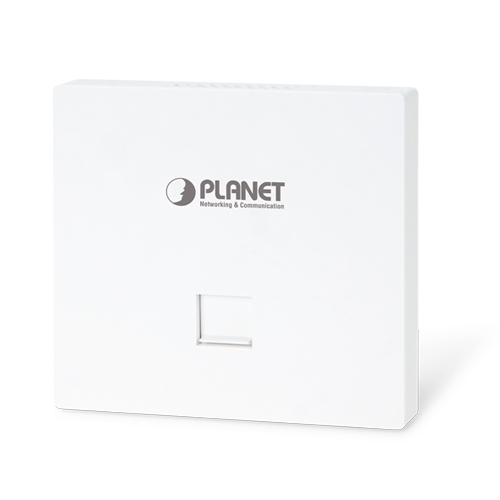
1200Mbps 802.11ac Wave 2 Dual Band Ceiling-mount Wireless Access Point w/802.3at PoE+ and 2 10/100/1000T LAN Ports

» WDAP-C7210E

Ultra-high-speed, Wave 2 MU-MIMO Wireless LAN Solution

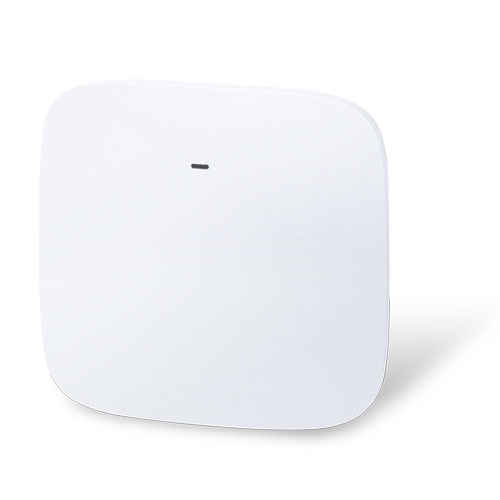
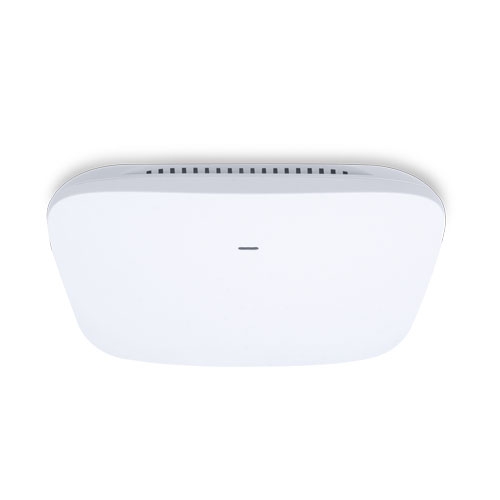
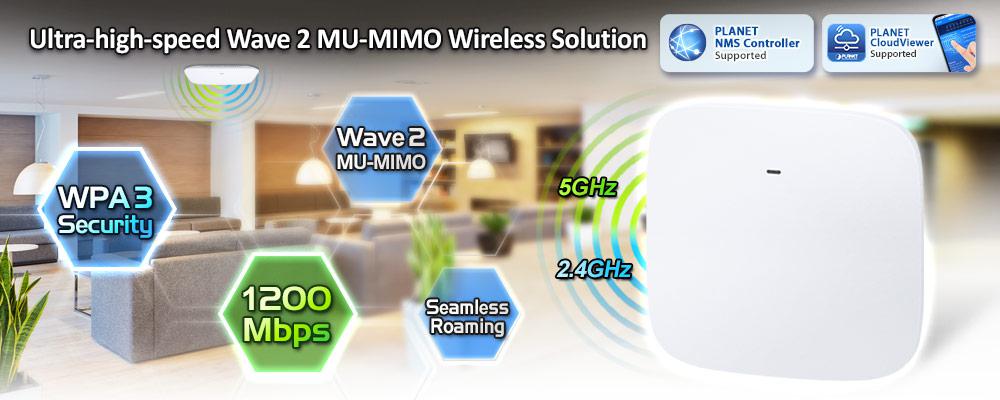
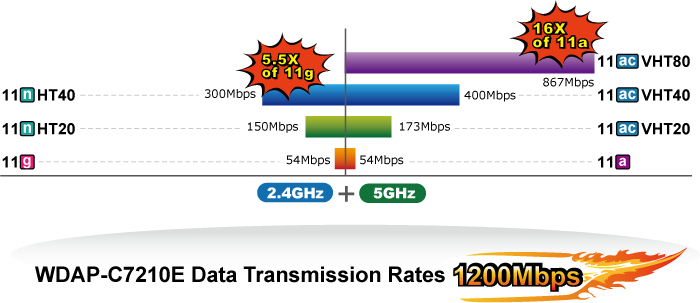
PLANET WDAP-C7210E 1200Mbps Wave 2 Dual Band 802.11ac Wireless AP supports central management through PLANET NMS controllers. With IEEE 802.11ac Wave 2 MU-MIMO 2T2R dual-band technology, the WDAP-C7210E provides a maximum wireless speed of 867Mbps at 5GHz and 300Mbps at 2.4GHz. The new version of the WDAP-C7210E  not only has more powerful performance but also supports PLANET CloudViewer app for remotely monitoring devices from anywhere.
edm WDAP C7210E v2


فوائد تقنية MU-MIMO في ظل معيار 802.11ac الموجة الثانية

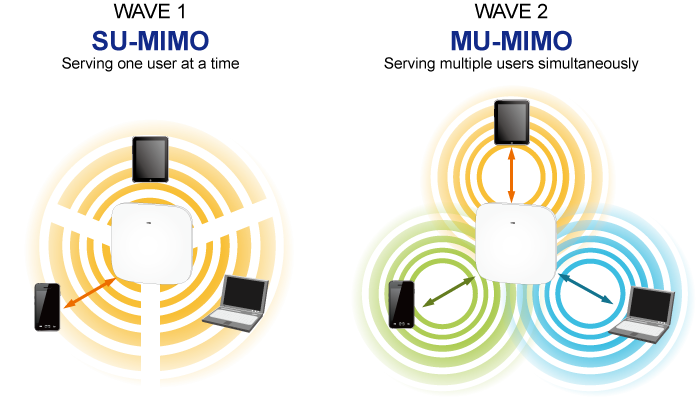
With the MU-MIMO Wave 2 technology, the WDAP-C7210E, installed in public areas such as hotspots, airports and conferences, reduces the frustration that Wi-Fi users often experience in downloading web pages, e-mail file attachments and media contents. For cellular operators, the WDAP-C7210E provides a better Wi-Fi user experience, reducing the likelihood of users turning off Wi-Fi and putting more load on the cellular network. For enterprises, this technology also can solve Wi-Fi congestion issues in open work spaces and conference rooms.
 

WDAP C7210E 1

Powerful Dual-band WLAN Solution

PLANET WDAP-C7210E, adopting the IEEE 802.11ac Wave 2 standard, provides a high-speed transmission of power and data, meaning two remote nodes in the 5 جيجاهرتز frequency band can be bridged. The 2.4 جيجاهرتز wireless connection can also be used simultaneously. Furthermore, the WDAP-C7210E adopts the high-class Qualcomm Atheros SoC (System-on-a-Chip), which provides higher stability to meet the stringent requirements of the solution.
 

WDAP C7210E 2


Enhanced Security and Rigorous Authentication 

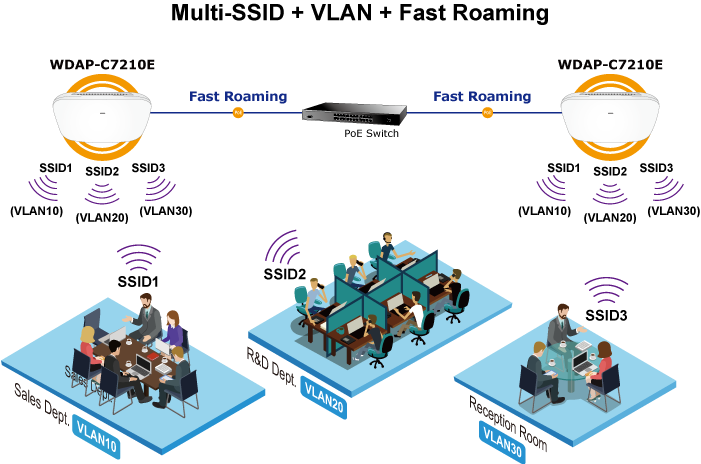
The WDAP-C7210E supports WPA / WPA2, WPA-PSK, WPA2-PSK and WPS3-PSK wireless encryptions, the advanced WPA2-AES mechanism and 802.1X RADIUS authentication, which can effectively prevent eavesdropping by unauthorized users or bandwidth occupied by unauthenticated wireless access. Furthermore, any users are granted or denied access to the wireless LAN network based on the ACL (Access Control List) that the administrator pre-established. For management purposes, the IEEE 802.1Q VLAN supported allows multiple VLAN tags to be mapped to multiple SSIDs to distinguish the wireless access.
 

WDAP C7210E 3


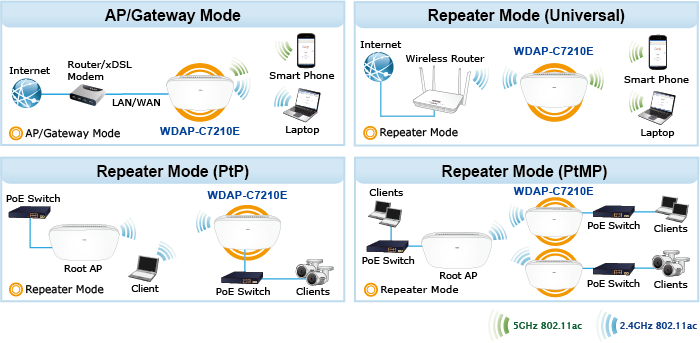
Multiple Operation Modes for Various Applications

The WDAP-C7210E supports AP, Gateway and Repeater mode, through which it provides more flexibility for users when wireless network is established. Compared with general wireless access points, the WDAP-C7210E offers more powerful and flexible capability for wireless clients.
 

WDAP C7210Ev2 2

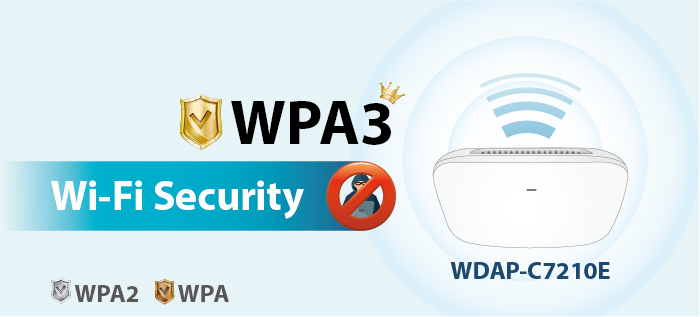
WPA3 Next Generation Security for Your WLAN Solution

WPA3 is the next generation Wi-Fi security technology that provides the most advanced security protocol to the market. WPA3 makes your connection more secure by preventing hackers from easily cracking your password no matter how simplified the password is. WPA3 can also provide more reliable password-based authentication, so it can better protect the security of individual users.
 

WDAP C7210Ev2 1


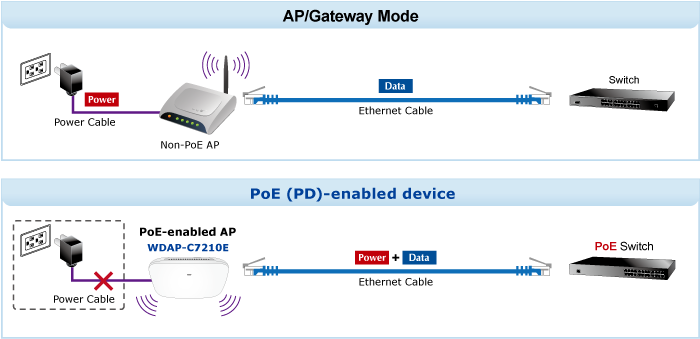
Ceiling-mount Design for Your Environment

With the standard IEEE802.3at Power over Ethernet (PoE) design, the WDAP-C7210E can be easily installed in the areas where power outlets are not available. By supporting the standard IEEE 802.3at PoE PD power scheme, the WDAP-C7210E can be powered and networked by a single UTP cable, effectively eliminating the needs of dedicated electrical outlets on the ceiling and reducing the cabling cost. Furthermore, the system administrator is able to arrange the PoE schedule of the WDAP-C7210E by working with the managed PoE switch.
 

WDAP C7210E 5


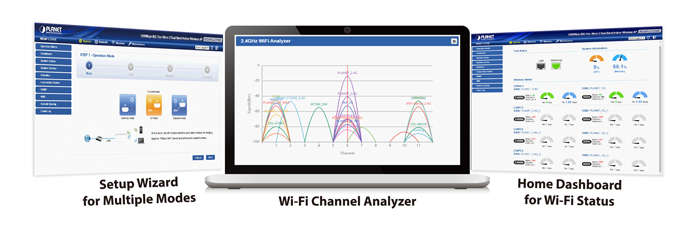
تحسين كفاءة إدارة الحسابات الدائنة 

The brand-new GUI configuration wizard helps the system administrator easily set up the WDAP-C7210E step by step. Besides, the built-in Wi-Fi analyzer provides real-time channel utilization to prevent channel overlapping to assure greater performance. With the automatic transmission power mechanism, distance control and scheduled reboot setting, the WDAP-C7210E is easy for the administrator to deploy and manage without on-site maintenance. Moreover, you can use PLANET NMS controller series, WS switch series, VR series, ICG-2515 router series, and AP control function to deliver wireless profiles to multiple APs simultaneously, thus making the central management simple.

*Note: The WDAP-C7210E and WDAP-C7210E (V2) are two different devices. Please make sure the model is right before setting it with NMS equipment. Check the model name from the label to make sure that the firmware is upgraded on the right version of the AP.
WDAP C7210Ev2 3

Extremely High Speed and Dual Band Make Wi-Fi Transmission More Powerful The WDAP-C7210E delivers the Dual Band technology to avoid signal interference and ensure the best Wi-Fi performance. It allows you to check e-mails and surf the Internet via the 2.4GHz band and simultaneously watch High-Definition (HD) video or any other multimedia application via 5GHz band. Moreover, the Gigabit Ethernet port of the WDAP-C7210E offers ultra-fast wired connections that utilize the maximum wireless bandwidth; therefore, users will have real wireless speed over 100Mbps. With outstanding stability of high-speed wireless transmission, the WDAP-C7210E can provide users with excellent experience in multimedia streaming with your mobile devices anywhere, anytime.  

شبكة محلية لاسلكية وشبكة محلية متوافقة مع المعايير الصناعية
  • Compliant with the IEEE 802.11a/b/g/n/ac wireless technology
  • Equipped with 10/100/1000Mbps RJ45 ports, auto MDI/MDI-X supported
  خصائص واجهة الترددات الراديوية
  • 802.11ac Wave 2 2T2R MIMO architecture with data rate of up to 1200Mbps (300Mbps at 2.4GHz and 867Mbps at 5GHz)
  • قدرة خرج عالية مع تحكم متعدد في قدرة الإرسال
  أوضاع تشغيل متعددة وميزات لاسلكية
  • Multiple operation modes: Access Point, Gateway, Repeater mode
  • توفر تقنية WMM (الوسائط المتعددة عبر الواي فاي) أولوية أعلى لنقل الوسائط المتعددة عبر الشبكة اللاسلكية
  • عتبة التغطية للحد من ضعف إشارة العملاء الذين يشغلون الجلسة
  • مخطط تحليل قناة Wi-Fi في الوقت الفعلي والتحكم في حدود العملاء لتحسين الأداء
  • يدعم التجوال السريع للأجهزة الطرفية باستخدام معايير 802.11k و802.11v و802.11r
  اتصال شبكة آمن
  • Full encryption supported: WAP-PSK/WPA2-PSK, WPA2-PSK, WPA2-PSK/ WPA3-PSK, WPA3-PSK, WPA/WPA2 Enterprise, WPA2 Enterprise and 802.1X RADIUS authentication
  • يدعم بروتوكول VLAN 802.1Q وتعيين SSID إلى VLAN
  • يدعم تصفية عناوين IP/المنافذ/عناوين MAC/عناوين URL، وهجمات حجب الخدمة (DoS)، وجدار الحماية SPI
  • Supports DMZ and Port forwarding
  • التحكم في عرض النطاق الترددي لكل عنوان IP لزيادة استقرار الشبكة
  Easy Deployment and Management
  • Supports PLANET AP Controllers in AP mode
  • آلية الإصلاح الذاتي من خلال إعداد إعادة التشغيل التلقائي للنظام
  • System status monitoring through remote syslog server
  • Gateway mode supports PLANET DDNS/Easy DDNS, Captive Portal, RADIUS Server/Client
  • أداة PLANET Smart Discovery لإدارة عمليات النشر
  • PLANET NMS system and CloudViewer for deployment management at the same time
 
مواصفات الأجهزة
واجهاتLAN 2 x 10/100/1000BASE-T RJ45 port Auto-negotiation and auto MDI/MDI-X
AntennasGain:2 x 2.4GHz internal 5dBi antenna, 2 x 5GHz internal 4dBi antenna
زر إعادة الضبطReset button on the rear side (Press over 7 seconds to reset the device to factory default)
مؤشرات LEDSYS, 2.4GHz, 5GHz
الأبعاد (العرض × العمق × الارتفاع)186 x 186 x 35.8mm
وزن380 ±5g
متطلبات الطاقة48V DC IN, 0.5A, IEEE 802.3at PoE+ or 12V DC IN, 1.0
استهلاك الطاقة< 12W
التركيبCeiling Mount
Wireless Interface Specifications
معيارIEEE 802.11ac IEEE 802.11n IEEE 802.11a IEEE 802.11b IEEE 802.11g IEEE 802.11i IEEE 802.3 10BASE-T IEEE 802.3u 100BASE-TX IEEE 802.3ab 1000BASE-T IEEE 802.3x flow control IEEE 802.11k, 802.11v, and 802.11r
التحكم في الوصول إلى الوسائطCSMA/CA
Data Modulation802.11ac: OFDM (BPSK / QPSK / 16QAM / 64QAM / 256QAM) 802.11a/g/n: OFDM (BPSK / QPSK / 16QAM / 64QAM) 802.11b: DSSS (DBPSK / DQPSK / CCK)
وضع النطاق2.4G / 5G concurrent mode
نطاق التردد2.4GHz: FCC: 2.412~2.462GHz ETSI: 2.412~2.472GHz 5GHz: FCC: 5.180~5.32240GHz, 5.500745~5.825GHz ETSI: 5.180~5.320GHz, 5.500~5.180~5.700GHz
قنوات التشغيل2.4GHz: FCC: 1, 2, 3, 4, 5, 6, 7, 8, 9, 10, 11 ETSI: 1, 2, 3, 4, 5, 6, 7, 8, 9, 10, 11, 12, 13 5GHz: FCC: 36, 40, 44, 48, 52, 56, 60, 64, 100, 104, 108, 112, 116, 120, 124, 128, 132, 136, 140, 149, 153, 157, 161, 165 (24 Channels) ETSI: 36, 40, 44, 48, 52, 56, 60, 64, 100, 104, 108, 112, 116, 120, 124, 128, 132, 136, 140 (19 Channels) *تختلف قائمة قنوات 5 جيجاهرتز في البلدان المختلفة وفقًا للوائحها.
أقصى قدرة إرسال (ديسيبل ميلي واط)FCC: up to 22 ± 1dBm ETSI: < 20dBm (EIRP)
حساسية الاستقبال
وضع الشبكةمعدل نقل البياناتحساسية الاستقبال (ديسيبل ميلي واط)
2.4 جيجاهرتز
802.11b1Mbps 11Mbps-99 -92
802.11g6Mbps 54Mbps-95 -82
802.11n HT20MCS0/MCS8 MCS7/MCS15-95 -77
802.11n HT40MCS0/MCS8 MCS7/MCS15-93 -75
5 جيجاهرتز
802.11a6Mbps 54Mbps-92 -75
802.11n HT20MCS0/MCS8 MCS7/MCS15-91 -72
802.11n HT40MCS0/MCS8 MCS7/MCS15-88 -70
802.11ac VHT20MCS0 MCS8-92 -70
802.11ac VHT40MCS0 MCS9-89 -65
802.11ac VHT80MCS0 MCS9-87 -61
Software Features
شبكة محليةStatic IP / Dynamic IP Supports IP-MAC binding
شبكة واسعة النطاقStatic IP Dynamic IP PPPoE PPTP L2TP
الوضع اللاسلكيAccess Point Gateway Repeater
عرض القناة20 ميجاهرتز، 40 ميجاهرتز، 80 ميجاهرتز
أمان التشفيرWPA, WPA-PSK, WPA2, WPA2-PSK, WPA3-PSK, 802.1X
أمان لاسلكيEnable/Disable SSID Broadcast Wireless max. 32 MAC addresses filtering User Isolation
الحد الأقصى لشبكات SSID8 (4 per radio)
الحد الأقصى للعملاء64 per radio
أقصى عدد من نظراء WDS4
جودة الخدمة اللاسلكيةيدعم تقنية الوسائط المتعددة عبر الواي فاي (WMM)
تقنية لاسلكية متطورةAuto Channel Selection 5-level Transmit Power Control (Max.100%, Efficient 75%, Enhanced 50%, Standard 25% or Min. 15%) Client Limit Control, Coverage Threshold Wi-Fi channel analysis chart Fast Roaming
مراقبة الحالةDevice status, Wireless client List PLANET Smart Discovery DHCP client table System Log supports remote syslog server
شبكة VLANIEEE 802.1Q VLAN (VID: 1~4094) SSID-to-VLAN mapping up to 4 SSIDs
الشفاء الذاتييدعم إعدادات إعادة التشغيل التلقائي يوميًا/ساعيًا
إدارةRemote management through PLANET DDNS/ Easy DDNS Configuration backup and restore Supports UPnP Supports IGMP Proxy Supports PPTP/L2TP/IPSec VPN Pass-through SNMP v1/v2c/v3 support, MIB I/II, Private MIB
الإدارة المركزيةApplicable controllers: NMS-500, NMS-1000V
البيئة والشهادات
درجة حرارةOperating: 0 ~ 40 degrees C Storage: -40 ~ 70 degrees C
رطوبةOperating: 10 ~ 90% (non-condensing) Storage: 5 ~ 90% (non-condensing)
التنظيميحاصلة على شهادتي CE و RoHS
تاريخإصداروصفتحميل
2023/12/051.0

WDAP-C7210E

Download Icon
تاريخإصداروصفتحميل
2022/30/112.0

إصدار متوافق مع إصدار الجهاز 2.0.

Download Icon
تاريخإصداروصفتحميل
2023/12/052.0

Release for hardwar version 2.0.

Download Icon
تاريخإصداروصفتحميل
2023/21/062.0

إعلان المفوضية الأوروبية.

Download Icon
تاريخإصداروصفتحميل
2025/14/012.2102250102

[إصدار للأجهزة الإصدار 2.0.]
تمت إضافة الوظيفة التالية:
– تمت إضافة وظيفة PSTI.
تحديث البرامج الثابتة لـ PSTIA (قانون أمن المنتجات والبنية التحتية للاتصالات)
*ملحوظة: بعد تحديث البرنامج الثابت، ستحتاج إلى إدخال رمز MAC الخاص بالمنتج عند تسجيل الدخول لأول مرة. يرجى تدوين رمز MAC قبل المتابعة في عملية التحديث.

Download Icon
2023/02/062.2102230519

[إصدار للأجهزة الإصدار 2.0.]
Added support for CloudViewerPro app.

Download Icon
2023/31/032.2102230310

إصدار متوافق مع إصدار الجهاز 2.0.

Download Icon

معلومات الطلب

WDAP-C7210E

1200Mbps 802.11ac Wave 2 Dual Band Ceiling-mount Wireless Access Point w/802.3at PoE+ and 2 10/100/1000T LAN Ports

معلومات الطلب

WDAP-C7210E

1200Mbps 802.11ac Wave 2 Dual Band Ceiling-mount Wireless Access Point w/802.3at PoE+ and 2 10/100/1000T LAN Ports
                               
✉

انضم إلى قائمتنا البريدية

احصل على آخر الأخبار والعروض والتحديثات من شركة بلانيت تكنولوجي مباشرة إلى بريدك الإلكتروني.

نحن نحترم خصوصيتك. يمكنك إلغاء الاشتراك في أي وقت.

اشترك في النشرة الإخبارية الإلكترونية لـ PLANET

احصل على أحدث معلومات المنتجات وأخبار الشركة!