

بيانات المنتج

  • رمز المنتج: جامعة نورث كارولينا - نيو مكسيكو
  • product_editor_4418_tab_content: <p><strong>حل اقتصادي لإدارة الشبكة المركزية للشركات الصغيرة والمتوسطة </strong></p> <p>PLANET NMS-500 and NMS-1000V controllers help service providers and IT managers control all PLANET network devices at the same time and enable the administrator to effectively manage a local network of up to 100 sites and 102,400 managed nodes simultaneously without having to purchase any license and hardware-based controller, and pay an expensive annual subscription fee.</p> <p> </p> <p>The administrator can automatically discover and configure device profiles, batch provisioning/firmware upgrade, and built-in SAPC (Smart AP Control) that customize Wi-Fi planning against floor maps, and monitor all managed APs through a single Web-based interface. It allows operating across different platforms through virtualization software, which helps SMBs save costs on the need to configure the wireless APs one by one if done manually. Through the device list virtual panel function, the administrator also can do configuration with an NMS remote management switch to modify the network environment in one minute.</p> <p><img style="display: block; margin-left: auto; margin-right: auto;" src="https://www.planet.com.sa/wp-content/uploads/2025/01/UNC-NMS-3.png" alt="" width="700" height="477" /></p> <p> </p> <p> </p> <p><img style="display: block; margin-left: auto; margin-right: auto;" src="https://www.planet.com.sa/wp-content/uploads/2025/01/UNC-NMS-4.png" alt="" width="700" height="355" /></p>
  • product_editor_4418_tab_enabled: نعم
  • product_editor_4418_tab_content_changed: نعم
  • product_editor_4418_tab_title: التطبيقات
  • product_editor_4421_tab_content: <p><strong>أجهزة مادية صناعية</strong></p> <ul> <li>6 x 10/100/1000BASE-T Gigabit Ethernet RJ45 ports (LAN 5 and LAN 6 are bypass ports)</li> <li>1 x LCM for basic system setting</li> <li>2 x LEDs (Power and HDD)</li> <li>منفذان USB 3.0 لعمل نسخ احتياطية واستعادة الإعدادات</li> <li>1 x RJ45 Console port interface</li> <li>1 x Factory default button (GPIO)</li> <li>1 x 3-pin AC Power input socket for 100~240V</li> <li>1U Rack-mount</li> </ul> <p> </p> <p> <strong>إدارة أجهزة الشبكة</strong></p> <table style="border-collapse: collapse; color: #212529; width: 95.4464%; font-family: 'Didact Gothic', Arial, 'Microsoft JhengHei', sans-serif; font-size: 16px; border: 1px solid #cccccc;" border="1" cellpadding="6"> <tbody> <tr> <td style="width: 26%;" bgcolor="edf0f7">لوحة التحكم</td> <td style="width: 73.2843%;">Providing the at-a-glance view of center system, site summary,  site Map, traffic, PoE network status</td> </tr> <tr> <td style="width: 26%;" bgcolor="edf0f7">Site Management</td> <td style="width: 73.2843%;">To create site list, site map for NMS agent management</td> </tr> <tr> <td style="width: 26%;" bgcolor="edf0f7">قائمة الأجهزة</td> <td style="width: 73.2843%;">To management all site devices or filter one site devices list for NMS agent function operation</td> </tr> <tr> <td style="width: 26%;" bgcolor="edf0f7">Statistic</td> <td style="width: 73.2843%;">To show  Top 10 Event Report,  History Comparison function,  Critical Events for devices</td> </tr> <tr> <td style="width: 26%;" bgcolor="edf0f7">Topology Viewer</td> <td style="width: 73.2843%;">A topology of network devices compliant with MQTT, SNMP, ONVIF, Smart Discovery and LLTD Protocol with Map or not</td> </tr> <tr> <td style="width: 26%;" bgcolor="edf0f7">تقارير الأحداث</td> <td style="width: 73.2843%;">يمكن الإبلاغ عن حالة الشبكة عبر إنذار الشبكة وسجل النظام</td> </tr> <tr> <td style="width: 26%;" bgcolor="edf0f7">نظام إنذار</td> <td style="width: 73.2843%;">تنبيهات البريد الإلكتروني للمسؤول عبر خادم SMTP</td> </tr> <tr> <td style="width: 26%;" bgcolor="edf0f7">Switch Virtual Panel</td> <td style="width: 73.2843%;">To directly configure the switch for basic function</td> </tr> <tr> <td style="width: 26%;" bgcolor="edf0f7">ONVIF IP Cam Snapshot</td> <td style="width: 73.2843%;">Directly catch the managed IP cam snapshot</td> </tr> <tr> <td style="width: 26%;" bgcolor="edf0f7">توفير الدفعات</td> <td style="width: 73.2843%;">Enabling multiple APs to be configured and upgraded at one time by using the designated profile for each site.</td> </tr> <tr> <td style="width: 26%;" bgcolor="edf0f7">خريطة تغطية حرارية</td> <td style="width: 73.2843%;">تغطية إشارة نقاط الوصول في الوقت الفعلي على خريطة الطابق التي يحددها المستخدم لتحسين نشر شبكة Wi-Fi الميدانية</td> </tr> <tr> <td style="width: 26%;" bgcolor="edf0f7">ملف تعريف مخصص</td> <td style="width: 73.2843%;">السماح بإنشاء وصيانة ملفات تعريف لاسلكية متعددة</td> </tr> <tr> <td style="width: 26%;" bgcolor="edf0f7">Auto Provisioning</td> <td style="width: 73.2843%;">توفير نقاط وصول متعددة بنقرة واحدة</td> </tr> <tr> <td style="width: 26%;" bgcolor="edf0f7"> إدارة المجموعات</td> <td style="width: 73.2843%;"> تبسيط إدارة نقاط البيع عالية الكثافة</td> </tr> <tr> <td style="width: 26%;" bgcolor="edf0f7"> مخطط المنطقة</td> <td style="width: 73.2843%;"> تحسين نشر نقاط الوصول مع تغطية الإشارة الفعلية</td> </tr> <tr> <td style="width: 26%;" bgcolor="edf0f7"> المصادقة</td> <td style="width: 73.2843%;"> خادم RADIUS مدمج ومتكامل بسلاسة مع شبكة المؤسسة</td> </tr> <tr> <td style="width: 26%;" bgcolor="edf0f7"> تحكم المستخدم</td> <td style="width: 73.2843%;"> السماح بإنشاء الحسابات عند الطلب وسياسة الوصول التي يحددها المستخدم</td> </tr> <tr> <td style="width: 26%;" bgcolor="edf0f7"> قابلية التوسع</td> <td style="width: 73.2843%;"> إمكانية ترقية النظام مجانًا وترقية البرامج الثابتة لنقاط الوصول بشكل جماعي</td> </tr> <tr> <td style="width: 26%;" bgcolor="edf0f7"> أقصى قابلية للتوسع</td> <td style="width: 73.2843%;"> 100 sites, 100 site maps, 102,400 nodes</td> </tr> </tbody> </table> <p> </p> <p><strong>خصائص إدارة الشبكة</strong></p> <ul> <li>خادم DHCP مدمج</li> <li>خادم RADIUS مدمج</li> <li>الوصول الآمن عبر SSL</li> <li>Certification Authentication</li> <li>واجهة إدارة رسومية عبر الويب</li> <li>إدارة SNMP الإصدار 1، والإصدار 2c، والإصدار 3</li> <li>يدعم PLANET DDNS/Easy DDNS</li> </ul>
  • product_editor_4421_tab_enabled: نعم
  • product_editor_4421_tab_content_changed: نعم
  • product_editor_4421_tab_title: الميزات الرئيسية
  • product_editor_4422_tab_content: <div class="table-responsive"> <table class="common_table_sky" style="width: 100%;"> <thead> <tr> <th colspan="2">جامعة نورث كارولينا - نيو مكسيكو</th> </tr> </thead> <tbody> <tr> <td class="align-middle">منتج</td> <td>UNC-NMS Universal Network Management Center Central Controller with LCD & 6 10/100/1000T LAN Ports (1024 x 100 nodes)</td> </tr> <tr> <td class="align-middle">عامل الشكل</td> <td>1U Rack-mount</td> </tr> </tbody> <thead> <tr> <th colspan="2">المواصفات الفيزيائية</th> </tr> </thead> <tbody> <tr> <td class="align-middle">واجهة الإدخال/الإخراج</td> <td>6 10/100/1000BASE-T Gigabit Ethernet RJ45 ports (LAN 5 and LAN 6 were bypass design) 2 USB 3.0 ports (They cannot be used at the same time.) 1 Factory default button (GPIO) 1 RJ45 Console port interface 2 DB-9 COM1,COM2 (reserve)</td> </tr> <tr> <td class="align-middle">تخزين</td> <td>قرص صلب SATA سعة 64 جيجابايت بحجم 2.5 بوصة</td> </tr> <tr> <td class="align-middle">قاد</td> <td>2 LED (Power / HDD)</td> </tr> <tr> <td class="align-middle">حجم LCM (المنطقة النشطة)</td> <td>49.45 mm (W) x 9.58 mm (H)</td> </tr> <tr> <td class="align-middle">زر LCM</td> <td>أربعة أزرار تعمل باللمس للدخول والخروج والتحرك لأعلى ولأسفل</td> </tr> <tr> <td class="align-middle">الأبعاد (العرض × العمق × الارتفاع)</td> <td>438 (W) x 180 (D) x 44 mm (H) 17.24” (W) x 7.09” (D) x 1.73” (H)</td> </tr> <tr> <td class="align-middle">وزن</td> <td>3 كجم (6.62 رطل)</td> </tr> <tr> <td class="align-middle">حاوية</td> <td>معدن</td> </tr> <tr> <td class="align-middle">متطلبات الطاقة</td> <td>3 pin AC Power input socket AC 100~240V , 65W</td> </tr> </tbody> <thead> <tr> <th colspan="2">البيئة والشهادات</th> </tr> </thead> <tbody> <tr> <td class="align-middle">درجة حرارة</td> <td>درجة حرارة التشغيل: من 0 إلى 50 درجة مئوية، درجة حرارة التخزين: من -20 إلى 70 درجة مئوية</td> </tr> <tr> <td class="align-middle">رطوبة</td> <td>5 ~ 90% الرطوبة النسبية (بدون تكثيف)</td> </tr> <tr> <td class="align-middle">متوسط الوقت بين الأعطال (ساعات)</td> <td>100,000</td> </tr> </tbody> <thead> <tr> <th colspan="2">إدارة الشبكة</th> </tr> </thead> <tbody> <tr> <td class="align-middle">Number of Managed Sites</td> <td>100</td> </tr> <tr> <td class="align-middle">عدد الأجهزة المُدارة</td> <td>102,400</td> </tr> <tr> <td class="align-middle">Auto Discovery by NMS agent</td> <td>يدعم أجهزة PLANET</td> </tr> <tr> <td class="align-middle">لوحة التحكم</td> <td>Providing the at-a-glance view of center system, site summary, site Map, traffic, PoE network status</td> </tr> <tr> <td class="align-middle">Site Management</td> <td>To create site list, site map for NMS agent management</td> </tr> <tr> <td class="align-middle">قائمة الأجهزة</td> <td>To manage all site devices or filter one site devices list for NMS agent function operation</td> </tr> <tr> <td class="align-middle">Statistic</td> <td>To show Top 10 Event Report, History Comparison function, Critical Events for devices</td> </tr> <tr> <td class="align-middle">Topology Viewer</td> <td>A topology of network devices compliant with MQTT, SNMP, ONVIF, Smart Discovery and LLTD Protocol with Map or not</td> </tr> <tr> <td class="align-middle">تقارير الأحداث</td> <td>يمكن الإبلاغ عن حالة الشبكة عبر إنذار الشبكة وسجل النظام</td> </tr> <tr> <td class="align-middle">نظام إنذار</td> <td>تنبيهات البريد الإلكتروني للمسؤول عبر خادم SMTP</td> </tr> <tr> <td class="align-middle">Switch Virtual Panel</td> <td>To directly configure the switch for basic function</td> </tr> <tr> <td class="align-middle">ONVIF IP Cam Snapshot</td> <td>Directly catch the managed IP cam snapshot</td> </tr> <tr> <td class="align-middle">توفير الدفعات</td> <td>Enabling multiple APs to be configured and upgraded at one time by using the designated profile for each site.</td> </tr> <tr> <td class="align-middle">خريطة تغطية حرارية</td> <td>تغطية إشارة نقاط الوصول في الوقت الفعلي على خريطة الطابق التي يحددها المستخدم لتحسين نشر شبكة Wi-Fi الميدانية</td> </tr> <tr> <td class="align-middle">ملف تعريف مخصص</td> <td>السماح بإنشاء وصيانة ملفات تعريف لاسلكية متعددة</td> </tr> <tr> <td class="align-middle">Auto Provisioning</td> <td>توفير نقاط وصول متعددة بنقرة واحدة</td> </tr> <tr> <td class="align-middle">إدارة المجموعات</td> <td>تبسيط إدارة نقاط البيع عالية الكثافة</td> </tr> <tr> <td class="align-middle">مخطط المنطقة</td> <td>تحسين نشر نقاط الوصول مع تغطية الإشارة الفعلية</td> </tr> <tr> <td class="align-middle">المصادقة</td> <td>خادم RADIUS مدمج ومتكامل بسلاسة مع شبكة المؤسسة</td> </tr> <tr> <td class="align-middle">تحكم المستخدم</td> <td>السماح بإنشاء الحسابات عند الطلب وسياسة الوصول التي يحددها المستخدم</td> </tr> <tr> <td class="align-middle">قابلية التوسع</td> <td>إمكانية ترقية النظام مجانًا وترقية البرامج الثابتة لنقاط الوصول بشكل جماعي</td> </tr> </tbody> <thead> <tr> <th colspan="2">خدمات الشبكة</th> </tr> </thead> <tbody> <tr> <td class="align-middle">شبكة</td> <td>DDNS Supports PLANET DDNS/Easy DDNS DHCP Built-in DHCP Server for auto IP assignment to APs Management Console; Telnet; SSL; Web browser (Chrome is recommended.); SNMP v1, v2c, v3 Discovery Supports SNMP, ONVIF and PLANET Smart Discovery</td> </tr> <tr> <td class="align-middle">صيانة</td> <td>Backup System backup and restore to local or USB HDD Reboot Provides system reboot manually or automatically per power schedule Diagnostic Provides IPv4/IPv6 ping and trace route</td> </tr> </tbody> <thead> <tr> <th colspan="2">الامتثال للمعايير</th> </tr> </thead> <tbody> <tr> <td class="align-middle">الامتثال التنظيمي</td> <td>CE، FCC</td> </tr> <tr> <td class="align-middle">الامتثال للمعايير</td> <td>IEEE 802.3 10BASE-T، IEEE 802.3u 100BASE-TX، IEEE 802.3ab Gigabit 1000BASE-T</td> </tr> </tbody> </table> </div>
  • product_editor_4422_tab_enabled: نعم
  • product_editor_4422_tab_content_changed: نعم
  • product_editor_4422_tab_title: تحديد
  • عدد مشاهدات منشورات ekit: 719
  • product_editor_4418_tab_sticky_width: pw-content-1
  • product_editor_4418_tab_sticky_position: pw-left-stick
  • product_editor_4421_tab_sticky_width: pw-content-1
  • product_editor_4421_tab_sticky_position: pw-left-stick
  • product_editor_4422_tab_sticky_width: pw-content-1
  • product_editor_4422_tab_sticky_position: pw-left-stick
  • product_editor_4423_tab_content:
  • product_editor_4423_tab_content_changed: نعم
  • product_editor_4423_tab_enabled: نعم
  • product_editor_4423_tab_title: التنزيلات
  • product_editor_4423_tab_sticky_width: pw-content-1
  • product_editor_4423_tab_sticky_height: 1
  • product_editor_4423_tab_sticky_position: pw-left-stick
  • product_editor_4424_tab_content:
  • product_editor_4424_tab_content_changed: لا
  • product_editor_4424_tab_enabled: نعم
  • product_editor_4424_tab_title: المنتجات ذات الصلة
  • product_editor_4424_tab_sticky_width: pw-content-1
  • product_editor_4424_tab_sticky_height: 1
  • product_editor_4424_tab_sticky_position: pw-left-stick
  • إجمالي المبيعات: 0
  • جدول الملحقات:
  • product_label:
  • prouduct_loop_image_transparent_bg_:
  • 6_features_images: a:9:{i:0;s:5:"14799";i:1;s:5:"14798";i:2;s:5:"14797";i:3;s:5:"14796";i:4;s:5:"14795";i:5;s:5:"14794";i:6;s:5:"14793";i:7;s:5:"14792";i:8;s:5:"14791";}
  • datasheet_0_date: 20231208
  • datasheet_0_version: 1.0
  • وصف ورقة البيانات 0: جامعة نورث كارولينا - نيو مكسيكو
  • datasheet_0_download_pdf: https://www.planet.com.sa/storage/products/UNC-NMS/C-UNC-NMS_L.pdf
  • ورقة البيانات: 1
  • quick_guide_0_date: 20220829
  • quick_guide_0_version: 1.0
  • quick_guide_0_description: الإصدار الأولي.
  • quick_guide_0_download_pdf: https://www.planet.com.sa/storage/products/UNC-NMS/EMQ-UNC-NMS_v1.0.pdf
  • دليل سريع: 1
  • users_manual_0_date: 20241018
  • دليل المستخدم_الإصدار_0: 1.0
  • وصف دليل المستخدم 0: الإصدار الأولي لدليل التكوين.
  • users_manual_0_download_pdf: https://www.planet.com.sa/storage/products/UNC-NMS/UNC-NMS-Configuration%20Guide%20%28Brief%29_v1.0.pdf
  • دليل المستخدم: 1
  • ec_declaration:
  • تطبيق أندرويد:
  • السائق:
  • firmware_0_date: 20240909
  • firmware_0_version: 1.0240816
  • firmware_0_description: Optimize the architecture to enhance both front-end and back-end performance of the platform.
  • firmware_0_download_pdf: https://www.planet.com.sa/storage/products/UNC-NMS/FW-UNC-NMS_v1.0b240816.zip
  • firmware_1_date: 20231208
  • firmware_1_version: 1.0231130
  • firmware_1_description: الإصدار الأولي.
  • firmware_1_download_pdf: https://www.planet.com.sa/storage/products/UNC-NMS/FW-UNC-NMS_v1.0b231130.zip
  • البرامج الثابتة: 2
  • جدوى:
  • قائمة_التوافق:
  • تخطيط الشريط الجانبي للموقع: تقصير
  • ast-site-content-layout: تقصير
  • نمط محتوى الموقع: تقصير
  • نمط الشريط الجانبي للموقع: تقصير
  • theme-transparent-header-meta: تقصير
  • علامة تبويب التطبيقات: <strong>حل اقتصادي لإدارة الشبكة المركزية للشركات الصغيرة والمتوسطة </strong> PLANET NMS-500 and NMS-1000V controllers help service providers and IT managers control all PLANET network devices at the same time and enable the administrator to effectively manage a local network of up to 100 sites and 102,400 managed nodes simultaneously without having to purchase any license and hardware-based controller, and pay an expensive annual subscription fee.   The administrator can automatically discover and configure device profiles, batch provisioning/firmware upgrade, and built-in SAPC (Smart AP Control) that customize Wi-Fi planning against floor maps, and monitor all managed APs through a single Web-based interface. It allows operating across different platforms through virtualization software, which helps SMBs save costs on the need to configure the wireless APs one by one if done manually. Through the device list virtual panel function, the administrator also can do configuration with an NMS remote management switch to modify the network environment in one minute. <img style="display: block; margin-left: auto; margin-right: auto;" src="https://www.planet.com.sa/wp-content/uploads/2025/01/UNC-NMS-3.png" alt="" width="700" height="477" />     <img style="display: block; margin-left: auto; margin-right: auto;" src="https://www.planet.com.sa/wp-content/uploads/2025/01/UNC-NMS-4.png" alt="" width="700" height="355" />
  • key_features_tab: <strong>أجهزة مادية صناعية</strong> <ul> <li>6 x 10/100/1000BASE-T Gigabit Ethernet RJ45 ports (LAN 5 and LAN 6 are bypass ports)</li> <li>1 x LCM for basic system setting</li> <li>2 x LEDs (Power and HDD)</li> <li>منفذان USB 3.0 لعمل نسخ احتياطية واستعادة الإعدادات</li> <li>1 x RJ45 Console port interface</li> <li>1 x Factory default button (GPIO)</li> <li>1 x 3-pin AC Power input socket for 100~240V</li> <li>1U Rack-mount</li> </ul>   <strong>إدارة أجهزة الشبكة</strong> <table style="border-collapse: collapse; color: #212529; width: 95.4464%; font-family: 'Didact Gothic', Arial, 'Microsoft JhengHei', sans-serif; font-size: 16px; border: 1px solid #cccccc;" border="1" cellpadding="6"> <tbody> <tr> <td style="width: 26%;" bgcolor="edf0f7">لوحة التحكم</td> <td style="width: 73.2843%;">Providing the at-a-glance view of center system, site summary,  site Map, traffic, PoE network status</td> </tr> <tr> <td style="width: 26%;" bgcolor="edf0f7">Site Management</td> <td style="width: 73.2843%;">To create site list, site map for NMS agent management</td> </tr> <tr> <td style="width: 26%;" bgcolor="edf0f7">قائمة الأجهزة</td> <td style="width: 73.2843%;">To management all site devices or filter one site devices list for NMS agent function operation</td> </tr> <tr> <td style="width: 26%;" bgcolor="edf0f7">Statistic</td> <td style="width: 73.2843%;">To show  Top 10 Event Report,  History Comparison function,  Critical Events for devices</td> </tr> <tr> <td style="width: 26%;" bgcolor="edf0f7">Topology Viewer</td> <td style="width: 73.2843%;">A topology of network devices compliant with MQTT, SNMP, ONVIF, Smart Discovery and LLTD Protocol with Map or not</td> </tr> <tr> <td style="width: 26%;" bgcolor="edf0f7">تقارير الأحداث</td> <td style="width: 73.2843%;">يمكن الإبلاغ عن حالة الشبكة عبر إنذار الشبكة وسجل النظام</td> </tr> <tr> <td style="width: 26%;" bgcolor="edf0f7">نظام إنذار</td> <td style="width: 73.2843%;">تنبيهات البريد الإلكتروني للمسؤول عبر خادم SMTP</td> </tr> <tr> <td style="width: 26%;" bgcolor="edf0f7">Switch Virtual Panel</td> <td style="width: 73.2843%;">To directly configure the switch for basic function</td> </tr> <tr> <td style="width: 26%;" bgcolor="edf0f7">ONVIF IP Cam Snapshot</td> <td style="width: 73.2843%;">Directly catch the managed IP cam snapshot</td> </tr> <tr> <td style="width: 26%;" bgcolor="edf0f7">توفير الدفعات</td> <td style="width: 73.2843%;">Enabling multiple APs to be configured and upgraded at one time by using the designated profile for each site.</td> </tr> <tr> <td style="width: 26%;" bgcolor="edf0f7">خريطة تغطية حرارية</td> <td style="width: 73.2843%;">تغطية إشارة نقاط الوصول في الوقت الفعلي على خريطة الطابق التي يحددها المستخدم لتحسين نشر شبكة Wi-Fi الميدانية</td> </tr> <tr> <td style="width: 26%;" bgcolor="edf0f7">ملف تعريف مخصص</td> <td style="width: 73.2843%;">السماح بإنشاء وصيانة ملفات تعريف لاسلكية متعددة</td> </tr> <tr> <td style="width: 26%;" bgcolor="edf0f7">Auto Provisioning</td> <td style="width: 73.2843%;">توفير نقاط وصول متعددة بنقرة واحدة</td> </tr> <tr> <td style="width: 26%;" bgcolor="edf0f7"> إدارة المجموعات</td> <td style="width: 73.2843%;"> تبسيط إدارة نقاط البيع عالية الكثافة</td> </tr> <tr> <td style="width: 26%;" bgcolor="edf0f7"> مخطط المنطقة</td> <td style="width: 73.2843%;"> تحسين نشر نقاط الوصول مع تغطية الإشارة الفعلية</td> </tr> <tr> <td style="width: 26%;" bgcolor="edf0f7"> المصادقة</td> <td style="width: 73.2843%;"> خادم RADIUS مدمج ومتكامل بسلاسة مع شبكة المؤسسة</td> </tr> <tr> <td style="width: 26%;" bgcolor="edf0f7"> تحكم المستخدم</td> <td style="width: 73.2843%;"> السماح بإنشاء الحسابات عند الطلب وسياسة الوصول التي يحددها المستخدم</td> </tr> <tr> <td style="width: 26%;" bgcolor="edf0f7"> قابلية التوسع</td> <td style="width: 73.2843%;"> إمكانية ترقية النظام مجانًا وترقية البرامج الثابتة لنقاط الوصول بشكل جماعي</td> </tr> <tr> <td style="width: 26%;" bgcolor="edf0f7"> أقصى قابلية للتوسع</td> <td style="width: 73.2843%;"> 100 sites, 100 site maps, 102,400 nodes</td> </tr> </tbody> </table>   <strong>خصائص إدارة الشبكة</strong> <ul> <li>خادم DHCP مدمج</li> <li>خادم RADIUS مدمج</li> <li>الوصول الآمن عبر SSL</li> <li>Certification Authentication</li> <li>واجهة إدارة رسومية عبر الويب</li> <li>إدارة SNMP الإصدار 1، والإصدار 2c، والإصدار 3</li> <li>يدعم PLANET DDNS/Easy DDNS</li> </ul>
  • علامة تبويب المواصفات: <table class="common_table_sky" style="width: 100%;"> <thead> <tr> <th colspan="2">جامعة نورث كارولينا - نيو مكسيكو</th> </tr> </thead> <tbody> <tr> <td class="align-middle">منتج</td> <td>UNC-NMS Universal Network Management Center Central Controller with LCD & 6 10/100/1000T LAN Ports (1024 x 100 nodes)</td> </tr> <tr> <td class="align-middle">عامل الشكل</td> <td>1U Rack-mount</td> </tr> </tbody> <thead> <tr> <th colspan="2">المواصفات الفيزيائية</th> </tr> </thead> <tbody> <tr> <td class="align-middle">واجهة الإدخال/الإخراج</td> <td>6 10/100/1000BASE-T Gigabit Ethernet RJ45 ports (LAN 5 and LAN 6 were bypass design) 2 USB 3.0 ports (They cannot be used at the same time.) 1 Factory default button (GPIO) 1 RJ45 Console port interface 2 DB-9 COM1,COM2 (reserve)</td> </tr> <tr> <td class="align-middle">تخزين</td> <td>قرص صلب SATA سعة 64 جيجابايت بحجم 2.5 بوصة</td> </tr> <tr> <td class="align-middle">قاد</td> <td>2 LED (Power / HDD)</td> </tr> <tr> <td class="align-middle">حجم LCM (المنطقة النشطة)</td> <td>49.45 mm (W) x 9.58 mm (H)</td> </tr> <tr> <td class="align-middle">زر LCM</td> <td>أربعة أزرار تعمل باللمس للدخول والخروج والتحرك لأعلى ولأسفل</td> </tr> <tr> <td class="align-middle">الأبعاد (العرض × العمق × الارتفاع)</td> <td>438 (عرض) × 180 (عمق) × 44 مم (ارتفاع) 17.24 بوصة (عرض) × 7.09 بوصة (عمق) × 1.73 بوصة (ارتفاع)</td> </tr> <tr> <td class="align-middle">وزن</td> <td>3 كجم (6.62 رطل)</td> </tr> <tr> <td class="align-middle">حاوية</td> <td>معدن</td> </tr> <tr> <td class="align-middle">متطلبات الطاقة</td> <td>3 pin AC Power input socket AC 100~240V , 65W</td> </tr> </tbody> <thead> <tr> <th colspan="2">البيئة والشهادات</th> </tr> </thead> <tbody> <tr> <td class="align-middle">درجة حرارة</td> <td>درجة حرارة التشغيل: من 0 إلى 50 درجة مئوية، درجة حرارة التخزين: من -20 إلى 70 درجة مئوية</td> </tr> <tr> <td class="align-middle">رطوبة</td> <td>5 ~ 90% الرطوبة النسبية (بدون تكثيف)</td> </tr> <tr> <td class="align-middle">متوسط الوقت بين الأعطال (ساعات)</td> <td>100,000</td> </tr> </tbody> <thead> <tr> <th colspan="2">إدارة الشبكة</th> </tr> </thead> <tbody> <tr> <td class="align-middle">Number of Managed Sites</td> <td>100</td> </tr> <tr> <td class="align-middle">عدد الأجهزة المُدارة</td> <td>102,400</td> </tr> <tr> <td class="align-middle">Auto Discovery by NMS agent</td> <td>يدعم أجهزة PLANET</td> </tr> <tr> <td class="align-middle">لوحة التحكم</td> <td>Providing the at-a-glance view of center system, site summary, site Map, traffic, PoE network status</td> </tr> <tr> <td class="align-middle">Site Management</td> <td>To create site list, site map for NMS agent management</td> </tr> <tr> <td class="align-middle">قائمة الأجهزة</td> <td>To manage all site devices or filter one site devices list for NMS agent function operation</td> </tr> <tr> <td class="align-middle">Statistic</td> <td>To show Top 10 Event Report, History Comparison function, Critical Events for devices</td> </tr> <tr> <td class="align-middle">Topology Viewer</td> <td>A topology of network devices compliant with MQTT, SNMP, ONVIF, Smart Discovery and LLTD Protocol with Map or not</td> </tr> <tr> <td class="align-middle">تقارير الأحداث</td> <td>يمكن الإبلاغ عن حالة الشبكة عبر إنذار الشبكة وسجل النظام</td> </tr> <tr> <td class="align-middle">نظام إنذار</td> <td>تنبيهات البريد الإلكتروني للمسؤول عبر خادم SMTP</td> </tr> <tr> <td class="align-middle">Switch Virtual Panel</td> <td>To directly configure the switch for basic function</td> </tr> <tr> <td class="align-middle">ONVIF IP Cam Snapshot</td> <td>Directly catch the managed IP cam snapshot</td> </tr> <tr> <td class="align-middle">توفير الدفعات</td> <td>Enabling multiple APs to be configured and upgraded at one time by using the designated profile for each site.</td> </tr> <tr> <td class="align-middle">خريطة تغطية حرارية</td> <td>تغطية إشارة نقاط الوصول في الوقت الفعلي على خريطة الطابق التي يحددها المستخدم لتحسين نشر شبكة Wi-Fi الميدانية</td> </tr> <tr> <td class="align-middle">ملف تعريف مخصص</td> <td>السماح بإنشاء وصيانة ملفات تعريف لاسلكية متعددة</td> </tr> <tr> <td class="align-middle">Auto Provisioning</td> <td>توفير نقاط وصول متعددة بنقرة واحدة</td> </tr> <tr> <td class="align-middle">إدارة المجموعات</td> <td>تبسيط إدارة نقاط البيع عالية الكثافة</td> </tr> <tr> <td class="align-middle">مخطط المنطقة</td> <td>تحسين نشر نقاط الوصول مع تغطية الإشارة الفعلية</td> </tr> <tr> <td class="align-middle">المصادقة</td> <td>خادم RADIUS مدمج ومتكامل بسلاسة مع شبكة المؤسسة</td> </tr> <tr> <td class="align-middle">تحكم المستخدم</td> <td>السماح بإنشاء الحسابات عند الطلب وسياسة الوصول التي يحددها المستخدم</td> </tr> <tr> <td class="align-middle">قابلية التوسع</td> <td>إمكانية ترقية النظام مجانًا وترقية البرامج الثابتة لنقاط الوصول بشكل جماعي</td> </tr> </tbody> <thead> <tr> <th colspan="2">خدمات الشبكة</th> </tr> </thead> <tbody> <tr> <td class="align-middle">شبكة</td> <td>DDNS Supports PLANET DDNS/Easy DDNS DHCP Built-in DHCP Server for auto IP assignment to APs Management Console; Telnet; SSL; Web browser (Chrome is recommended.); SNMP v1, v2c, v3 Discovery Supports SNMP, ONVIF and PLANET Smart Discovery</td> </tr> <tr> <td class="align-middle">صيانة</td> <td>Backup System backup and restore to local or USB HDD Reboot Provides system reboot manually or automatically per power schedule Diagnostic Provides IPv4/IPv6 ping and trace route</td> </tr> </tbody> <thead> <tr> <th colspan="2">الامتثال للمعايير</th> </tr> </thead> <tbody> <tr> <td class="align-middle">الامتثال التنظيمي</td> <td>CE، FCC</td> </tr> <tr> <td class="align-middle">الامتثال للمعايير</td> <td>IEEE 802.3 10BASE-T، IEEE 802.3u 100BASE-TX، IEEE 802.3ab Gigabit 1000BASE-T</td> </tr> </tbody> </table>
  • astra-migrate-meta-layouts: تعيين
  • rank_math_news_sitemap_robots: فِهرِس
  • rank_math_robots: a:1:{i:0;s:5:"index";}
  • rank_math_internal_links_processed: 1
  • rank_math_focus_keyword: جامعة نورث كارولينا - نيو مكسيكو

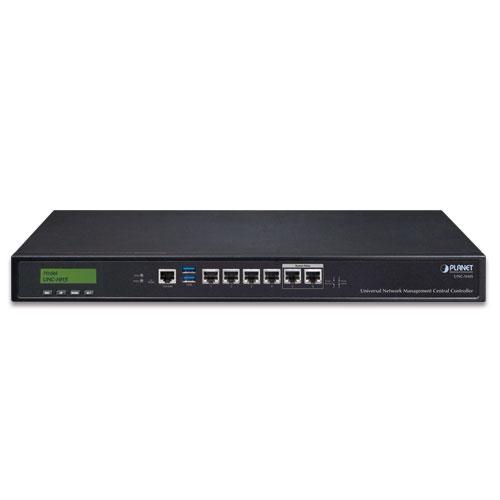
وحدة تحكم مركزية لإدارة الشبكة العالمية مزودة بشاشة LCD و 6 منافذ LAN بسرعة 10/100/1000T (1024 × 100 عقدة)

» UNC-NMS

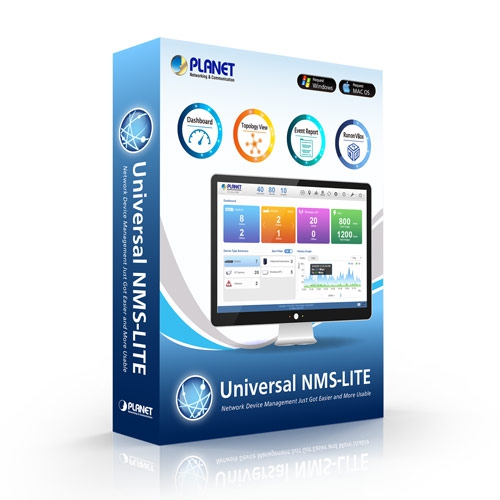
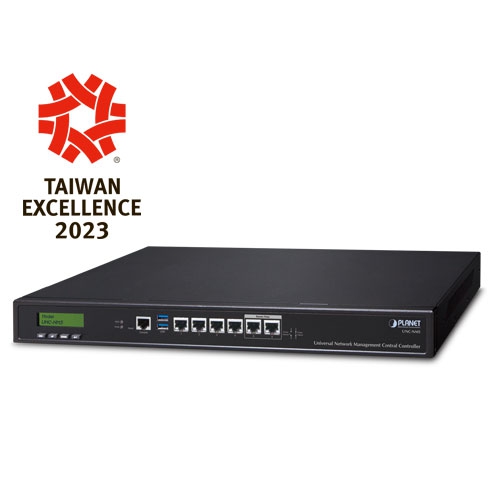
Universal Network Management Central Controller with LCD

PLANET’s UNC-NMS Network Management Central Controllers can directly monitor 102,400 nodes by monitoring NMS-500 or NMS-1000V up to 100 sites. However, the deployed devices, such as managed switches, media converters, routers, smart APs, VoIP phones, IP cameras, etc., have to be compliant with the MQTT بروتوكول،, بروتوكول إدارة الشبكة البسيط (SNMP) بروتوكول،, ONVIF البروتوكول و اكتشاف الكوكب الذكي utility. These enable the administrator to centrally manage these nodes from a central office, greatly boosting network and power management efficiency.


PLANET NMS solution features intuitive dashboard, topology and map viewing to make network management efficient and effective.

تشمل الميزات الحصرية لحلول PLANET NMS ما يلي:

  • Centralized control of up to 102,400 nodes
  • System upgrade and license (free of charge)
  • Intuitive and user-friendly management functions
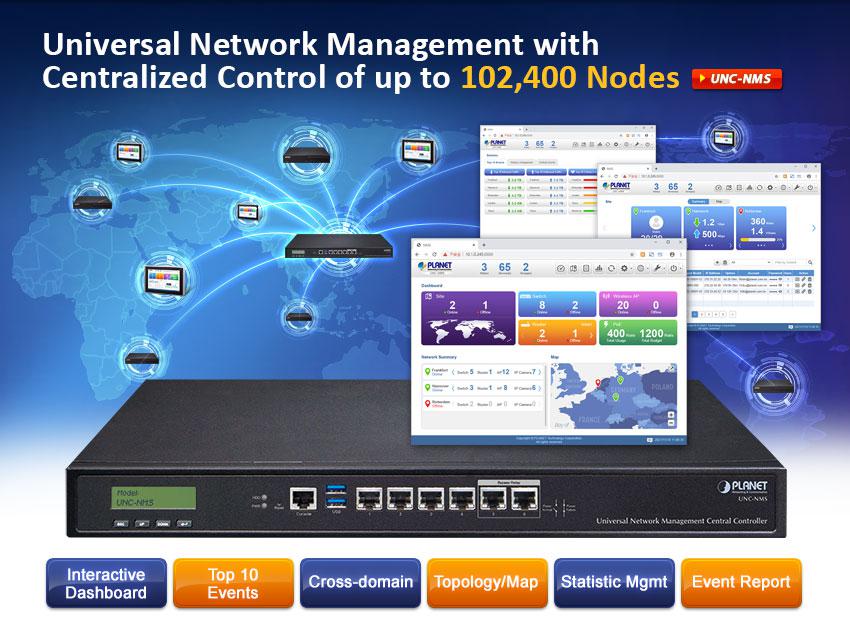
edm UNC NMS


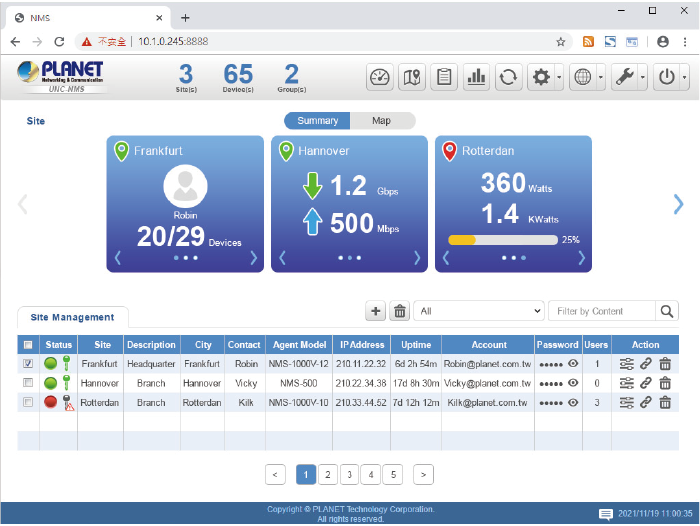
Interactive Dashboard Shows Network Statuses in an Instant 

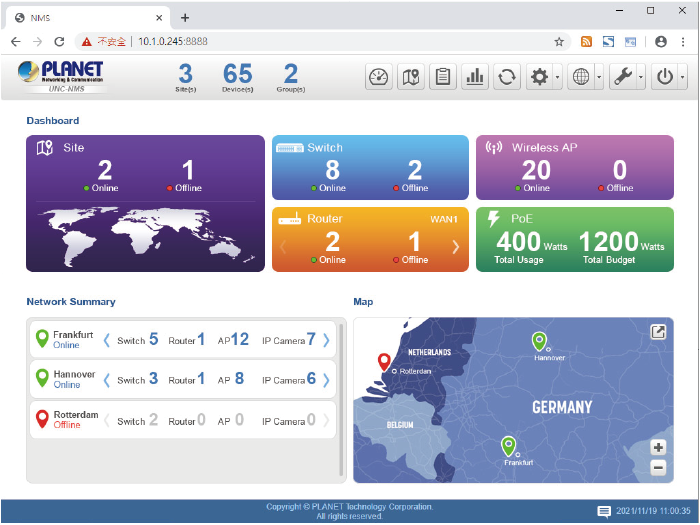
The NMS Controller’s interactive dashboard includes all the managed sites of network routers, switches, access points and PoE statistics. The administrator can quickly overview the status of each device from the Network Summary and Mapping window. Through each dashboard function button, the administrator can quickly link to the detailed current status. The site management page of deployed nodes can be monitored and managed in the VPN network environment. Status on a faulty event or log-in page is also displayed, thus immediately knowing where the disconnection issue comes from.
 

UNC NMS 5UNC NMS 6
UNC NMS 7UNC NMS 8


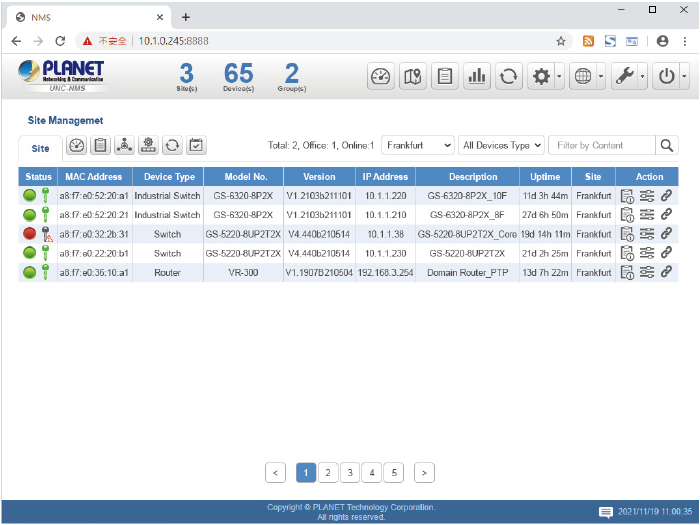
شاهد الشبكة في غضون دقائق

The Device list information web page presents a list of managed devices, an NMS agent dashboard, topology view, AP control, and event and log viewing function. It provides the at-a-glance and efficient summary of your management network. It lets you have a valuable information on the current wired and wireless network statuses via data-driven graphical charts for each site. The topology viewer and event reports enable you to visualize the system usage and node status in real time so as to address whatever issue they may have.
 

UNC NMS 1


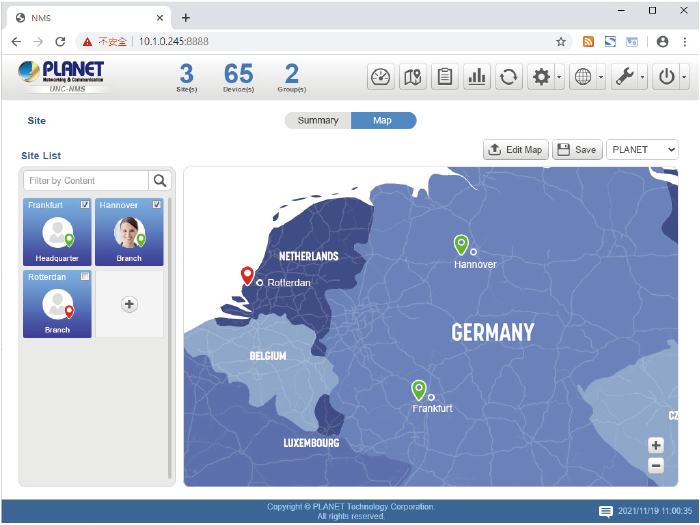
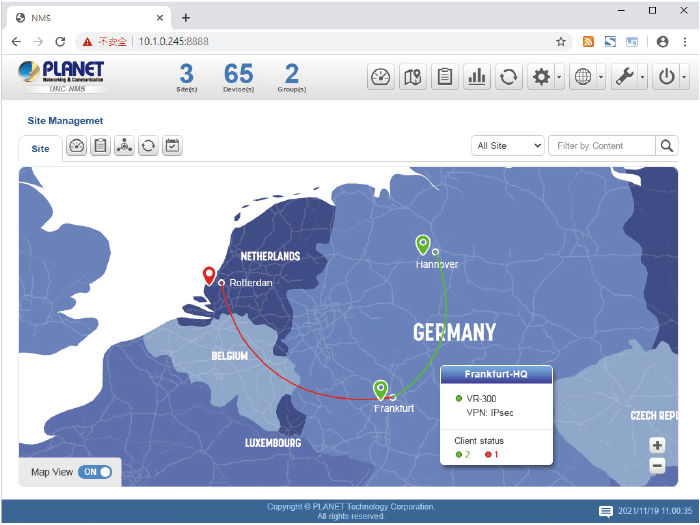
Optimizing Multiple Sites with Topology Viewer (with Maps)

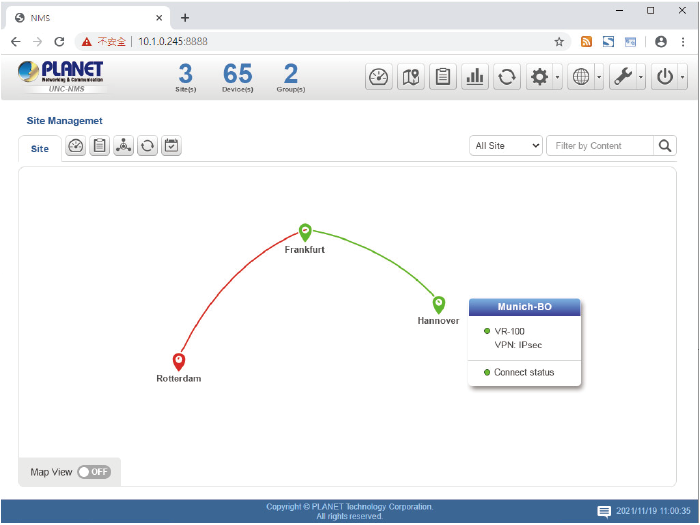
With the site maps, each site can be located according to the map, thus helping the administrator quickly overview the NMS agent and saving time and cost of on-site support and monitoring. The current statuses of NMS agents are shown in real time to optimize the site-to-site VPN network performance. The NMS Center Controller can provide up to 100 sites for all managed NMS agents.
UNC NMS 9UNC NMS 10


Real-time Centralized Monitoring with E-mail Alarm Function

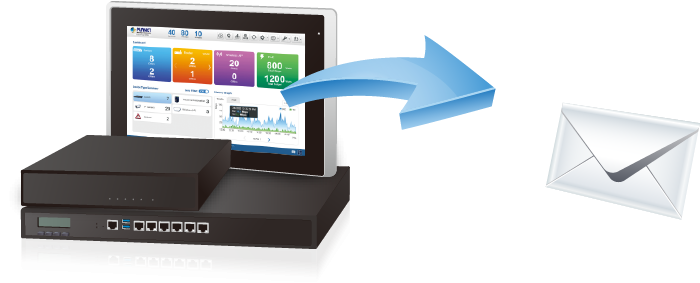
As the NMS controllers can display a topology view of the deployed powered devices, they can detect which device is online (Green) or offline (Red). The real-time centralized monitoring of these devices can help the administrator know what the current statuses of these devices are. Pop-up alerts shown on the touch panel tell where the problems are. The e-mail alarm function is designed to send an email alert to the administrator via the SMTP server where syslog information can be found once an abnormality is detected. This can prompt the administrator to quickly fix the identified problem in the network.
 

UNC NMS 2

Statistics for Top 10 Events to Manage Network Traffic and PoE Power

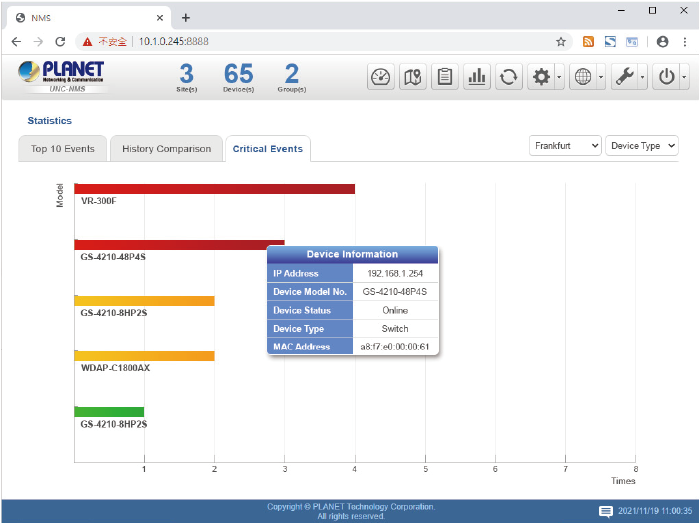
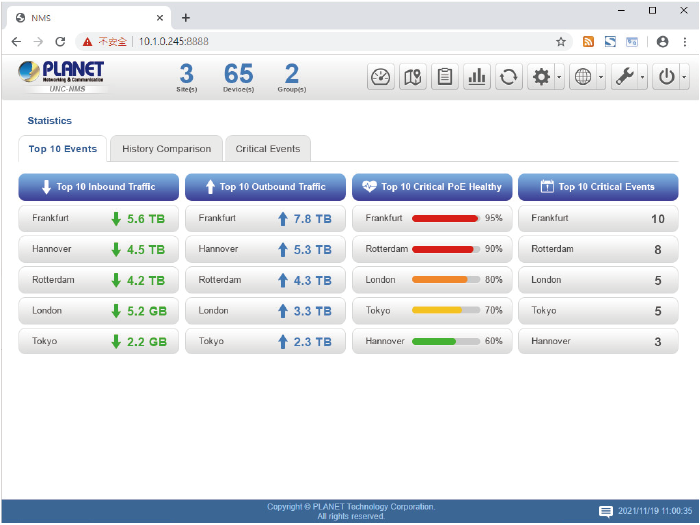
The NMS statistic page lists the top 10 inbound and outbound traffic, PoE health, and critical events. It can help administrator to analyze which device is having abnormal power consumption, abnormally high temperature, illegal time of usage, and the near end of life cycle in order to avoid network crash.
UNC NMS 11UNC NMS 12


Power Consumption Analysis and Unloading Management Mechanism

The NMS Controllers provide raw data records for PoE device power usage. Through the history statistics, the administrator can flexibly operate in whatever power is in demand. For energy savings and carbon reduction, the NMS system can help enterprises to save energy by unloading the low priority devices and ensure the safety and stability of electricity consumption in the overall environment of company, factory, etc.
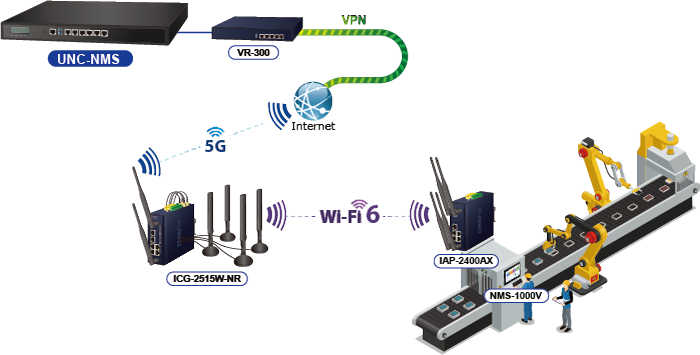
 

حل اقتصادي لإدارة الشبكة المركزية للشركات الصغيرة والمتوسطة 

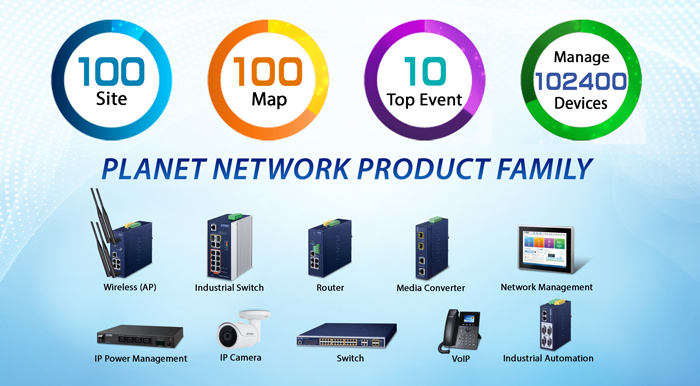
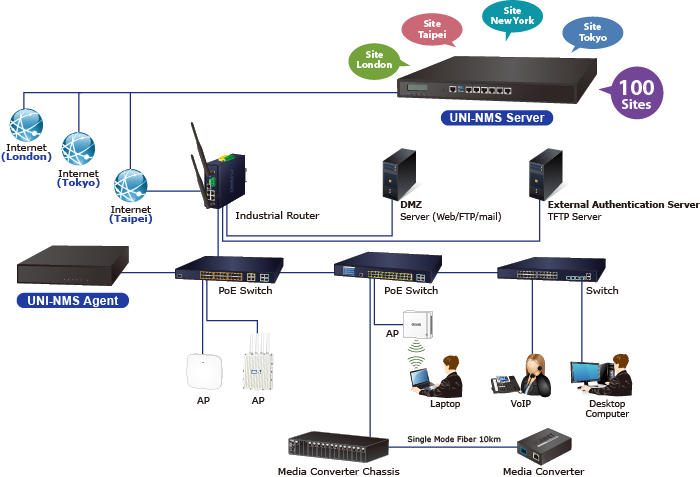
PLANET NMS-500 and NMS-1000V controllers help service providers and IT managers control all PLANET network devices at the same time and enable the administrator to effectively manage a local network of up to 100 sites and 102,400 managed nodes simultaneously without having to purchase any license and hardware-based controller, and pay an expensive annual subscription fee.


The administrator can automatically discover and configure device profiles, batch provisioning/firmware upgrade, and built-in SAPC (Smart AP Control) that customize Wi-Fi planning against floor maps, and monitor all managed APs through a single Web-based interface. It allows operating across different platforms through virtualization software, which helps SMBs save costs on the need to configure the wireless APs one by one if done manually. Through the device list virtual panel function, the administrator also can do configuration with an NMS remote management switch to modify the network environment in one minute.


أجهزة مادية صناعية

  • 6 x 10/100/1000BASE-T Gigabit Ethernet RJ45 ports (LAN 5 and LAN 6 are bypass ports)
  • 1 x LCM for basic system setting
  • 2 x LEDs (Power and HDD)
  • منفذان USB 3.0 لعمل نسخ احتياطية واستعادة الإعدادات
  • 1 x RJ45 Console port interface
  • 1 x Factory default button (GPIO)
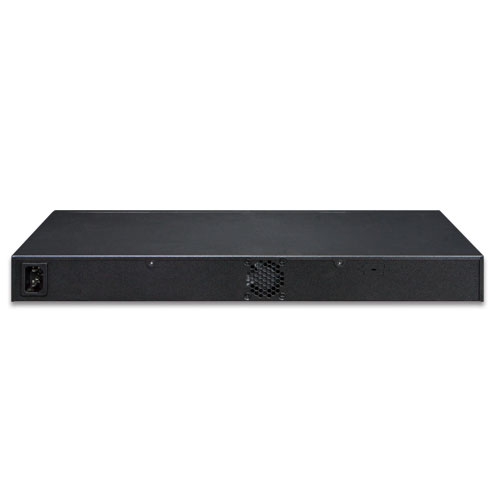
  • 1 x 3-pin AC Power input socket for 100~240V
  • 1U Rack-mount


إدارة أجهزة الشبكة

لوحة التحكمProviding the at-a-glance view of center system, site summary,  site Map, traffic, PoE network status
Site ManagementTo create site list, site map for NMS agent management
قائمة الأجهزةTo management all site devices or filter one site devices list for NMS agent function operation
StatisticTo show  Top 10 Event Report,  History Comparison function,  Critical Events for devices
Topology ViewerA topology of network devices compliant with MQTT, SNMP, ONVIF, Smart Discovery and LLTD Protocol with Map or not
تقارير الأحداثيمكن الإبلاغ عن حالة الشبكة عبر إنذار الشبكة وسجل النظام
نظام إنذارتنبيهات البريد الإلكتروني للمسؤول عبر خادم SMTP
Switch Virtual PanelTo directly configure the switch for basic function
ONVIF IP Cam SnapshotDirectly catch the managed IP cam snapshot
توفير الدفعاتEnabling multiple APs to be configured and upgraded at one time by using the designated profile for each site.
خريطة تغطية حراريةتغطية إشارة نقاط الوصول في الوقت الفعلي على خريطة الطابق التي يحددها المستخدم لتحسين نشر شبكة Wi-Fi الميدانية
ملف تعريف مخصصالسماح بإنشاء وصيانة ملفات تعريف لاسلكية متعددة
Auto Provisioningتوفير نقاط وصول متعددة بنقرة واحدة
 إدارة المجموعات تبسيط إدارة نقاط البيع عالية الكثافة
 مخطط المنطقة تحسين نشر نقاط الوصول مع تغطية الإشارة الفعلية
 المصادقة خادم RADIUS مدمج ومتكامل بسلاسة مع شبكة المؤسسة
 تحكم المستخدم السماح بإنشاء الحسابات عند الطلب وسياسة الوصول التي يحددها المستخدم
 قابلية التوسع إمكانية ترقية النظام مجانًا وترقية البرامج الثابتة لنقاط الوصول بشكل جماعي
 أقصى قابلية للتوسع 100 sites, 100 site maps, 102,400 nodes


خصائص إدارة الشبكة

  • خادم DHCP مدمج
  • خادم RADIUS مدمج
  • الوصول الآمن عبر SSL
  • Certification Authentication
  • واجهة إدارة رسومية عبر الويب
  • إدارة SNMP الإصدار 1، والإصدار 2c، والإصدار 3
  • يدعم PLANET DDNS/Easy DDNS
جامعة نورث كارولينا - نيو مكسيكو
منتججامعة نورث كارولينا - نيو مكسيكو
Universal Network Management Center Central Controller with LCD & 6 10/100/1000T LAN Ports (1024 x 100 nodes)
عامل الشكل1U Rack-mount
المواصفات الفيزيائية
واجهة الإدخال/الإخراج6 10/100/1000BASE-T Gigabit Ethernet RJ45 ports (LAN 5 and LAN 6 were bypass design)
منفذان USB 3.0 (لا يمكن استخدامهما في نفس الوقت).
1 Factory default button (GPIO)
1 واجهة منفذ وحدة التحكم RJ45
2 DB-9 COM1,COM2 (reserve)
تخزينقرص صلب SATA بحجم 2.5 بوصة وسعة 64 جيجابايت
قاد2 LED (Power / HDD)
حجم LCM (المنطقة النشطة)49.45 mm (W) x 9.58 mm (H)
زر LCMأربعة أزرار تعمل باللمس للدخول والخروج والتحرك لأعلى ولأسفل
الأبعاد (العرض × العمق × الارتفاع)438 (عرض) × 180 (عمق) × 44 مم (ارتفاع)
17.24 بوصة (عرض) × 7.09 بوصة (عمق) × 1.73 بوصة (ارتفاع)
وزن3 كجم (6.62 رطل)
حاويةمعدن
متطلبات الطاقة3 pin AC Power input socket
تيار متردد 100~240 فولت، 65 واط
البيئة والشهادات
درجة حرارةنطاق التشغيل: من 0 إلى 50 درجة مئوية
التخزين: من -20 إلى 70 درجة مئوية
رطوبة5 ~ 90% الرطوبة النسبية (بدون تكثيف)
متوسط الوقت بين الأعطال (ساعات)100,000
إدارة الشبكة
Number of Managed Sites100
عدد الأجهزة المُدارة102,400
Auto Discovery by NMS agentيدعم أجهزة PLANET
لوحة التحكمProviding the at-a-glance view of center system, site summary, site Map, traffic, PoE network status
Site ManagementTo create site list, site map for NMS agent management
قائمة الأجهزةTo manage all site devices or filter one site devices list for NMS agent function operation
StatisticTo show Top 10 Event Report, History Comparison function, Critical Events for devices
Topology ViewerA topology of network devices compliant with MQTT, SNMP, ONVIF, Smart Discovery and LLTD Protocol with Map or not
تقارير الأحداثيمكن الإبلاغ عن حالة الشبكة عبر إنذار الشبكة وسجل النظام
نظام إنذارتنبيهات البريد الإلكتروني للمسؤول عبر خادم SMTP
Switch Virtual PanelTo directly configure the switch for basic function
ONVIF IP Cam SnapshotDirectly catch the managed IP cam snapshot
توفير الدفعاتEnabling multiple APs to be configured and upgraded at one time by using the designated profile for each site.
خريطة تغطية حراريةتغطية إشارة نقاط الوصول في الوقت الفعلي على خريطة الطابق التي يحددها المستخدم لتحسين نشر شبكة Wi-Fi الميدانية
ملف تعريف مخصصالسماح بإنشاء وصيانة ملفات تعريف لاسلكية متعددة
Auto Provisioningتوفير نقاط وصول متعددة بنقرة واحدة
إدارة المجموعاتتبسيط إدارة نقاط البيع عالية الكثافة
مخطط المنطقةتحسين نشر نقاط الوصول مع تغطية الإشارة الفعلية
المصادقةخادم RADIUS مدمج ومتكامل بسلاسة مع شبكة المؤسسة
تحكم المستخدمالسماح بإنشاء الحسابات عند الطلب وسياسة الوصول التي يحددها المستخدم
قابلية التوسعإمكانية ترقية النظام مجانًا وترقية البرامج الثابتة لنقاط الوصول بشكل جماعي
خدمات الشبكة
شبكةDDNS
يدعم PLANET DDNS/Easy DDNS

DHCP
Built-in DHCP Server for auto IP assignment to APs

إدارة
Console; Telnet; SSL; Web browser (Chrome is recommended.);
SNMP الإصدار 1، الإصدار 2c، الإصدار 3

Discovery
Supports SNMP, ONVIF and PLANET Smart Discovery

صيانةBackup
System backup and restore to local or USB HDD

Reboot
Provides system reboot manually or automatically per power schedule

التشخيص
Provides IPv4/IPv6 ping and trace route

الامتثال للمعايير
الامتثال التنظيميCE، FCC
الامتثال للمعاييرIEEE 802.3 10BASE-T
IEEE 802.3u 100BASE-TX
IEEE 802.3ab جيجابت 1000BASE-T
تاريخإصداروصفتحميل
2023/08/121.0

جامعة نورث كارولينا - نيو مكسيكو

Download Icon
تاريخإصداروصفتحميل
2022/29/081.0

الإصدار الأولي.

Download Icon
تاريخإصداروصفتحميل
2024/18/101.0

الإصدار الأولي لدليل التكوين.

Download Icon
تاريخإصداروصفتحميل
2024/09/091.0240816

Optimize the architecture to enhance both front-end and back-end performance of the platform.

Download Icon
2023/08/121.0231130

الإصدار الأولي.

Download Icon

معلومات الطلب

جامعة نورث كارولينا - نيو مكسيكو

وحدة تحكم مركزية لإدارة الشبكة العالمية مزودة بشاشة LCD و 6 منافذ LAN بسرعة 10/100/1000T (1024 × 100 عقدة)

✉

انضم إلى قائمتنا البريدية

احصل على آخر الأخبار والعروض والتحديثات من شركة بلانيت تكنولوجي مباشرة إلى بريدك الإلكتروني.

نحن نحترم خصوصيتك. يمكنك إلغاء الاشتراك في أي وقت.

اشترك في النشرة الإخبارية الإلكترونية لـ PLANET

احصل على أحدث معلومات المنتجات وأخبار الشركة!