

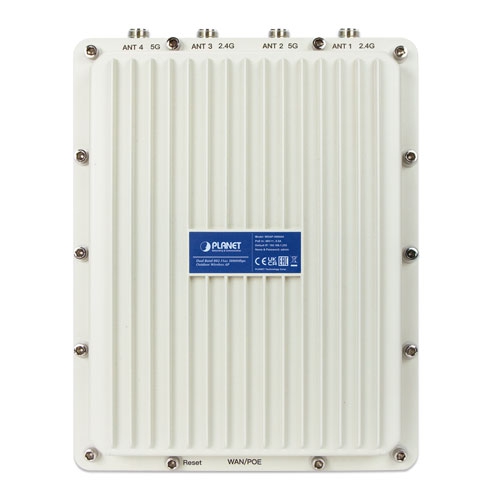
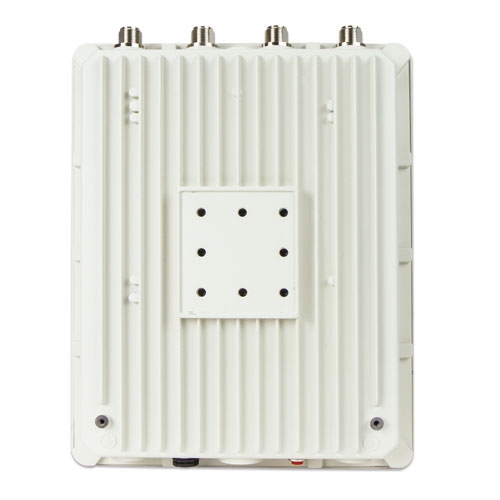
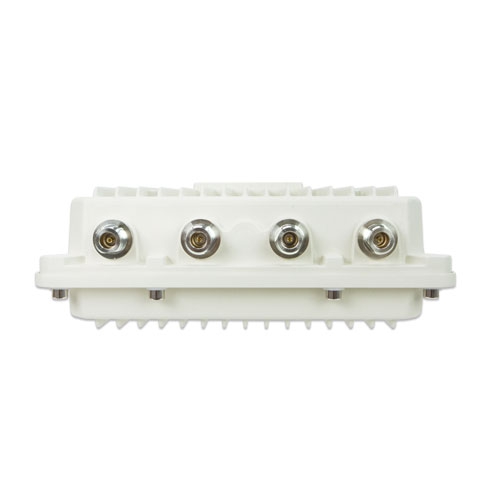
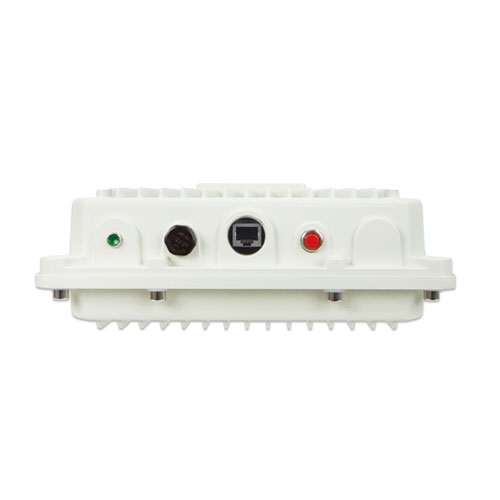
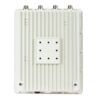
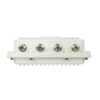
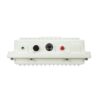
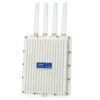
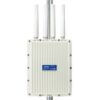
بيانات المنتج

  • رمز المنتج: WDAP-3000AX
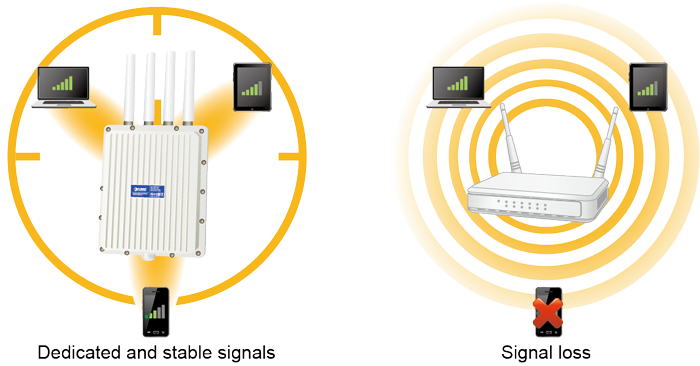
  • product_editor_4418_tab_content: <strong>Robust Hardware and Flexible Dual RF for Various Outdoor Requirements</strong> With high-power, long-distance, reliable and comprehensive characteristics, the WDAP-3000AX designed with durable and robust IP67 hardware architecture, and dramatic wireless efficiency is perfect for any outdoor network infrastructure. With higher gain antennas and dual RF design, the WDAP-3000AX is suitable for various applications. For example, the WDAP-3000AX can establish the backhaul link through the 5GHz radio and then relay the wireless signal through the 2.4GHz radio to provide internet service to rural residents. With the WDAP-3000AX, an outdoor wireless infrastructure in the harsh environment can be speedily deployed to reduce cabling cost and installation time. <img style="display: block; margin-left: auto; margin-right: auto;" src="https://www.planet.com.sa/wp-content/uploads/2025/01/WDAP-3000AX-2.png" alt="" width="700" height="282" /> **We recommend you to match the WDAP-3000AX with our related products to get the best results.
  • product_editor_4418_tab_enabled: نعم
  • product_editor_4418_tab_content_changed: نعم
  • product_editor_4418_tab_title: التطبيقات
  • product_editor_4421_tab_content: <strong>الأجهزة </strong> <ul> <li>Compliant with the IEEE 802.11a/b/g/n/ac/ax wireless technology</li> <li>Equipped with 10/100/1000Mbps RJ45 ports, and auto MDI/MDI-X</li> <li>One reset button and power LED indicator</li> </ul>   <strong>خصائص واجهة الترددات الراديوية</strong> <ul> <li>802.11ax 2T2R architecture with data rate of up to 3000Mbps (600Mbps in 2.4GHz and 2400Mbps in 5GHz)</li> <li>Built-in four N-type antenna connectors</li> <li>قدرة خرج عالية مع تحكم متعدد في قدرة الإرسال</li> </ul>   <strong>الخصائص البيئية الخارجية</strong> <ul> <li>IP67 rating, IEEE 802.3at PoE design</li> <li>Rugged protection with aluminum extrusion case and ground terminal</li> <li>20KV surge protection for wire cable interface</li> <li>Operating temperature: -40~70 degrees C</li> </ul>   <strong>أوضاع تشغيل متعددة وميزات لاسلكية</strong> <ul> <li>Multiple operation modes: AP, gateway and repeater</li> <li>Supports OFDMA (orthogonal frequency division multiple access)</li> <li>Supports MU-MIMO (multi-user multiple-input multiple-output), Beamforming and BSS Coloring</li> <li>توفر تقنية WMM (الوسائط المتعددة عبر الواي فاي) أولوية أعلى لنقل الوسائط المتعددة عبر الشبكة اللاسلكية</li> <li>عتبة التغطية للحد من ضعف إشارة العملاء الذين يشغلون الجلسة</li> <li>مخطط تحليل قناة Wi-Fi في الوقت الفعلي والتحكم في حدود العملاء لتحسين الأداء</li> <li>Support Terminal Seamless Roaming with 802.11k, 802.11v, and 802.11r</li> <li>Supports mesh connection(The maximum number of Mesh supported device is 6 pcs.)</li> </ul>   <strong>اتصال شبكة آمن</strong> <ul> <li>Full encryption supported: WPA3 Personal, WPA2/WPA3 Personal, WPA2 Personal (AES), WPA2 Personal (TKIP), WPA2 Personal (TKIP+AES), WPA/WPA2 Personal (AES), WPA/WPA2 Personal (TKIP), WPA/WPA2 Personal (TKIP+AES), WPA2 Enterprise, WPA/WPA2 Enterprise</li> <li>Supports 802.1Q port VLAN Supports IP/Port/MAC address/URL filtering, DoS, SPI firewall</li> <li>Supports DMZ and port forwarding</li> <li>التحكم في عرض النطاق الترددي لكل عنوان IP لزيادة استقرار الشبكة</li> </ul>   <strong>Easy Deployment and Management</strong> <ul> <li>Support management by PLANET CloudViewer and CloudViewerPro app</li> <li>Supports PLANET AP Controllers in AP mode</li> <li>اكتشاف سهل بواسطة PLANET Smart Discovery</li> <li>آلية الإصلاح الذاتي من خلال إعداد إعادة التشغيل التلقائي للنظام</li> <li>System status monitoring through remote syslog server</li> <li>Gateway mode supports PLANET DDNS/Easy DDNS, Captive Portal, RADIUS Server/Client</li> </ul>  
  • product_editor_4421_tab_enabled: نعم
  • product_editor_4421_tab_content_changed: نعم
  • product_editor_4421_tab_title: الميزات الرئيسية
  • product_editor_4422_tab_content:   <div class="table-responsive"> <table class="common_table_sky" style="width: 100%;"> <thead> <tr> <th colspan="2">مواصفات الأجهزة</th> </tr> </thead> <tbody> <tr> <td class="align-middle">واجهات</td> <td>PoE WAN/LAN: 1 x 10/100/1000BASE-T, auto-MDI/MDIX, 802.3at PoE In</td> </tr> <tr> <td class="align-middle">Antennas</td> <td>Built-in four N-type connectors</td> </tr> <tr> <td class="align-middle">زر إعادة الضبط</td> <td>Reset button (Press over 5 seconds to reset the device to factory default)</td> </tr> <tr> <td class="align-middle">مؤشرات LED</td> <td>قوة</td> </tr> <tr> <td class="align-middle">الأبعاد (العرض × العمق × الارتفاع)</td> <td>231 x 80 x 295 mm</td> </tr> <tr> <td class="align-middle">وزن</td> <td>2527 g</td> </tr> <tr> <td class="align-middle">Material</td> <td>Aluminum</td> </tr> <tr> <td class="align-middle">متطلبات الطاقة</td> <td>48V 0.5A, IEEE 802.3at PoE+</td> </tr> <tr> <td class="align-middle">استهلاك الطاقة</td> <td>< 15W</td> </tr> <tr> <td class="align-middle">التركيب</td> <td>Mast mounting</td> </tr> <tr> <td class="align-middle">مستوى IP</td> <td>IP67</td> </tr> <tr> <td class="align-middle">حماية من التفريغ الكهروستاتيكي</td> <td>±8kV air gap discharge ±4kV contact discharge</td> </tr> <tr> <td class="align-middle">الحماية من زيادة التيار</td> <td>±20kV</td> </tr> </tbody> <thead> <tr> <th colspan="2">Wireless Interface Specifications</th> </tr> </thead> <tbody> <tr> <td class="align-middle">معيار</td> <td>IEEE 802.11ax IEEE 802.11ac IEEE 802.11n IEEE 802.11a IEEE 802.11b IEEE 802.11g IEEE 802.11i IEEE 802.3 10BASE-T IEEE 802.3u 100BASE-TX IEEE 802.3ab 1000BASE-T IEEE 802.3x flow control IEEE 802.11k, 802.11v, and 802.11r</td> </tr> <tr> <td class="align-middle">التحكم في الوصول إلى الوسائط</td> <td>CSMA/CA</td> </tr> <tr> <td class="align-middle">Data Modulation</td> <td>802.11ax: MIMO-OFDMA (BPSK / QPSK / 16QAM / 64QAM / 256QAM, 1024QAM) 802.11ac: MIMO-OFDM (BPSK / QPSK / 16QAM / 64QAM / 256QAM) 802.11a/g/n: OFDM (BPSK / QPSK / 16QAM / 64QAM) 802.11b: DSSS (DBPSK / DQPSK / CCK)</td> </tr> <tr> <td class="align-middle">وضع النطاق</td> <td>2.4GHz / 5GHz concurrent mode</td> </tr> <tr> <td class="align-middle">نطاق التردد</td> <td><b>2.4GHz:</b> FCC: 2.412~2.462GHz ETSI: 2.412~2.472GHz <b>5GHz:</b> لجنة الاتصالات الفيدرالية: 5.180~5.240 جيجاهرتز، 5.745~5.825 جيجاهرتز، المعهد الأوروبي لمعايير الاتصالات: 5.180~5.700 جيجاهرتز</td> </tr> <tr> <td class="align-middle">قنوات التشغيل</td> <td><b>ETSI: </b> 2.4GHz: 1, 2, 3, 4, 5, 6, 7, 8, 9, 10, 11, 12, 13 (13 Channels) 5GHz: 36, 40, 44, 48, 52, 56, 60, 64, 100, 104, 108, 112, 116, 120,124,256,132, 136, 140 (19 Channels) <b>FCC:</b> 2.4GHz: 1, 2, 3, 4, 5, 6, 7, 8, 9, 10, 11 (11 Channels) 5GHz: 36, 40, 44, 48, 52, 56, 60, 64, 100, 104, 108, 112, 116,120,124,128,132, 136, 140, 149, 153, 157, 161,165 (24Channels) <b>5GHz channel list may vary in different countries according to their regulations.</b></td> </tr> <tr> <td class="align-middle">أقصى قدرة إرسال (ديسيبل ميلي واط)</td> <td>FCC: up to 22 ± 1dBm ETSI: < 19dBm (EIRP)<span style="color: #ffffff;">5G Power</span> <table class="table-bordered-bone" cellpadding="0"> <tbody> <tr> <td align="middle" bgcolor="#7f9cd3" width="200"><span style="color: #ffffff;">وضع الشبكة</span></td> <td align="middle" bgcolor="#7f9cd3" width="200"><span style="color: #ffffff;">معدل نقل البيانات</span></td> <td align="middle" bgcolor="#7f9cd3" width="200"><span style="color: #ffffff;">أقصى قدرة إرسال (ديسيبل ميلي واط)</span></td> </tr> <tr> <td colspan="3" valign="middle" bgcolor="#7f9cd3" width="0"><span style="color: #ffffff;">2.4G Power</span></td> </tr> <tr> <td align="middle" valign="”middle”" width="100">802.11b</td> <td align="middle" valign="middle" width="100">1Mbps 11Mbps</td> <td align="middle" valign="middle" width="200">22±2 22±2</td> </tr> <tr> <td align="middle" valign="”middle”" width="100">802.11g</td> <td align="middle" valign="middle" width="100">6Mbps 54Mbps</td> <td align="middle" valign="middle" width="200">21±2 19±2</td> </tr> <tr> <td align="middle" valign="”middle”" width="100">802.11n HT20</td> <td align="middle" valign="middle" width="100">MCS0 MCS7</td> <td align="middle" valign="middle" width="200">20±2 18±2</td> </tr> <tr> <td align="middle" valign="”middle”" width="100">802.11n HT40</td> <td align="middle" valign="middle" width="100">MCS0 MCS7</td> <td align="middle" valign="middle" width="200">20±2 18±2</td> </tr> <tr> <td align="middle" valign="”middle”" width="100">802.11ax HT20</td> <td align="middle" valign="middle" width="100">MCS0 MCS11</td> <td align="middle" valign="middle" width="200">20±2 16±2</td> </tr> <tr> <td align="middle" valign="”middle”" width="100">802.11ax HT40</td> <td align="middle" valign="middle" width="100">MCS0 MCS11</td> <td align="middle" valign="middle" width="200">20±2 16±2</td> </tr> </tbody> </table> </td> </tr> <tr> <td align="middle" valign="”middle”" width="100">802.11a</td> <td align="middle" valign="middle" width="100">6Mbps 54Mbps</td> <td align="middle" valign="middle" width="200">21±2 19±2</td> </tr> <tr> <td align="middle" valign="”middle”" width="100">802.11n HT20</td> <td align="middle" valign="middle" width="100">MCS0 MCS7</td> <td align="middle" valign="middle" width="200">20±2 18±2</td> </tr> <tr> <td align="middle" valign="”middle”" width="100">802.11n HT40</td> <td align="middle" valign="middle" width="100">MCS0 MCS7</td> <td align="middle" valign="middle" width="200">20±2 18±2</td> </tr> <tr> <td align="middle" valign="”middle”" width="100">802.11ac HT20</td> <td align="middle" valign="middle" width="100">MCS0 MCS7</td> <td align="middle" valign="middle" width="200">20±2 17±2</td> </tr> <tr> <td align="middle" valign="”middle”" width="100">802.11ac HT40</td> <td align="middle" valign="middle" width="100">MCS0 MCS7</td> <td align="middle" valign="middle" width="200">20±2 17±2</td> </tr> <tr> <td align="middle" valign="”middle”" width="100">802.11ac HT80</td> <td align="middle" valign="middle" width="100">MCS0 MCS9</td> <td align="middle" valign="middle" width="200">19±2 17±2</td> </tr> <tr> <td align="middle" valign="”middle”" width="100">802.11ax HT20</td> <td align="middle" valign="middle" width="100">MCS0 MCS11</td> <td align="middle" valign="middle" width="200">20±2 16±2</td> </tr> <tr> <td align="middle" valign="”middle”" width="100">802.11ax HT40</td> <td align="middle" valign="middle" width="100">MCS0 MCS11</td> <td align="middle" valign="middle" width="200">20±2 16±2</td> </tr> <tr> <td align="middle" valign="”middle”" width="100">802.11ax HT80</td> <td align="middle" valign="middle" width="100">MCS0 MCS11</td> <td align="middle" valign="middle" width="200">19±2 16±2</td> </tr> <tr> <td align="middle" valign="”middle”" width="100">802.11ax HT160</td> <td align="middle" valign="middle" width="100">MCS0 MCS11</td> <td align="middle" valign="middle" width="200">18±2 14±2</td> </tr> </tbody> </table> حساسية الاستقبال <table class="table-bordered-bone" cellpadding="0"> <tbody> <tr> <td align="middle" bgcolor="#7f9cd3" width="200"><span style="color: #ffffff;">وضع الشبكة</span></td> <td align="middle" bgcolor="#7f9cd3" width="200"><span style="color: #ffffff;">معدل نقل البيانات</span></td> <td align="middle" bgcolor="#7f9cd3" width="200"><span style="color: #ffffff;">حساسية الاستقبال (ديسيبل ميلي واط)</span></td> </tr> <tr> <td colspan="3" valign="middle" bgcolor="#7f9cd3" width="200"><span style="color: #ffffff;">2.4 جيجاهرتز</span></td> </tr> <tr> <td align="middle" valign="”middle”" width="200">802.11b</td> <td valign="middle" width="200">1Mbps 11Mbps</td> <td valign="middle" width="200">-96 -87</td> </tr> <tr> <td align="middle" valign="”middle”" width="200">802.11g</td> <td valign="middle" width="200">6Mbps 54Mbps</td> <td valign="middle" width="200">-93 -75</td> </tr> <tr> <td align="middle" valign="”middle”" width="200">802.11n HT20</td> <td valign="middle" width="200">MCS0 MCS7</td> <td valign="middle" width="200">-92 -73</td> </tr> <tr> <td align="middle" valign="”middle”">802.11n HT40</td> <td valign="middle">MCS0 MCS7</td> <td valign="middle">-88 -63</td> </tr> <tr> <td align="middle" valign="”middle”">802.11ax HT20</td> <td valign="middle">MCS0 MCS11</td> <td valign="middle">-92 -64</td> </tr> <tr> <td align="middle" valign="”middle”" width="200">802.11ax HT40</td> <td valign="middle" width="200">MCS0 MCS11</td> <td valign="middle" width="200">-88 -58</td> </tr> <tr> <td colspan="3" valign="middle" bgcolor="#7f9cd3" width="200"><span style="color: #ffffff;">5 جيجاهرتز</span></td> </tr> <tr> <td align="middle" valign="”middle”" width="200">802.11a</td> <td valign="middle" width="200">6Mbps 54Mbps</td> <td valign="middle" width="200">-92 -74</td> </tr> <tr> <td align="middle" valign="”middle”" width="200">802.11n HT20</td> <td valign="middle" width="200">MCS0 MCS7</td> <td valign="middle" width="200">-90 -73</td> </tr> <tr> <td align="middle" valign="”middle”" width="200">802.11n HT40</td> <td valign="middle" width="200">MCS0 MCS7</td> <td valign="middle" width="200">-87 -70</td> </tr> <tr> <td align="middle" valign="”middle”" width="200">802.11ac HT20</td> <td valign="middle" width="200">MCS0 MCS7</td> <td valign="middle" width="200">-91 -67</td> </tr> <tr> <td align="middle" valign="”middle”" width="200">802.11ac HT40</td> <td valign="middle" width="200">MCS0 MCS7</td> <td valign="middle" width="200">-88 -63</td> </tr> <tr> <td align="middle" valign="”middle”">802.11ac HT80</td> <td valign="middle">MCS0 MCS9</td> <td valign="middle">-84 -60</td> </tr> <tr> <td align="middle" valign="”middle”">802.11ax HT20</td> <td valign="middle">MCS0 MCS11</td> <td valign="middle">-91 -62</td> </tr> <tr> <td align="middle" valign="”middle”">802.11ax HT40</td> <td valign="middle">MCS0 MCS11</td> <td valign="middle">-89 -59</td> </tr> <tr> <td align="middle" valign="”middle”" width="200">802.11ax HT80</td> <td valign="middle" width="200">MCS0 MCS11</td> <td valign="middle" width="200">-86 -56</td> </tr> <tr> <td align="middle" valign="”middle”" width="200">802.11ax HT160</td> <td valign="middle" width="200">MCS0 MCS11</td> <td valign="middle" width="200">-83 -53</td> </tr> </tbody> </table> Software FeaturesLANStatic IP / Dynamic IPWANStatic IP Dynamic IP PPPoE/PPTP/L2TPWireless ModeAccess Point Gateway Repeater WISP Mesh (The maximum number of Mesh supported device is 6 pcs.)Channel Width20MHz, 40MHz, 80MHz, 160MHzEncryption SecurityWPA3 Personal, WPA2/WPA3 Personal, WPA2 Personal (AES), WPA2 Personal (TKIP),WPA2 Personal (TKIP+AES), WPA/WPA2 Personal (AES), WPA/WPA2 Personal (TKIP), WPA/WPA2 Personal (TKIP+AES), WPA2 Enterprise, WPA/WPA2 EnterpriseWireless SecurityEnable/Disable SSID Broadcast Wireless Max. 32 MAC address filtering User IsolationMax. SSIDs8 (4 per radio)Max. Clients256 (200 is suggested, depending on usage)Wireless QoSSupports Wi-Fi Multimedia (WMM)Wireless AdvancedMesh Auto Channel Selection 5-level Transmit Power Control: Max (100%), Efficient (75%), Enhanced (50%), Standard (25%) or Min (15%) Client Limit Control, Coverage Threshold Wi-Fi channel analysis chart Seamless Roaming Beamforming BSS ColoringStatus MonitoringDevice status, wireless client List PLANET Smart Discovery DHCP client table System Log supports remote syslog serverVLANIEEE 802.1Q VLAN (VID: 1~4094) SSID-to-VLAN mapping to up to 4 SSIDsSelf-healingSupports auto reboot settings per day/hourManagementRemote management through PLANET DDNS/ Easy DDNS Configuration backup and restore Supports UPnP Supports IGMP Proxy Supports PPTP/L2TP/IPSec VPN Pass-through Supports Captive Portal, RADIUS Server/ClientCentral ManagementApplicable controllers: NMS APC, WS APC, VR/IVR APC, ICG APC, PLANET CloudViewer, PLANET CloudViewerProEnvironment & CertificationTemperatureOperating: -40~ 70 degrees C Storage: -40 ~ 70 degrees CHumidityOperating: 10 ~ 90% (non-condensing) Storage: 5 ~ 95% (non-condensing)RegulatoryCE, RoHS </div>
  • product_editor_4422_tab_enabled: نعم
  • product_editor_4422_tab_content_changed: نعم
  • product_editor_4422_tab_title: تحديد
  • عدد مشاهدات منشورات ekit: 693
  • product_editor_4418_tab_sticky_width: pw-content-1
  • product_editor_4418_tab_sticky_position: pw-left-stick
  • product_editor_4421_tab_sticky_width: pw-content-1
  • product_editor_4421_tab_sticky_position: pw-left-stick
  • product_editor_4422_tab_sticky_width: pw-content-1
  • product_editor_4422_tab_sticky_position: pw-left-stick
  • product_editor_4423_tab_content:
  • product_editor_4423_tab_content_changed: نعم
  • product_editor_4423_tab_enabled: نعم
  • product_editor_4423_tab_title: التنزيلات
  • product_editor_4423_tab_sticky_width: pw-content-1
  • product_editor_4423_tab_sticky_height: 1
  • product_editor_4423_tab_sticky_position: pw-left-stick
  • product_editor_4424_tab_content:
  • product_editor_4424_tab_content_changed: نعم
  • product_editor_4424_tab_enabled: نعم
  • product_editor_4424_tab_title: المنتجات ذات الصلة
  • product_editor_4424_tab_sticky_width: pw-content-1
  • product_editor_4424_tab_sticky_height: 1
  • product_editor_4424_tab_sticky_position: pw-left-stick
  • إجمالي المبيعات: 0
  • product_label:
  • prouduct_loop_image_transparent_bg_:
  • 6_features_images: a:6:{i:0;s:5:"14487";i:1;s:5:"14486";i:2;s:5:"14485";i:3;s:5:"14484";i:4;s:5:"14483";i:5;s:5:"14482";}
  • datasheet_0_date: 20241025
  • datasheet_0_version: 1.0
  • وصف ورقة البيانات 0: WDAP-3000AX
  • datasheet_0_download_pdf: https://www.planet.com.sa/storage/products/WDAP-3000AX/C-WDAP-3000AX_L.pdf
  • ورقة البيانات: 1
  • quick_guide_0_date: 20241011
  • quick_guide_0_version: 1.1
  • quick_guide_0_description: تمت إضافة وظيفة PSTI.
  • quick_guide_0_download_pdf: https://www.planet.com.sa/storage/products/WDAP-3000AX/EMQ-WDAP-3000AX_v1.1.pdf
  • quick_guide_1_date: 20230928
  • quick_guide_1_version: 1.0
  • quick_guide_1_description: الإصدار الأولي.
  • quick_guide_1_download_pdf:
  • دليل سريع: 2
  • users_manual_0_date: 20240822
  • دليل المستخدم_الإصدار_0: 1.1
  • وصف دليل المستخدم 0: Added WDAP-W3000AX.
  • users_manual_0_download_pdf: https://www.planet.com.sa/storage/products/WDAP-3000AX/EM-WDAP-3000series_v1.1.pdf
  • تاريخ دليل المستخدم 1: 20231020
  • دليل المستخدم_الإصدار_1: 1.0
  • وصف دليل المستخدم 1: الإصدار الأولي.
  • users_manual_1_download_pdf: https://www.planet.com.sa/storage/products/WDAP-3000AX/EM-WDAP-3000series_v1.0.pdf
  • دليل المستخدم: 2
  • ec_declaration_0_date: 20240906
  • ec_declaration_0_version: 1.0
  • ec_declaration_0_description: إعلان المفوضية الأوروبية.
  • ec_declaration_0_download_pdf: https://www.planet.com.sa/storage/products/WDAP-3000AX/WDAP-3000AX.pdf
  • ec_declaration: 1
  • تطبيق أندرويد:
  • السائق:
  • firmware_0_date: 20240905
  • firmware_0_version: 1.2305240822
  • firmware_0_description: Function added: 1. Changed wireless mesh setting. 2. Added PSTI function. <b>تحديث البرامج الثابتة لـ PSTIA</b> (قانون أمن المنتجات والبنية التحتية للاتصالات) <b>*ملحوظة:</b> بعد تحديث البرنامج الثابت، ستحتاج إلى إدخال رمز MAC الخاص بالمنتج عند تسجيل الدخول لأول مرة. يرجى تدوين رمز MAC قبل المتابعة في عملية التحديث.
  • firmware_0_download_pdf: https://www.planet.com.sa/storage/products/WDAP-3000AX/FW-WDAP-3000AX_v1.2305b240822.zip
  • البرامج الثابتة: 1
  • جدوى:
  • قائمة_التوافق:
  • تخطيط الشريط الجانبي للموقع: تقصير
  • ast-site-content-layout: تقصير
  • نمط محتوى الموقع: تقصير
  • نمط الشريط الجانبي للموقع: تقصير
  • theme-transparent-header-meta: تقصير
  • جدول الملحقات: <table class="common_table"> <thead> <tr> <th colspan="2">معلومات الطلب</th> </tr> </thead> <tbody> <tr> <td class="text-center align-middle"> <h3 class="h6 m-0">WDAP-3000AX</h3> </td> <td>Dual Band 802.11ax 3000Mbps Outdoor Wireless AP</td> </tr> </tbody> </table>                            
  • علامة تبويب التطبيقات: <strong>Robust Hardware and Flexible Dual RF for Various Outdoor Requirements</strong> With high-power, long-distance, reliable and comprehensive characteristics, the WDAP-3000AX designed with durable and robust IP67 hardware architecture, and dramatic wireless efficiency is perfect for any outdoor network infrastructure. With higher gain antennas and dual RF design, the WDAP-3000AX is suitable for various applications. For example, the WDAP-3000AX can establish the backhaul link through the 5GHz radio and then relay the wireless signal through the 2.4GHz radio to provide internet service to rural residents. With the WDAP-3000AX, an outdoor wireless infrastructure in the harsh environment can be speedily deployed to reduce cabling cost and installation time. <img style="display: block; margin-left: auto; margin-right: auto;" src="https://www.planet.com.sa/wp-content/uploads/2025/01/WDAP-3000AX-2.png" alt="" width="700" height="282" /> **We recommend you to match the WDAP-3000AX with our related products to get the best results.
  • key_features_tab: <strong>الأجهزة </strong> <ul> <li>Compliant with the IEEE 802.11a/b/g/n/ac/ax wireless technology</li> <li>Equipped with 10/100/1000Mbps RJ45 ports, and auto MDI/MDI-X</li> <li>One reset button and power LED indicator</li> </ul>   <strong>خصائص واجهة الترددات الراديوية</strong> <ul> <li>802.11ax 2T2R architecture with data rate of up to 3000Mbps (600Mbps in 2.4GHz and 2400Mbps in 5GHz)</li> <li>Built-in four N-type antenna connectors</li> <li>قدرة خرج عالية مع تحكم متعدد في قدرة الإرسال</li> </ul>   <strong>الخصائص البيئية الخارجية</strong> <ul> <li>IP67 rating, IEEE 802.3at PoE design</li> <li>Rugged protection with aluminum extrusion case and ground terminal</li> <li>20KV surge protection for wire cable interface</li> <li>Operating temperature: -40~70 degrees C</li> </ul>   <strong>أوضاع تشغيل متعددة وميزات لاسلكية</strong> <ul> <li>Multiple operation modes: AP, gateway and repeater</li> <li>Supports OFDMA (orthogonal frequency division multiple access)</li> <li>Supports MU-MIMO (multi-user multiple-input multiple-output), Beamforming and BSS Coloring</li> <li>توفر تقنية WMM (الوسائط المتعددة عبر الواي فاي) أولوية أعلى لنقل الوسائط المتعددة عبر الشبكة اللاسلكية</li> <li>عتبة التغطية للحد من ضعف إشارة العملاء الذين يشغلون الجلسة</li> <li>مخطط تحليل قناة Wi-Fi في الوقت الفعلي والتحكم في حدود العملاء لتحسين الأداء</li> <li>Support Terminal Seamless Roaming with 802.11k, 802.11v, and 802.11r</li> <li>Supports mesh connection(The maximum number of Mesh supported device is 6 pcs.)</li> </ul>   <strong>اتصال شبكة آمن</strong> <ul> <li>Full encryption supported: WPA3 Personal, WPA2/WPA3 Personal, WPA2 Personal (AES), WPA2 Personal (TKIP), WPA2 Personal (TKIP+AES), WPA/WPA2 Personal (AES), WPA/WPA2 Personal (TKIP), WPA/WPA2 Personal (TKIP+AES), WPA2 Enterprise, WPA/WPA2 Enterprise</li> <li>Supports 802.1Q port VLAN Supports IP/Port/MAC address/URL filtering, DoS, SPI firewall</li> <li>Supports DMZ and port forwarding</li> <li>التحكم في عرض النطاق الترددي لكل عنوان IP لزيادة استقرار الشبكة</li> </ul>   <strong>Easy Deployment and Management</strong> <ul> <li>Support management by PLANET CloudViewer and CloudViewerPro app</li> <li>Supports PLANET AP Controllers in AP mode</li> <li>اكتشاف سهل بواسطة PLANET Smart Discovery</li> <li>آلية الإصلاح الذاتي من خلال إعداد إعادة التشغيل التلقائي للنظام</li> <li>System status monitoring through remote syslog server</li> <li>Gateway mode supports PLANET DDNS/Easy DDNS, Captive Portal, RADIUS Server/Client</li> </ul>  
  • علامة تبويب المواصفات: <table class="common_table_sky" style="width: 100%;"> <thead> <tr> <th colspan="2">مواصفات الأجهزة</th> </tr> </thead> <tbody> <tr> <td class="align-middle">واجهات</td> <td>PoE WAN/LAN: 1 x 10/100/1000BASE-T, auto-MDI/MDIX, 802.3at PoE In</td> </tr> <tr> <td class="align-middle">Antennas</td> <td>Built-in four N-type connectors</td> </tr> <tr> <td class="align-middle">زر إعادة الضبط</td> <td>Reset button (Press over 5 seconds to reset the device to factory default)</td> </tr> <tr> <td class="align-middle">مؤشرات LED</td> <td>قوة</td> </tr> <tr> <td class="align-middle">الأبعاد (العرض × العمق × الارتفاع)</td> <td>231 x 80 x 295 mm</td> </tr> <tr> <td class="align-middle">وزن</td> <td>2527 g</td> </tr> <tr> <td class="align-middle">Material</td> <td>Aluminum</td> </tr> <tr> <td class="align-middle">متطلبات الطاقة</td> <td>48V 0.5A, IEEE 802.3at PoE+</td> </tr> <tr> <td class="align-middle">استهلاك الطاقة</td> <td>< 15W</td> </tr> <tr> <td class="align-middle">التركيب</td> <td>Mast mounting</td> </tr> <tr> <td class="align-middle">مستوى IP</td> <td>IP67</td> </tr> <tr> <td class="align-middle">حماية من التفريغ الكهروستاتيكي</td> <td>±8kV air gap discharge ±4kV contact discharge</td> </tr> <tr> <td class="align-middle">الحماية من زيادة التيار</td> <td>±20kV</td> </tr> </tbody> <thead> <tr> <th colspan="2">Wireless Interface Specifications</th> </tr> </thead> <tbody> <tr> <td class="align-middle">معيار</td> <td>IEEE 802.11ax IEEE 802.11ac IEEE 802.11n IEEE 802.11a IEEE 802.11b IEEE 802.11g IEEE 802.11i IEEE 802.3 10BASE-T IEEE 802.3u 100BASE-TX IEEE 802.3ab 1000BASE-T IEEE 802.3x flow control IEEE 802.11k, 802.11v, and 802.11r</td> </tr> <tr> <td class="align-middle">التحكم في الوصول إلى الوسائط</td> <td>CSMA/CA</td> </tr> <tr> <td class="align-middle">Data Modulation</td> <td>802.11ax: MIMO-OFDMA (BPSK / QPSK / 16QAM / 64QAM / 256QAM, 1024QAM) 802.11ac: MIMO-OFDM (BPSK / QPSK / 16QAM / 64QAM / 256QAM) 802.11a/g/n: OFDM (BPSK / QPSK / 16QAM / 64QAM) 802.11b: DSSS (DBPSK / DQPSK / CCK)</td> </tr> <tr> <td class="align-middle">وضع النطاق</td> <td>2.4GHz / 5GHz concurrent mode</td> </tr> <tr> <td class="align-middle">نطاق التردد</td> <td><b>2.4GHz:</b> FCC: 2.412~2.462GHz ETSI: 2.412~2.472GHz <b>5GHz:</b> لجنة الاتصالات الفيدرالية: 5.180~5.240 جيجاهرتز، 5.745~5.825 جيجاهرتز، المعهد الأوروبي لمعايير الاتصالات: 5.180~5.700 جيجاهرتز</td> </tr> <tr> <td class="align-middle">قنوات التشغيل</td> <td><b>ETSI: </b> 2.4GHz: 1, 2, 3, 4, 5, 6, 7, 8, 9, 10, 11, 12, 13 (13 Channels) 5GHz: 36, 40, 44, 48, 52, 56, 60, 64, 100, 104, 108, 112, 116, 120,124,256,132, 136, 140 (19 Channels) <b>FCC:</b> 2.4GHz: 1, 2, 3, 4, 5, 6, 7, 8, 9, 10, 11 (11 Channels) 5GHz: 36, 40, 44, 48, 52, 56, 60, 64, 100, 104, 108, 112, 116,120,124,128,132, 136, 140, 149, 153, 157, 161,165 (24Channels) <b>5GHz channel list may vary in different countries according to their regulations.</b></td> </tr> <tr> <td class="align-middle">أقصى قدرة إرسال (ديسيبل ميلي واط)</td> <td>FCC: up to 22 ± 1dBm ETSI: < 19dBm (EIRP) <span style="color: #ffffff;">5G Power</span> <table class="table-bordered-bone" cellpadding="0"> <tbody> <tr> <td align="center" bgcolor="#7f9cd3" width="200"><span style="color: #ffffff;">وضع الشبكة</span></td> <td align="center" bgcolor="#7f9cd3" width="200"><span style="color: #ffffff;">معدل نقل البيانات</span></td> <td align="center" bgcolor="#7f9cd3" width="200"><span style="color: #ffffff;">أقصى قدرة إرسال (ديسيبل ميلي واط)</span></td> </tr> <tr> <td colspan="3" valign="middle" bgcolor="#7f9cd3" width="0"><span style="color: #ffffff;">2.4G Power</span></td> </tr> <tr> <td align="center" valign="”middle”" width="100">802.11b</td> <td align="center" valign="middle" width="100">1Mbps 11Mbps</td> <td align="center" valign="middle" width="200">22±2 22±2</td> </tr> <tr> <td align="center" valign="”middle”" width="100">802.11g</td> <td align="center" valign="middle" width="100">6Mbps 54Mbps</td> <td align="center" valign="middle" width="200">21±2 19±2</td> </tr> <tr> <td align="center" valign="”middle”" width="100">802.11n HT20</td> <td align="center" valign="middle" width="100">MCS0 MCS7</td> <td align="center" valign="middle" width="200">20±2 18±2</td> </tr> <tr> <td align="center" valign="”middle”" width="100">802.11n HT40</td> <td align="center" valign="middle" width="100">MCS0 MCS7</td> <td align="center" valign="middle" width="200">20±2 18±2</td> </tr> <tr> <td align="center" valign="”middle”" width="100">802.11ax HT20</td> <td align="center" valign="middle" width="100">MCS0 MCS11</td> <td align="center" valign="middle" width="200">20±2 16±2</td> </tr> <tr> <td align="center" valign="”middle”" width="100">802.11ax HT40</td> <td align="center" valign="middle" width="100">MCS0 MCS11</td> <td align="center" valign="middle" width="200">20±2 16±2</td> </tr> </tbody> </table> </td> </tr> <tr> <td align="center" valign="”middle”" width="100">802.11a</td> <td align="center" valign="middle" width="100">6Mbps 54Mbps</td> <td align="center" valign="middle" width="200">21±2 19±2</td> </tr> <tr> <td align="center" valign="”middle”" width="100">802.11n HT20</td> <td align="center" valign="middle" width="100">MCS0 MCS7</td> <td align="center" valign="middle" width="200">20±2 18±2</td> </tr> <tr> <td align="center" valign="”middle”" width="100">802.11n HT40</td> <td align="center" valign="middle" width="100">MCS0 MCS7</td> <td align="center" valign="middle" width="200">20±2 18±2</td> </tr> <tr> <td align="center" valign="”middle”" width="100">802.11ac HT20</td> <td align="center" valign="middle" width="100">MCS0 MCS7</td> <td align="center" valign="middle" width="200">20±2 17±2</td> </tr> <tr> <td align="center" valign="”middle”" width="100">802.11ac HT40</td> <td align="center" valign="middle" width="100">MCS0 MCS7</td> <td align="center" valign="middle" width="200">20±2 17±2</td> </tr> <tr> <td align="center" valign="”middle”" width="100">802.11ac HT80</td> <td align="center" valign="middle" width="100">MCS0 MCS9</td> <td align="center" valign="middle" width="200">19±2 17±2</td> </tr> <tr> <td align="center" valign="”middle”" width="100">802.11ax HT20</td> <td align="center" valign="middle" width="100">MCS0 MCS11</td> <td align="center" valign="middle" width="200">20±2 16±2</td> </tr> <tr> <td align="center" valign="”middle”" width="100">802.11ax HT40</td> <td align="center" valign="middle" width="100">MCS0 MCS11</td> <td align="center" valign="middle" width="200">20±2 16±2</td> </tr> <tr> <td align="center" valign="”middle”" width="100">802.11ax HT80</td> <td align="center" valign="middle" width="100">MCS0 MCS11</td> <td align="center" valign="middle" width="200">19±2 16±2</td> </tr> <tr> <td align="center" valign="”middle”" width="100">802.11ax HT160</td> <td align="center" valign="middle" width="100">MCS0 MCS11</td> <td align="center" valign="middle" width="200">18±2 14±2</td> </tr> </tbody> </table> حساسية الاستقبال <table class="table-bordered-bone" cellpadding="0"> <tbody> <tr> <td align="center" bgcolor="#7f9cd3" width="200"><span style="color: #ffffff;">وضع الشبكة</span></td> <td align="center" bgcolor="#7f9cd3" width="200"><span style="color: #ffffff;">معدل نقل البيانات</span></td> <td align="center" bgcolor="#7f9cd3" width="200"><span style="color: #ffffff;">حساسية الاستقبال (ديسيبل ميلي واط)</span></td> </tr> <tr> <td colspan="3" valign="middle" bgcolor="#7f9cd3" width="200"><span style="color: #ffffff;">2.4 جيجاهرتز</span></td> </tr> <tr> <td align="center" valign="”middle”" width="200">802.11b</td> <td valign="middle" width="200">1Mbps 11Mbps</td> <td valign="middle" width="200">-96 -87</td> </tr> <tr> <td align="center" valign="”middle”" width="200">802.11g</td> <td valign="middle" width="200">6Mbps 54Mbps</td> <td valign="middle" width="200">-93 -75</td> </tr> <tr> <td align="center" valign="”middle”" width="200">802.11n HT20</td> <td valign="middle" width="200">MCS0 MCS7</td> <td valign="middle" width="200">-92 -73</td> </tr> <tr> <td align="center" valign="”middle”">802.11n HT40</td> <td valign="middle">MCS0 MCS7</td> <td valign="middle">-88 -63</td> </tr> <tr> <td align="center" valign="”middle”">802.11ax HT20</td> <td valign="middle">MCS0 MCS11</td> <td valign="middle">-92 -64</td> </tr> <tr> <td align="center" valign="”middle”" width="200">802.11ax HT40</td> <td valign="middle" width="200">MCS0 MCS11</td> <td valign="middle" width="200">-88 -58</td> </tr> <tr> <td colspan="3" valign="middle" bgcolor="#7f9cd3" width="200"><span style="color: #ffffff;">5 جيجاهرتز</span></td> </tr> <tr> <td align="center" valign="”middle”" width="200">802.11a</td> <td valign="middle" width="200">6Mbps 54Mbps</td> <td valign="middle" width="200">-92 -74</td> </tr> <tr> <td align="center" valign="”middle”" width="200">802.11n HT20</td> <td valign="middle" width="200">MCS0 MCS7</td> <td valign="middle" width="200">-90 -73</td> </tr> <tr> <td align="center" valign="”middle”" width="200">802.11n HT40</td> <td valign="middle" width="200">MCS0 MCS7</td> <td valign="middle" width="200">-87 -70</td> </tr> <tr> <td align="center" valign="”middle”" width="200">802.11ac HT20</td> <td valign="middle" width="200">MCS0 MCS7</td> <td valign="middle" width="200">-91 -67</td> </tr> <tr> <td align="center" valign="”middle”" width="200">802.11ac HT40</td> <td valign="middle" width="200">MCS0 MCS7</td> <td valign="middle" width="200">-88 -63</td> </tr> <tr> <td align="center" valign="”middle”">802.11ac HT80</td> <td valign="middle">MCS0 MCS9</td> <td valign="middle">-84 -60</td> </tr> <tr> <td align="center" valign="”middle”">802.11ax HT20</td> <td valign="middle">MCS0 MCS11</td> <td valign="middle">-91 -62</td> </tr> <tr> <td align="center" valign="”middle”">802.11ax HT40</td> <td valign="middle">MCS0 MCS11</td> <td valign="middle">-89 -59</td> </tr> <tr> <td align="center" valign="”middle”" width="200">802.11ax HT80</td> <td valign="middle" width="200">MCS0 MCS11</td> <td valign="middle" width="200">-86 -56</td> </tr> <tr> <td align="center" valign="”middle”" width="200">802.11ax HT160</td> <td valign="middle" width="200">MCS0 MCS11</td> <td valign="middle" width="200">-83 -53</td> </tr> </tbody> </table> Software FeaturesLANStatic IP / Dynamic IPWANStatic IP Dynamic IP PPPoE/PPTP/L2TPWireless ModeAccess Point Gateway Repeater WISP Mesh (The maximum number of Mesh supported device is 6 pcs.)Channel Width20MHz, 40MHz, 80MHz, 160MHzEncryption SecurityWPA3 Personal, WPA2/WPA3 Personal, WPA2 Personal (AES), WPA2 Personal (TKIP),WPA2 Personal (TKIP+AES), WPA/WPA2 Personal (AES), WPA/WPA2 Personal (TKIP), WPA/WPA2 Personal (TKIP+AES), WPA2 Enterprise, WPA/WPA2 EnterpriseWireless SecurityEnable/Disable SSID Broadcast Wireless Max. 32 MAC address filtering User IsolationMax. SSIDs8 (4 per radio)Max. Clients256 (200 is suggested, depending on usage)Wireless QoSSupports Wi-Fi Multimedia (WMM)Wireless AdvancedMesh Auto Channel Selection 5-level Transmit Power Control: Max (100%), Efficient (75%), Enhanced (50%), Standard (25%) or Min (15%) Client Limit Control, Coverage Threshold Wi-Fi channel analysis chart Seamless Roaming Beamforming BSS ColoringStatus MonitoringDevice status, wireless client List PLANET Smart Discovery DHCP client table System Log supports remote syslog serverVLANIEEE 802.1Q VLAN (VID: 1~4094) SSID-to-VLAN mapping to up to 4 SSIDsSelf-healingSupports auto reboot settings per day/hourManagementRemote management through PLANET DDNS/ Easy DDNS Configuration backup and restore Supports UPnP Supports IGMP Proxy Supports PPTP/L2TP/IPSec VPN Pass-through Supports Captive Portal, RADIUS Server/ClientCentral ManagementApplicable controllers: NMS APC, WS APC, VR/IVR APC, ICG APC, PLANET CloudViewer, PLANET CloudViewerProEnvironment & CertificationTemperatureOperating: -40~ 70 degrees C Storage: -40 ~ 70 degrees CHumidityOperating: 10 ~ 90% (non-condensing) Storage: 5 ~ 95% (non-condensing)RegulatoryCE, RoHS
  • astra-migrate-meta-layouts: تعيين
  • rank_math_news_sitemap_robots: فِهرِس
  • rank_math_robots: a:1:{i:0;s:5:"index";}
  • rank_math_internal_links_processed: 1
  • rank_math_focus_keyword: WDAP-3000AX

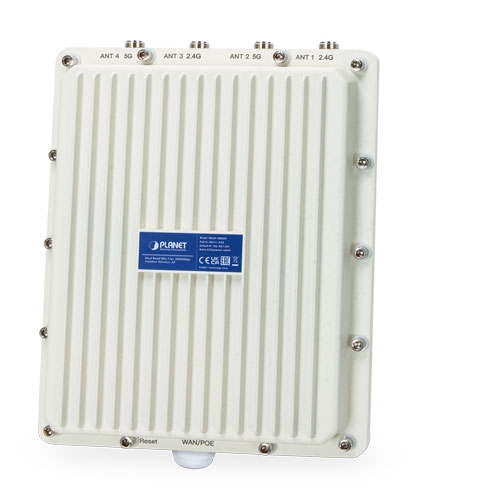
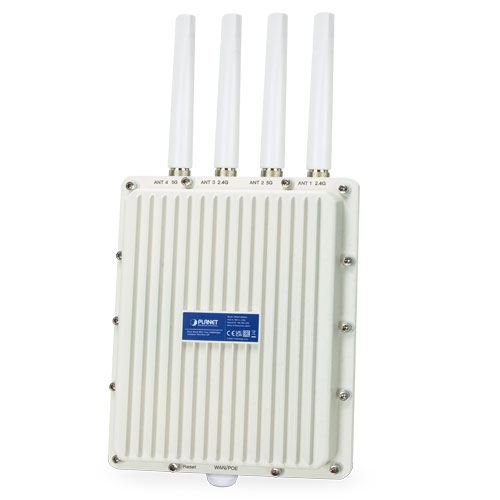
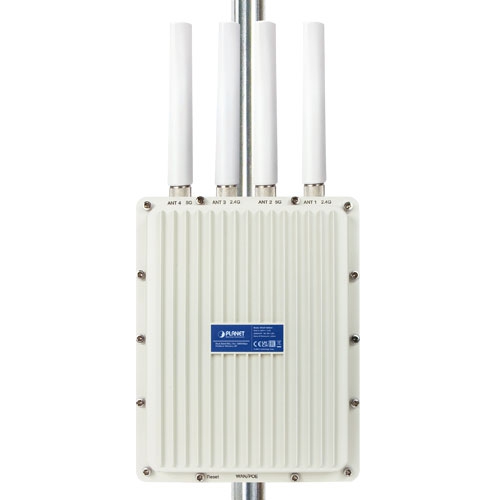
Dual Band 802.11ax 3000Mbps Outdoor Wireless AP (IP67, 802.3at PoE+, 4 x N-type connector)

» WDAP-3000AX

Ultra-high-speed Wi-Fi 6 Wireless LAN Solution

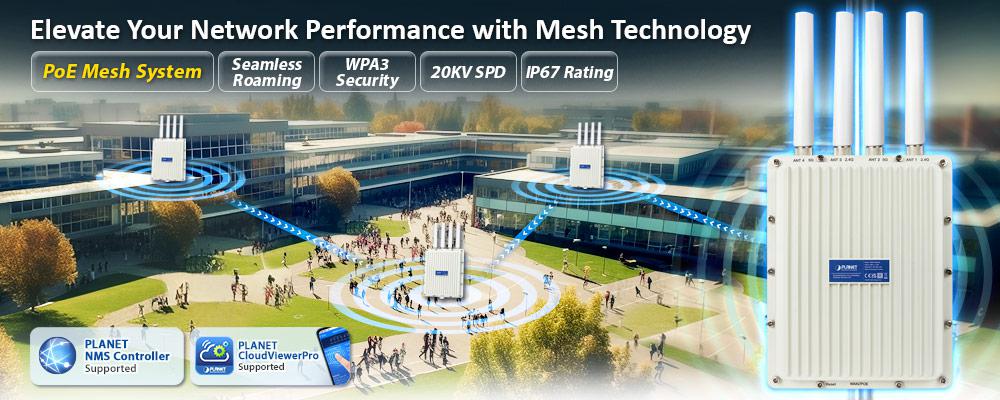
PLANET’s WDAP-3000AX is a high-performance Dual Band 802.11ax Wireless Access Point (AP) designed to deliver blazing-fast Wi-Fi speeds and advanced features. With support for Wi-Fi Mesh, MU-MIMO, OFDMA, Seamless Roaming, Beamforming, ، و BSS Coloring technology, this AP ensures a seamless and efficient wireless experience.

في 5 جيجاهرتز band, it offers an impressive maximum wireless speed of 2400Mbps, while in the 2.4 جيجاهرتز band, it provides 600Mbps of speed. This dual-band capability ensures reliable connectivity for various devices.

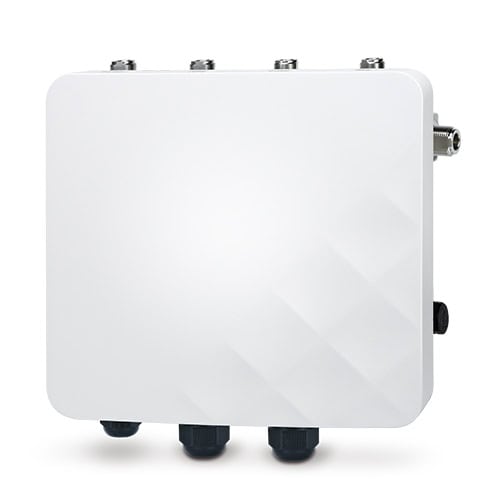
One of the standout features of the WDAP-3000AX is its rugged build. Encased in an علبة من الألومنيوم بتصنيف IP67, it’s safeguarded against dust and water, making it suitable for deployment in harsh outdoor environments. Additionally, the flexible N-type connectors allow system integrators to easily set up high-gain antennas for long-distance outdoor applications, even in rough weather conditions.

To enhance product durability further, the WDAP-3000AX includes 20KV surge protection for wired cable interfaces, safeguarding against electrical surges and ensuring stable operation.

With support for up to 256 client users, this AP is well-suited for high-density environments, providing secure and robust connectivity. Its adoption of Wi-Fi 6 technology ensures optimal performance and efficiency, making it an excellent choice for businesses and organizations that demand top-tier wireless capabilities.
edm WDAP 3000AX


Benefits of MU-MIMO, OFDMA, Seamless Roaming, Beamforming and BSS Coloring

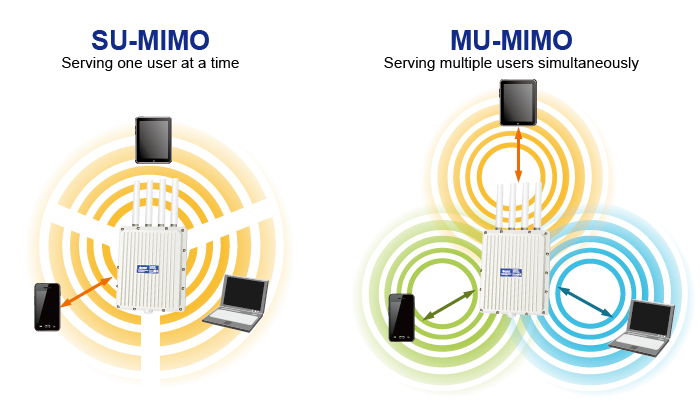
The WDAP-3000AX can be installed in public areas such as hotspots, airports and conferences as OFDMA, a multi-user version of OFDM, enables the concurrent AP to communicate (uplink and downlink) with multiple clients by assigning subsets of subcarriers called resource units (RUs) to the 0 clients. With MU-MIMO and Seamless Roaming technologies, it provides a better Wi-Fi user experience, reducing the likelihood of users turning off Wi-Fi and putting more load on the cellular network. Beamforming is to improve your Wi-Fi signal when you are far away from your router. The BSS color is a numerical identifier of the BSS. 802.11ax radios are able to differentiate between BSSs using BSS color identifier when other radios transmit on the same channel.

These technologies also can solve Wi-Fi congestion issues in open work spaces and conference rooms. The WDAP-3000AX can offer more powerful throughput coverage of up to 256 client users.WDAP 1800AX 1
OFDMA (Orthogonal Frequency Division Multiple Access) Benefits

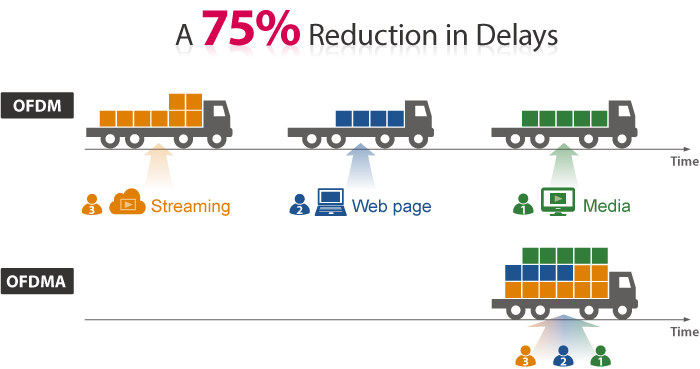
  • Helps transmit small and large packets together to reduce bandwidth burden and improve data transmission performance
  • Transmitting data at the same time can effectively reduce the transmission delay for longer frame and low-speed transmission.
  • Improves the overall traffic quality, and effectively uses bandwidth in an environment where multiple people use the Internet.
  • Increases the number of devices that can be connected to the AP.
  • Reduces the power consumption of the device by way of the use of low bandwidth.
WDAP C1800AX 1Beamforming 

Beamforming is to improve your Wi-Fi signal when you are far away from your router. When you use beamforming, Wi-Fi beamforming narrows the focus of that router signal, sending it directly to your devices in a straight line, thus minimizing surrounding signal interference and increasing the strength of the signal that ultimately bring you the following benefits:

  • Extend your Wi-Fi coverage
  • Deliver a more stable Wi-Fi connection
  • Deliver better Wi-Fi throughput
  • Reduce router interference

WDAP 1800AX 2

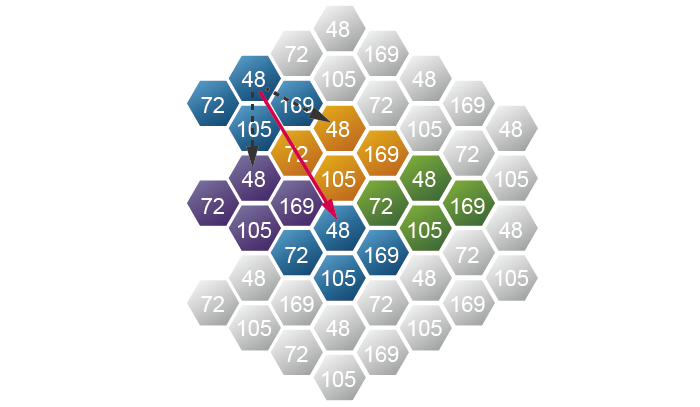
BSS Coloring

The BSS color is a numerical identifier of the BSS. 802.11ax radios are able to differentiate between BSSs using BSS color identifier when other radios transmit on the same channel. If the color is the same, this is considered to be an intra-BSS frame transmission. In other words, the transmitting radio belongs to the same BSS as the receiver. If the detected frame has a different BSS color from its own, then the STA considers that frame as an inter-BSS frame from an overlapping BSS.
WDRT 1800AX 4


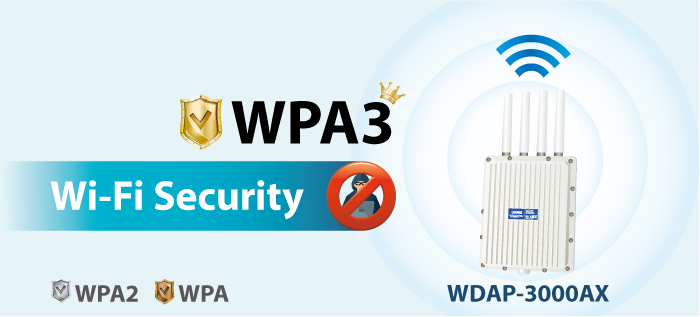
WPA3 Next Generation Security for Your WLAN Solution

WPA3 is the next generation Wi-Fi security technology that provides the most advanced security protocol to the market. WPA3 makes your connection more secure by preventing hackers from easily cracking your password no matter how simplified the password is. WPA3 can also provide more reliable password-based authentication, so it can better protect the security of individual users.

* WDAP-3000AX only supports WPA3-Personal.
WDAP 3000AX 3

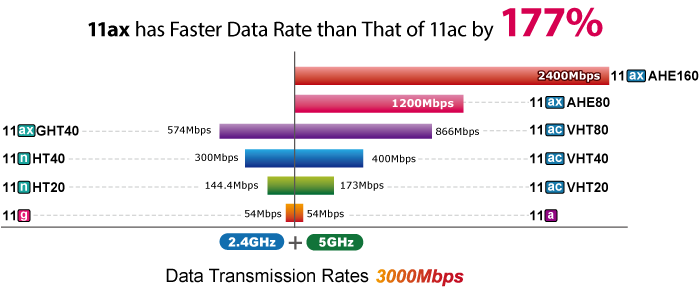
Super Power Dual band WLAN Solution

PLANET WDAP-3000AX, adopting the IEEE 802.11ax Wi-Fi 6 standard, provides a high-speed transmission. The maximum wireless speed in 2.4GHz band is up to 11AX of 574Mbps, and in the 5GHz band is up to 11AX of 2402Mbps. Both the 2.4GHz and 5GHz wireless connections can also be used simultaneously.
WDAP C3000AX 4

Advanced Security and Rigorous Authentication 

The WDAP-3000AX supports WPA/WPA2/WPA3 wireless encryptions, and also supports the WPA2 Enterprise, WPA/WPA2 Enterprise, which can effectively prevent eavesdropping by unauthorized users or bandwidth occupied by unauthenticated wireless access. Furthermore, any users are granted or denied access to the wireless LAN network based on the ACL (Access Control List) that the administrator pre-established.


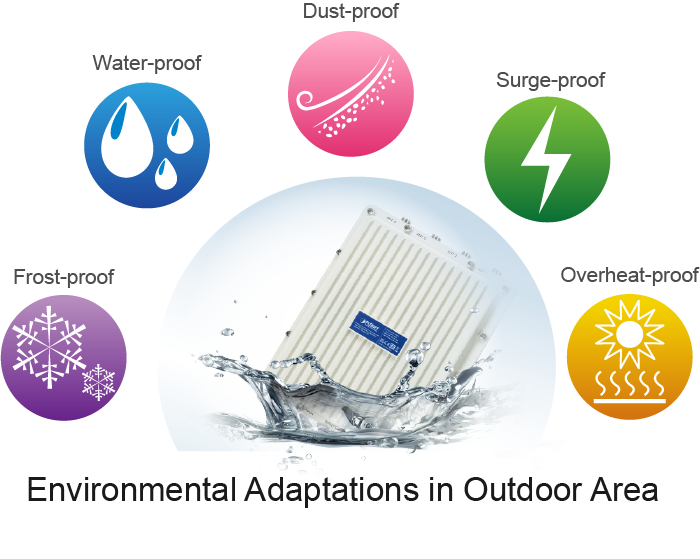
Flexible, Durable and Reliable Outdoor Characteristics

To reach maximum reliability in the harsh environment, the WDAP-3000AX comes with IP67-rated Aluminum Die-cast Housing, capable of withstanding wide temperature ranging from -40 to 70 degrees C. The WDAP-3000AX includes 20KV surge protection for wired cable interfaces, safeguarding against electrical surges and ensuring stable operation. Designed with the IEEE 802.3at PoE+ (Power over Ethernet) power scheme, the WDAP-3000AX can be easily installed in the areas where power outlets are not available. Furthermore, it is also suitable to be integrated with PLANET Renewable Power PoE System to offer farther wireless service in remote areas.
WDAP 1800AX 4Multiple Operation Modes for Various Applications

The WDAP-3000AX supports the simplified usage modes of AP, Gateway, Repeater and WISP mode, through which they provide more flexibility for users when wireless network is established. Compared with general wireless access points, the WDAP-3000AX offers more powerful and flexible capability for wireless clients.
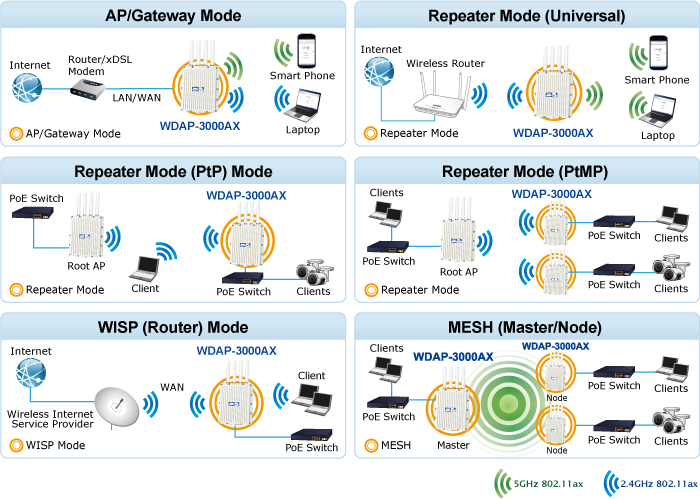
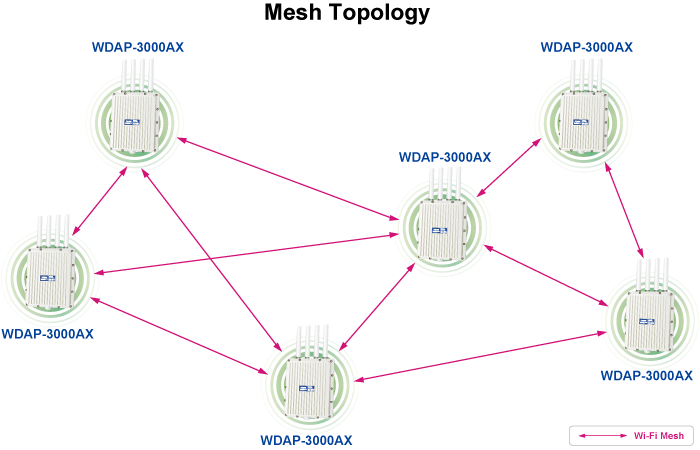
WDAP 3000AX 4Mesh Wi-Fi for More Hassle-free Network

The WDAP-3000AX boasts support for 802.11s Mesh technology, an open standard wireless networking solution that takes Wi-Fi coverage and stability to the next level. It enables seamless collaboration between various router and Wi-Fi device brands, creating a unified and efficient network experience.

Mesh technology leverages multiple frequency bands, enabling fast roaming and intelligent network management, resulting in top-notch performance. Setting up a Mesh network is a breeze, thanks to its user-friendly installation process and automated configuration. This ensures that users can enjoy extended Wi-Fi coverage and a consistently reliable connection across their homes or workplaces.

In summary, Mesh technology is the go-to solution for those seeking to enhance their Wi-Fi coverage without the headache of complex network setups. It’s a convenient and effective way to achieve a seamless and robust wireless network.

(The maximum number of Mesh supported device is 6 pcs.)
WDAP 3000AX 5

Optimized Efficiency in AP Management with Cloud and NMS system

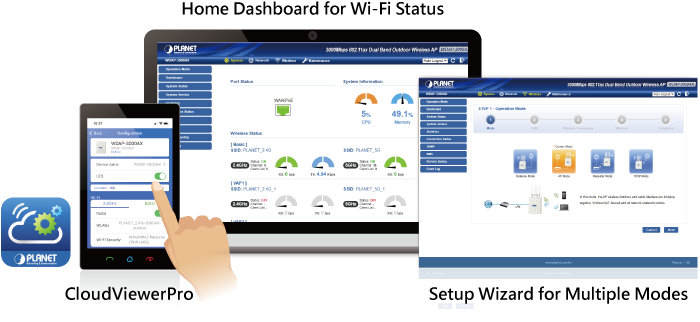
Via the PLANET CloudViewerPro app, you can monitor and control Access Points in real time without a specified location and time limitation. The brand-new GUI configuration wizard helps the system administrator easily set up the WDAP-3000AX step by step. Besides, the built-in Wi-Fi analyzer provides real-time channel utilization to prevent channel overlapping to assure greater performance. With the automatic transmission power mechanism, distance control and scheduling reboot setting, the WDAP-3000AX is easy for the administrator to deploy and manage without on-site maintenance. Moreover, you can use PLANET NMS-500 or NMS-1000V AP control function to deliver wireless profiles to multiple APs simultaneously, thus making the central management simple.
WDAP 3000AX 1

Robust Hardware and Flexible Dual RF for Various Outdoor Requirements

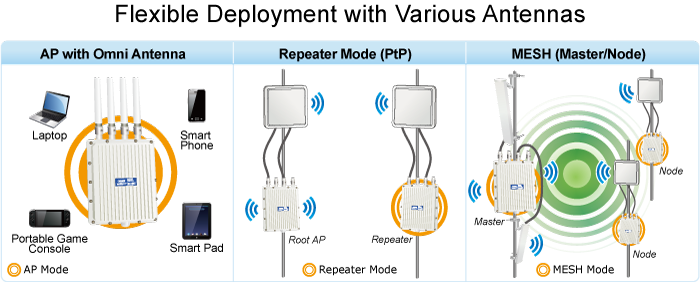
With high-power, long-distance, reliable and comprehensive characteristics, the WDAP-3000AX designed with durable and robust IP67 hardware architecture, and dramatic wireless efficiency is perfect for any outdoor network infrastructure. With higher gain antennas and dual RF design, the WDAP-3000AX is suitable for various applications. For example, the WDAP-3000AX can establish the backhaul link through the 5GHz radio and then relay the wireless signal through the 2.4GHz radio to provide internet service to rural residents. With the WDAP-3000AX, an outdoor wireless infrastructure in the harsh environment can be speedily deployed to reduce cabling cost and installation time.

**We recommend you to match the WDAP-3000AX with our related products to get the best results.

الأجهزة 

  • Compliant with the IEEE 802.11a/b/g/n/ac/ax wireless technology
  • Equipped with 10/100/1000Mbps RJ45 ports, and auto MDI/MDI-X
  • One reset button and power LED indicator


خصائص واجهة الترددات الراديوية

  • 802.11ax 2T2R architecture with data rate of up to 3000Mbps (600Mbps in 2.4GHz and 2400Mbps in 5GHz)
  • Built-in four N-type antenna connectors
  • قدرة خرج عالية مع تحكم متعدد في قدرة الإرسال


الخصائص البيئية الخارجية

  • IP67 rating, IEEE 802.3at PoE design
  • Rugged protection with aluminum extrusion case and ground terminal
  • 20KV surge protection for wire cable interface
  • Operating temperature: -40~70 degrees C


أوضاع تشغيل متعددة وميزات لاسلكية

  • Multiple operation modes: AP, gateway and repeater
  • Supports OFDMA (orthogonal frequency division multiple access)
  • Supports MU-MIMO (multi-user multiple-input multiple-output), Beamforming and BSS Coloring
  • توفر تقنية WMM (الوسائط المتعددة عبر الواي فاي) أولوية أعلى لنقل الوسائط المتعددة عبر الشبكة اللاسلكية
  • عتبة التغطية للحد من ضعف إشارة العملاء الذين يشغلون الجلسة
  • مخطط تحليل قناة Wi-Fi في الوقت الفعلي والتحكم في حدود العملاء لتحسين الأداء
  • Support Terminal Seamless Roaming with 802.11k, 802.11v, and 802.11r
  • Supports mesh connection(The maximum number of Mesh supported device is 6 pcs.)


اتصال شبكة آمن

  • Full encryption supported: WPA3 Personal, WPA2/WPA3 Personal, WPA2 Personal (AES), WPA2 Personal (TKIP), WPA2 Personal (TKIP+AES), WPA/WPA2 Personal (AES), WPA/WPA2 Personal (TKIP), WPA/WPA2 Personal (TKIP+AES), WPA2 Enterprise, WPA/WPA2 Enterprise
  • Supports 802.1Q port VLAN Supports IP/Port/MAC address/URL filtering, DoS, SPI firewall
  • Supports DMZ and port forwarding
  • التحكم في عرض النطاق الترددي لكل عنوان IP لزيادة استقرار الشبكة


Easy Deployment and Management

  • Support management by PLANET CloudViewer and CloudViewerPro app
  • Supports PLANET AP Controllers in AP mode
  • اكتشاف سهل بواسطة PLANET Smart Discovery
  • آلية الإصلاح الذاتي من خلال إعداد إعادة التشغيل التلقائي للنظام
  • System status monitoring through remote syslog server
  • Gateway mode supports PLANET DDNS/Easy DDNS, Captive Portal, RADIUS Server/Client


مواصفات الأجهزة
واجهاتPoE WAN/LAN: 1 x 10/100/1000BASE-T,
auto-MDI/MDIX, 802.3at PoE In
AntennasBuilt-in four N-type connectors
زر إعادة الضبطReset button (Press over 5 seconds to reset the device to factory default)
مؤشرات LEDقوة
الأبعاد (العرض × العمق × الارتفاع)231 x 80 x 295 mm
وزن2527 g
MaterialAluminum
متطلبات الطاقة48V 0.5A, IEEE 802.3at PoE+
استهلاك الطاقة< 15W
التركيبMast mounting
مستوى IPIP67
حماية من التفريغ الكهروستاتيكي±8kV air gap discharge
±4kV contact discharge
الحماية من زيادة التيار±20kV
Wireless Interface Specifications
معيارIEEE 802.11ax
IEEE 802.11ac
IEEE 802.11n
IEEE 802.11a
IEEE 802.11b
IEEE 802.11g
IEEE 802.11i
IEEE 802.3 10BASE-T
IEEE 802.3u 100BASE-TX
IEEE 802.3ab 1000BASE-T
التحكم في التدفق وفقًا لمعيار IEEE 802.3x
IEEE 802.11k و 802.11v و 802.11r
التحكم في الوصول إلى الوسائطCSMA/CA
Data Modulation802.11ax: MIMO-OFDMA (BPSK / QPSK / 16QAM / 64QAM / 256QAM, 1024QAM)
802.11ac: MIMO-OFDM (BPSK / QPSK / 16QAM / 64QAM / 256QAM)
802.11a/g/n: OFDM (BPSK / QPSK / 16QAM / 64QAM)
802.11b: DSSS (DBPSK / DQPSK / CCK)
وضع النطاق2.4GHz / 5GHz concurrent mode
نطاق التردد2.4GHz:
FCC: 2.412~2.462 جيجاهرتز
ETSI: 2.412~2.472 جيجاهرتز
5GHz:
FCC: 5.180~5.240 جيجاهرتز، 5.745~5.825 جيجاهرتز
ETSI: 5.180~5.700 جيجاهرتز
قنوات التشغيلETSI:
2.4GHz: 1, 2, 3, 4, 5, 6, 7, 8, 9, 10, 11, 12, 13 (13 Channels)
5GHz: 36, 40, 44, 48, 52, 56, 60, 64, 100, 104, 108, 112, 116, 120,124,256,132, 136, 140 (19 Channels)
FCC:
2.4GHz: 1, 2, 3, 4, 5, 6, 7, 8, 9, 10, 11 (11 Channels)
5GHz: 36, 40, 44, 48, 52, 56, 60, 64, 100, 104, 108, 112, 116,120,124,128,132, 136, 140, 149, 153, 157, 161,165 (24Channels)
5GHz channel list may vary in different countries according to their regulations.
أقصى قدرة إرسال (ديسيبل ميلي واط)FCC: up to 22 ± 1dBm
ETSI: < 19dBm (EIRP)

5G Power

وضع الشبكةمعدل نقل البياناتأقصى قدرة إرسال (ديسيبل ميلي واط)
2.4G Power
802.11b1Mbps
11Mbps
22±2
22±2
802.11g6 ميجابت في الثانية
54 ميجابت في الثانية
21±2
19±2
802.11n HT20MCS0
MCS7
20±2
18±2
802.11n HT40MCS0
MCS7
20±2
18±2
802.11ax HT20MCS0
MCS11
20±2
16±2
802.11ax HT40MCS0
MCS11
20±2
16±2
802.11a6 ميجابت في الثانية
54 ميجابت في الثانية
21±2
19±2
802.11n HT20MCS0
MCS7
20±2
18±2
802.11n HT40MCS0
MCS7
20±2
18±2
802.11ac HT20MCS0
MCS7
20±2
17±2
802.11ac HT40MCS0
MCS7
20±2
17±2
802.11ac HT80MCS0
MCS9
19±2
17±2
802.11ax HT20MCS0
MCS11
20±2
16±2
802.11ax HT40MCS0
MCS11
20±2
16±2
802.11ax HT80MCS0
MCS11
19±2
16±2
802.11ax HT160MCS0
MCS11
18±2
14±2

حساسية الاستقبال

وضع الشبكةمعدل نقل البياناتحساسية الاستقبال (ديسيبل ميلي واط)
2.4 جيجاهرتز
802.11b1Mbps
11Mbps
-96
-87
802.11g6 ميجابت في الثانية
54 ميجابت في الثانية
-93
-75
802.11n HT20MCS0
MCS7
-92
-73
802.11n HT40MCS0
MCS7
-88
-63
802.11ax HT20MCS0
MCS11
-92
-64
802.11ax HT40MCS0
MCS11
-88
-58
5 جيجاهرتز
802.11a6 ميجابت في الثانية
54 ميجابت في الثانية
-92
-74
802.11n HT20MCS0
MCS7
-90
-73
802.11n HT40MCS0
MCS7
-87
-70
802.11ac HT20MCS0
MCS7
-91
-67
802.11ac HT40MCS0
MCS7
-88
-63
802.11ac HT80MCS0
MCS9
-84
-60
802.11ax HT20MCS0
MCS11
-91
-62
802.11ax HT40MCS0
MCS11
-89
-59
802.11ax HT80MCS0
MCS11
-86
-56
802.11ax HT160MCS0
MCS11
-83
-53

Software FeaturesLANStatic IP / Dynamic IPWANStatic IP
عنوان IP ديناميكي
PPPoE/PPTP/L2TPWireless ModeAccess Point
بوابة
مكرر
خصلة شعر
Mesh
(The maximum number of Mesh supported device is 6 pcs.)Channel Width20MHz, 40MHz, 80MHz, 160MHzEncryption SecurityWPA3 Personal, WPA2/WPA3 Personal, WPA2 Personal (AES), WPA2 Personal (TKIP),WPA2 Personal (TKIP+AES), WPA/WPA2 Personal (AES),
WPA/WPA2 Personal (TKIP), WPA/WPA2 Personal (TKIP+AES), WPA2 Enterprise, WPA/WPA2 EnterpriseWireless SecurityEnable/Disable SSID Broadcast
تصفية عناوين MAC اللاسلكية بحد أقصى 32
User IsolationMax. SSIDs8 (4 per radio)Max. Clients256 (200 is suggested, depending on usage)Wireless QoSSupports Wi-Fi Multimedia (WMM)Wireless AdvancedMesh
اختيار القناة التلقائي
5-level Transmit Power Control:
Max (100%), Efficient (75%), Enhanced (50%), Standard (25%) or Min (15%)
التحكم في حدود العميل، عتبة التغطية
مخطط تحليل قناة الواي فاي
Seamless Roaming
Beamforming
BSS ColoringStatus MonitoringDevice status, wireless client List
اكتشاف الكوكب الذكي
جدول عملاء DHCP
System Log supports remote syslog serverVLANIEEE 802.1Q VLAN (VID: 1~4094)
SSID-to-VLAN mapping to up to 4 SSIDsSelf-healingSupports auto reboot settings per day/hourManagementRemote management through PLANET DDNS/ Easy DDNS
النسخ الاحتياطي واستعادة الإعدادات
يدعم UPnP
يدعم وكيل IGMP
يدعم تمرير VPN من نوع PPTP/L2TP/IPSec
Supports Captive Portal, RADIUS Server/ClientCentral ManagementApplicable controllers: NMS APC, WS APC, VR/IVR APC, ICG APC, PLANET CloudViewer, PLANET CloudViewerProEnvironment & CertificationTemperatureOperating: -40~ 70 degrees C
Storage: -40 ~ 70 degrees CHumidityOperating: 10 ~ 90% (non-condensing)
Storage: 5 ~ 95% (non-condensing)RegulatoryCE, RoHS

تاريخإصداروصفتحميل
2024/25/101.0

WDAP-3000AX

Download Icon
تاريخإصداروصفتحميل
2024/11/101.1

تمت إضافة وظيفة PSTI.

Download Icon
2023/28/091.0

الإصدار الأولي.

N/A
تاريخإصداروصفتحميل
2024/22/081.1

Added WDAP-W3000AX.

Download Icon
2023/20/101.0

الإصدار الأولي.

Download Icon
تاريخإصداروصفتحميل
2024/06/091.0

إعلان المفوضية الأوروبية.

Download Icon
تاريخإصداروصفتحميل
2024/05/091.2305240822

تمت إضافة الوظيفة التالية:
1. Changed wireless mesh setting.
2. تمت إضافة وظيفة PSTI.
تحديث البرامج الثابتة لـ PSTIA (قانون أمن المنتجات والبنية التحتية للاتصالات)
*ملحوظة: بعد تحديث البرنامج الثابت، ستحتاج إلى إدخال رمز MAC الخاص بالمنتج عند تسجيل الدخول لأول مرة. يرجى تدوين رمز MAC قبل المتابعة في عملية التحديث.

Download Icon

معلومات الطلب

WDAP-3000AX

Dual Band 802.11ax 3000Mbps Outdoor Wireless AP (IP67, 802.3at PoE+, 4 x N-type connector)

معلومات الطلب

WDAP-3000AX

Dual Band 802.11ax 3000Mbps Outdoor Wireless AP
                           
✉

انضم إلى قائمتنا البريدية

احصل على آخر الأخبار والعروض والتحديثات من شركة بلانيت تكنولوجي مباشرة إلى بريدك الإلكتروني.

نحن نحترم خصوصيتك. يمكنك إلغاء الاشتراك في أي وقت.

اشترك في النشرة الإخبارية الإلكترونية لـ PLANET

احصل على أحدث معلومات المنتجات وأخبار الشركة!